by hauraki
Imports your Todoist projects into Obsidian to track their status.
Todoist Project Tracker
An Obsidian plugin that imports your Todoist projects into your vault so you can track them alongside your notes.
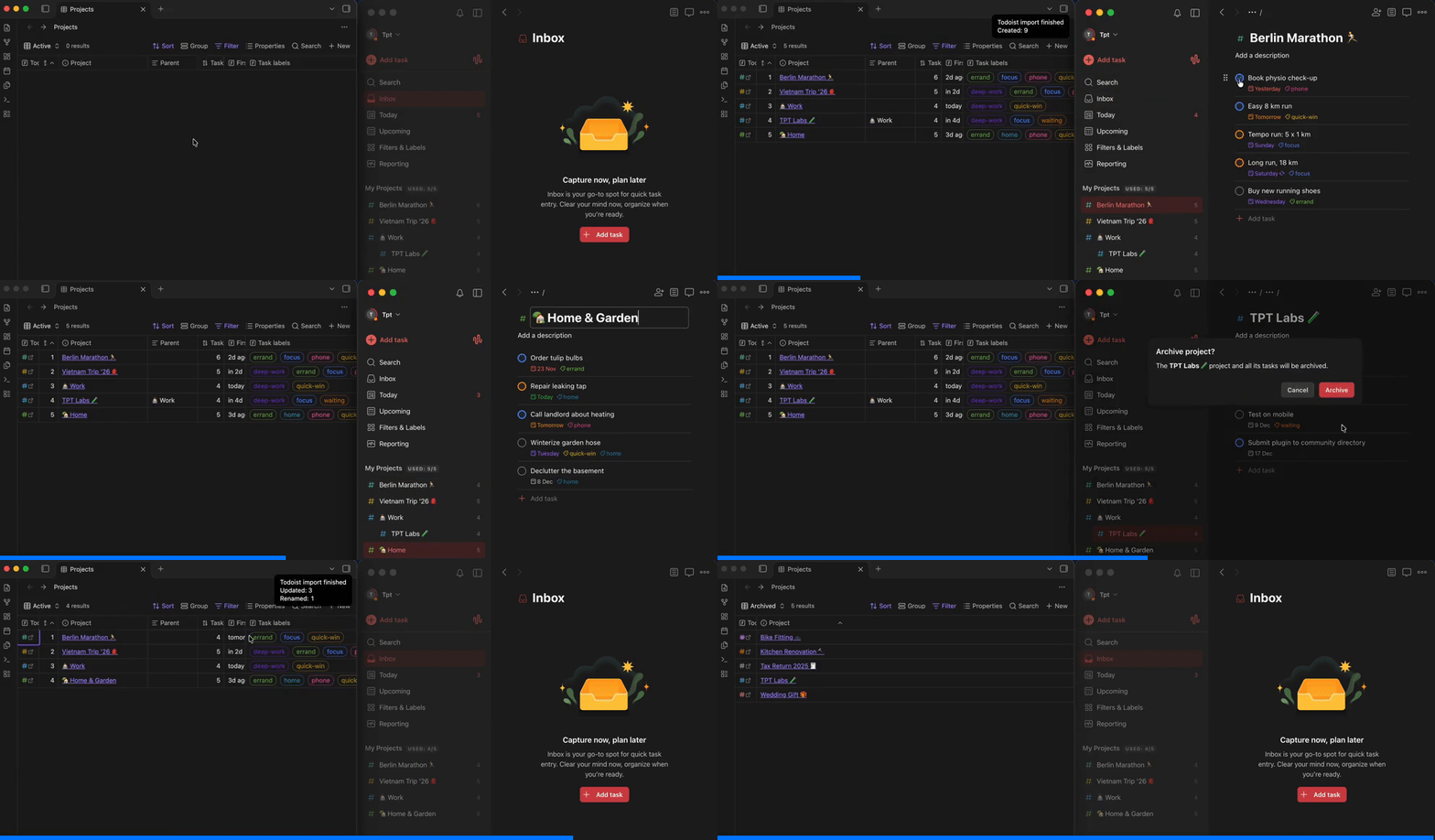
The plugin is read-only towards Todoist: it only ever reads data via the Todoist API and never writes anything back.
Network use and privacy
- The plugin connects to the Todoist API (
api.todoist.com) and nowhere else. It only does so when you run Import projects, or in the background when Auto-import is on (shortly after you open or return to Obsidian and every 15 minutes by default, only while Obsidian is open and only on devices with an API token). Set Auto-import to Off to connect only when you import manually. - No telemetry or analytics are collected, and no vault content is sent anywhere.
- Your Todoist API token is kept in Obsidian's secret storage (Settings → Keychain), encrypted by your operating system. It is stored on this device only and not synced with your vault;
data.jsonholds only the name of the secret. On Linux, encryption requires kwallet or gnome-libsecret. - Like all plugin data, secrets in Obsidian's secret storage can be read by other plugins you install. Only install plugins you trust.
Settings
- Todoist API token (required): select or create a secret that holds your personal API token, found in Todoist under Settings → Integrations → Developer. Because secrets are not synced, add the token on each device you import from.
- Projects folder (optional): the vault folder that holds the project files. Defaults to
TPT. - Label filter (optional): comma-separated list of labels. Only these labels are written to
tpt_tasks_labels, in this order. Leave empty to import all labels. - Auto-import (optional): how often to import in the background while Obsidian is open: off, or every 5, 15 (default), 30 or 60 minutes. It also imports 30 seconds after you open or return to Obsidian, if the last import is older than that; the wait gives sync time to bring in changes from your other devices first. Background imports are silent and only show a notice if they fail. Bases that show the project files update on their own after each import.
- Next task label (optional): the label that marks a project's next task. Use it on one task per project; if several tasks carry it, any one of them is picked.
Commands
- Import projects: fetches all active and archived projects (and the active tasks of active projects) and your labels from Todoist and reconciles them with the files in the projects folder. A notice shows how many files were created, updated, renamed and marked as deleted.
- Create projects base: creates a sample base next to the projects folder, named after it (for example
TPT.base), and opens it. Its Active view lists your active projects with a Todoist icon, rank, parent, task count, next due date or deadline and colored labels. An existing file is never overwritten; a new one gets a number instead (TPT 1.base). The base is yours to change; the plugin does not update it later. It requires the Bases core plugin. If you rename the projects folder afterwards, update the folder in the base's filter or create a new base.
How it works
Each Todoist project maps to one markdown file in the projects folder (flat, no nesting). The file name is the project name with characters that are not allowed in Obsidian file names (* " \ / < > : | ? # ^ [ ]) replaced by a space. A file counts as a project file as soon as its frontmatter has at least one tpt_ property.
All properties written by the plugin are prefixed with tpt_. You can add your own properties to a project file; the plugin never touches them.
| Property | Active | Archived | Deleted |
|---|---|---|---|
tpt_parent_project_name | parent name or empty | empty | |
tpt_project_color | ✓ | ✓ | |
tpt_project_description | if set | if set | |
tpt_project_id | Todoist project id | ✓ | ✓ |
tpt_project_is_favorite | ✓ | ||
tpt_project_link | todoist://project?id=… | ✓ | |
tpt_project_name | original name | ✓ | ✓ |
tpt_project_rank | position in Todoist's project tree (1-based) | ||
tpt_project_status | active | archived | deleted |
tpt_tasks_count | ✓ | ||
tpt_tasks_labels | set of all task labels, or only the labels listed in the Label filter setting (in that order) | ||
tpt_tasks_label_colors | Todoist color of each label in tpt_tasks_labels, in the same order; empty for shared labels | ||
tpt_tasks_first_due_on / tpt_tasks_last_due_on | earliest / latest due date | ||
tpt_tasks_first_deadline_on / tpt_tasks_last_deadline_on | earliest / latest deadline | ||
tpt_tasks_next_content | text of the next task, or empty |
The next task is the task carrying the Next task label, if that setting is set and such a task exists. Otherwise it is the task with the earliest due date or deadline, time of day included; a date without a time counts as the end of that day. A project whose tasks have neither gets an empty value. The task text is stored as entered in Todoist, including any markdown.
Remote projects are matched to local files by tpt_project_id. Files that do not have this property yet (written by an older version, or created by hand) are matched by file name instead and receive the id on the next import.
On import:
- A remote project without a local file is created (case A).
- A remote project with a local file gets all its
tpt_properties replaced (case B). User properties stay in place,tpt_properties are appended after them. If the project was renamed in Todoist, the file is renamed to follow it; links to the file in your vault are updated by Obsidian. - A local project file without a remote project keeps only
tpt_project_idandtpt_project_nameand getstpt_project_status: deleted(case C). If a project with the same name is created in Todoist later, it takes over this file.
Two projects whose names normalize to the same file name cannot both be tracked; the second one is skipped and a warning is logged to the developer console. Likewise, a renamed project keeps its old file name if the new one is already taken.
Styling
The plugin's stylesheet provides Todoist's project colors and a colored # icon for use in Bases formulas. For example, this formula shows the icon in the project's color and opens the project in Todoist:
formulas:
  icon: link(tpt_project_link, html("<span class=\"tpt-hash tpt-color-" + tpt_project_color + "\">#</span>"))
This formula shows the task labels in their Todoist colors:
formulas:
  labels: tpt_tasks_labels.map(html("<span class=\"tpt-label tpt-color-" + tpt_tasks_label_colors[index] + "\">" + value + "</span>"))
tpt-hash: the icon, drawn in the current--tpt-color. Without a color (for example on deleted projects) it is drawn in the muted text color.tpt-label: text in the current--tpt-color, or the normal text color without one.tpt-color-<name>: sets--tpt-colorto a Todoist color, named as intpt_project_color(blue,berry_red, …).--tpt-color-<name>: the color values. Override them in a CSS snippet to adjust them.
These class and variable names may still change before version 1.0.
Development
npm install
npm run dev     # watch build
npm run build   # type check + production build
npm run test    # unit tests (node:test via tsx)
npm run lint
The plugin folder must live in <Vault>/.obsidian/plugins/todoist-project-tracker/. Reload Obsidian after building and enable the plugin under Settings → Community plugins.
License
For plugin developers
Search results and similarity scores are powered by semantic analysis of your plugin's README. If your plugin isn't appearing for searches you'd expect, try updating your README to clearly describe your plugin's purpose, features, and use cases.