Triage
approvedby Toto Tvalavadze
Resurfaces unprocessed notes in a triage queue. - This plugin has not been manually reviewed by Obsidian staff.
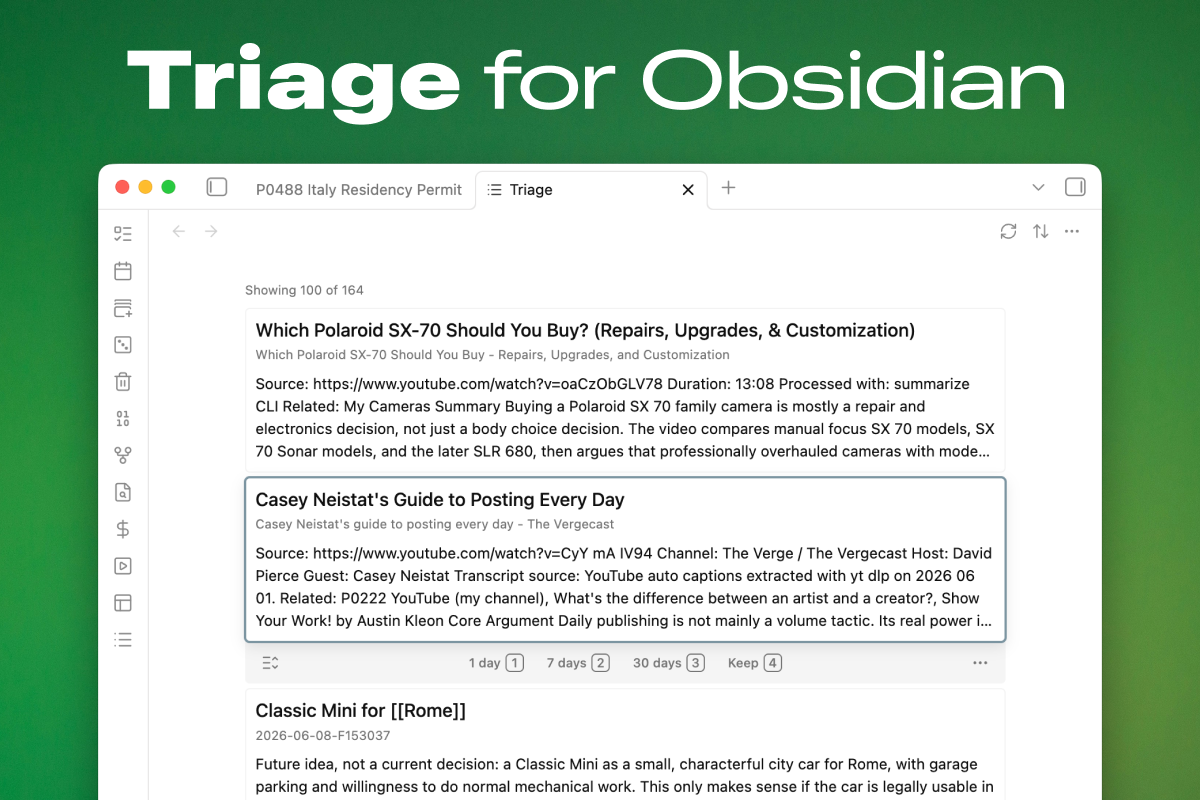
Triage
Triage for Obsidian: a triage queue that resurfaces unprocessed notes so they get reviewed instead of forgotten.
Every vault accumulates loose material — fleeting notes, literature notes, clippings, notes that never got a tag or a category. They aren't tasks, so they don't belong in a task manager, but left alone they quietly disappear into the graph. Triage gives them a way back: it collects eligible notes into a scrolling queue of cards, and you work through them with quick, low-stakes decisions — keep, snooze, delete, or open and actually do something with the note.
The resurfacing idea follows Andy Matuschak's "Peripheral vision": concrete cues beat abstract queues, so cards show the note's actual content rather than a bare title; and resurfacing should be dynamic, so snoozed notes return on real due dates instead of sitting in a static list you learn to ignore.
The review flow borrows Anki's ergonomics — a focused card, numbered answers, intervals you can feel — but Triage is not a spaced-repetition or flashcard tool. There is no scheduling algorithm, no ease factors, and nothing to memorize. Snoozing simply writes a plain due date into the note's frontmatter; when the date arrives, the note comes back.
How it works
- Open the Triage view from the ribbon or the command palette.
- The queue shows every note matching your filters, as cards with a title and a content preview. Cards expand in place to a fully rendered body.
- Move through the queue with the mouse or keyboard and decide, card by card:
- Keep — this note no longer needs triage. Marks it via frontmatter, a tag, or a frontmatter value of your choosing (see below). The file is never moved.
- Snooze — not now, ask me again later. Three configurable intervals (1, 7, and 30 days by default) write a concrete due date; the note resurfaces when it's due.
- Delete — hands off to Obsidian's built-in delete prompt. Triage never deletes silently.
- Open — the note deserves real attention; open it in the editor.
triage_status: snoozed
triage_snooze: shortcut-2
triage_due: 2026-06-19
Field names are configurable, so the plugin can adopt whatever conventions your vault already uses.
Keyboard-first review
| Key | Action |
|---|---|
↓ / j, ↑ / k | Focus next / previous card |
Enter | Open the focused note |
Space | Expand or collapse the focused card |
1 2 3 | Snooze for the first / second / third interval |
4 | Keep |
0 | Clear snooze |
Esc | Clear focus |
Every action is also available as a command for custom hotkeys, and shortcut hints can be shown as keycaps on the card toolbar. Mouse review works too: hovering focuses a card, and stationary hover won't steal focus back after keyboard navigation.
Configuration
What counts as "unprocessed" is different in every vault, so eligibility is fully configurable and composable:
- Sources — include or exclude notes by folder, tag, or
field=valuefrontmatter matches; include untagged notes; include notes missing a category field. Include filters are OR-based; exclude filters always win. - Keep behavior — choose what Keep means in your vault: set a managed status field, add a tag such as
#evergreen, or set a frontmatter value such ascategory: evergreen. Whichever you pick also acts as the filter that hides kept notes from the queue. - Snooze intervals — the day counts behind the three snooze shortcuts.
- State fields — the frontmatter field names Triage reads and writes.
- Display — preview length (compact, normal, long) and keycap shortcut hints.
A typical setup: include notes tagged #fleeting or #literature, include notes missing your category field, and exclude your templates folder. Nothing is hardcoded.
Installation
Triage is published in the Obsidian community plugin directory.
In Obsidian, open Settings → Community plugins → Browse, search for Triage, then install and enable it.
For a manual install from a release or local build, copy the plugin assets into your vault:
.obsidian/plugins/triage/
├── manifest.json
├── main.js
└── styles.css
Then enable Triage in Obsidian's community plugins settings.
Development
npm install
npm run build     # type-check and bundle
npm run check     # type-check only
npm run lint
npm test
For live development, point the watch build at a test vault and it will rebuild on change (pairs well with the Hot Reload plugin):
OBSIDIAN_PLUGIN_DIR="/path/to/vault/.obsidian/plugins/triage" npm run dev
The product spec lives in docs/spec.md and is kept up to date as behavior changes.
License
For plugin developers
Search results and similarity scores are powered by semantic analysis of your plugin's README. If your plugin isn't appearing for searches you'd expect, try updating your README to clearly describe your plugin's purpose, features, and use cases.