Uncertainty Calculator
approvedby Masoud Masoumi
Spreadsheet-style calculator that propagates measurement uncertainty: input forms, significant figures, expanded uncertainty, uncertainty budgets, and Monte Carlo, following the GUM and its Supplement 1. - This plugin has not been manually reviewed by Obsidian staff.
Uncertainty Calculator for Obsidian
A spreadsheet-style calculator that propagates measurement uncertainty through your notes. Write a calc block, assign measured quantities with their uncertainties, and reference them in later formulas — the plugin tracks correlations, significant figures, expanded uncertainty, an uncertainty budget, and (when you ask) a full Monte Carlo propagation of distributions.
It fills a gap: Obsidian has unit-aware calculators (Numerals), symbolic math (LaTeX Math), and plotting, but nothing that carries a ± through a calculation the way Python's uncertainties, R's errors, or LaTeX's siunitx do.
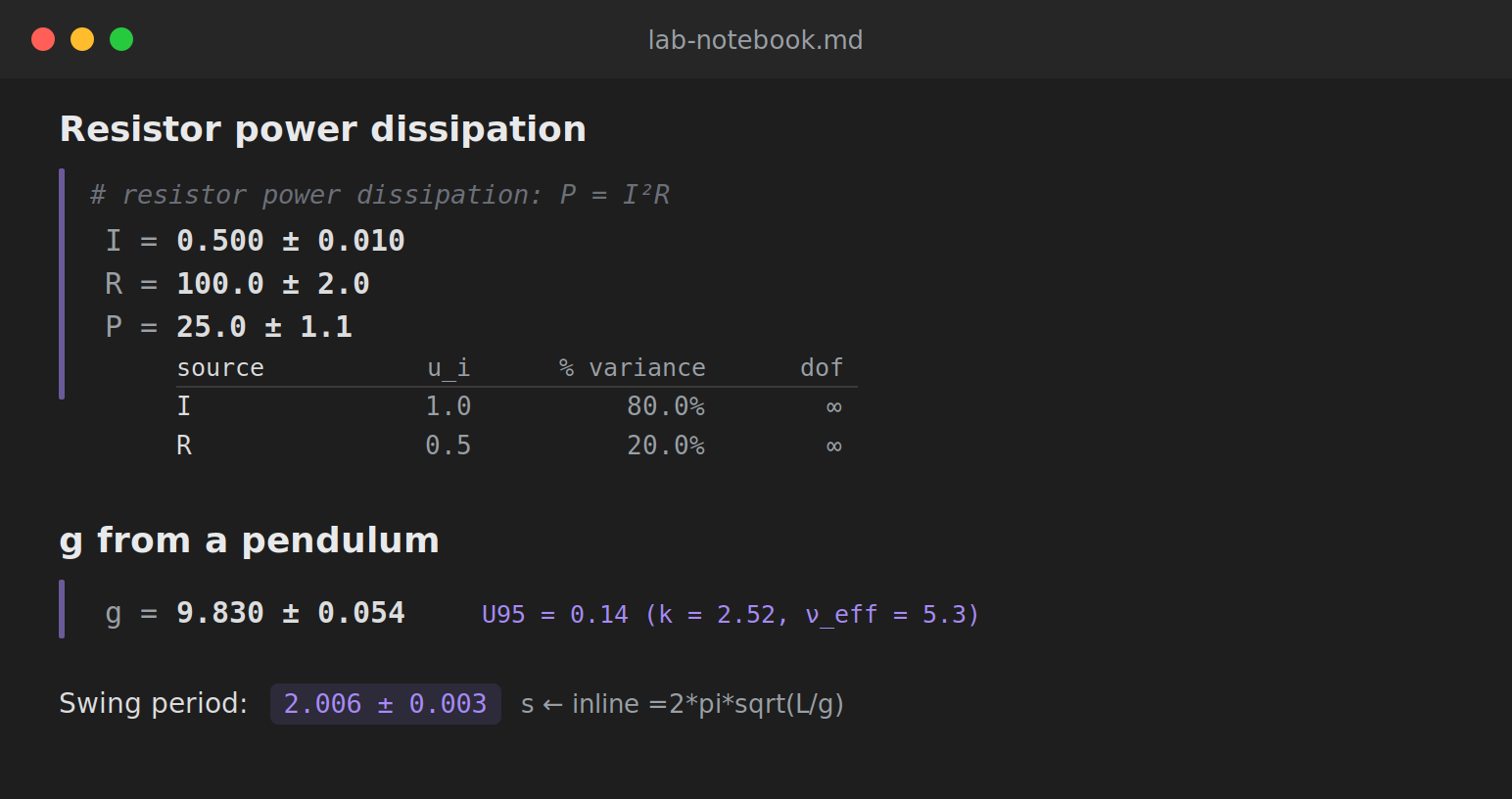
The calc block
```calc
# resistor power: P = I²R   (lines beginning with # are comments)
I = 0.50 ± 0.01
R = 100 ± 2
P = I**2 * R
P | budget
```
renders each line with its result, builds a running scope so P can use I and R, and shows the uncertainty budget (here I contributes ~80% because it is squared).
Writing measured quantities
| form | meaning |
|---|---|
9.81 ± 0.02 | value with standard uncertainty (also 9.81 +- 0.02) |
200 ± 2% | relative uncertainty (→ ±4) |
1.234(12) | compact notation (→ 1.234 ± 0.012) |
typeA(2.01, 2.00, 2.02, 1.99) | Type A: mean ± standard error, with dof = n−1 |
5.0 ± 0.1 [rect] | Type B rectangular bound (÷√3); also [tri], [k=2], [normal] |
Operators + - * / **, parentheses, the constants pi and e, and the functions sin cos tan asin acos atan exp log ln log10 sqrt sinh cosh tanh are supported. Two separate ± literals are independent; a reused named variable stays correlated (so x - x is exactly 0, while (5 ± 1) - (5 ± 1) is not).
Detail flags
Append | flag to any line for more than the bare value:
expr | budget— per-source contribution table (u_i, % of variance, dof)expr | expandor| expand 0.99— expanded uncertaintyU = k·u_cwith the coverage factor from the Student-t at the Welch–Satterthwaite effective degrees of freedomexpr | mcor| mc 200000— Monte Carlo (GUM Supplement 1): mean, standard deviation, coverage interval, and skewness, correct for strong nonlinearity and non-Gaussian inputs where the linear method fails
Inline =expr
In ordinary text, an inline code span that begins with = is replaced by its value: writing `=2*pi*sqrt((1.0 ± 0.002)/(9.81 ± 0.02))` renders as 2.006 ± 0.003.
Why propagate distributions?
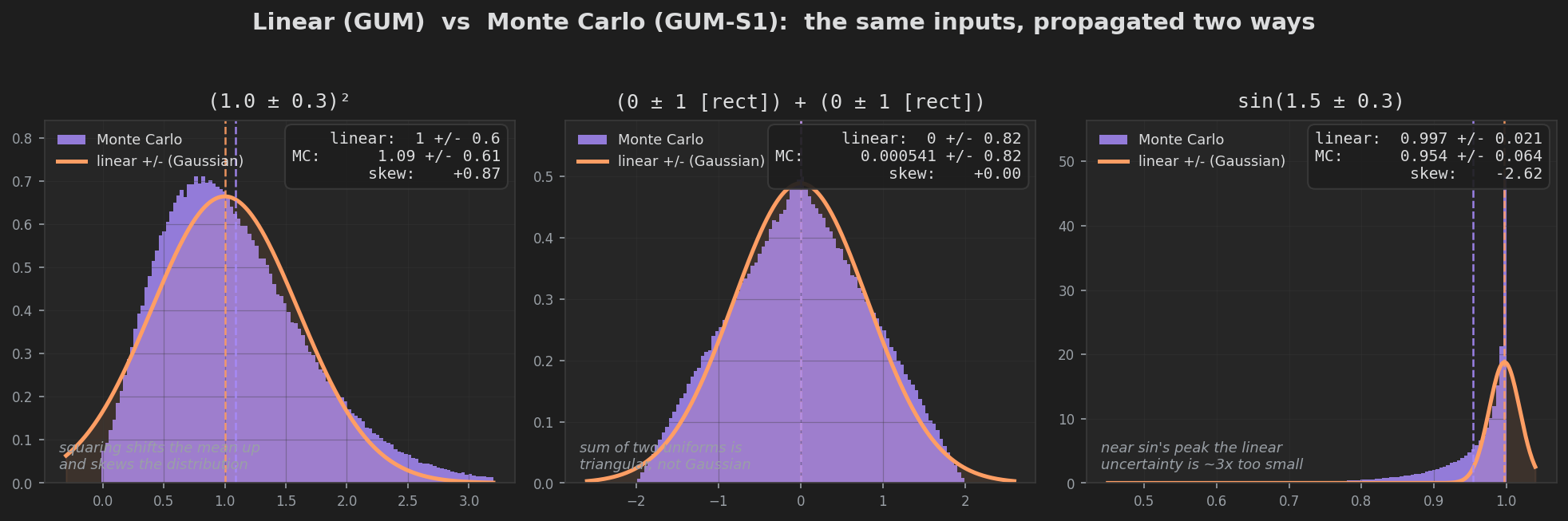
The linear (GUM) method approximates the function by its slope at the estimate. That is exact for sums and scalings, but for a nonlinear function it can get both the value and the width wrong. The | mc flag runs a Monte Carlo propagation of the full input distributions instead, and the difference can be large:
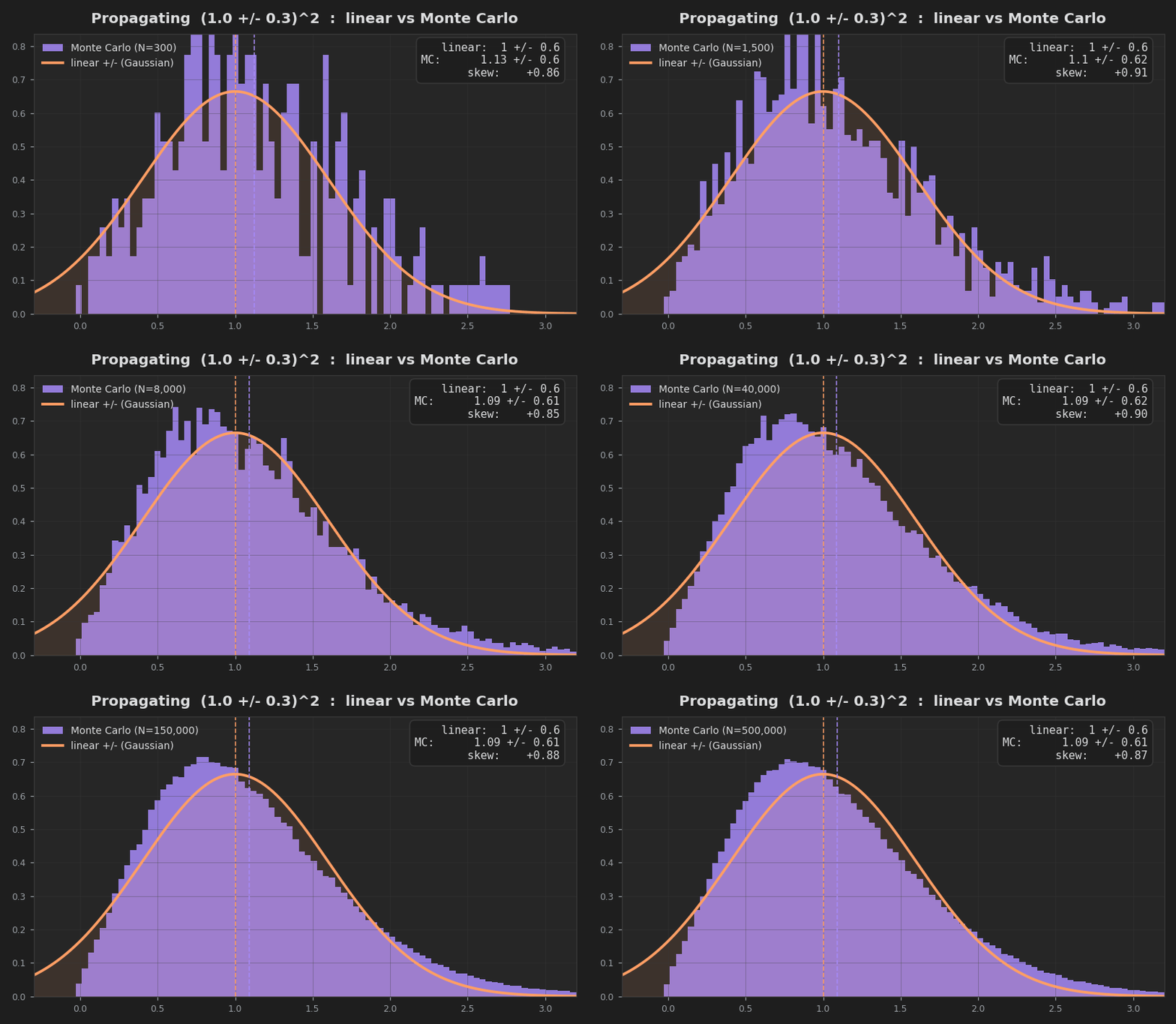
Squaring a measurement, for instance, shifts the mean upward by σ² and skews the result — neither of which a symmetric ± can express. Three cases where the linear approximation visibly fails, each compared against the Monte Carlo distribution from the same inputs:
Settings
Default coverage probability, significant figures on the uncertainty, Monte Carlo trial count, and an inline-evaluation toggle.
Install (manual)
Copy main.js, manifest.json, and styles.css into <vault>/.obsidian/plugins/uncertainty-calc/, then enable the plugin in Settings → Community plugins. See EXAMPLE.md for ready-to-paste blocks.
Build from source
npm install
npm run build      # bundles src/ → main.js
The numerical core under src/ (propagation, units, formatting, statistics, budget, Monte Carlo, and the sheet engine) is an independent TypeScript implementation that is cross-checked test-for-test against Python's uncertainties, pint, scipy, and numpy (212 checks). The Obsidian layer (main.ts, render.ts, settings.ts) only wraps that core.
For plugin developers
Search results and similarity scores are powered by semantic analysis of your plugin's README. If your plugin isn't appearing for searches you'd expect, try updating your README to clearly describe your plugin's purpose, features, and use cases.