by Liam Hatherton
Forked from World Builder
A setting builder sidebar-contained wiki for characters, locations, groups, lore entries, and timeline events.
Universe Builder
A fiction world-building toolkit for Obsidian: characters, locations, groups, lore entries, and timeline events. This plugin is a fork of World Builder originally authored by wesswart77. It has been adapted to work well outside of a fantasy setting and instead puts an emphasis on sci-fi.
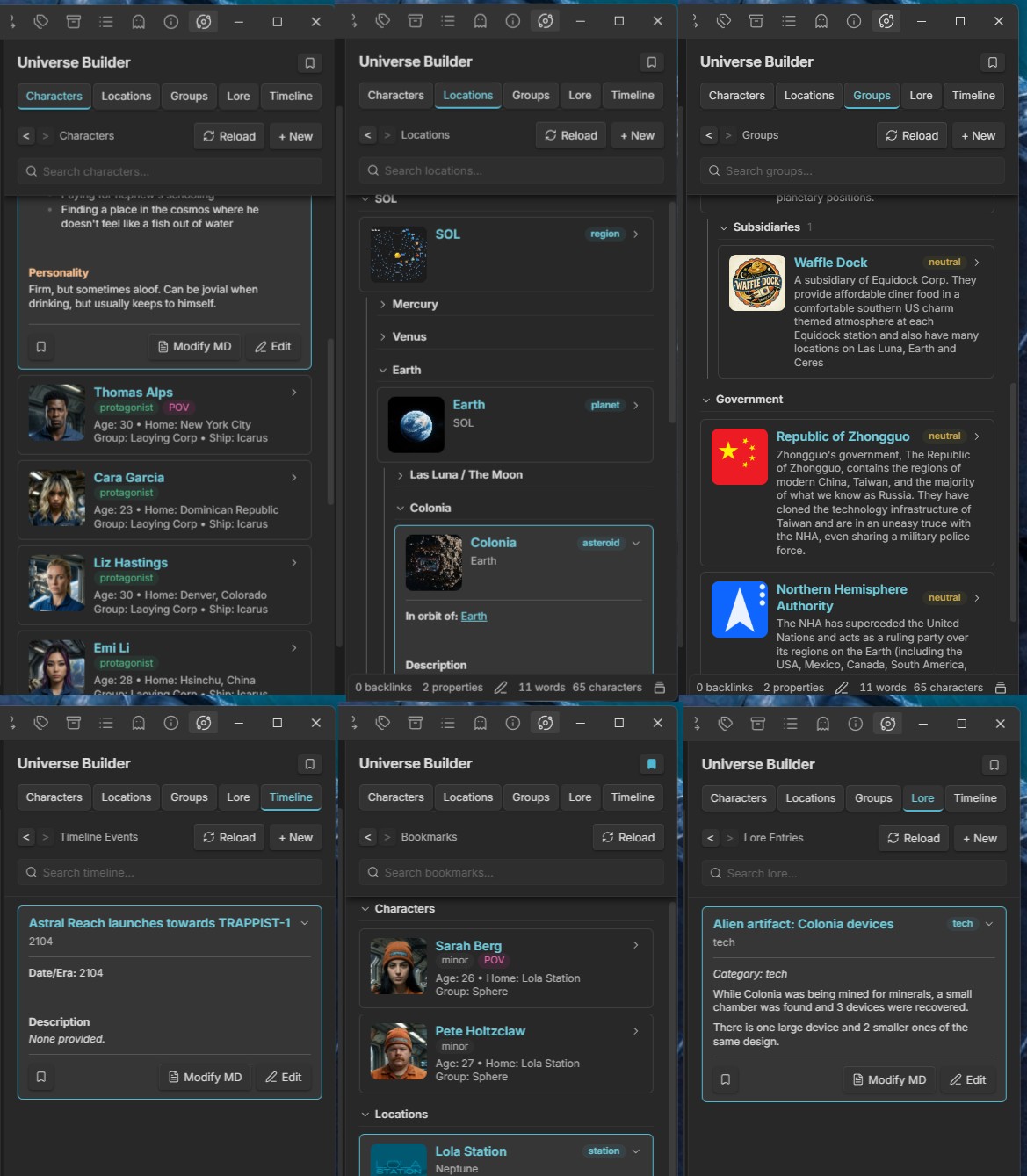
Features
- Characters — name, role, age, group, ship, home, physical description, personality, goals
- Locations — name, type, parent location, description, inhabitants, secrets
- Groups — name, type, subsidiary of, alignment, goals, enemies, allies, description
- Lore Entries — title, category (history/tech/religion/culture/other), content
- Timeline Events — date/era, title, description, linked characters/locations
- World Sidebar — tabbed view across all five entry types
- Bookmarks — bookmark any entry from its expanded view, and open them all from the Bookmarks button beside the sidebar's title
- 10 languages — English, Español, Português, Português (Brasil), Français, Deutsch, Русский, Українська, 简体中文 and 日本語. The sidebar, forms, messages, commands and settings follow Obsidian's language, or the Language setting
- Search — a search bar pinned under the section header on every tab (each tab keeps its own text); type to hide whatever doesn't match, all words must match. Characters are matched on name, group, ship and home; the other tabs on the name and the text of the note
- Novel scene editor — notes in the main editor with both
novelr-typeandnovelr-statusproperties open in Live Preview with a toolbar above the text: a Scene Metadata toggle on the left, which slides open a section under the toolbar with a row each for Characters, Locations, Groups, Lore and Timeline (each row's + opens a menu of that sidebar section's entries to add to the scene; you can also drag any card from the sidebar, or the header of an expanded card, anywhere onto the scene to add it; the chosen ones show as labels, with their portraits, under the toolbar that open their entry in the sidebar when clicked, and are saved as links in theuniverse-builder-scene-characterlist,-locationlist,-grouplist,-lorelistand-timelinelistproperties), an optional Properties button (a floating panel to edit, add and remove properties, instead of the properties block at the top of the note), bold / italic / underline / strikethrough and align left / center / right in the middle, and the word count on the right. With nothing selected, formatting applies to the word the cursor is in or touching. Alignment is stored as a hidden comment at the end of the line (%%align:center%%), so other apps just show the paragraph left-aligned
Settings
Requires Obsidian 1.13.0 or later. Settings are declared with Obsidian's declarative settings API, so all of them appear in the Settings search box.
- Language — the language the plugin is shown in: Automatic (the default) follows Obsidian's own language (Settings › General › Language), or pick one of the plugin's languages to override it. Falls back to English when Obsidian is set to a language the plugin hasn't been translated into
- Universe folder — where all Universe Builder notes are stored (default:
UniverseBuilder). Changing it doesn't move existing notes - Sidebar editor — what the Edit button on an expanded entry opens: Live Preview (Obsidian's own editor, the default) or Raw markdown (a plain text box holding the whole file, frontmatter included). See Undocumented Obsidian API
- Novel scene editor — turns the novel scene editor on or off (on by default). While it's on: Required properties (the properties a note must all have, default
novelr-type, novelr-status), Open in Live Preview, Show Properties button (off by default), Hide inline properties, Lock scene title (on by default: the bold title above a scene, its file name, can't be edited - and the scene renamed - from the scene editor) and Show word count
Privacy
- Clipboard — the plugin only writes to the clipboard, and only when you right-click selected text in an expanded card's preview and choose Copy. It never reads the clipboard
- Network — the plugin makes no network requests
- Files outside the vault — read only when you drop or choose an image for a portrait; the image is copied into the vault and nothing outside it is changed
More documentation
- Moving notes out of the World folder — the one-time prompt that moves notes from
World/toUniverseBuilder/for users of earlier versions - Changes from upstream — everything this fork adds or changes compared to the original World Builder
- Undocumented Obsidian API — where the sidebar's Live Preview editor relies on Obsidian internals, and what to do if an update breaks it
- Translations — one file per language holding every piece of text the plugin shows;
src/i18n.tsexplains how to add another
For plugin developers
Search results and similarity scores are powered by semantic analysis of your plugin's README. If your plugin isn't appearing for searches you'd expect, try updating your README to clearly describe your plugin's purpose, features, and use cases.