Note Relatives
unlistedby Abdulrahman S. Al-Batati
Show a note's parent, siblings, children, counterpart and property relations as links, drawn from its frontmatter.
Note Relatives
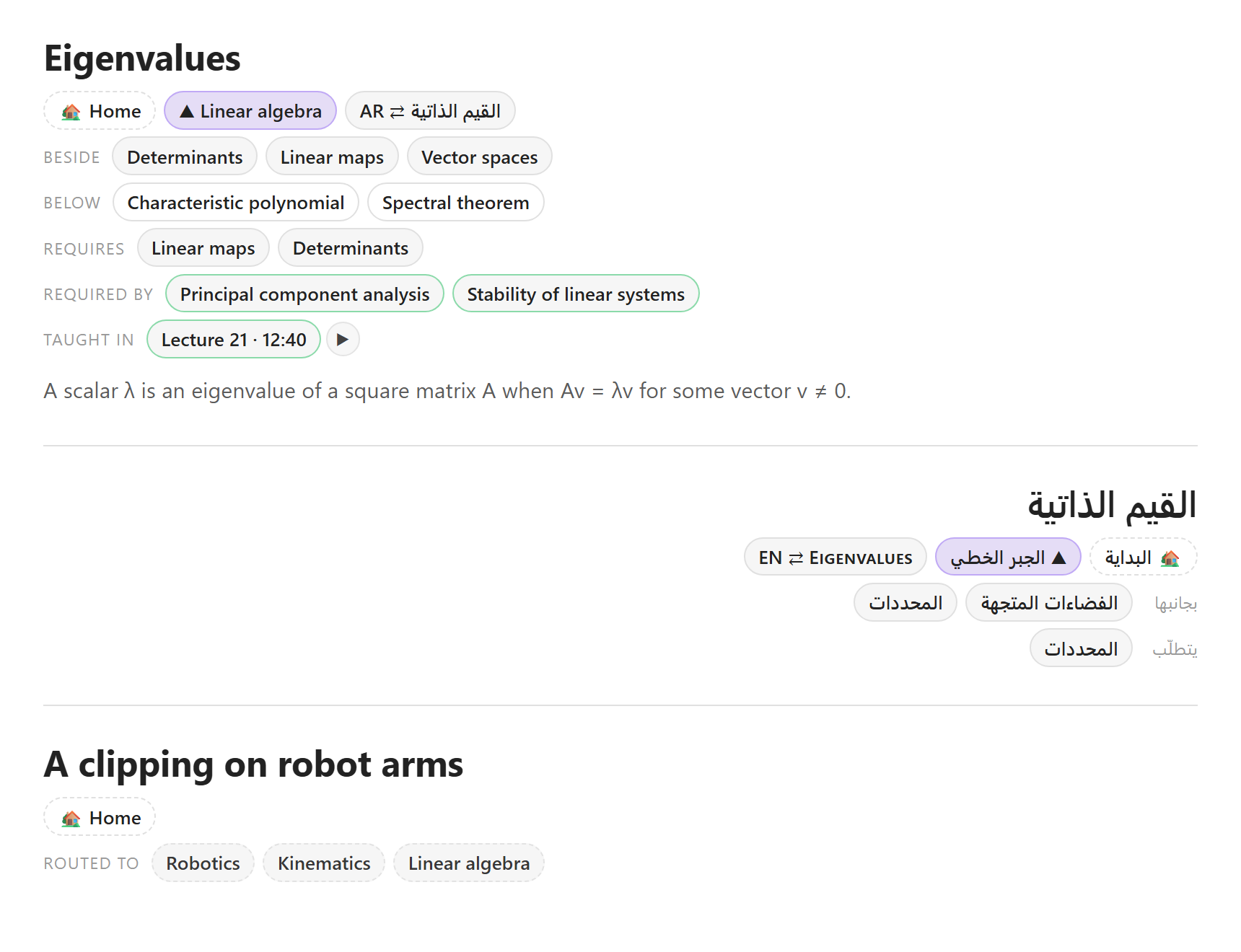
Show a note's relatives as links at the top of the note: its parent, the notes beside it and below it, its counterpart in another language, and any list property read both ways, such as requires and required by. Everything is read from frontmatter, and nothing is written into your notes.
Using it
Put a nav code block in a note, usually right after its frontmatter, or run the command Insert relatives block:
---
up: "[[Linear algebra]]"
counterpart: "[[القيم الذاتية]]"
requires:
  - "[[Linear maps]]"
  - "[[Determinants]]"
---
```nav
```
The block draws, in rows:
- 🏡 the home note, if you set one;
- ▲ the parent, the note named by
up; - ⇄ the counterpart, the note named by
counterpart, for notes kept in two languages or two versions; - beside: the notes with the same parent;
- below: the notes whose parent is this note;
- a row per relation you set up, either the note's own list (requires) or the same list read the other way
(required by: every note whose
requiresnames this one); - routed to, for a note with no parent: the notes its chosen properties link;
- badges: a word shown when a property holds a value, such as axiom when
axiom: true; - a warning when the parent is not a note.
A click opens a note, Ctrl-click (Cmd-click on macOS) opens it in a new tab, and hovering with the same key shows a preview. A long row shows 24 links and counts the rest.
The block is drawn from an index of parents and relations that the plugin keeps up to date one note at a time, so opening a note never scans the vault. When another note's frontmatter changes, the open blocks are drawn again.
Right to left
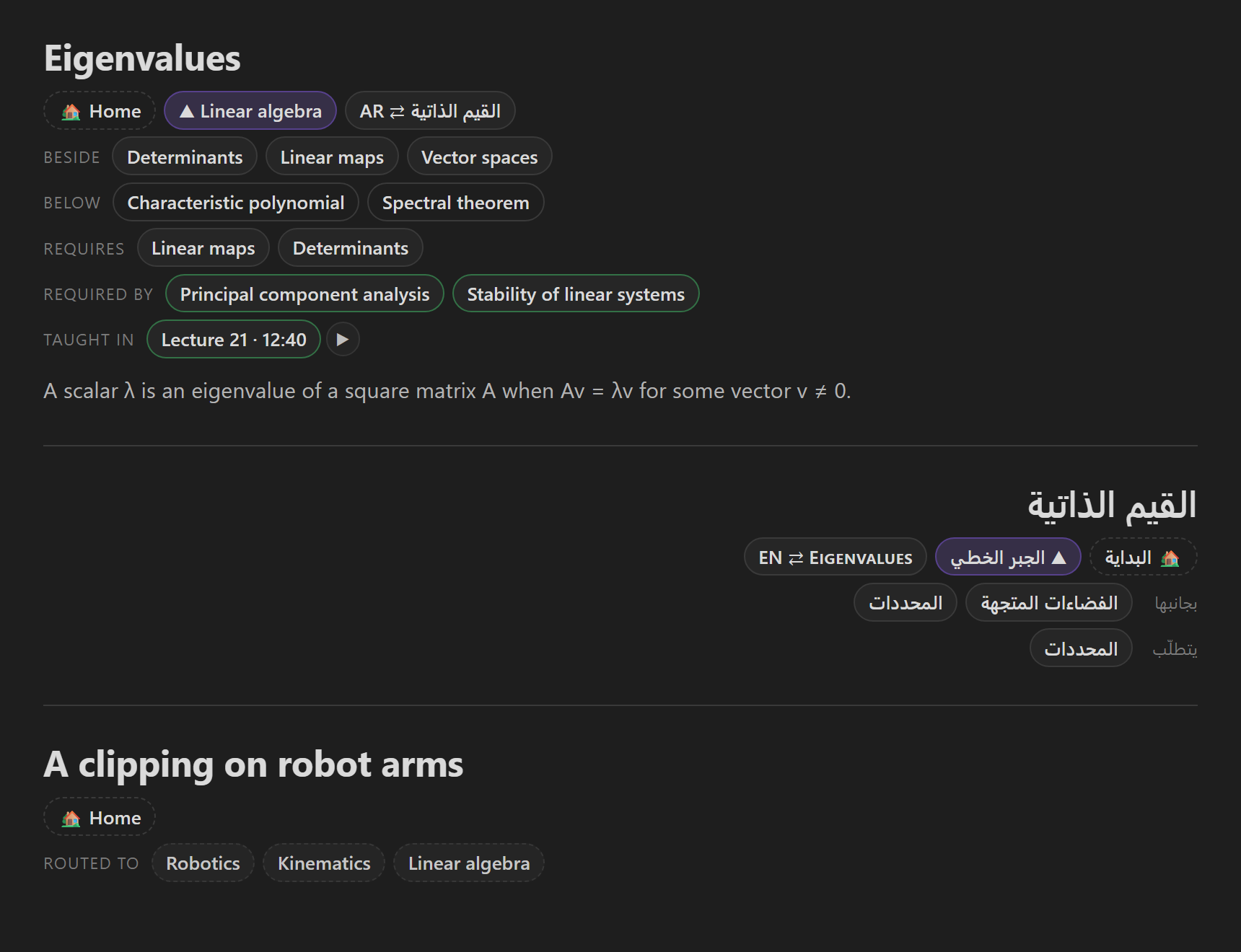
A note whose language property is a right-to-left language (ar, fa, he and ur by default) is drawn right to
left, with its own labels and its own home note. Any label left empty for right-to-left notes falls back to the
ordinary one.
Where a note is taught
A relation read the other way can also say where. Give it a section heading, such as Concepts it teaches. In
each linking note, the list item under that heading which links this note is read for a place:
| Written | Shown |
|---|---|
- [[Eigenvalues]] 12:40 or 1:02:03 | Lecture 21 · 12:40 |
- [[Eigenvalues]] [12:40](https://…) | Lecture 21 · 12:40 and a ▶ link to the video |
- [[Eigenvalues]] p. 82, pp. 82–84 | Book ch. 5 · pp. 82–84 |
- [[Eigenvalues]] sl. 74 | Lecture 21 · sl. 74 |
With short names on, a note called Lecture 21 - Eigenvalues and eigenvectors is shown as Lecture 21.
Settings
| Setting | Default | What it does |
|---|---|---|
| Block name | nav | The code block's language. A change takes effect when the plugin is reloaded. |
| Parent property | up | Names a note's parent; children and siblings follow from it. |
| Counterpart property | counterpart | Names the same note in another language. Empty hides it. |
| Language property | language | Holds a note's language code. |
| Right-to-left languages | ar, fa, he, ur | Their notes are drawn right to left. |
| Show siblings, Show children | on | The two rows the parent gives. |
| Links per row | 24 | A longer row counts the rest. |
| Home note, and one for right-to-left notes | none | A note linked first on every block. |
| Excluded folders | none | Their notes are nobody's child or sibling: a templates folder, for one. |
| Properties for a note with no parent | none | Shown as one row when a note has no parent. |
| Relations listed by the note | none | Rows of what a note's own list properties link. |
| Relations naming the note | none | Rows of the notes whose list names this one, with an optional section that says where. |
| Badges | none | A word shown when a property holds a value. |
| Labels | English | Every row's label, and its right-to-left counterpart. |
Every setting appears in Obsidian's settings search.
Privacy
The plugin makes no network requests and writes nothing into your notes; its settings live in its own data.json.
It reads frontmatter from Obsidian's metadata cache. It reads a note's text only for a relation that has a "where"
section, and then only the notes that link the one on screen.
Installing
From Settings → Community plugins, once it is listed there. Until then, copy main.js, manifest.json and
styles.css from the latest release into
<your vault>/.obsidian/plugins/note-relatives/, then enable Note Relatives. It needs Obsidian 1.13 or later. It
uses no desktop-only API, so it is not limited to desktop, though it has been tested on Windows only.
Development
npm install
npm test          # the model, the locator, the renderer, and the plugin end to end in Node
npm run lint      # ESLint with Obsidian's review rules
npm run build     # type check, then main.js
npm run dev       # rebuild on every change
node docs/demo/build.mjs --shots   # the screenshots above, from docs/demo
A release is a tag: npm version patch (or minor, major) bumps manifest.json and versions.json, and pushing
the tag makes the workflow build the plugin and draft a GitHub release with main.js, manifest.json and
styles.css.
Licence
MIT.
For plugin developers
Search results and similarity scores are powered by semantic analysis of your plugin's README. If your plugin isn't appearing for searches you'd expect, try updating your README to clearly describe your plugin's purpose, features, and use cases.