PopClip
unlistedby Can Burak Sofyalıoğlu
Save PopClip selections with source details and tags, or append them to existing and daily notes.
Obsidian PopClip
Save text selected on macOS into an Obsidian vault. Create a new note, append to an Inbox or another note, or collect clips in daily notes. A PopClip extension sends the selection through an Obsidian URL, and this Obsidian plugin saves it with source details and tags.
Requirements
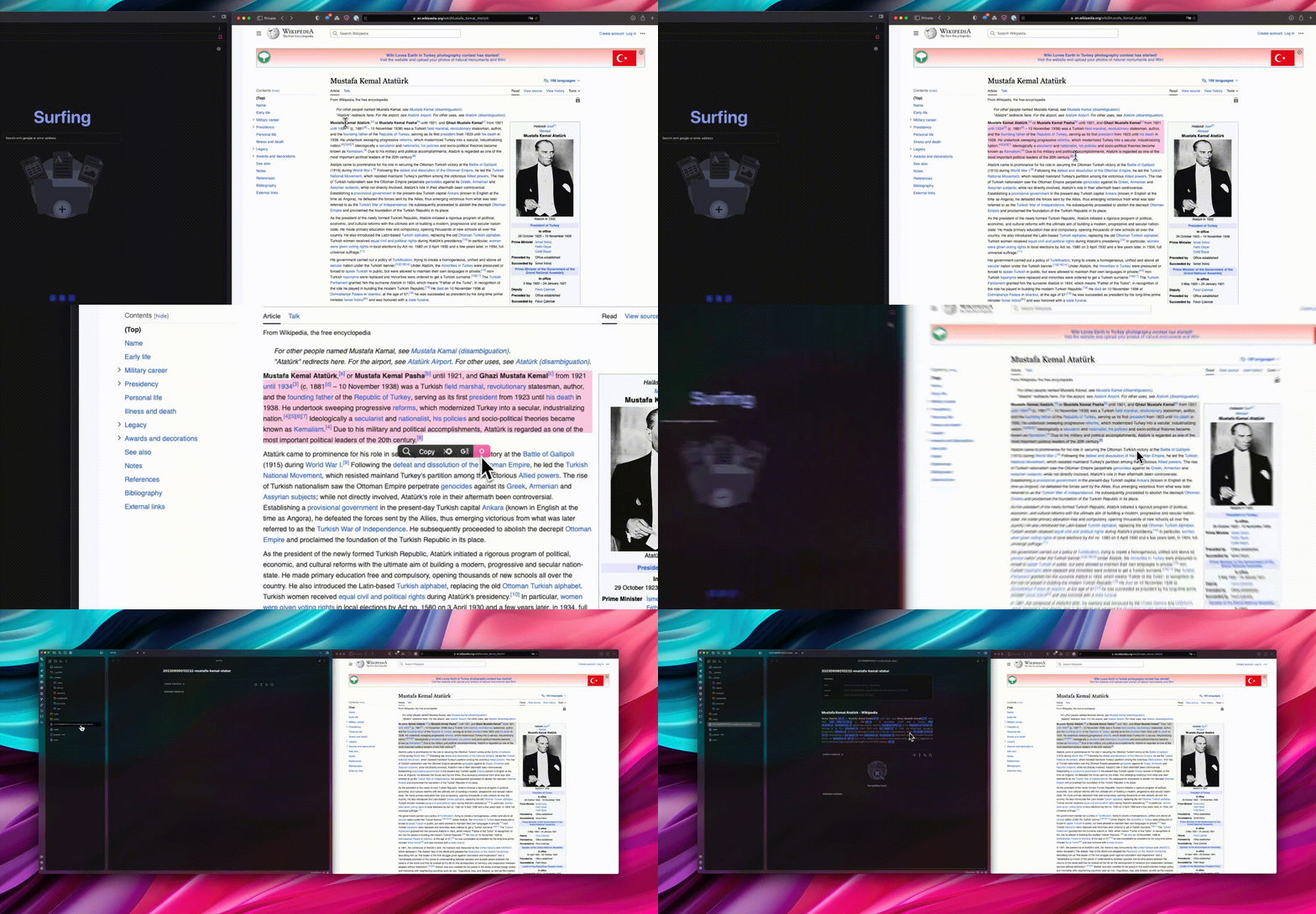
1. Install the PopClip extension
Select the entire YAML block below. PopClip will offer to install it. Enter the vault name exactly as it appears in Obsidian and choose a folder for new notes, relative to the vault root. The default folder is Clippings; leave it empty to use the root. Choose a save mode and optional comma- or space-separated tags. Append and daily destinations are configured in Obsidian.
If you installed an older version of this snippet, selecting and installing this block replaces it. Update the Obsidian plugin first. The extension does not need Advanced URI.
#popclip
name: Obsidian Clipper
identifier: ObsidianClipper
icon: |-
  preserve-color svg:<svg viewBox="0 0 512 512" xmlns="http://www.w3.org/2000/svg"><radialGradient id="a" cx="0" cy="0" gradientTransform="matrix(-59 -225 150 -39 161.4 470)" gradientUnits="userSpaceOnUse" r="1"><stop offset="0" stop-color="#fff" stop-opacity=".4"/><stop offset="1" stop-opacity=".1"/></radialGradient><radialGradient id="b" cx="0" cy="0" gradientTransform="matrix(50 -379 280 37 360 374.2)" gradientUnits="userSpaceOnUse" r="1"><stop offset="0" stop-color="#fff" stop-opacity=".6"/><stop offset="1" stop-color="#fff" stop-opacity=".1"/></radialGradient><radialGradient id="c" cx="0" cy="0" gradientTransform="matrix(69 -319 218 47 175.4 307)" gradientUnits="userSpaceOnUse" r="1"><stop offset="0" stop-color="#fff" stop-opacity=".8"/><stop offset="1" stop-color="#fff" stop-opacity=".4"/></radialGradient><radialGradient id="d" cx="0" cy="0" gradientTransform="matrix(-96 -163 187 -111 335.3 512.2)" gradientUnits="userSpaceOnUse" r="1"><stop offset="0" stop-color="#fff" stop-opacity=".3"/><stop offset="1" stop-opacity=".3"/></radialGradient><path d="M382.3 475.6c-3.1 23.4-26 41.6-48.7 35.3-32.4-8.9-69.9-22.8-103.6-25.4l-51.7-4a34 34 0 0 1-22-10.2l-89-91.7a34 34 0 0 1-6.7-37.7s55-121 57.1-127.3c2-6.3 9.6-61.2 14-90.6 1.2-7.9 5-15 11-20.3L248 8.9a34.1 34.1 0 0 1 49.6 4.3L386 125.6a37 37 0 0 1 7.6 22.4c0 21.3 1.8 65 13.6 93.2 11.5 27.3 32.5 57 43.5 71.5a17.3 17.3 0 0 1 1.3 19.2 1494 1494 0 0 1-44.8 70.6c-15 22.3-21.9 49.9-25 73.1z" fill="#6c31e3"/><path d="M165.9 478.3c41.4-84 40.2-144.2 22.6-187-16.2-39.6-46.3-64.5-70-80-.6 2.3-1.3 4.4-2.2 6.5L60.6 342a34 34 0 0 0 6.6 37.7l89.1 91.7a34 34 0 0 0 9.6 7z" fill="url(#a)"/><path d="M278.4 307.8c11.2 1.2 22.2 3.6 32.8 7.6 34 12.7 65 41.2 90.5 96.3 1.8-3.1 3.6-6.2 5.6-9.2a1536 1536 0 0 0 44.8-70.6 17 17 0 0 0-1.3-19.2c-11-14.6-32-44.2-43.5-71.5-11.8-28.2-13.5-72-13.6-93.2 0-8.1-2.6-16-7.6-22.4L297.6 13.2a34 34 0 0 0-1.5-1.7 96 96 0 0 1 2 54 198.3 198.3 0 0 1-17.6 41.3l-7.2 14.2a171 171 0 0 0-19.4 71c-1.2 29.4 4.8 66.4 24.5 115.8z" fill="url(#b)"/><path d="M278.4 307.8c-19.7-49.4-25.8-86.4-24.5-115.9a171 171 0 0 1 19.4-71c2.3-4.8 4.8-9.5 7.2-14.1 7.1-13.9 14-27 17.6-41.4a96 96 0 0 0-2-54A34.1 34.1 0 0 0 248 9l-105.4 94.8a34.1 34.1 0 0 0-10.9 20.3l-12.8 85-.5 2.3c23.8 15.5 54 40.4 70.1 80a147 147 0 0 1 7.8 24.8c28-6.8 55.7-11 82.1-8.3z" fill="url(#c)"/><path d="M333.6 511c22.7 6.2 45.6-12 48.7-35.4a187 187 0 0 1 19.4-63.9c-25.6-55-56.5-83.6-90.4-96.3-36-13.4-75.2-9-115 .7 8.9 40.4 3.6 93.3-30.4 162.2 4 1.8 8.1 3 12.5 3.3 0 0 24.4 2 53.6 4.1 29 2 72.4 17.1 101.6 25.2z" fill="url(#d)"/></svg>
requirements: [text]
captureHtml: true
app:
  name: Obsidian
  link: https://obsidian.md/
  bundleIdentifiers: [md.obsidian]
  checkInstalled: true
options:
  - identifier: vault
    label: Vault name
    description: Enter the vault name exactly as it appears in Obsidian.
    type: string
  - identifier: path
    label: Destination folder
    description: New notes only. Use a vault-relative path; leave empty for the vault root.
    type: string
    defaultValue: Clippings
  - identifier: mode
    label: Save mode
    type: multiple
    values: [default, create, append, daily]
    valueLabels: [Obsidian setting, New note, Append to note, Daily note]
  - identifier: tags
    label: Tags
    type: string
    description: Comma- or space-separated tags, added to the Obsidian defaults.
javaScript: |
  const vaultName = String(popclip.options.vault ?? "").trim();
  if (!vaultName) {
    throw new Error("Settings error: enter your Obsidian vault name.");
  }

  const data = {
    schemaVersion: 2,
    clipping: popclip.input.markdown || popclip.input.text,
    format: popclip.input.markdown ? "markdown" : "text",
    path: String(popclip.options.path ?? "").trim(),
    capturedAt: new Date().toISOString(),
    appName: popclip.context.appName,
    appIdentifier: popclip.context.appIdentifier,
    tags: String(popclip.options.tags ?? "").split(/[,\s]+/).filter(Boolean),
    mode: popclip.options.mode === "default" ? undefined : popclip.options.mode,
  };
  if (popclip.context.browserUrl) {
    data.title = popclip.context.browserTitle;
    data.source = popclip.context.browserUrl;
  }

  const url = `obsidian://popclip?vault=${encodeURIComponent(vaultName)}&data=${encodeURIComponent(JSON.stringify(data))}`;
  if (url.length > 60000) throw new Error("Clip too large: choose a shorter selection.");
  await popclip.openUrl(url);
2. Install the Obsidian plugin
The plugin is not yet in the Obsidian Community plugins directory, so install it manually:
- Download or clone this repository.
- Copy the
dist/popclipfolder to<your-vault>/.obsidian/plugins/popclip. - Restart Obsidian.
- Open Settings → Community plugins and enable PopClip.
The installed folder must contain main.js, manifest.json, and styles.css. To build those files from source, run npm install followed by npm run deploy.
3. Choose how clips are saved
Open Settings → PopClip in Obsidian. A new installation creates separate notes by default. The PopClip extension's Save mode can follow these settings or override the mode for that extension instance.
| Mode | Destination | Behavior |
|---|---|---|
| New note | The folder selected in PopClip | Creates a new file, using a timestamp or the title/selection as its filename. Existing names receive a suffix. |
| Append to note | Append note, initially Clippings/Inbox.md | Adds each clip to that file, creating it and its parent folders if needed. |
| Daily note | Daily note folder and Daily note date format | Adds clips to the note for their local capture date, creating it if needed. Defaults to Daily notes/YYYY-MM-DD.md. |
Daily note settings are independent of Obsidian's core Daily notes plugin. Set the same folder and date format to use the same notes. Formats such as YYYY/MM/YYYY-MM-DD support subfolders. Core daily-note templates are not applied.
For append/daily modes, set Append heading to a heading's exact text, or leave it empty to append at the end. A missing heading is created as a level-2 heading by default; When the heading is missing can instead append at the end. Clips are placed at the end of the matching section, before the next section of the same or higher level. Duplicate matching headings produce a clear error without changing the note.
Open note after saving shows the destination after a successful save. Open in a new tab controls where it appears. Both are off by default. The Obsidian URL handoff can still activate the app even when opening the note is disabled.
Metadata and tags
The updated extension sends the selected Markdown, with plain text as fallback, capture time, source application, browser page title/URL when available, and optional tags. It sends only the selection and its context; it does not fetch the full page or contact a remote service. Browser details depend on PopClip's support for the source browser.
With Add clip metadata enabled, new notes include properties like:
---
title: A useful article
source: https://example.com/article
date: '2026-09-19T18:01:00.000Z'
captured: '2026-09-19T18:00:00.000Z'
domain: example.com
source_app: Safari
source_app_id: com.apple.Safari
format: markdown
tags:
  - clip
  - research/web
---
date is the time Obsidian saves the note; captured is when PopClip captured the selection. Unavailable fields are omitted. Default tags in Obsidian are combined with tags from PopClip, with duplicates removed. Leading # is optional; nested and Unicode tags are supported. Tags cannot contain spaces or consist only of numbers.
Appended clips include their own metadata below the selection, including inline tags. The destination note's existing properties are left unchanged; new frontmatter is not inserted into its body. Turning off Add clip metadata removes generated properties/metadata from new captures, including tags. Include page title separately controls the title above the selection.
Upgrading and troubleshooting
- Replace the Obsidian plugin files with
dist/popclipversion 1.2.0 and restart or reload the plugin. - Reinstall the README's PopClip snippet for the new metadata, tags, and save-mode options.
- Check the vault name and choose the desired destinations in Settings → PopClip.
Older snippets remain supported by the new plugin. Existing title, filename, and metadata settings are retained. New options use defaults until configured.
- No clip appears: check that the PopClip plugin is enabled in the selected vault and that the vault name matches; updating the Obsidian plugin does not update the PopClip extension.
- Clip too large: select a shorter passage. The extension limits the encoded URL to 60,000 characters as an application safeguard; this is not a guaranteed OS transport limit. The plugin separately limits decoded messages to 120,000 characters and selections to 100,000.
- Ambiguous heading: use a heading that occurs once, or clear the heading setting to append at the end.
- Unclosed Markdown block: close any unclosed frontmatter, code fence, or HTML comment in the destination before appending.
- Invalid destination: use a vault-relative path without hidden folders or
..; append targets must end in.md. A literal%20stays part of a folder name. - Saved but could not open: the clip is already on disk; navigate to the path in the notice rather than clipping again.
All requests use the plugin's own obsidian://popclip handler. Existing notes are never replaced; repeated intentional captures create separate notes or entries.
Protocol and implementation
The plugin accepts the original unversioned message (clipping, optional path, title, source) and version-2 messages. The full field contract, implementation plan, and verification scope are in the implementation plan and protocol documentation.
Development
npm testruns the PopClip-to-Obsidian contract tests.npm run buildtype-checks and creates the productionmain.jsbundle.npm run deploy:test-vaultbuilds and installs the plugin into the included development vault.
Use a disposable vault for development and testing.
The README snippet must stay self-contained and below PopClip's 5,000-character selection limit. Its script uses the documented input and context fields. Appends use Obsidian's atomic Vault processing.
Special thanks to Nick and EdM for their contributions in this PopClip forum discussion.
For plugin developers
Search results and similarity scores are powered by semantic analysis of your plugin's README. If your plugin isn't appearing for searches you'd expect, try updating your README to clearly describe your plugin's purpose, features, and use cases.