Move to New Folder
unlistedby d0d1
Move files and folders into newly created folders with a faster workflow.
Move to New Folder
Move to New Folder is an Obsidian community plugin that moves a file or folder into a newly created folder without requiring you to type the full destination path.
What it does
- Adds
Move file to new folder...for notes - Adds
Move folder to new folder...in the file explorer for folders - Lets you choose a parent folder from a searchable picker
- Creates the new child folder and moves the target safely with Obsidian APIs
- Preserves Obsidian's normal link-update behavior when moving files
Preview
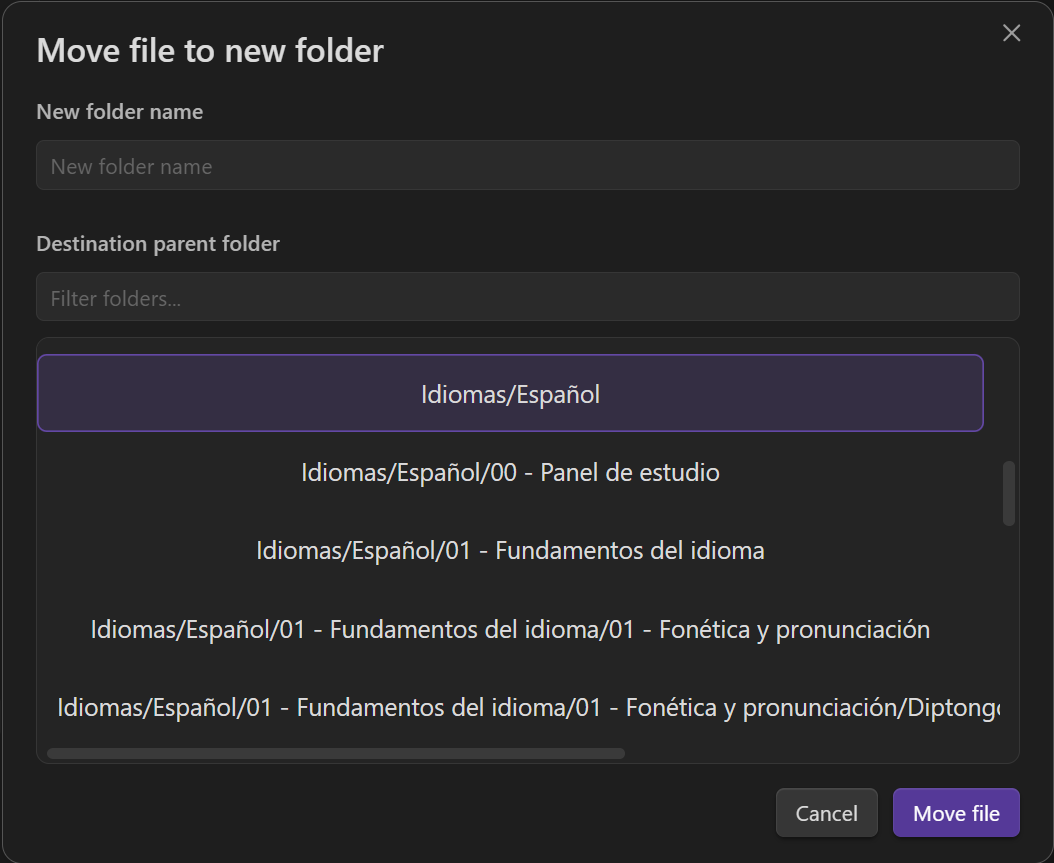
How to use it
File explorer
- Right-click a note or folder
- Choose
Move file to new folder...orMove folder to new folder... - Pick the parent folder
- Enter the new folder name
- Confirm the move
Command palette
- Open a note
- Run
Move file to new folder... - Complete the same modal flow
Folder moves are supported from the file explorer context menu.
Settings
- Default parent to current note folder: start the picker from the active note's parent instead of vault root
Platform support
- Designed for desktop and mobile
- Tested primarily on Windows and Android
- Other supported Obsidian platforms may work but are not fully validated yet
Install with BRAT
This plugin is currently in beta and can be installed through BRAT before official Community Plugins submission.
- Install and enable the BRAT plugin in Obsidian
- In BRAT, choose to add a beta plugin from GitHub
- Enter
d0d1/obsidian-move-to-new-folder - Install Move to New Folder from BRAT
Install from GitHub release
If you prefer not to use BRAT, you can install the plugin from the latest GitHub release:
- Download
move-to-new-folder-<version>.zipfrom the latest release - Create the folder
.obsidian/plugins/move-to-new-folder/in your vault if it does not already exist - Extract the ZIP contents into that folder
- Enable Move to New Folder in Obsidian
Privacy and external services
- No telemetry
- No analytics
- No network access
- No account requirement
- No payments or subscriptions
- No external service dependencies at runtime
Docs
For plugin developers
Search results and similarity scores are powered by semantic analysis of your plugin's README. If your plugin isn't appearing for searches you'd expect, try updating your README to clearly describe your plugin's purpose, features, and use cases.