MinerU View
unlistedby Ding Zheng Yuan
Show MinerU layout results on your PDFs: block boxes colored by type, reading order, and copy actions for text, formulas, tables and figures.
MinerU View




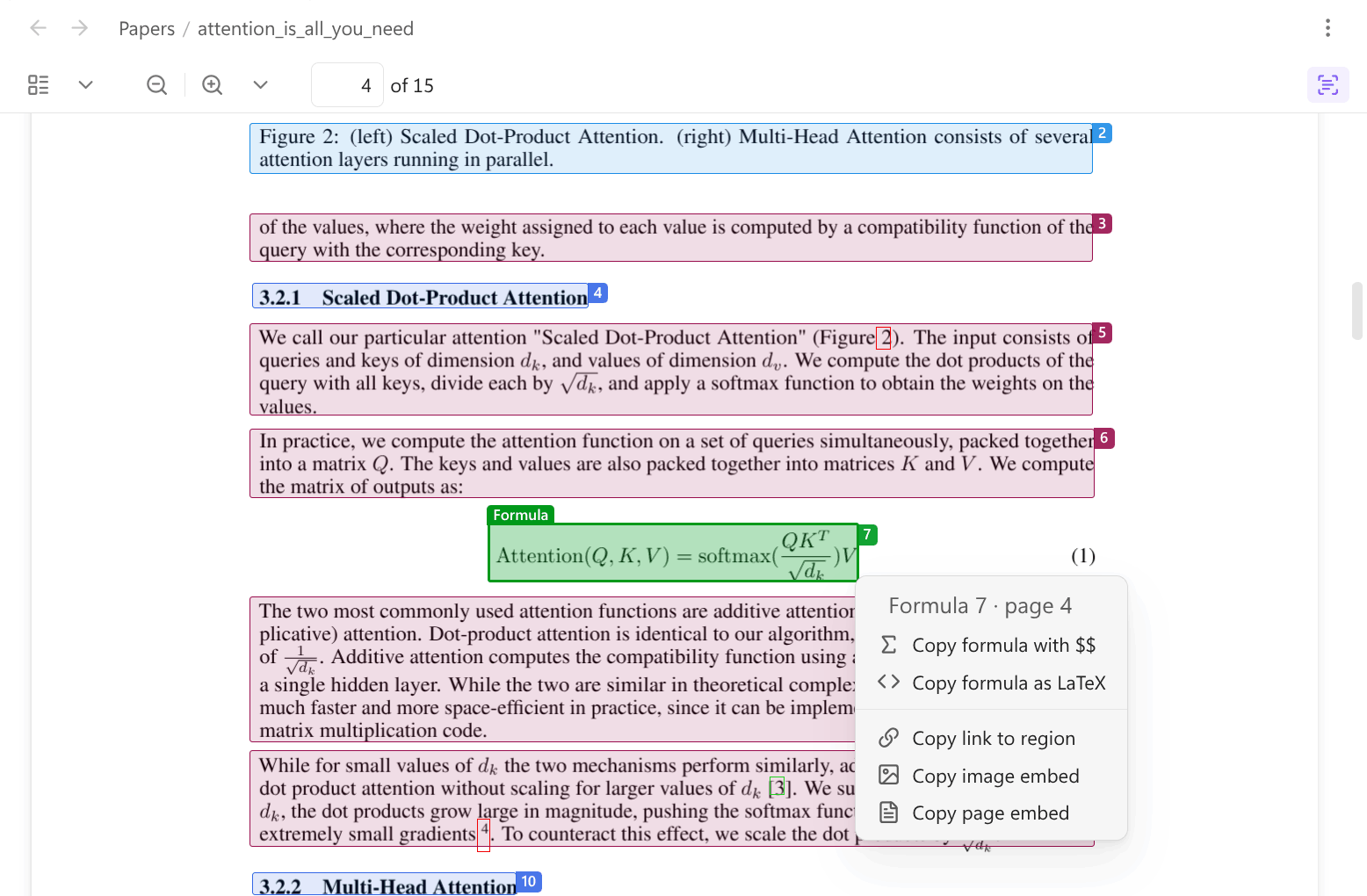
See MinerU's layout analysis directly on your PDFs in Obsidian: every block MinerU found, colored by type and numbered in reading order, drawn over the built-in PDF viewer. Right-click a block to copy its text, formula or table, or a link back to that spot in the PDF.
A companion to mineru-for-zotero, from which the layout code is ported. See License.
This version only views results you already have. It does not call the MinerU API or run MinerU for you.
Features
- Block boxes over the PDF, in the colors of MinerU's own
layout.pdf. - Reading-order numbers on each box, and optional arrows joining the boxes of a page in order.
- Three modes per PDF tab: all boxes, only the box under the pointer, or off.
- A legend that shows what each color means and hides the block types you do not want to see.
- Right-click a box, or click its number, to copy:
- text, headings, captions and references as text (inline formulas as
$…$); - formulas as
$$…$$or as plain LaTeX; - tables as Markdown, HTML, LaTeX or TSV;
- figures, charts, tables and formulas as an embed of the picture MinerU exported;
- a link to the block's region of the PDF, or an embed of its page.
- text, headings, captions and references as text (inline formulas as
- Works in popout windows and next to other PDF plugins.
Requirements
- Obsidian Desktop 1.13.1 or later. The plugin is desktop only.
- MinerU output for your PDFs, with the middle JSON (
middle_json.json). Results from MinerU 3.x (docvortex.middle2.0) and the olderpdf_infolayout are both read.
Installation
From Obsidian (once it is listed in the community directory): open Settings → Community plugins → Browse, search for MinerU View, then select Install and Enable.
By hand: download main.js, manifest.json and styles.css from the latest release into <vault>/.obsidian/plugins/mineru-view/, then enable MinerU View under Settings → Community plugins.
Where to put MinerU's results
The plugin looks in one vault folder, the results folder (MinerU by default), for a subfolder named like the PDF without .pdf:
Papers/attention_is_all_you_need.pdf        ← anywhere in the vault
MinerU/
  attention_is_all_you_need/                ← same name as the PDF
    middle_json.json                        ← required
    images/page_2_image_0.jpg …             ← optional, for image embeds
    markdown.md, structured_content.json    ← ignored
- Which file is read.
middle_json.jsonif it is there. Otherwise the first other.jsonin the folder (by name) that is a MinerU middle JSON.structured_content.jsonis never used: it has boxes but not the information needed to place them. - Images are optional. Without
images/, boxes still show; figures and tables simply have no "Copy image embed". - Two PDFs with the same name. Only the file name counts, not the folder, so
a/paper.pdfandb/paper.pdfboth useMinerU/paper/. Give PDFs distinct names if their results differ. - Changes are picked up. Adding, replacing, renaming or deleting a result updates open PDFs. There is also a Reload result command.
Using it
Open a PDF. If it has a result, its boxes appear and the PDF toolbar shows a layout button.
| Action | How |
|---|---|
| Switch mode (all → pointer → off) | Click the toolbar button, or run Cycle layout mode |
| Open the legend, hide block types | Right-click the toolbar button, or run Show layout legend |
| Copy from a block | Right-click the block, or click its number |
| Toggle arrows | Toggle reading-order arrows, or the legend |
A dimmed toolbar button means no result was found for that PDF; click it to see where the plugin looked.
Commands (no default hotkeys): Cycle layout mode, Show all layout boxes, Show the layout box under the pointer, Hide layout boxes, Toggle reading-order arrows, Show layout legend, Reload result.
Good to know
- The PDF stays usable. Boxes don't take clicks: you can select text and follow links inside them. With text selected, right-click gives the viewer's own menu instead of the block's.
- Captions are their own boxes, separate from their figure or table.
Settings
| Setting | Default | |
|---|---|---|
| Results folder | MinerU | Vault folder that holds one result folder per PDF. Empty means the vault root. |
| Default mode | All boxes | The mode a PDF opens in. |
| Reading-order numbers | on | |
| Reading-order arrows | off | |
| Box fill opacity | 0.15 | 0 draws outlines only. |
| Hidden block types | none | Set in the legend; "Show all" resets it. |
Privacy and security
- Network: none. The plugin makes no requests and collects no telemetry.
- Files: it only reads MinerU results and PDFs inside your vault, through Obsidian's API. It writes nothing but its own settings.
- Clipboard: it writes to the clipboard when you pick a copy action, and never reads it.
- No Node or Electron API, no
child_process, nofs.
Limitations
- Links to a region look like
[[paper.pdf#page=6&rect=118,606,493,681|Table p.6]]. Obsidian opens the PDF at that page. Highlighting the region itself needs a plugin that understandsrect, such as PDF Companion or PDF++. - Embeds. Obsidian's PDF embed shows a whole page and ignores
rect, so "Copy page embed" gives you the page. For a cropped figure, table or formula use "Copy image embed", which embeds the picture MinerU exported. - Rotated pages are not supported: boxes are placed for the page as MinerU saw it.
- Embedded PDFs (
![[paper.pdf]]inside a note) do not get an overlay, only PDF tabs do.
Development
npm install
npm run dev          # watch build
npm run build        # typecheck + production bundle
npm test             # unit tests
npm run lint
npm run lint:review  # what Obsidian's community scanner checks
Releasing
npm version also updates manifest.json and versions.json, and tags without a v, as Obsidian requires. The release workflow builds and publishes the tag.
npm version patch    # or minor / major
git push --follow-tags origin main
See AGENTS.md for the architecture and constraints.
License
The box normalizer, type palette, copy formatter and box helpers are ported from mineru-for-zotero (AGPL-3.0-or-later); each ported file names its source.
- Copyright (C) Asianfleet: the original MinerU for Zotero.
- Copyright (C) 2026 Ding Zheng Yuan: the fork's modifications and this plugin.
The block colors follow MinerU's layout.pdf. This project is not affiliated with MinerU, OpenDataLab or Obsidian.
For plugin developers
Search results and similarity scores are powered by semantic analysis of your plugin's README. If your plugin isn't appearing for searches you'd expect, try updating your README to clearly describe your plugin's purpose, features, and use cases.