Secure Inline (age)
unlistedby arie
Inline age-encrypted secrets in notes.
Secure Inline (age)
Obsidian plugin for encrypting sensitive text directly inside notes with interoperable age encryption.
Warning
- Lost keys = lost data. Ciphertext cannot be recovered without your age identity file or passphrase.
- Back up your keys (
~/.config/age/keys.txt) and passphrases before relying on this plugin. - Test on a copy of a note before encrypting important data.
- Use at your own risk — see LICENSE for full terms.
Features
- Encrypt selected text into a fenced
secureblock containing age ASCII armor. - Encrypt short single-line selections into compact
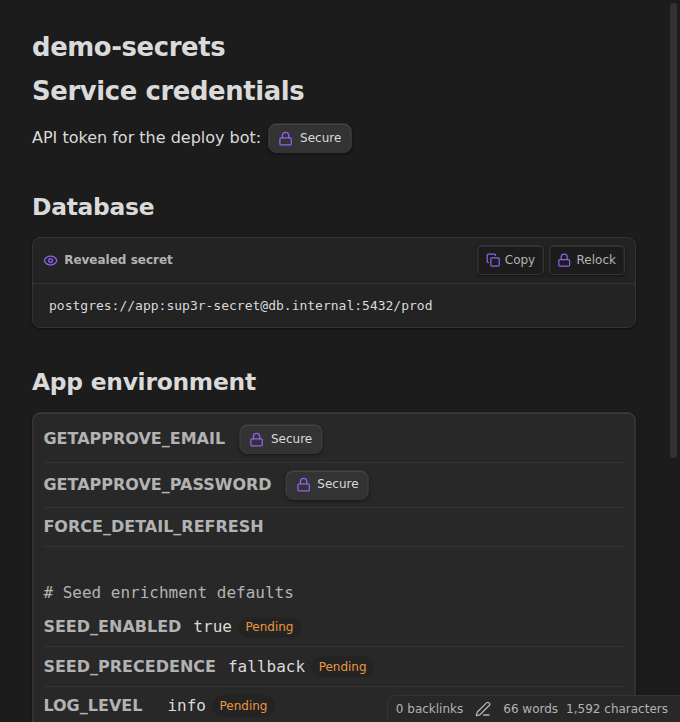
sec:v1:inline tokens. - Click encrypted content in Reading mode or Live Preview to reveal it.
- Relock revealed plaintext manually or automatically after a timeout.
- Reveal every secret for the session with a global toggle.
- Copy plaintext from revealed values or with Ctrl/Cmd-click on locked secrets.
- Encrypt with an age passphrase when recipient keys are unavailable.
- Auto-encrypt plaintext typed inside
secure/agefences when the cursor leaves the block. - Keep
secure-propertieskeys readable while encrypting every scalar value assec:v1:. - Sweep a note for pending plaintext secure blocks with an explicit command.
- Read native age X25519 identities and recipients on desktop.
- Store a generated mobile device identity in Obsidian SecretStorage.
- Keep interoperability with the
ageCLI.
Formats
Fenced block
```secure
-----BEGIN AGE ENCRYPTED FILE-----
...
-----END AGE ENCRYPTED FILE-----
```
If ciphertext ever contains a triple-backtick sequence, Secure Inline emits a four-backtick fence. Decryption also recognizes age fenced blocks for compatibility.
Inline token
sec:v1:<unpadded-base64url-age-ciphertext>
Inline tokens are intentionally versioned. Legacy unversioned sec: tokens are rejected as invalid.
Secure properties
```secure-properties
username: arie
api_key: sec:v1:<unpadded-base64url-age-ciphertext>
password: sec:v1:<unpadded-base64url-age-ciphertext>
```
secure-properties keeps keys readable and encrypts every non-empty scalar value. Both key: value and dotenv-style KEY=value lines are supported; comments, blank lines, nested YAML, lists, block scalars, and other structured values are left unchanged.
Key setup
Desktop
Create a native age key file outside the vault:
mkdir -p ~/.config/age
age-keygen -o ~/.config/age/keys.txt
The plugin reads identities and public recipients from ~/.config/age/keys.txt by default. It understands:
AGE-SECRET-KEY-1...identities# public key: age1...comments- bare
age1...recipients
Unsupported AGE-PLUGIN-* identities are skipped and reported as warnings. Keep private key files outside the synced vault.
Mobile / per-device identity
In plugin settings, use Generate under Device recipient. Secure Inline generates an age identity, stores the private identity in Obsidian SecretStorage, and displays only the public age1... recipient.
Copy that public recipient into Extra recipients on other devices, or into another age recipient set, so those devices can decrypt content encrypted for this device.
data.json stores only the SecretStorage secret name. It never stores the private identity.
Extra recipients
Add one age1... recipient per line in settings. These recipients are merged with public recipients found in keys.txt and the generated device identity recipient.
Usage
Encrypt
- Select text, then run Secure Inline: Encrypt selection.
- Single-line selections up to the configured inline limit become
sec:v1:tokens. - Longer or multi-line selections become
securearmor blocks. - Right-click a non-empty selection and choose Secure selection.
- With no selection, the command opens a modal that can encrypt typed text or clipboard contents.
- Run Secure Inline: Encrypt selection with passphrase to use age's scrypt passphrase recipient instead of public keys.
Plaintext secure blocks
- Type plaintext inside a
secureoragefence. - Type plaintext values inside a
secure-propertiesfence askey: valuelines. - With Auto-encrypt plaintext secure blocks enabled, moving the cursor outside the fence encrypts pending contents or property values in place.
- Run Secure Inline: Encrypt plaintext secure blocks to encrypt every pending plaintext fence and secure-property value in the active note.
- Empty fences, empty property values, existing
sec:v1:values, and blocks already containing-----BEGIN AGE ENCRYPTED FILE-----are skipped. - If no recipients are configured or the block changes during encryption, plaintext is left untouched.
Decrypt
- In Reading mode, click a
secure/ageblock to reveal it. - In Reading mode or Live Preview, click a
sec:v1:token or secure-property value to reveal it. secure-propertiesrenders as a key/value table; encrypted values reveal in place and expose per-value Copy and Relock controls.- Run Secure Inline: Toggle global reveal, or right-click the editor and choose Reveal all secrets, to reveal every rendered secret for the session.
- With Reveal inline tokens on focus enabled, placing the cursor inside a Live Preview token displays
sec:v1:<plaintext>without changing the file. - Ctrl/Cmd-click a locked inline token or secure block to copy plaintext and reveal it.
- Click Copy next to a revealed value to copy it.
- Click Relock, or use the global toggle again, to hide plaintext. Auto-relock is suspended while global reveal is enabled.
- If no configured identity matches, the plugin prompts for a passphrase and retries passphrase decryption.
age CLI interoperability
A fenced block's contents are standard age ASCII armor. Extract the armor to a file and decrypt with:
age -d -i ~/.config/age/keys.txt secret.age
Inline tokens are raw age ciphertext encoded as unpadded base64url, not armor. Decode the base64url payload before passing it to age -d if you need CLI access to an inline token.
Manual install
From this repository:
npm install
npm run install:local -- "/path/to/vault"
The installer builds main.js and copies main.js, manifest.json, and styles.css into /path/to/vault/.obsidian/plugins/secure-inline/. Restart Obsidian or reload plugins, then enable Secure Inline (age) in community plugin settings.
For development symlinks instead of copies:
npm run install:local -- "/path/to/vault" --link
For Android, run the installer against the synced vault directory before opening it in Obsidian mobile, or use a shell with Node.js on the device.
Security boundary
- The vault contains ciphertext only.
- Desktop private identities stay in
~/.config/age/keys.txtoutside the vault. - Generated device identities are stored through Obsidian SecretStorage, not plugin settings.
- Decrypted plaintext appears only in the reveal DOM and in the clipboard after explicit user action.
- Global reveal is session-only and display-only; it is not saved to settings or the note file.
- Clipboard managers, sync tools, screenshots, and Obsidian's own editor history can still expose revealed or copied plaintext.
- Copying editor source preserves ciphertext. Copying or exporting rendered output can include revealed plaintext, and a locked rendered block does not contain its armor source.
- Clipboard clearing is optional and only clears the clipboard if it still contains the same plaintext.
- Plaintext typed inside a
secure/age/secure-propertiesfence can remain in the note until the cursor leaves the block or the sweep command runs. secure-propertiesintentionally stores keys in plaintext; values are stored as ciphertext after encryption.
Development
npm test
npm run build
npx tsc --noEmit
The esbuild bundle keeps obsidian, electron, @codemirror/*, and Node builtins external. Node filesystem access is dynamically required only behind the desktop platform branch.
For plugin developers
Search results and similarity scores are powered by semantic analysis of your plugin's README. If your plugin isn't appearing for searches you'd expect, try updating your README to clearly describe your plugin's purpose, features, and use cases.