Mneme
unlistedby Linus
A concept-centered learning layer for Obsidian.
Mneme
Turn what you read into what you remember.
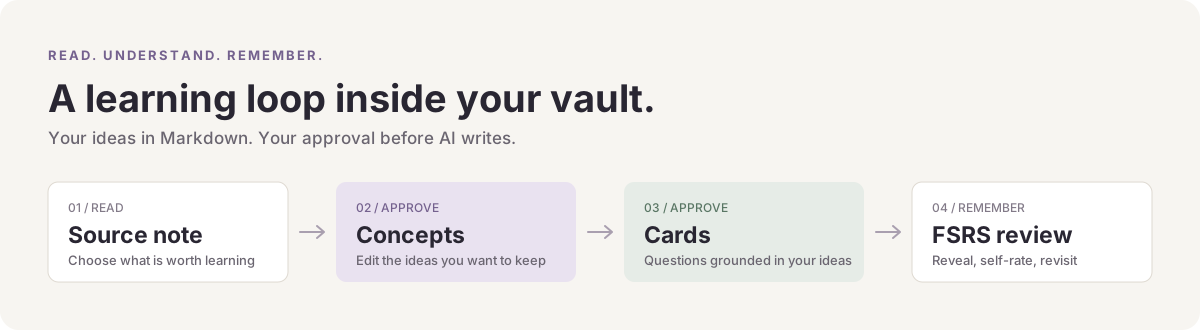
A concept-centered learning plugin for Obsidian. Turn your notes into editable Concepts, build Cards from the ideas you approve, and revisit them with spaced repetition. Your knowledge stays in Markdown.


Install · Try the offline demo · 中文说明 · Contribute
Why Mneme?
You have a vault full of things you have read. Mneme helps you turn the ideas worth keeping into a small, usable learning workflow.
- Learn around ideas. Each Concept has its own note, source links, and review Cards. Browse your knowledge by Concept.
- You decide what enters your vault. Edit, accept, or reject AI proposals in Inbox before they become final learning notes.
- Write it yourself, too. Create Concepts and Cards directly. AI is optional.
- Keep readable files. Concepts are Markdown notes; each Concept has one Markdown Card Group with independently scheduled Cards.
- Review with FSRS. Reveal the answer and choose Again, Hard, Good, or Easy. Scheduling is local, and routine review uses no AI calls.
- Start without an account. Manual authoring and the offline Mock demo need no API key. Choose OpenAI, Claude, Gemini, DeepSeek, Qwen, Zhipu, Moonshot, SiliconFlow, or a custom endpoint when you want real AI drafting.
Install
Mneme is currently distributed through GitHub Releases. The first release was verified on macOS with Obsidian 1.13.7. The manifest declares Obsidian 1.5.0 or newer; Windows and mobile have not yet received the same native acceptance coverage.
With BRAT
- Install BRAT from Obsidian's Community plugins.
- In BRAT, add the beta plugin repository
HetongLin/mneme. - Enable Mneme in Community plugins.
Manual installation
- Download
mneme-1.1.0.zipfrom the latest release. Use the plugin ZIP, rather than GitHub's automatically generated source-code ZIP. - Extract the
mnemefolder into your vault's plugin folder:<vault>/.obsidian/plugins/. If your vault uses a custom configuration folder, use that folder instead of.obsidian. - Reload Obsidian, then enable Mneme in Settings → Community plugins.
The installed folder contains main.js, manifest.json, and styles.css. No build tools are needed.
Your first learning loop
- Open a note you want to learn from. The included Stable identity example is a good starting point.
- In Mneme settings, enable Enable AI capture. Leave Provider → Mock for a deterministic offline demo, or configure a provider for real extraction. See AI provider setup for protocols, base URLs, and model IDs.
- Run Mneme: Analyze Current Note from the command palette. Open Mneme: Open Inbox, review a Concept proposal, and accept it.
- Open the accepted Concept and run Mneme: Generate Cards from Current Concept. Review and accept the Card proposals in Inbox.
- Open Mneme: Open Review View. Choose a Concept, click Show Answer, and rate your recall.
You can also start with Mneme: Create Concept and Mneme: Create Card to author everything yourself. The walkthrough explains both paths and provider setup.
Your files, your knowledge
Your vault/
├── Your source notes.md
└── Mneme/
    ├── Concepts/
    │   └── Stable-Identity.md
    └── Cards/
        └── Stable-Identity/
            └── Cards.md
Concept and Card content lives in these editable Markdown files. Mneme's local plugin data holds scheduling, proposals, settings, and recovery state. Keep that data when moving a vault if you want to retain review history.
AI capture is off by default. When you explicitly use a remote provider, the selected note or Concept content and request context go to your configured endpoint. Keys are stored locally in Obsidian plugin data, without encryption by Mneme. Read the privacy notes for the exact boundaries.
Questions
Do I need AI? No. Manual Concept and Card authoring works without a provider. Mock lets you try the proposal-and-approval workflow offline; it demonstrates the flow rather than real semantic extraction.
Can I use my existing notes? Yes. Analyze a source note explicitly when you want proposals; ordinary browsing and review stay local.
Which AI providers are supported? Mneme includes OpenAI, Anthropic Claude, Google Gemini, Alibaba Qwen, Zhipu GLM, Moonshot Kimi, SiliconFlow, DeepSeek, and a configurable custom endpoint. See AI provider setup.
Can I use Anki? Mneme can export accepted Cards as an Anki-importable TSV. The exported copy has its own state in Anki; there is no synchronization.
Where should I report a problem? Open an issue with a small reproducible example. Suggestions, documentation improvements, and contributions are welcome.
Development
git clone https://github.com/HetongLin/mneme.git
cd mneme
npm ci
npm run build
npm run test:all
npm run dev creates a watch build. Product and architecture decisions live in the ADRs; see Contributing before changing behavior. Release notes describe the public release, and next priorities keep the scope visible.
License and acknowledgements
MIT. Upstream scaffold and bundled dependency notices are retained in Third-party notices. Mneme uses the Obsidian Plugin API, ts-fsrs, and Zod.
If Mneme helps you keep learning, a star makes the project easier for others to find. Specific feedback and small contributions help it grow.
For plugin developers
Search results and similarity scores are powered by semantic analysis of your plugin's README. If your plugin isn't appearing for searches you'd expect, try updating your README to clearly describe your plugin's purpose, features, and use cases.