Quick Spell Check
unlistedby k0src
Check and accept spelling suggestions using keyboard shortcuts, without needing to move your mouse.
Quick Spell Check
An Obsidian plugin for checking spelling and accepting suggestions using keyboard shortcuts, without needing to move your mouse.
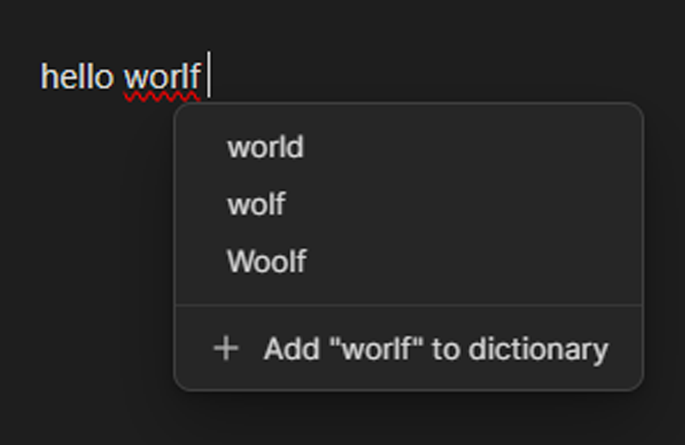
Features
- Accept top suggestion: Automatically replaces the nearest misspelled word on the current line with the top spelling suggestion
- Open spelling menu: Opens a menu with spelling suggestions for the nearest misspelled word. Press the hotkey again to cycle through other misspelled words on the line
- Custom dictionary: Add words to a custom dictionary through settings or directly from the spelling menu
- Multiple language support: The dictionary language can be changed in the plugin settings
Installation
Manual Installation
- Download the latest release from the Releases page
- Add the files to your the plugin folder in your vault
- Reload Obsidian
- Enable "Quick Spell Check" in Settings > Community plugins
The English dictionary is downloaded automatically by default. Additional languages can be downloaded from the plugin settings.
From Community Plugins
Coming soon
Usage
Setup
- Go to Settings > Hotkeys
- Search for "Select Spell Check"
- Assign hotkeys to:
- "Accept top spelling suggestion"
- "Open spelling menu"
Realistically, it's not as accurate as the native Obsidian spell-check, but it's much faster, and works ~90% of the time.
Credits
Spell checking powered by nspell.
Dictionaries are downloaded from wooorm/dictionaries.
License
For plugin developers
Search results and similarity scores are powered by semantic analysis of your plugin's README. If your plugin isn't appearing for searches you'd expect, try updating your README to clearly describe your plugin's purpose, features, and use cases.