Tahoe Glass
unlistedby Krishnan Adaikkappan
Companion to the Tahoe theme: real refraction for its glass, with dispersion, glare and a pointer highlight, a battery saver, and header cards on settings pages. macOS.
Tahoe Glass
Real refraction for the Tahoe theme's glass. CSS can blur what's behind a surface, but it can't bend it. Tahoe Glass draws a lens for each floating surface (the toolbar capsules, menus, the command palette, notices, the status bar) that matches its exact size and corners, so the content behind bends at the rim the way it does through a piece of glass, with a little colour split, glare along the edge, and a soft highlight that follows the pointer. Settings pages get a header card with the page's icon, name and what it's for.
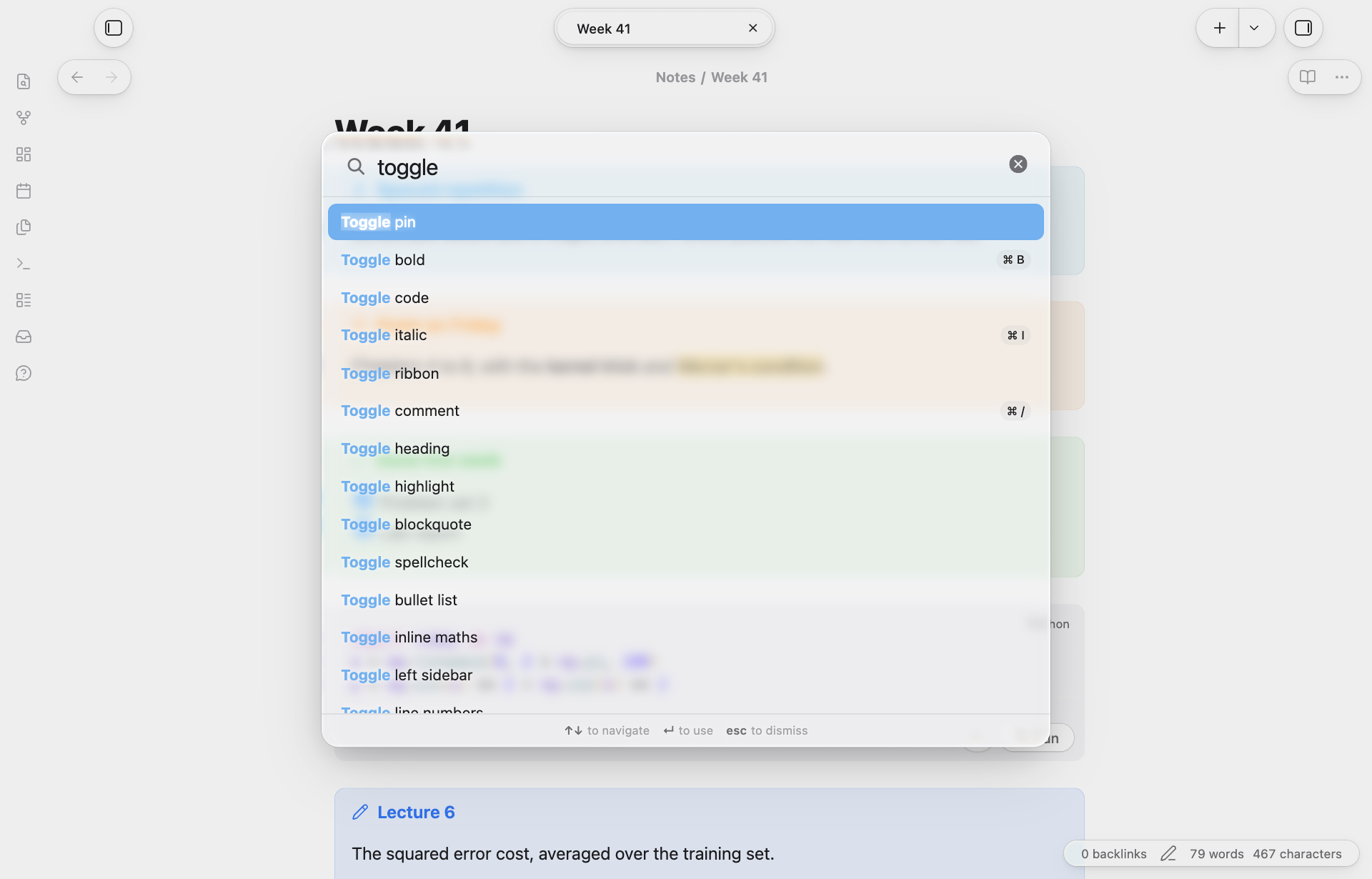
It needs the Tahoe theme: with another theme there's no glass for it to bend.
Settings
- Glass level: from Clear (more of the content shows through) to Tinted (more opaque and easier to read). The theme takes every tint and blur from this one value.
- Refraction and Strength: the bend at the edges, and how far it reaches.
- Chromatic dispersion: colours split slightly at the rim, like a real lens. Uses a little more of the GPU.
- Rim light: glare where the edge faces the light, and a thin bright edge all the way round.
- Pointer highlight: a soft glow that follows the pointer across glass.
- Lighter glass on the toolbar: the toolbar's small buttons sit over scrolling notes and redraw every frame, so they get a simpler version of the effect (on by default).
- Battery saver: on battery or in low power mode (or always), every surface gets the lighter glass and the pointer highlight rests.
- Header cards on settings pages: the page's icon, name and a line about it at the top of each settings page.
- Window controls in the settings sidebar (macOS): the Settings window's close, minimise and zoom buttons sit inside its floating sidebar.
If anything feels slow, Record slow moments for 2 minutes notes every frame over 50 ms and whose code ran in it, and saves a report you can share in an issue.
Desktop only; made on macOS.
The Tahoe family
Tahoe is a set of plugins and a theme that work on their own and fit together.
| Tahoe Run | Run the code in your notes, like a notebook: Python with a debugger and variables view, MATLAB, and ~25 other languages. | available |
| Tahoe Math | A calculator in your notes: type an expression ending in = and the answer appears. | available |
| Tahoe | A clean, Mac-like theme, in light and dark. | available |
| Tahoe Code | An IDE in your code blocks: suggestions, checking as you type, quick fixes, go to definition, formatting and AI edits. | available |
| Tahoe Glass | Real refraction for the Tahoe theme's glass, and header cards on settings pages. | this one |
| Tahoe Organize | Keep a growing vault tidy: inbox triage, smart folders, colored tags, link suggestions, vault health, literature notes and text from images. | available |
| Tahoe Intelligence | On-device AI for your notes: ask your notes, related notes, distilling permanent notes and more. | available |
Better together
- With Tahoe: the toolbar, menus, command palette and notices bend what's behind them, and the theme takes its tint and blur from Glass level.
- With Tahoe Run: the ▶ Run capsules on code blocks get the same glass.
How it works
Chromium accepts SVG filters in backdrop-filter. For each glass surface, Tahoe Glass renders a displacement map for its size and corner radii (a rounded-rectangle distance field with a convex rim) in a worker, wraps it in an feDisplacementMap filter and hands it to the theme as the --tahoe-lens variable. Maps are drawn once and reused for surfaces of about the same size.
Disclosures
- It runs a program on your Mac:
pmset -g, once a minute, to see whether low power mode is on (for the battery saver). It only reads. - Files outside your vault: only when you run Record slow moments, which saves its report to
~/Library/Caches/tahoe-glass/slow-moments.json. - Obsidian's window and settings: to move the Settings window's buttons, it uses Electron's window API, and puts them back when you turn the option off or disable the plugin. Header cards are added when a settings page opens, by wrapping Obsidian's settings tab switching; that's undone when the plugin is disabled.
- No network use, telemetry, ads, accounts or payments.
Credits
The bend across the rim follows Liquid Glass Studio by Charles Yin (MIT); see THIRD_PARTY_NOTICES.md.
Tahoe Glass is an independent project. It isn't affiliated with, or endorsed by, Apple.
License
MIT © 2026 Krishnan Adaikkappan
Building from source
npm ci
npm run build     # writes main.js
Releases are built by GitHub Actions: push a tag that matches the version in manifest.json, then publish the draft release it creates.
For plugin developers
Search results and similarity scores are powered by semantic analysis of your plugin's README. If your plugin isn't appearing for searches you'd expect, try updating your README to clearly describe your plugin's purpose, features, and use cases.