Second Thoughts
unlistedby Liam Bray
AI-generated relational links and ideation responses drawn from your vault.
Second Thoughts
Your notes already contain ideas you haven't had yet.
Second Thoughts finds them.




Features · How It Works · Install · Settings · Development
An Obsidian plugin that reads your vault, understands the relationships between your notes, and surfaces connections you missed and ideas you haven't considered — automatically as footnotes, or on-demand through a modal.
Features
Footnotes — Automatic Connections
When you stop editing a note and navigate away, the plugin finds related notes by link distance and semantic similarity, then proposes connections as native Obsidian footnotes.
Sperm whales are the deepest-diving mammals.[^st-1]

---

[^st-1]: See [[Whale Diving]] — both notes explore physiological
adaptations enabling cetaceans to withstand extreme depth. *(Second Thoughts)*
- Only connections above a configurable confidence threshold are proposed
*(Second Thoughts)*marks AI-generated footnotes — remove it to keep, delete the footnote to discard- A notification appears for each connection found
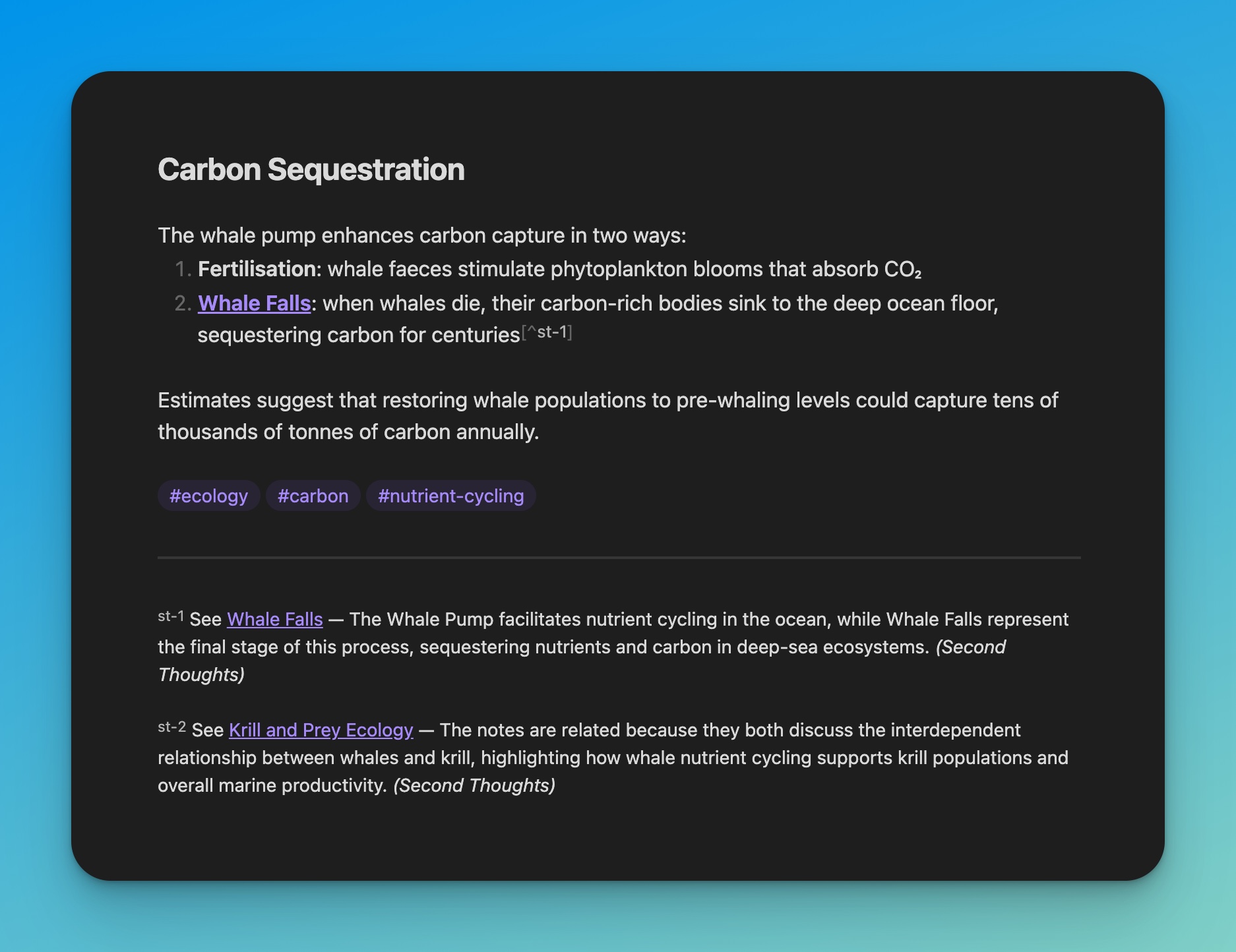
Footnotes rendered natively in Obsidian's reading view
Ideation — Cross-Cluster Bridging
Select text → Cmd/Ctrl+P → "Ask Second Thoughts"
The plugin finds notes that are relevant to your selection but diverse from each other — pulling from different areas of your vault using Maximal Marginal Relevance. It generates concise ideas that connect concepts you haven't explicitly linked.
Each idea can be individually accepted (inserted as an [!idea] callout) or dismissed.
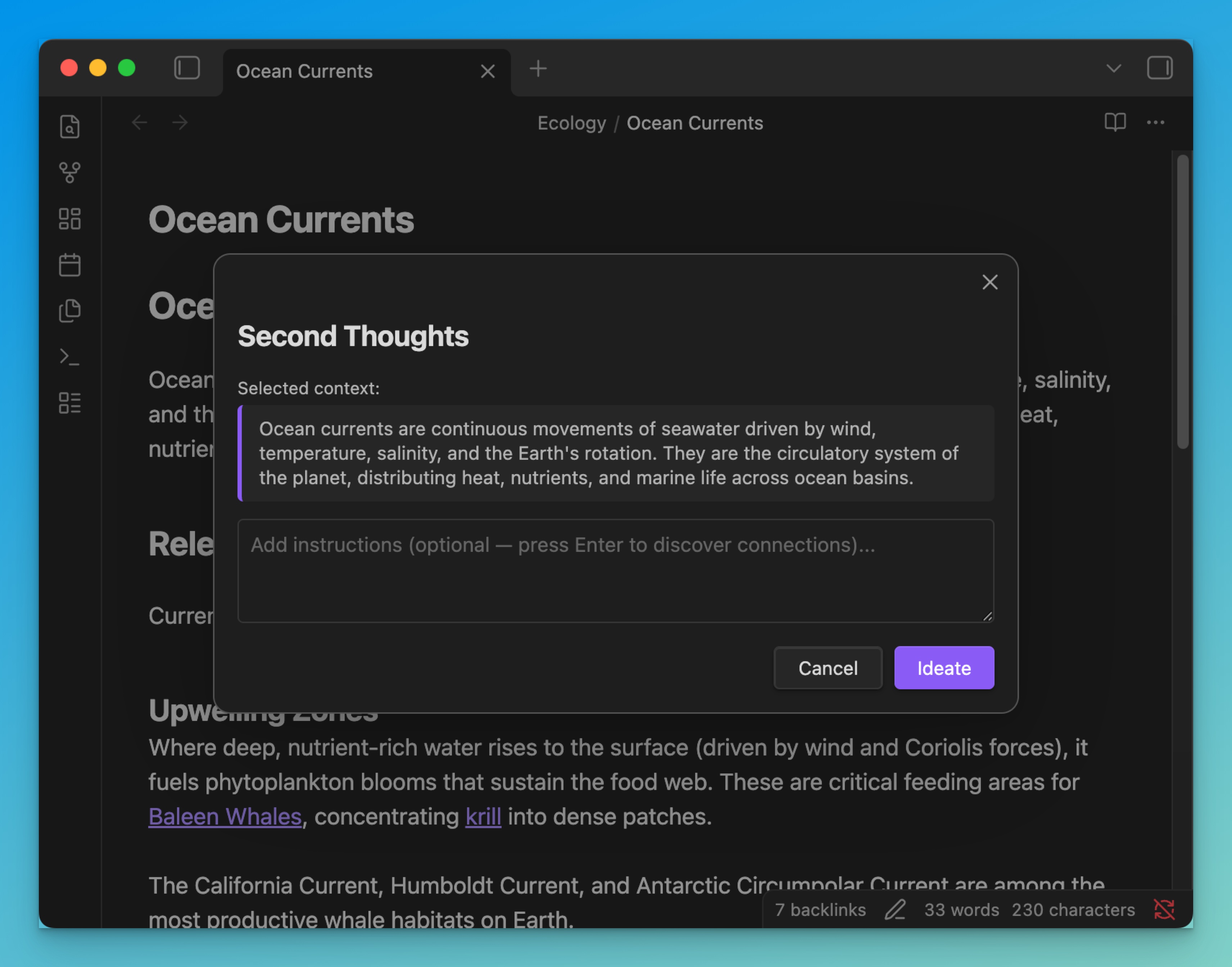
Select text and invoke the command — your selection becomes the context
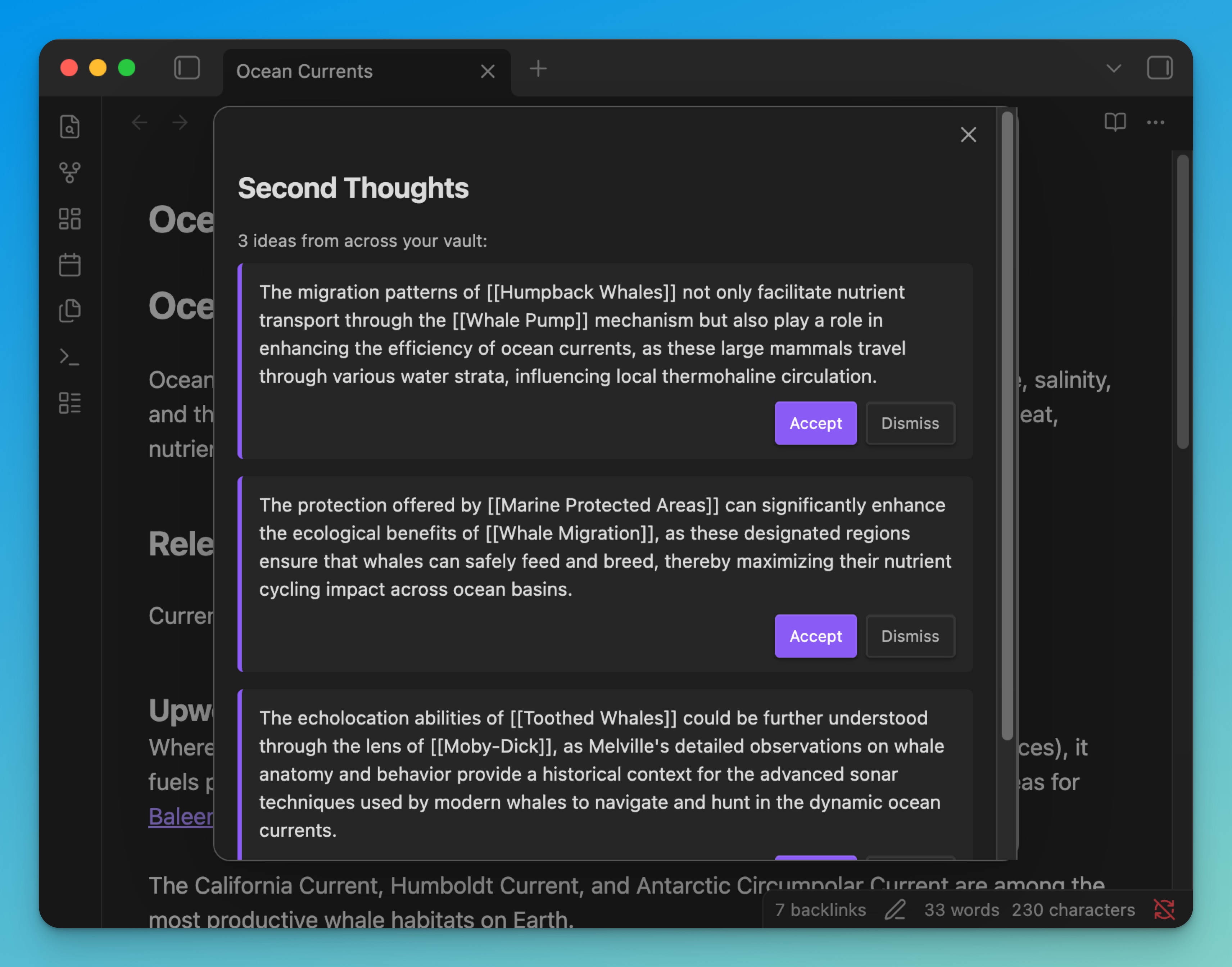
3 bridging ideas from diverse notes across your vault
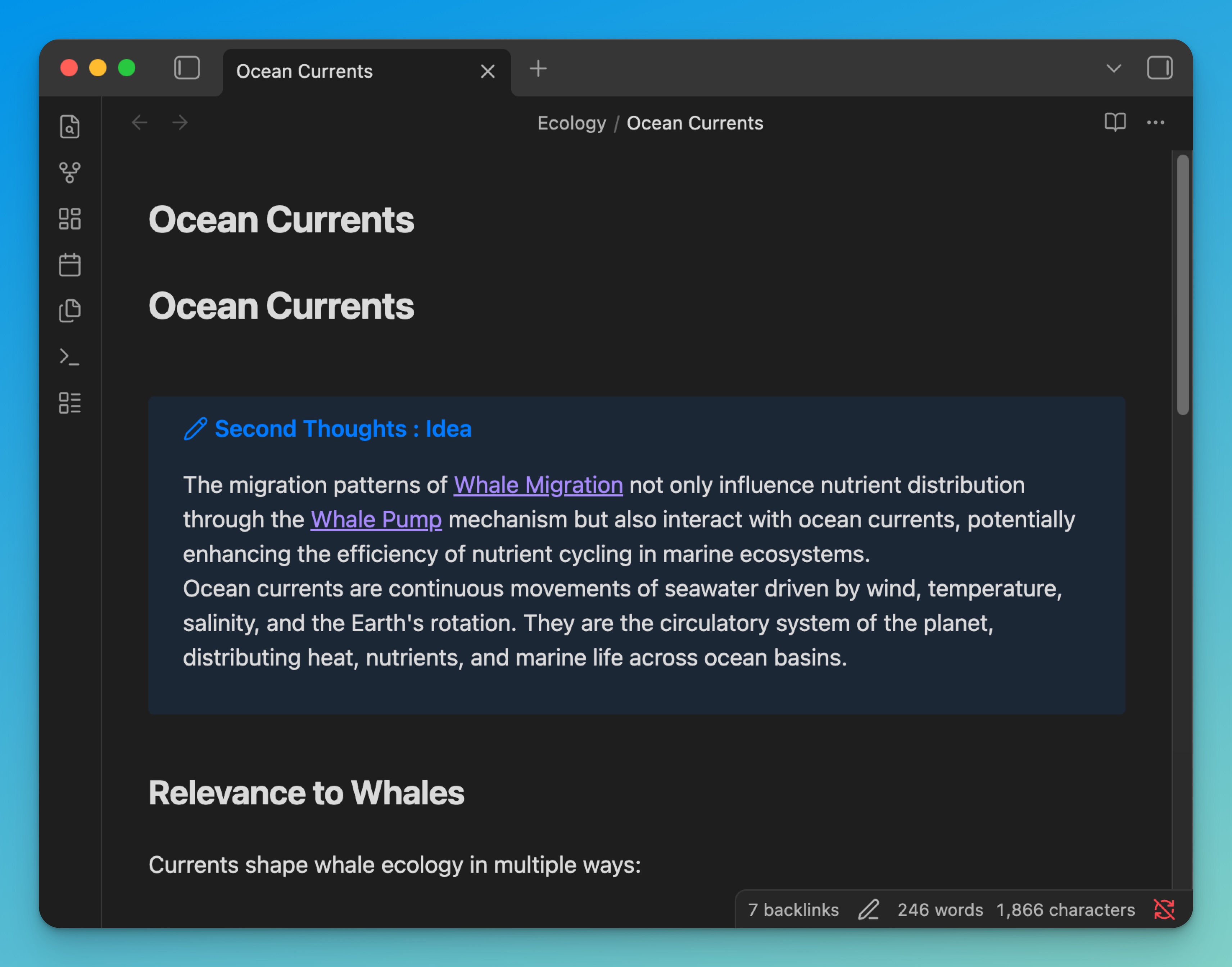
Accepted ideas insert as native Obsidian callouts
How It Works
The Vector Store
- Compartment extraction — Each note is split into four compartments: title, tags, links, and content
- Embedding — Each compartment is embedded via OpenAI's
text-embedding-3-small - Caching — Vectors are stored as JSON files in the plugin's data directory — one per note, invisible to the user
- Indexing — On startup, cached embeddings are loaded into memory. Stale notes are re-embedded in batches
- Retrieval — Features query the index using cosine similarity, BFS scope filtering, and MMR diversity selection
The store updates incrementally. When a note changes and goes idle, only that note is re-embedded. No bulk reprocessing. No external database. Everything stays inside .obsidian/plugins/.
Footnotes Pipeline
- Note goes idle (configurable delay after last edit)
- Candidates found via link-distance BFS
- Ranked by cosine similarity across all compartments
- Filtered by confidence threshold
- For each qualifying candidate, an LLM generates a one-sentence reason
- Footnote reference inserted at the most relevant paragraph
- Footnote definition appended at the bottom
Ideation Pipeline
- User selects text and invokes the command (or uses full note if no selection)
- Selection is embedded on the fly
- MMR selects 5 diverse notes — relevant to the selection but dissimilar to each other
- LLM generates bridging ideas that connect concepts across the diverse sources
- User accepts or dismisses each idea individually
Installation
This plugin is not yet in the Obsidian Community Plugin directory. Install with BRAT (recommended) or manually.
Requirements
- Obsidian 1.12.0 or later (desktop only)
- An OpenAI API key (used for embeddings and LLM generation)
Install via BRAT (recommended)
BRAT handles installation and automatic updates.
- Install BRAT from Settings > Community Plugins
- Open the command palette (
Cmd/Ctrl+P) and run BRAT: Add a beta plugin for testing - Enter
Liamhbray/second-thoughtsand click Add Plugin - Go to Settings > Community Plugins, refresh the list, and enable Second Thoughts
- Go to Settings > Second Thoughts and enter your OpenAI API key
- Start writing — footnotes will appear automatically after your notes go idle
BRAT will notify you when updates are available.
Manual Install
- Download
main.js,manifest.json, andstyles.cssfrom the latest release - In your vault, navigate to
.obsidian/plugins/and create a folder calledsecond-thoughts - Copy the three downloaded files into that folder
- Open Obsidian and go to Settings > Community Plugins
- Enable Restricted Mode to be off (if not already)
- Find Second Thoughts in the installed plugins list and enable it
- Go to Settings > Second Thoughts and enter your OpenAI API key
- Start writing — footnotes will appear automatically after your notes go idle
Updating (manual installs only)
To update, download the latest main.js, manifest.json, and styles.css from the releases page and replace the files in .obsidian/plugins/second-thoughts/. Restart Obsidian or reload the plugin.
Settings
Features
| Setting | Default | Description |
|---|---|---|
| Enable footnotes | On | Auto-generate footnote connections on idle |
| Enable ideation | On | Show the "Ask Second Thoughts" command |
Footnotes
| Setting | Default | Description |
|---|---|---|
| Processing delay | 5 min | Time after last edit before generation |
| Footnote link depth | 3 | Link hops to search for candidates |
| Retrieval depth | 5 | Similar notes per search |
| Connection confidence | 0.5 | Minimum similarity (0.2–0.9) for a footnote |
Ideation
| Setting | Default | Description |
|---|---|---|
| Model | gpt-4o-mini | gpt-4o-mini (fast) or gpt-4o (creative) |
| Ideas per generation | 3 | Bridging ideas per request |
Exclusions
| Setting | Default | Description |
|---|---|---|
| Excluded folders | — | Folders exempt from processing |
| Excluded tags | — | Tags that exempt notes |
Development
git clone https://github.com/Liamhbray/second-thoughts.git
cd second-thoughts
npm install
echo "OPENAI_API_KEY=sk-..." > .env
npm run build
First run: open seed-vault/ as a vault in Obsidian and enable the plugin.
| Command | Description |
|---|---|
npm run build | Build + deploy to seed vault |
npm test | Unit tests |
npm run e2e | E2E tests via Obsidian CLI |
npm version patch | Bump version + auto-release |
Architecture
src/
  core/             — vector store, LLM provider, similarity, idle detection
  features/
    footnotes/      — automated footnote connections
    ideation/       — modal-driven cross-cluster bridging
    _template/      — documented template for adding new features
  main.ts           — thin wiring (~260 lines)
Features are isolated modules that only import from core/. Adding a new feature means copying _template/, implementing the logic, and adding one activate() call. See CONTRIBUTING.md.
Privacy
Note content is sent to the OpenAI API for embedding and generation. No data is stored externally. Embeddings are cached locally inside your vault's plugin directory.
For plugin developers
Search results and similarity scores are powered by semantic analysis of your plugin's README. If your plugin isn't appearing for searches you'd expect, try updating your README to clearly describe your plugin's purpose, features, and use cases.