Research Desk
unlistedby Lijinghai
A local-first Obsidian workbench for academic papers, evidence-aware reading progress and practical reading plans.
Research Desk
Turn a folder of papers into a reading practice.
A local-first academic reading workbench for Obsidian. Know what to read next, resume where you stopped, and keep questions beside evidence.
中文说明 · Download · User guide · Screenshot tour · Report an issue




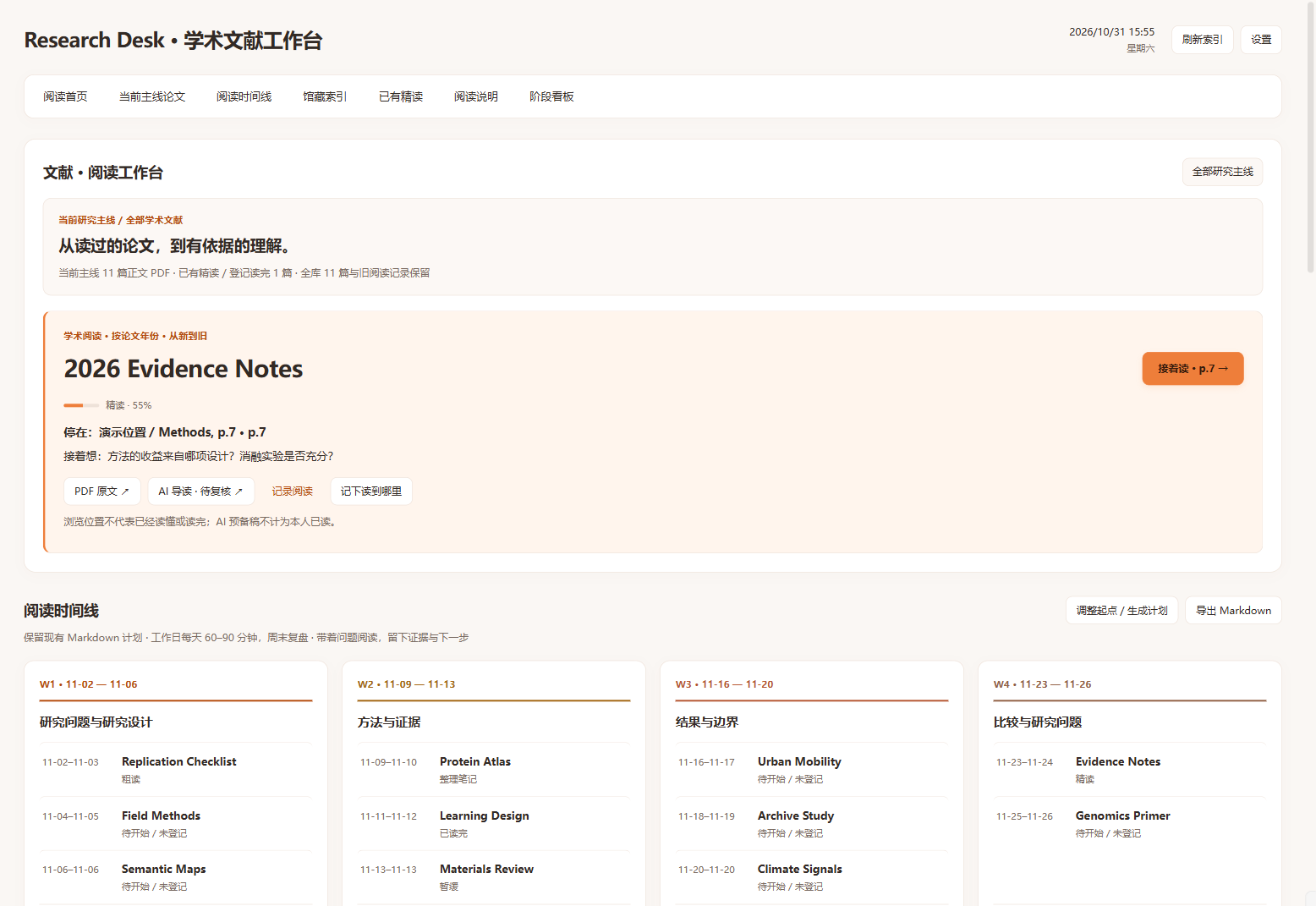
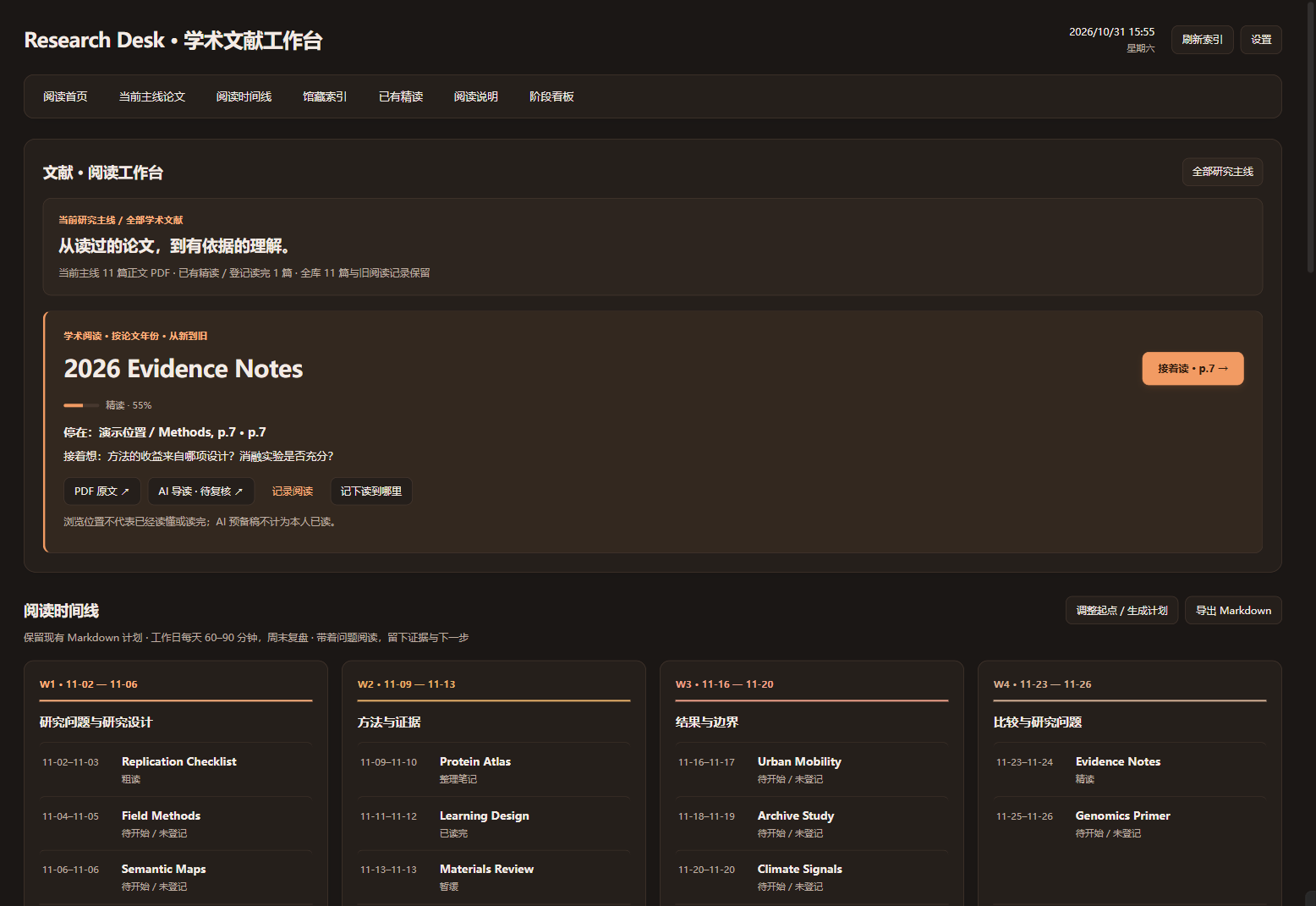
Real Obsidian captures, taken for this repository in a separate synthetic vault. Every paper, note and reading record shown is fictional. No personal vault or supplied user screenshot is published.
Less collecting. More understanding.
A paper library should answer more than “what did I save?”
- What should I read next? Choose any research topic and see a transparent, newest-year-first queue.
- Where did I stop? Record a page and return to it in Obsidian’s PDF reader.
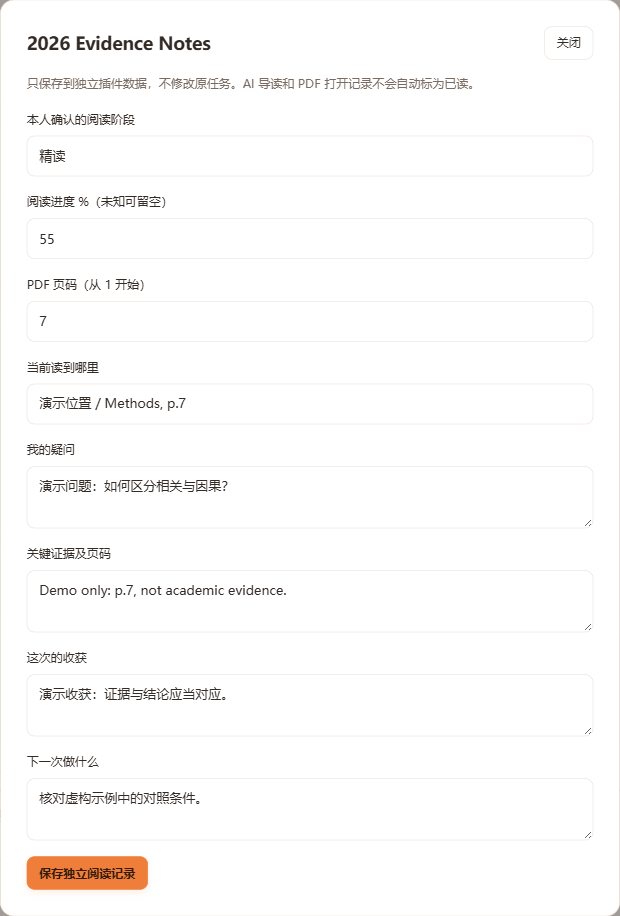
- What did I actually learn? Save a question, page-linked evidence, a takeaway and a next action.
- When will I read it? Keep your Markdown timeline or generate a practical weekday plan.
Built for academic literature across disciplines, from humanities and social sciences to medicine, life sciences and engineering. Topics come from your folders or metadata, not a fixed VLN taxonomy. This is an organizational tool, not medical advice or automated scientific appraisal.
A desk, not another database to maintain
| Capability | What it does |
|---|---|
| Paper library | Local PDFs, linked Markdown tasks/notes, optional local figures and diagram links |
| Three views | Visual cards, compact list and reading-stage board |
| Find your evidence | Search indexed metadata, questions and evidence; filter by topic, stage or available material |
| Honest progress | Six explicit stages, optional percentage and page; opening a PDF is not completing it |
| Reading timeline | Import a seven-column Markdown table; generate, export or restore a separate plan |
| Research focus | Any topic; known publication years descending, same-year titles ordered naturally |
| Your Obsidian | Warm orange light/dark design and narrow desktop panes; optional startup homepage |
| Local ownership | No account, API key, telemetry or required cloud service; no Xove or Dataview dependency |
AI-prepared notes stay “awaiting review.” A 100% progress bar does not automatically mark a paper read. Legacy completed tasks without confirmation get a review lane.
Read with a question. Leave with evidence.
Plan the work, not imaginary completion
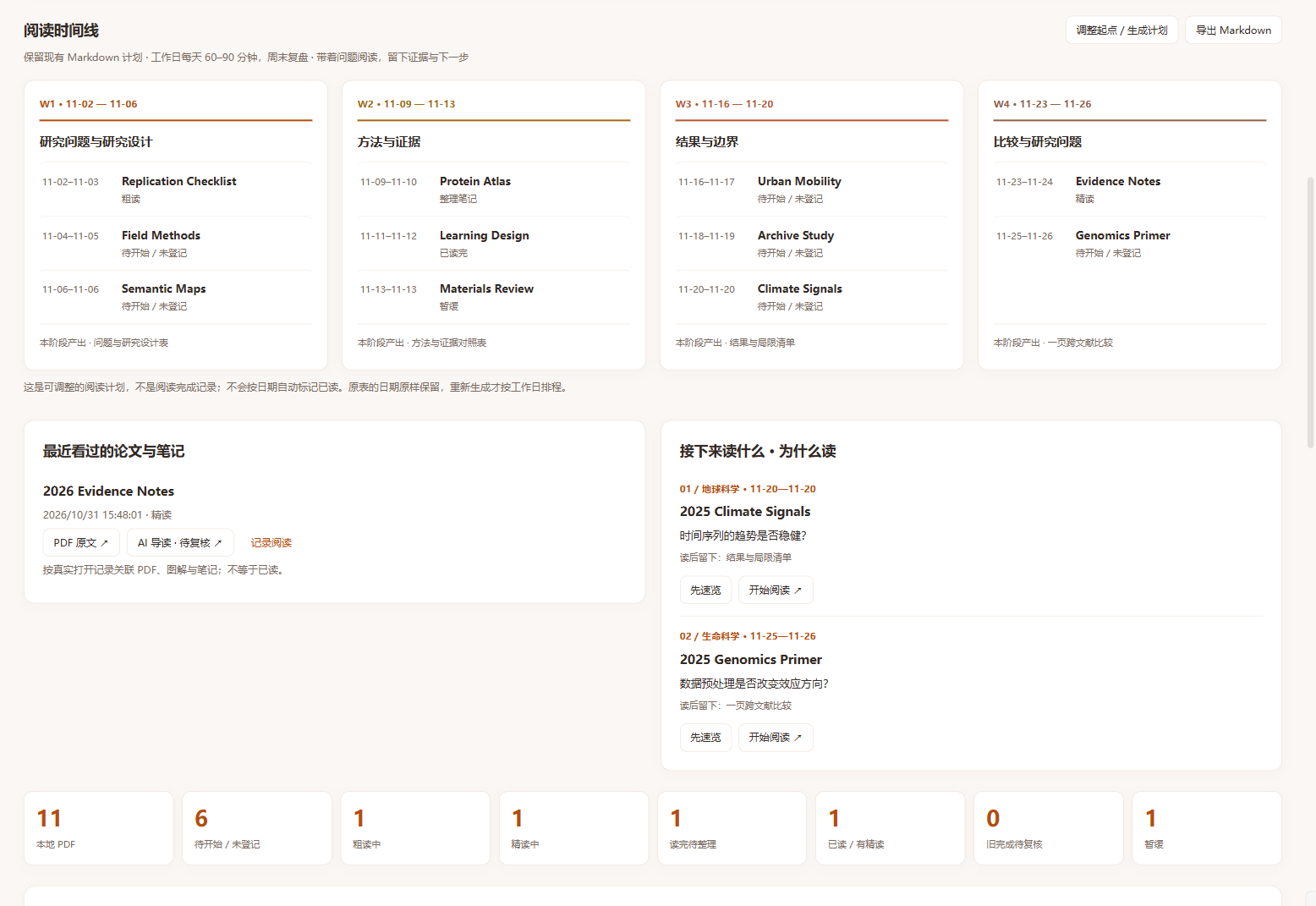
Workday budget: 60–90 minutes. Generated plans allocate a fixed 180-minute first pass per paper, skip completed/paused/review-needed items, and leave weekends for review. They can extend beyond four weeks. This is a scheduling heuristic, not an AI difficulty estimate.
See the library your way
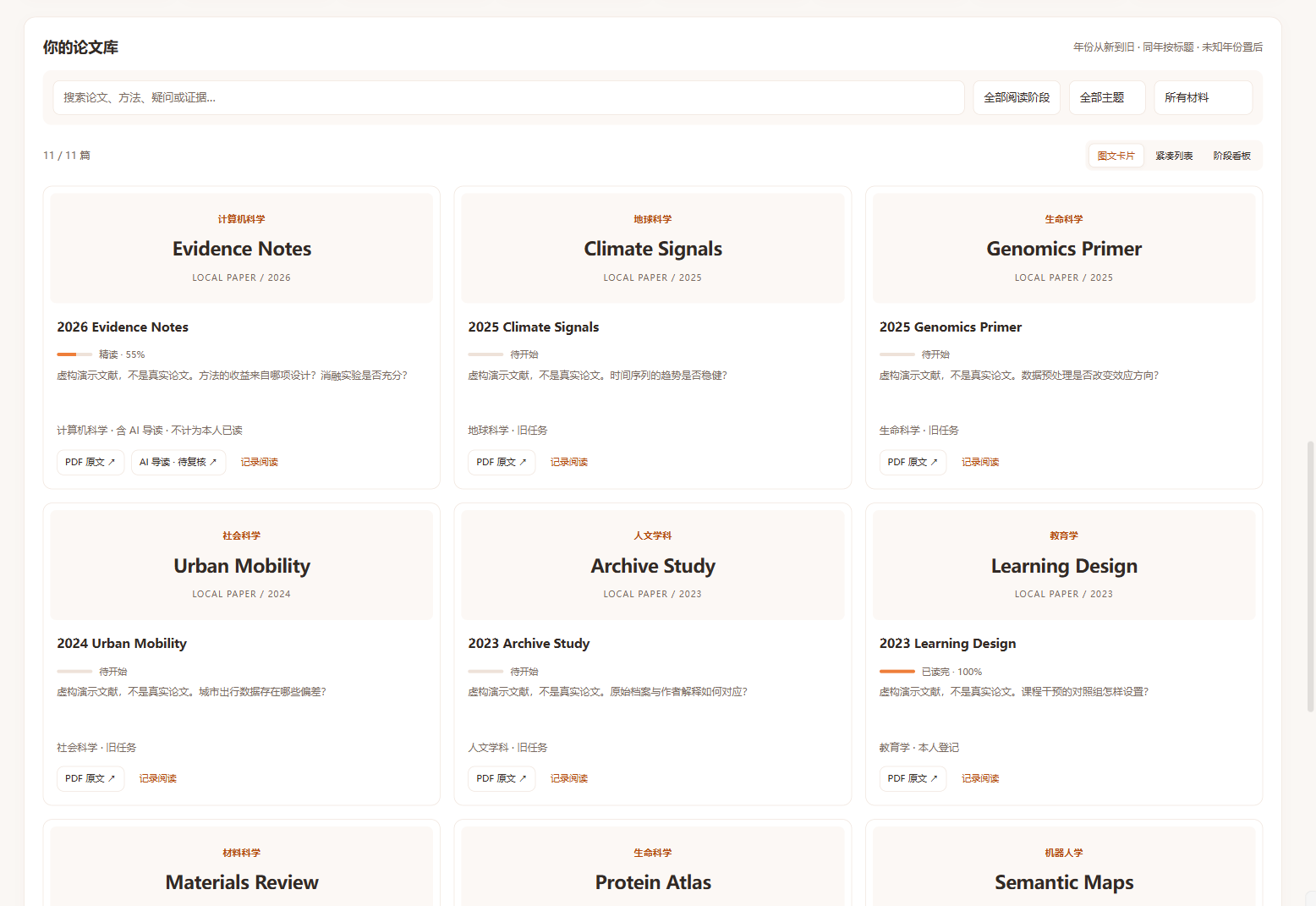
Compact list · Stage board · Topic filter · All 20 screenshots
Dark mode and connection settings

Install in two minutes
Early desktop release. Not yet listed in Obsidian’s Community Plugins catalog.
- Download
main.js,manifest.jsonandstyles.cssfrom the latest release, or extract the release ZIP. - Place the three files directly in
<your-vault>/.obsidian/plugins/ljh-vln-research-desk/. - Reload Obsidian, enable Research Desk under Community Plugins, then open it using the library ribbon icon or the Research Desk: 打开文献阅读工作台 command.
- Click 设置 (Settings), choose your PDF folder and save. Other paths are optional. Autodetection only proposes paths; check them first.
The internal folder/manifest ID retains ljh-vln-research-desk for compatibility with earlier local installs. The public name and functionality are general academic Research Desk. Do not install a second copy under a different ID.
Current interface: Chinese. English metadata and this English documentation are supported; a localized English interface is planned. Declared minimum Obsidian version is 1.8.0; native acceptance was on Windows / Obsidian 1.14.5, not all versions or platforms.
Bring your own folders
No prescribed discipline or folder hierarchy. For example:
- PDF root:
Papers; first subfolders such asPsychology,HistoryorMaterialsbecome topics. - Optional tasks:
Reading; each task links one PDF using an Obsidian wikilink. - Optional notes:
Notes; link the paper, local figures or Excalidraw files. - Optional timeline:
Reading/reading-plan.md.
Copyable metadata and timeline examples · Detailed setup and behavior
Private by design, with clear limits
The plugin reads file names and configured Markdown metadata, not PDF body text. New reading records, paths, open history and generated plans live only in its own data.json. Original PDFs, tasks, notes and timeline files are not rewritten. Exports are explicit downloads.
No outbound network calls are implemented in the plugin runtime. Obsidian Sync, your other plugins and your vault backup provider have their own policies. Removing the plugin folder removes its independent records; back up that file privately if needed.
Not included: PDF downloading, OCR, DOI enrichment, Zotero synchronization, citation formatting, LLM summaries or automatic page tracking. Records use PDF paths as keys; renaming/moving a PDF does not migrate its saved record yet. Privacy and limitations
Build, test, contribute
npm ci
npm run typecheck
npm test
npm run test:ui
npm run test:style
npm run package
Node.js 22+ recommended. Browser checks need a local Chromium browser; set BROWSER_EXECUTABLE if necessary. Packaged files appear in dist/ljh-vln-research-desk/.
2026-10-31 / v0.3.0 verification: 39 core/plugin tests, 15 shared-renderer interaction checks and 12 style checks passed. Native demo acceptance verified record persistence after plugin reload, a 9-paper weekday plan and restoration, path autodetection, a single reused desk tab and PDF resume at page 7. No full application-restart, macOS/Linux or mobile acceptance is claimed.
Reproduce the tests · Architecture · Contributing · Changelog · Security
Next: English UI, path-rename migration, reference-manager integrations and broader compatibility tests. These are plans, not delivered features.
Inspiration & license
Inspired by the clear value propositions, visual tours and quick starts in Apex Dashboard, Hearth and Obsidian Dashboard Gallery. This is an independent native ItemView implementation, not a fork or Vue application. No screenshots or code from those projects are redistributed. See acknowledgements.
Made by Lijinghai. MIT licensed. If Research Desk helps your reading, a star, reproducible issue or contribution is welcome.
For plugin developers
Search results and similarity scores are powered by semantic analysis of your plugin's README. If your plugin isn't appearing for searches you'd expect, try updating your README to clearly describe your plugin's purpose, features, and use cases.