Stenographer
unlistedby The Lossless Group
Turn a YouTube, TikTok, or podcast link into a fully-frontmattered note with a timestamped transcript — without leaving your vault.
Stenographer
Turn a YouTube, TikTok, or podcast link into a fully-frontmattered note with a timestamped transcript — without leaving your vault.
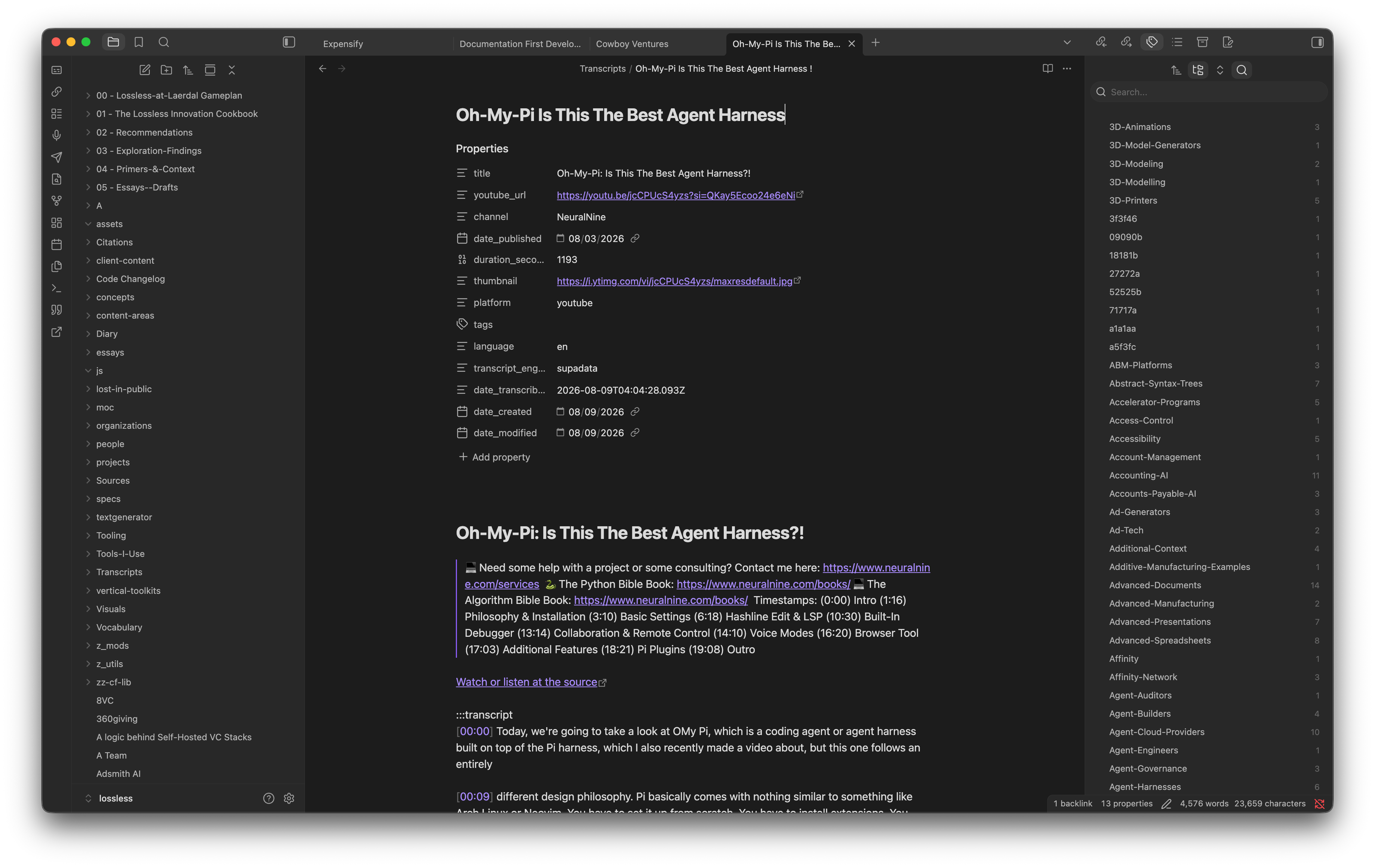
Paste a link. Get a note. The video's title, channel, publish date, duration, and thumbnail land in YAML frontmatter; the words land in the body as a timestamped, speaker-aware transcript. Spoken content becomes searchable, linkable, quotable material in your vault instead of a URL you'll never open again.
Why care?
The best thinking in a lot of fields is now spoken, not written — a two-hour podcast, a conference talk, a founder interview. That material is effectively invisible to a note-taking practice built on text. You can't grep it, can't link to a claim inside it, can't quote it without scrubbing a timeline.
Stenographer closes that gap in one command. The transcript lands in your vault, in your folder structure, under your frontmatter conventions — not in a SaaS silo you rent access to. Once it's a note, every tool you already use on notes works on it: backlinks, search, tags, dataview, your own plugins.
And because the transcript is written as a Lossless Flavored Markdown :::transcript block, the exact same file reads cleanly as plain markdown in any editor and hydrates into an interactive, timestamp-linked player when published through an Astro Knots site. One artifact, two lives.
What's new?
This is v0.1.0 — the first working cut.
- Two commands.
Generate transcript from URLopens an empty modal for a pasted URL.Generate transcript from the URL under the cursorreads the link out of your selection, or just the line the cursor is on, and prefills it. - Two engines, routed automatically. Platform links go to Supadata; direct audio files go to AssemblyAI when a key is present, for speaker-by-speaker diarization.
- The modal tells you which engine will run — and why — before you spend an API credit.
- Frontmatter that matches your vault. A YouTube link writes
youtube_url, Apple Podcasts writesapple_podcasts_url, SoundCloud writessoundcloud_url— because that's how a vault refers to its sources. Every field name is configurable. - Your tag namespace stays yours. Provider tags are SEO keywords chosen by an uploader, so they're off by default. So is the description blockquote, which on YouTube is usually a wall of sponsor links.
- Backlinks that carry both halves. Optionally writes a line into the note you triggered from holding the wikilink to the new transcript and the original source URL, so the provenance survives.
- Long recordings handled. Videos over ~20 minutes come back as an async job; Stenographer polls it, reports elapsed time in the status notice, and gives up on a configurable timeout instead of hanging forever.
How it works
Install a key, then paste a link.
- Add an API key. Settings → Stenographer. A Supadata key is the one to add first — it's the only engine that ingests a YouTube page directly, so it covers YouTube, TikTok, Instagram, X, and Facebook. An AssemblyAI key is optional and adds speaker labels for podcast MP3s and raw audio URLs.
- Run a command from the palette, or click the ribbon icon.
- Choose a mode.
nativereuses captions the platform already has — fastest and cheapest.generatealways runs fresh AI transcription, which is what you want for a video with no captions.autotries native and falls back. - Get a note in your transcript folder, opened for you.
The result looks like this:
---
title: "How We Think About Distribution"
youtube_url: "https://www.youtube.com/watch?v=…"
channel: "Some Channel"
date_published: "2026-04-02"
duration_seconds: 3720
transcript_engine: "supadata"
date_transcribed: "2026-08-08T19:04:11.000Z"
---

# How We Think About Distribution

[Watch or listen at the source](https://www.youtube.com/watch?v=…)

:::transcript
[00:00] **A**: The thing everybody gets wrong about distribution is that they treat it as a channel problem.

[00:14] **B**: Say more about that.
:::
Under the hood
Why two engines, and why this split. AssemblyAI and Deepgram are excellent transcribers that require a direct media URL — they will not ingest a YouTube page. Getting a media URL out of YouTube means running yt-dlp somewhere, which means either shipping a Python dependency to every user or standing up a server. Stenographer v1 does neither. Supadata ingests the platform URL itself, so the plugin stays a plugin. AssemblyAI earns its place on the other side of the split: it's the only engine here that knows who is speaking, so direct audio links route to it when a key exists.
The routing rule lives in exactly one place (src/utils/urls.ts::chooseEngine) and the modal renders its answer live, because "AssemblyAI can't take a YouTube link" is the kind of constraint that's invisible until it fails.
Caption fragments get merged. YouTube caption tracks arrive as 2–5 word fragments. One timestamped line per fragment is an unreadable wall. Adjacent fragments merge up to a configurable character budget — but a speaker change always starts a new line regardless of length, because losing a diarization boundary to save a line break loses actual meaning.
Nothing overwrites. A transcript can represent minutes of paid API time. Filename collisions resolve by appending 2, 3 — Obsidian's own convention — and never by clobbering.
Failures are ranked by what you lose. Metadata is fetched first because it names the file, but a metadata failure returns null and the run continues: losing a title is annoying, losing a transcript you already paid for is not acceptable. An empty transcript, by contrast, stops the run with an actionable message rather than creating a hollow note.
Requests go through Obsidian's requestUrl, not browser fetch — a marketplace requirement, and it sidesteps CORS by threading through the Electron main process.
Symlinked folders work. Obsidian's index doesn't reliably contain symlinked directories, and plenty of vaults alias folders in from a repo. The usual "index says missing, so create it" idiom would hit a real directory, throw, and lose your transcript after the paid API call — so existence is checked against the filesystem adapter too.
Files
main.ts                          command + ribbon registration
src/modals/StenographerModal.ts  the single configuration surface
src/services/pipeline.ts         URL → metadata → transcript → note
src/services/supadataService.ts  platform engine (sync 200 / async 202 + polling)
src/services/assemblyAiService.ts diarization engine (submit + poll)
src/transcript/lfm.ts            :::transcript rendering, segment grouping
src/utils/urls.ts                platform detection + engine routing
src/utils/filename.ts            slugs, date prefixes, collision policy
src/settings/                    settings shape + settings tab
What's next
Named in the spec, not in this cut:
- Zoom recordings — deferred to v2. Local Zoom files are a file-picker path rather than a URL path, and cloud recordings need OAuth.
- Token-by-token streaming into the note body as the transcript arrives.
- Playlists and channels — select some or all items, process in parallel.
- The
intelligence:frontmatter block — hooks, sentiment, topics, summary.
Provider keys
You bring your own. Keys are stored in the plugin's local settings and sent only to the provider they belong to:
- Supadata — https://supadata.ai/ — sent as the
x-api-keyheader - AssemblyAI — https://www.assemblyai.com/ — sent raw in the
authorizationheader
Part of Content Farm, The Lossless Group's family of Obsidian plugins.
For plugin developers
Search results and similarity scores are powered by semantic analysis of your plugin's README. If your plugin isn't appearing for searches you'd expect, try updating your README to clearly describe your plugin's purpose, features, and use cases.