Search Link References
unlistedby Lumyo
Right-click any link to search all notes that reference it, using Obsidian's built-in search.
Search Link References
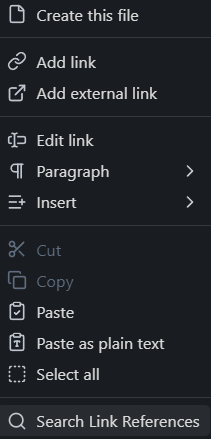
An Obsidian plugin that adds a "Search Link References" entry to the right-click context menu of any link, opening Obsidian's built-in search pre-filled with a query that finds all notes referencing that link.
Screenshot
What it does
Right-clicking a link anywhere in Obsidian adds Search Link References to the context menu. Clicking it opens the Search panel with a query that finds all notes containing a link to that target.
- Internal links (
[[Note Name]]) — searches"[[Note Name", which matches the plain link as well as aliased ([[Note Name|Alias]]) and heading variants ([[Note Name#Section]]) - External URLs — searches the URL as an exact quoted string
Supported contexts
| Context | Behaviour |
|---|---|
| Source mode & Live Preview | Item added to Obsidian's native context menu |
| Properties panel | Item injected into Obsidian's native properties context menu |
| Reading mode | Custom context menu shown (with open/copy actions) |
Installation
Manual
- Download
main.jsandmanifest.jsonfrom the latest release. - Copy them into
<your vault>/.obsidian/plugins/search-link-references/. - Reload Obsidian and enable the plugin under Settings → Community plugins.
Using BRAT
BRAT lets you install plugins that aren't yet in the community directory.
- Install Obsidian42 - BRAT from the Community Plugins directory.
- Open Settings → BRAT and click Add Beta plugin.
- Enter the repository URL:
https://github.com/tibog/obsidian-search-links - Click Add Plugin, then enable it under Settings → Community plugins.
BRAT will also notify you of future updates automatically.
From source
git clone https://github.com/tibog/obsidian-search-links.git
cd obsidian-search-links
yarn install
yarn build
Copy the resulting main.js and manifest.json into your vault's plugin folder as above.
Compatibility
- Requires Obsidian 1.12+
- Desktop and mobile
- Requires the Search core plugin to be enabled in Settings → Core plugins
License
MIT
For plugin developers
Search results and similarity scores are powered by semantic analysis of your plugin's README. If your plugin isn't appearing for searches you'd expect, try updating your README to clearly describe your plugin's purpose, features, and use cases.