Obsidian_to_Anki
unlistedby marqp
Obsidian_to_Anki fork with additional features and performance gains.
Obsidian_to_Anki (marqp fork) why?
Plugin to add flashcards from a text or markdown file to Anki. Runs in Obsidian as a plugin. Built with Obsidian markdown syntax in mind. Supports user-defined custom syntax for flashcards.
Why this fork?
Upstream (ObsidianToAnki/Obsidian_to_Anki) has not been updated since Feb 2024,
with open PRs and issues piling up. This fork started by merging those stalled
PRs and has since grown its own architecture. Same plugin ID
(obsidian-to-anki-plugin) — drop-in replacement via BRAT. Card syntax
(START/END, inline notes, custom regexps, Python CLI format) stays
compatible with upstream. In short:
- Sync you can trust — orphan deletion, dry-run preview, consolidated
updateNote, opt-in note-type conversion (see Fork additions). - Faster engine — incremental scans, memoized formatting, linear ID writes
(measured: up to 5.4x on large files, see
pnpm run test:bench). - Modern UX, minimal UI — tabbed settings, consolidated progress Notices, cooperative scan cancel, connection probing with auto-launch.
- Maintained toolchain — esbuild, strict TypeScript, Vitest + parity harness against pinned upstream.
Getting started
Check out the docs (also mirrored in the repo wiki)! It has a ton of information, including setup instructions for new users. I will include a copy of the instructions here:
Setup
All users
- Start up Anki, and navigate to your desired profile.
- Ensure that you've installed AnkiConnect.
Obsidian plugin users
- Have Obsidian downloaded
- Install via BRAT: add
marqp/Obsidian_to_Ankias a beta plugin (this fork is not listed in Community Plugins). - Enable the plugin in Settings → Community plugins.
- In Anki, navigate to Tools->Addons->AnkiConnect->Config, and change it to look like this:
{
    "apiKey": null,
    "apiLogPath": null,
    "webBindAddress": "127.0.0.1",
    "webBindPort": 8765,
    "webCorsOriginList": [
        "http://localhost",
        "app://obsidian.md"
    ]
}
- Restart Anki to apply the above changes
- With Anki running in the background, load the plugin. This will generate the plugin settings.
You shouldn't need Anki running to load Obsidian in the future, though of course you will need it for using the plugin!
To run the plugin, look for an Anki icon on your ribbon (the place where buttons such as 'open Graph view' and 'open Quick Switcher' are). For more information on use, please check out the docs!
Features
Current features (check out the docs for more details):
- Custom note types - You're not limited to the 6 built-in note types of Anki.
- Custom scan directories
- The plugin will scan the entire vault by default
- You can also set which directories (includes all sub-directories as well) to scan via plugin settings
- Ignore Folders and Files
- You can specify which files and folders to ignore
- This can be done in the settings of this plugin with Glob syntax.
- If you're working on your own globs, you can test them out here
- Examples:
**/*.excalidraw.md- Ignore all files that end in.excalidraw.md- => avoids excalidraw files from being scanned which can be extremely slow
Template/**- Ignore all files in theTemplatefolder (including subfolders)**/private/**- Ignore all files in folders that are calledprivateno matter where they are in the vault[Pp]rivate*/**- Ignore all files and folders in the root of the vault that start withprivateor withPrivate
- Updating notes from file - Your text files are the canonical source of the notes.
- Tags, including tags for an entire file.
- Adding to user-specified deck on a per-file basis. Multiple target decks can be specified within a single file — cards are assigned to the nearest
TARGET DECKline above them. If aTARGET DECKline is placed in YAML frontmatter, it locks the entire file to that deck. - Markdown formatting.
- Math formatting.
- Embedded images. GIFs should work too.
- Audio.
- Auto-deleting notes from the file.
- Reading from all files in a directory automatically - recursively too!
- Inline Notes - Shorter syntax for typing out notes on a single line.
- Easy cloze formatting - A more compact syntax to do Cloze text
- Frozen Fields
- Obsidian integration - A link to the file that made the flashcard, full link and image embed support.
- Custom syntax - Using regular expressions, add custom syntax to generate notes that make sense for you. Some examples:
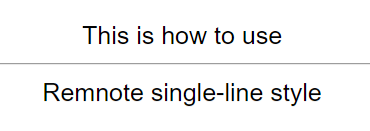
- RemNote single-line style.
This is how to use::Remnote single-line style
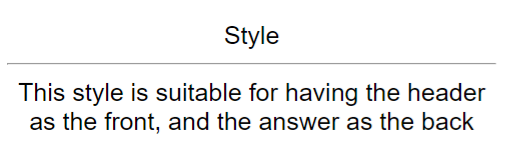
- Header paragraph style.
# Style
This style is suitable for having the header as the front, and the answer as the back
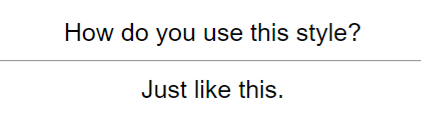
- Question answer style.
Q: How do you use this style?
A: Just like this.
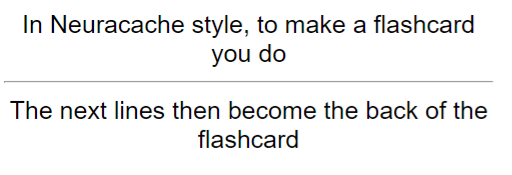
- Neuracache #flashcard style.
In Neuracache style, to make a flashcard you do #flashcard
The next lines then become the back of the flashcard
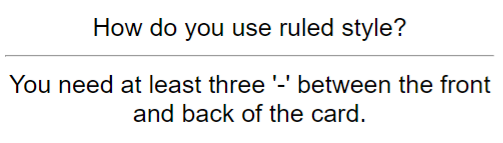
- Ruled style
How do you use ruled style?
---
You need at least three '-' between the front and back of the card.
- Markdown table style
| Why might this style be useful? |
| ------ |
| It looks nice when rendered as HTML in a markdown editor. |

- Cloze paragraph style
The idea of {cloze paragraph style} is to be able to recognise any paragraphs that contain {cloze deletions}.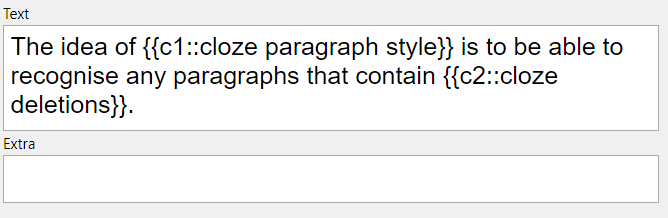
- RemNote single-line style.
Note that all custom syntax is off by default, and must be programmed into the script via the config file - see the regex docs for more details.
Fork additions
Everything above works as in upstream. On top of that, this fork adds:
Sync behavior
- Removed blocks delete their cards — deleting a
START…ENDblock from a note deletes the card in Anki on the next scan, noDELETEline needed. Tracked per file, so renames and moves between files are safe; the first scan of a file only records IDs. Toggle:Delete Removed Notes(on by default). - Dry-run preview — command
Obsidian to Anki: Dry run(also callable headless via the Obsidian CLI:obsidian "vault=My Vault" command id="obsidian-to-anki-plugin:anki-dry-run") prints exactly what a scan would add, update, delete or convert, without writing to files or Anki. - Preview modal — command
Obsidian to Anki: Preview Syncshows the same diff grouped per file withSync now/Cancel(delete-only plans get a destructive confirm).Confirm Before Sync(off by default) routesScan Vault/Scan Current Filethrough the modal too; the scheduler and headless dry-run stay non-interactive. - Faster updates — field+tag updates are consolidated into one
updateNotecall when the daemon supports it (probed per scan, legacy fallback otherwise).
Anki connectivity
- Anki availability detection — scans classify the endpoint (
ready,needs-key,denied-origin,closed,starting-or-busy,busy-port) and report actionable messages instead of a generic connection error. OptionalAuto-launch Anki(off by default, desktop only) starts Anki Desktop when a scan finds it closed. - API key support — works with AnkiConnect instances protected by
apiKey, plus a "Test AnkiConnect Connection" button in settings. - Optional AnkiWeb sync —
Sync to AnkiWeb(off by default) triggers a sync after each scan.
Notes and commands
- Note-type conversion (opt-in) —
Allow Note Type Changes(off by default) converts cards whose note type changed in Markdown, keeping review history. Anki discards fields absent from the new model, so preview with dry-run first. - Extra commands —
Scan Current File,View Note in Anki Browser,Edit Note in Anki(jumps to the card under the cursor).
Performance
- Incremental vault scans — files whose content hash is unchanged are skipped without re-reading.
- Faster boot — plugin data is read once at startup instead of once per loader.
- Single-pass text formatting — censor/decensor masking without double regex passes.
- Modern toolchain — esbuild bundle (~85ms builds), strict TypeScript, Vitest + mutation-tested core.
Plugin identity
The plugin ID stays obsidian-to-anki-plugin on purpose: this fork is a
drop-in replacement for the upstream plugin. Same ID means the same settings
(data.json), the same command IDs (obsidian-to-anki-plugin:anki-scan-vault,
anki-scan-file, anki-dry-run, anki-preview-sync, anki-view-in-browser, anki-edit-note),
and the same install slot under BRAT — swap the remote to
marqp/Obsidian_to_Anki and keep your vault, your <!--ID: …--> comments,
and your Anki scheduling. Only the author (marqp) and the release artifacts
differ. Do not change the ID: it would orphan existing data.json files,
break headless obsidian … command id=… calls, and force users to re-add
every card.
Development
This fork is maintained with pnpm (v11.21) and Node 22. See AGENTS.md for the full contributor guide.
pnpm install --frozen-lockfile
pnpm run dev        # watch build
pnpm run build      # production bundle (main.js)
pnpm test           # unit + regression tests with coverage gate
pnpm run lint && pnpm run format:check
pnpm run test:parity # parity tests against pinned upstream
Test layout: tests/unit/ (Vitest unit and regression tests) · tests/parity/ (fork-vs-upstream parse parity harness).
For plugin developers
Search results and similarity scores are powered by semantic analysis of your plugin's README. If your plugin isn't appearing for searches you'd expect, try updating your README to clearly describe your plugin's purpose, features, and use cases.