Imperial to Metric Converter
unlistedby p0shkar
Plugin to convert measurements between imperial and metric.
Imperial to Metric Converter
Plugin to convert measurements between imperial and metric.
Usage:
Use the command palette, right click menu or select text and run commands.
Examples:
- Convert a simple value: select
12 ftand run "Convert selection" →3.66 m(default 2 decimals) - Foot symbol: select
5'→ converts to1.52 m - Temperatures: select
32 °F→ converts to0.00 °C;100 °C→212.00 °F - Spelled-out units: select
12 inches→ converts to30.48 cm - Mixed units: select
5 ft 3 in→ converts to1.60 m - Compact mixed units:
6'3"→1.91 m;5 ft 30 in→2.29 m - Ranges: select
10-15 ft→ converts to3.05 m-4.57 m - Ton variants:
5 short tons→4535.92 kg;1 long ton→1016.05 kg - Multiple values in a sentence: select
The board is 5 ft long and 2 in thick.→ converts both values in place - Fractions: select
1 1/2 in→ converts to3.81 cm - Insert original + converted: select
12 ftand run "Insert original + converted" →12 ft (3.66 m) - Auto-convert on paste: choose whether to paste the original with its conversion (
5 ft (1.52 m)) or only the conversion (1.52 m) - Liquid measures:
1 cup,1 fl oz,1 qt,1 tbsp, and1 tspuse the selected US customary or UK / Imperial definition; qualifiers such as(US),(UK), and(Imperial)explicitly select one
Features:
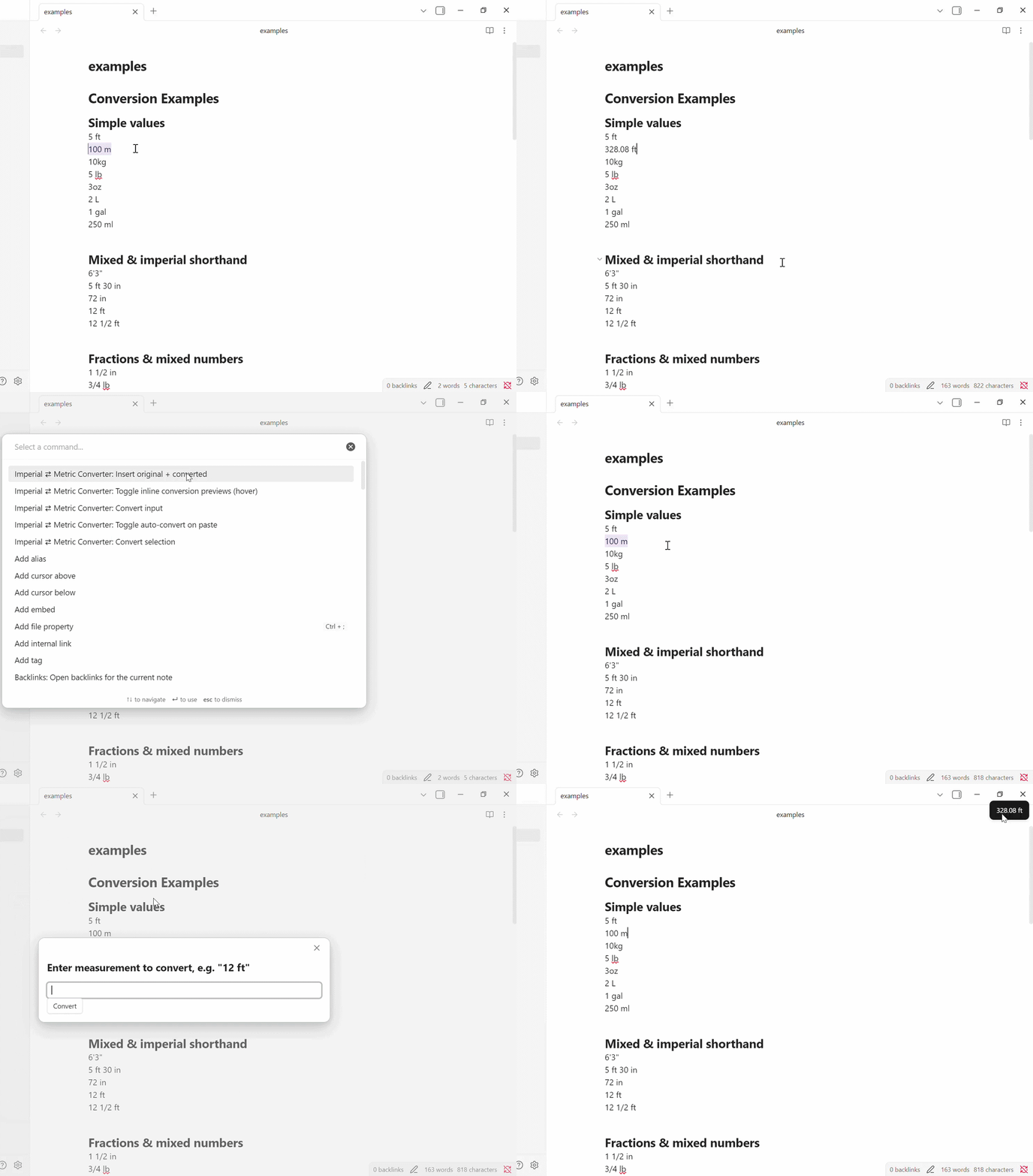
Conversion
- Convert selection: replaces
- Insert original + converted: inserts
original (converted)so you can keep both. - Input: prompts for a value and lets you choose Auto (convert to the opposite detected system), Metric, US customary, or UK / Imperial; display the result or insert it at the current editor selection. Auto uses the default target if detection fails.
Hover Preview
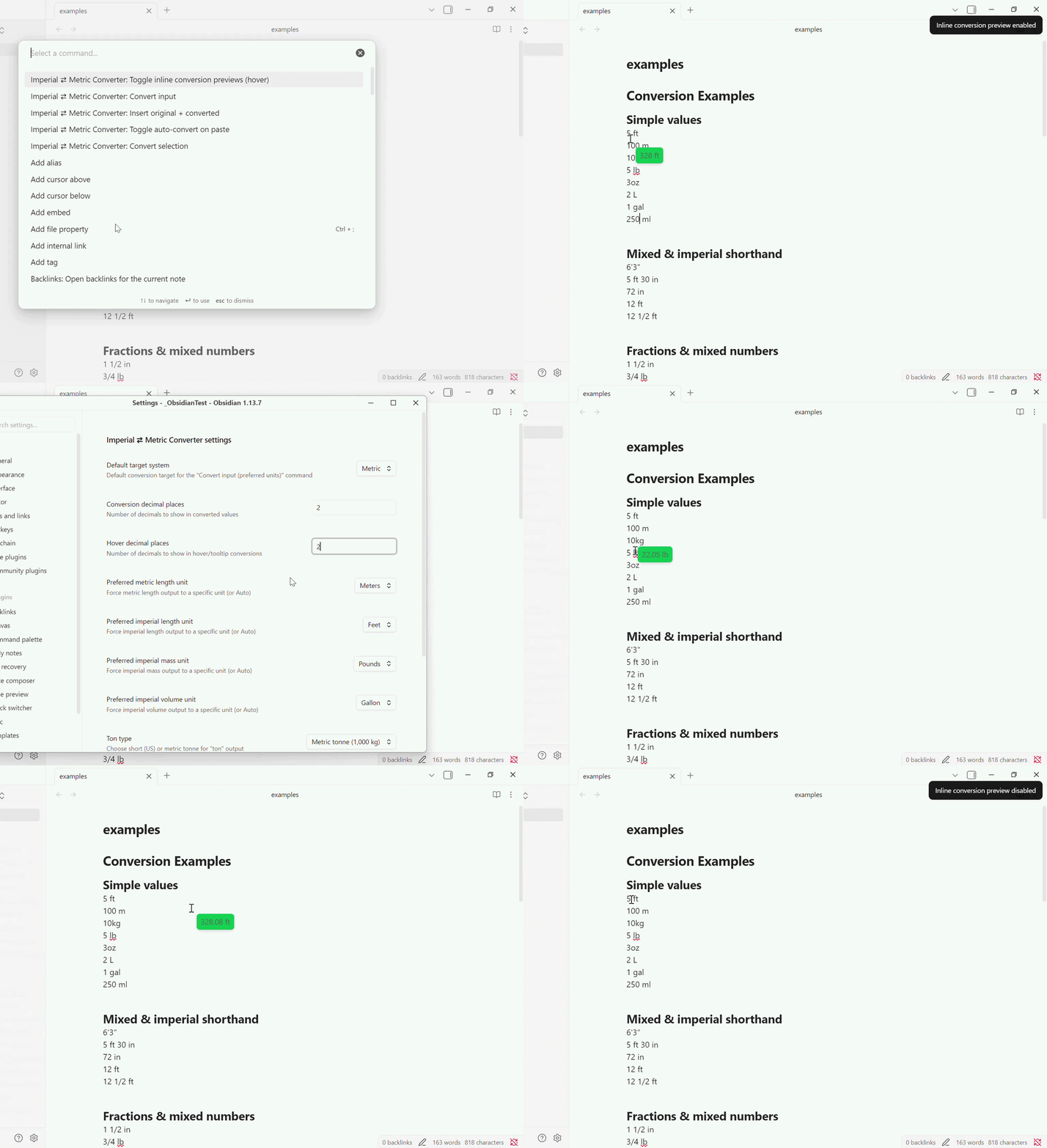
- Toggle: inline hover preview to show converted values on mouseover in the editor.
- Enable/Disable commands reflect whether hover preview and auto-convert on paste are currently on.
- Different decimal settings: you can configure how many decimals the converted value will be and set a different number of decimals that the hover preview will show.
Auto-Convert on Paste
- Toggle: auto-convert pasted measurements into the active editor (opt-in setting).
- Paste output format: select
Original + convertedto keep both values orConverted onlyto replace the pasted text with its conversion.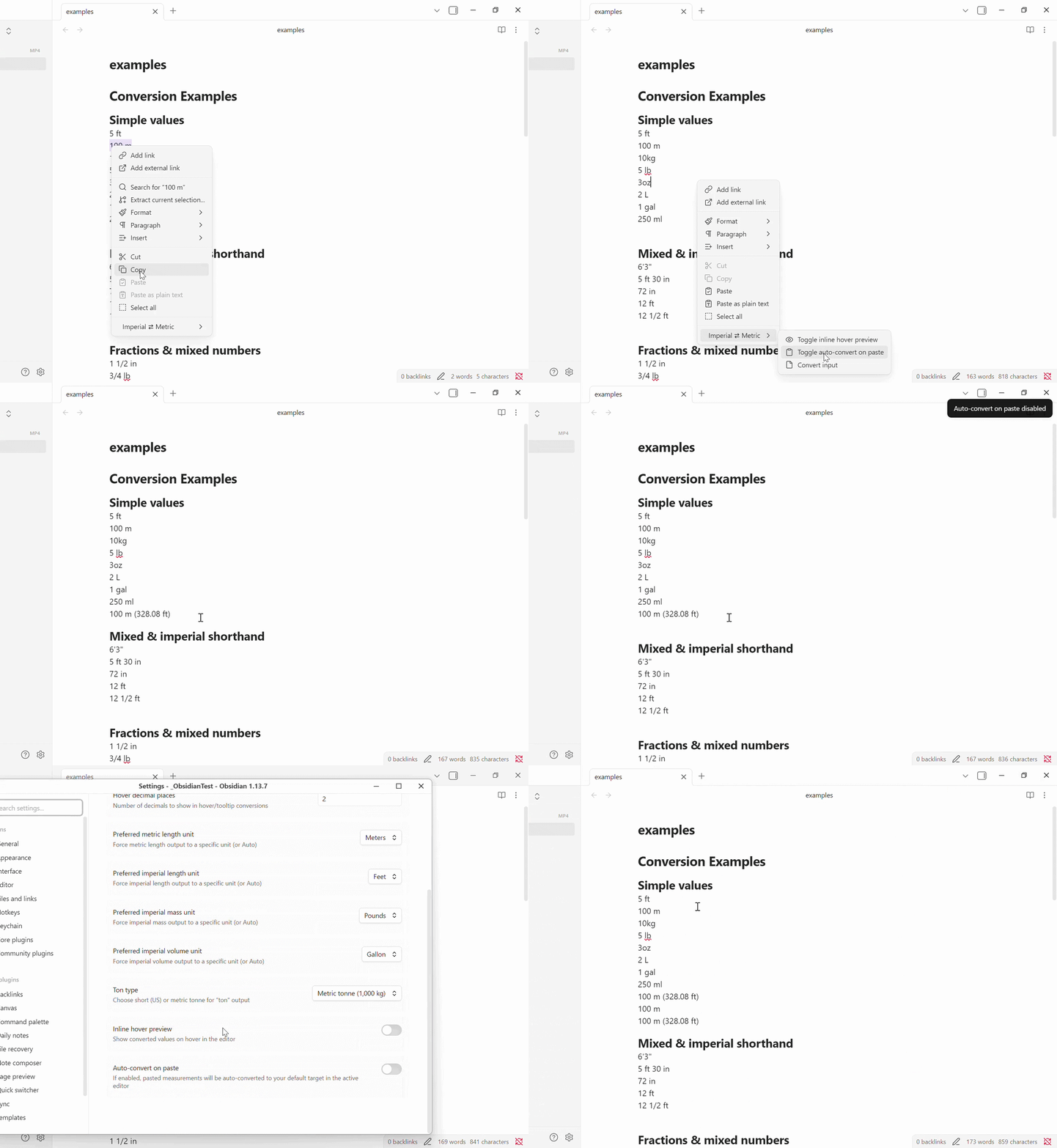
Parsing
- Parses fractions (
1/2), mixed numbers (1 1/2) and mixed-unit expressions (5 ft 3 in).
Supported units (aliases recognized):
- Length (imperial):
in,ft,yd,miand many spelled forms and localized names (inch, inches, foot, feet, pulgada, zoll, etc.) - Length (metric):
mm,cm,m,kmand spelled forms (meter, metre, metro, etc.) - Mass (imperial):
oz,lb,st,ton(configurable short/metric ton),short ton,long ton - Mass (metric):
g,kg,t(tonne) - Volume:
cup,fl oz,tsp,tbsp,gill,pt,qt,gal,ml,l- US customary or UK definitions are selectable - Temperature:
C,°C,Celsius,F,°F,Fahrenheit
Liquid conversion factors (milliliters per unit):
| Unit | US customary | UK / Imperial |
|---|---|---|
| Cup | 236.588 | 284.131 |
| Fluid ounce | 29.574 | 28.413 |
| Teaspoon | 4.929 | 4.736 |
| Tablespoon | 14.787 | 17.758 |
| Gill | 118.294 | 142.065 |
| Pint | 473.176 | 568.261 |
| Quart | 946.353 | 1136.523 |
| Gallon | 3785.412 | 4546.090 |
UK cup and spoon factors are fixed plugin values and may differ from recipe conventions. Explicit (US), (UK), or (Imperial) input qualifiers override the liquid measure setting.
Settings
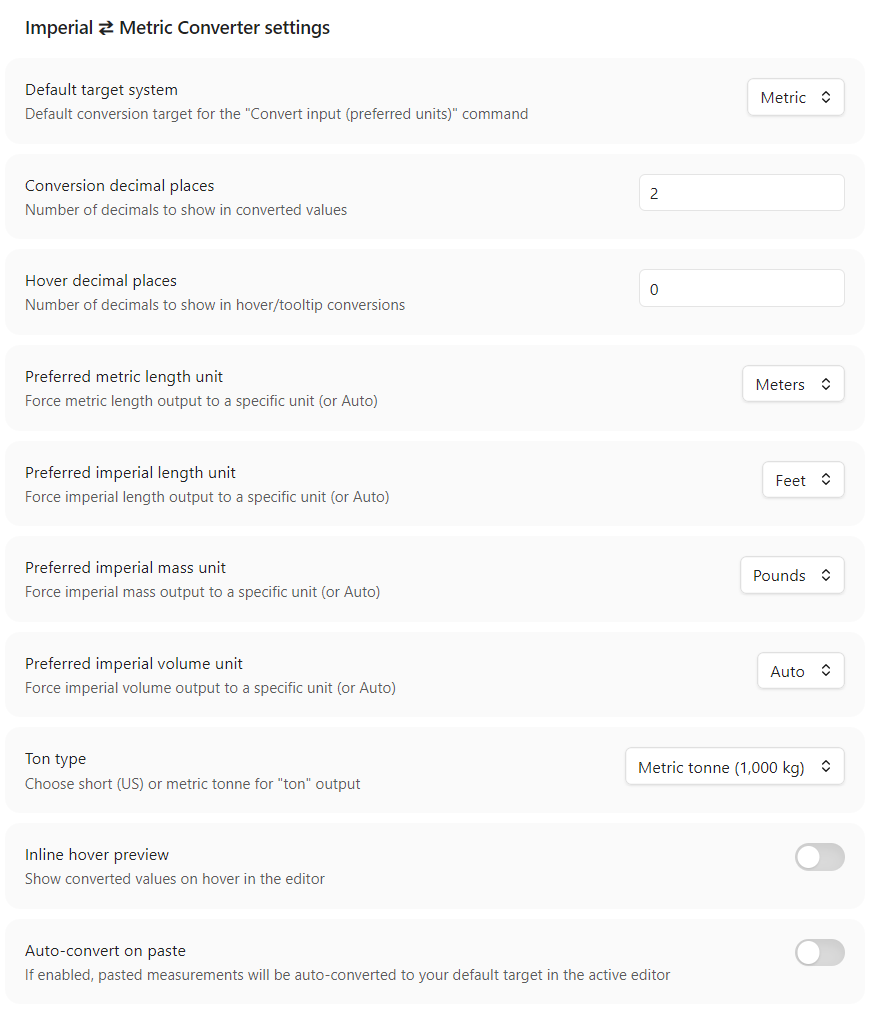
- Define the default measurement system (Metric, US customary, or UK / Imperial)
- Specify number of decimals when converting and when hovering
- Choose a custom inline hover background color or reset to the Obsidian theme default
- Choose US customary or UK / Imperial liquid measure definitions for cups, fluid ounces, spoons, gills, pints, quarts, and gallons
- Define preferred units of measurements or set it to auto to let the plugin decide
- Toggle Inline Hover and Auto-Convert on Paste settings.
Known limitations
- Parsing relies on heuristics and regexes; some complex or ambiguous text may not be parsed correctly.
- Hover preview is shown only when the pointer is over a parsed measurement in the editor.
- This plugin does not currently provide unit-aware rounding strategies beyond the configured decimal places.
- Localization: unit aliases include several common translations but are not exhaustive.
- Liquid measure definitions follow the selected US/UK preference, with explicit
(US),(UK), or(Imperial)qualifiers available for input. UK cup and spoon measures are fixed plugin values and may differ from recipe-specific conventions.
To Do
Please add suggestions for future features or updates as issues in GitHub or send me a message there.
- Fix Hover in Read-view.
- Fix Hover on callouts.
Install from the Obsidian Community Plugin store
- Open Obsidian.
- Go to Settings -> Community plugins.
- Make sure Safe Mode is off.
- Click Browse.
- Search for "Imperial to Metric Converter".
- Click Install, then Enable.
- Open the plugin settings and configure your preferences.
Caveat
I'm not a developer, therefore this plugin and its current implementation are largely vibe coded. The feature set is functional, but the codebase may still contain rough edges, assumptions, and areas that need cleanup or hardening.
Contributing
Contributions are what make the open source community such an amazing place to learn, inspire, and create. Any contributions you make are greatly appreciated.
License
This project is licensed under the MIT License - see the LICENSE file for details.
Contact
Oskar Norén - p0shkar
Project Link - ImperialToMetric-for-Obsidian
Support
Support me with liquid energy:

For plugin developers
Search results and similarity scores are powered by semantic analysis of your plugin's README. If your plugin isn't appearing for searches you'd expect, try updating your README to clearly describe your plugin's purpose, features, and use cases.