Advanced Word Count
unlistedby pan4ratte
Allows you to create complex word count presets that will display in the status bar. Made with academic use cases in mind.
Advanced Word Count plugin
English | Русский
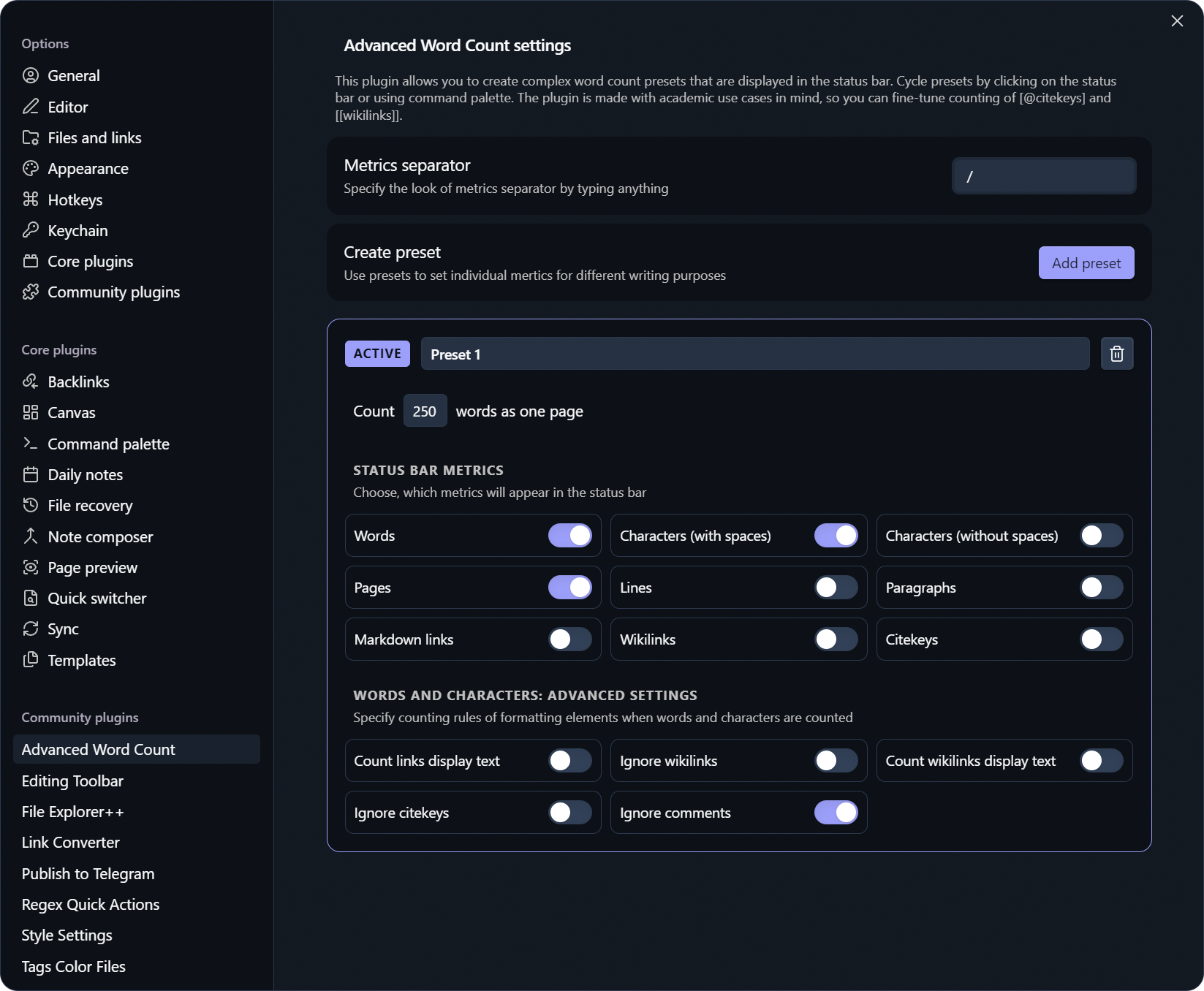
This plugin allows you to create complex word count presets that are displayed in the status bar. You can cycle presets by clicking on the status bar or using command palette. The plugin is made with academic use cases in mind, so you can fine-tune counting of [@citekeys] and [[wikilinks]].
Features
1. Create status bar metrics presets
You can quickly cycle your saved presets by clicking on status bar or from the command palette.
2. Track many different counting metrics
-
Essentials:
- Words
- Pages
- Characters (with spaces)
- Characters (without spaces)
-
Additional options:
- Lines (all lines, including blank lines)
- Paragraphs (only lines with text, excluding blank lines)
- Markdown links
(url)[label]and[label](url)
-
Special "academic" options:
- Wikilinks
[[wiki]]and[[wiki|label]] - Citekeys
[@doe2020]
- Wikilinks
3. Fine-tune "Words" and "Characters..." counting methods with advanced settings
You can specify, how formatting elements will be counted:
| Advanced option | Off | On |
|---|---|---|
| Count links display text | (url)[label] → label and url will be counted | only label will be counted |
| Ignore wikilinks | wikilinks text will be counted | wikilinks will be ignored |
| Count wikilinks display text | [[wiki|label]] → wiki and label will be counted | only label will be counted |
| Ignore citekeys | citekeys text will be counted | citekeys will be ignored |
| Ignore comments | comments %% … %% and <!-- … --> text will be counted | comments will be ignored |
Plugin use case
Let's say, you have three different projects, on which you are working simultaneously: two academic papers for different journals with different formatting requirements/limits and you write posts for your Telegram channel.
Journals have different page limits and use different fonts: that means that you will need two different presets and for each of them page count will be different. You can set it up with this plugin. For academic purposes you may want to count citekeys, e.g. number of references: you can set it up too.
At the same time, Telegram has a strict character limit and you may want to count characters in your posts, but in such a way, that, for example, only display text of your links is counted (Telegram does the same). You can set it up with this plugin. Etc, etc...
Without this plugin, it would be a nightmare to constantly change your preset settings and it would not be possible to adjust counters for academic purposes. Advanced Word Count plugin is a flexible tool, that makes your writing nightmares your sweet dreams :)
Installation Instructions
Before plugin appears in the official Obsidian store, the easiest way to install it is through the BRAT plugin:
-
Install the
BRATplugin from the official Obsidian plugin store. -
In the
BRATsettings, find the “Beta plugin list” section and click on the “Add beta plugin” button. -
In the window that appears, paste the link to the
Advanced Word Countplugin repository: https://github.com/pan4ratte/obsidian-advanced-word-count -
Under “Select a version” choose “Latest version” and click the “Add plugin” button.
Done! The plugin will automatically install and will be ready to use.
About the Author
My name is Mark Ingram (Ingrem), I am a Religious Studies scholar. Apart from my main area of study (Protestant Political Theology in Russia), I teach the subject "Information Technologies in Scientific Research", a unique course that I developed myself from scratch. This plugin helps me in my studies and I use it in my teaching, as well as other plugins that I develop and that you can find on my GitHub profile.
Hello to every student that came across this page!
For plugin developers
Search results and similarity scores are powered by semantic analysis of your plugin's README. If your plugin isn't appearing for searches you'd expect, try updating your README to clearly describe your plugin's purpose, features, and use cases.