KOS2
unlistedby pd
Ollama-first Obsidian plugin for KOS workflows, local retrieval, and cloud web tools.
KOS2

KOS2 is a Knowledge Operating System for Obsidian. Open, local-first, built for excellence in boring work.
KOS2 helps you move from note entropy to useful work:
- Organise intake notes into stabilised draft artifacts with traceability
- Next steps from projects, areas, and messy notes
- Decision drafts from evidence, not vibes
- Review loops that capture outcomes and missing follow-ups
If you want the mental model behind the product, read KOS Philosophy.
If You're In A Hurry
- Install KOS2 with BRAT using
pdurlej/KOS2 - Start Ollama locally
- Pull
qwen3:8bandbge-m3 - Turn on
Privacy (local) Mode - Run
Organisefrom the KOS starter or command palette
Install
Install with BRAT (recommended beta path)
- Install the
BRATplugin in Obsidian from Community Plugins - Open the command palette and run
BRAT: Add a beta plugin for testing - Enter the GitHub repo:
pdurlej/KOS2 - Install the latest release and enable
KOS2
BRAT is the easiest way to test new KOS2 releases without manually copying files.
Install from release assets
- Download the latest release from GitHub Releases
- Create the plugin folder in your vault:
mkdir -p "/path/to/YourVault/.obsidian/plugins/kos2"
- Copy these three files into that folder:
main.jsmanifest.jsonstyles.css
- In Obsidian:
- open
Settings -> Community plugins - turn off
Restricted modeif needed - reload plugins or restart Obsidian
- enable
KOS2
- open
Install from source (contributors)
git clone https://github.com/pdurlej/KOS2.git
cd KOS2
npm install
npm run build
mkdir -p "/path/to/YourVault/.obsidian/plugins/kos2"
cp main.js manifest.json styles.css "/path/to/YourVault/.obsidian/plugins/kos2/"
Privacy Modes
| Mode | What stays local | What uses cloud |
|---|---|---|
| Local-only | Ollama chat, Ollama embeddings, vault workflows | Nothing |
| Hybrid | Local chat, local embeddings, vault workflows | Optional Ollama Cloud for web search/fetch |
For the strongest local path, use:
Privacy (local) ModeKOS2 Local Agent- local embeddings in
Knowledge - no
Ollama Cloudkey configured
KOS2 can run fully local if you want your notes, embeddings, and decisions to stay on your machine.
What KOS2 Is Not
- not a generic chat sidebar for everything
- not a multi-provider playground
- not a promise of fully autonomous vault control
KOS2 is most useful when you use it as a local workflow layer for note operations.
Local Model Starting Points
These are practical starting points, not hard requirements:
Fast: smaller Qwen or Gemma modelsBalanced:qwen3:8bBest local quality: larger Qwen or Gemma models if your machine can handle themEmbeddings:bge-m3
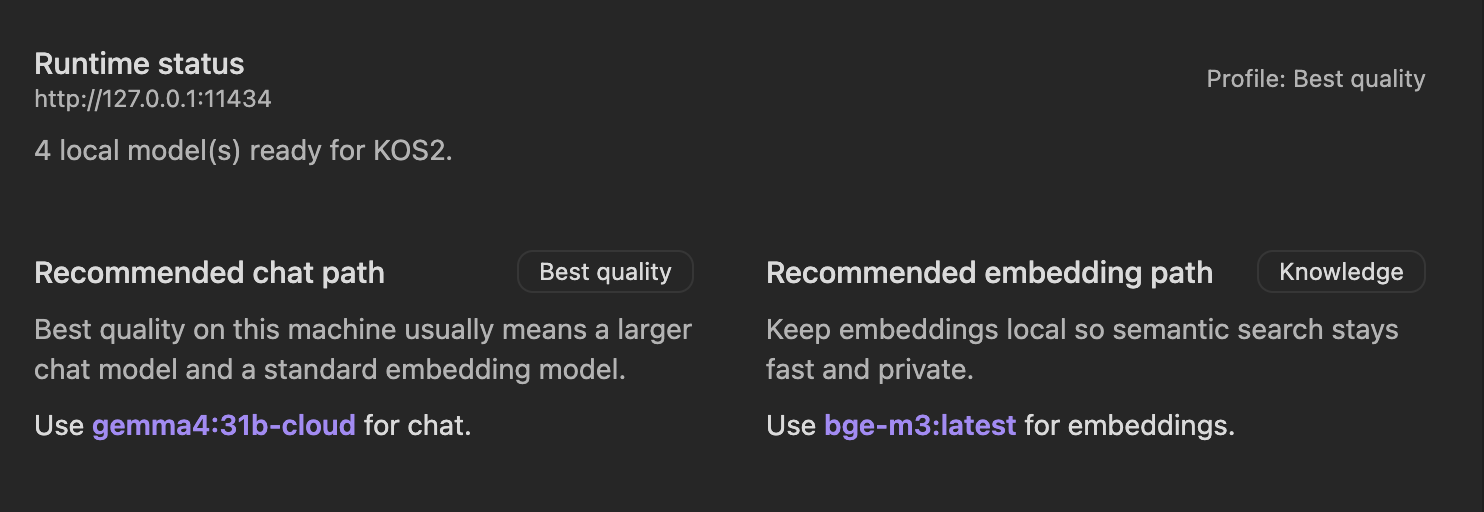
Inside the plugin, Knowledge surfaces recommendations based on what is actually installed and what your machine looks capable of running.
First Local Setup
Install Ollama from ollama.com, then run:
ollama pull qwen3:8b
ollama pull bge-m3
Then in KOS2:
- Open
Settings -> KOS2 -> Setup - Confirm local Ollama is reachable
- Turn on
Privacy (local) Modeif you want the default path to stay local - Use
KOS2 Local Agentor pick a specific local chat model - Open
Knowledge, sync models, and choose a local embedding model
Optional Cloud And Transcripts
KOS2 uses Ollama Cloud only for web search and web fetch. It is optional.
For YouTube transcripts, the current setup path is:
Supadatafor transcript API access- or local preparation with
yt-dlpandwhisper
Transcript UX is present in the plugin, but this is still an evolving capability rather than a fully finished media pipeline.
Troubleshooting
Ollama is not running
- Start Ollama and make sure
http://127.0.0.1:11434is reachable - Confirm
ollama listshows installed models
No models found after sync
- Open
Settings -> KOS2 -> Knowledge - Click
Refresh Ollama Models - Confirm the host matches your local Ollama address
Embeddings are not showing
- Make sure you actually pulled an embedding model such as
bge-m3 - Refresh models again in
Knowledge - If chat models show up but embeddings do not, try re-pulling the model and refreshing
No cloud key configured
- Local chat and local embeddings still work
- Only web search and web fetch flows stay unavailable until
Ollama Cloudis configured
Help Test KOS2
If you try KOS2, the most useful feedback right now is:
- install friction
- model sync issues
- whether
Organiseis genuinely useful - whether the privacy model matches your expectations
Open an issue here: github.com/pdurlej/KOS2/issues/new/choose
More Docs
- Getting Started
- KOS Philosophy
- Chat Interface
- Agent Mode and Tools
- Vault Search and Indexing
- Troubleshooting and FAQ
Planning And Design Docs
- PRD
- Architecture
- Epics and stories
- Test strategy
- Workflow contracts
- Release QA checklist
- BMAD archive
License And Attribution
KOS2 remains licensed under AGPL-3.0.
This project starts from logancyang/obsidian-copilot and keeps its AGPL obligations. KOS2 is a soft fork with a different product direction, not a claim that the upstream project authored this roadmap.
For plugin developers
Search results and similarity scores are powered by semantic analysis of your plugin's README. If your plugin isn't appearing for searches you'd expect, try updating your README to clearly describe your plugin's purpose, features, and use cases.