Vault Tree
unlistedby phlx
Live tree table of contents for the entire vault.
🌲 Vault Tree — Structural Navigation for Obsidian
Vault Tree turns your folder hierarchy into a living, navigable knowledge map.
It gives you:
- A true tree view of your entire vault
- A recursive system of Table-of-Contents notes that link everything together
- A way to use Obsidian’s Graph View to visualize structure, not just links
Your folders stop being storage. They become part of your knowledge graph.
🖼️ Overview
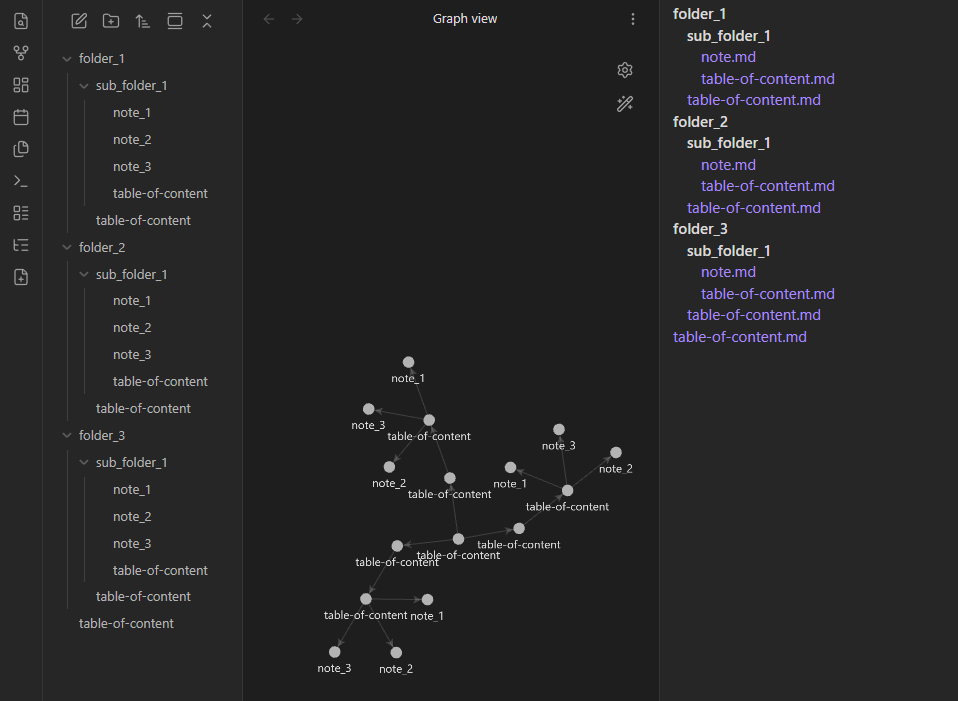
✨ What Vault Tree Does
🌳 1) Vault-Wide Tree Panel
A dedicated side panel that shows your entire vault structure as a clean tree:
- Folders always listed before files
- Click any note to open it
- Updates automatically when the vault changes
- Much clearer structural overview than the default file explorer for large vaults
This is your structural map of the vault.
📄 2) Recursive Table-of-Contents Generator
With one click, Vault Tree generates a table-of-content.md file inside every folder.
Each TOC contains:
- Links to all notes in that folder
- Links to the TOCs of all child folders
This creates a self-linking hierarchy across your entire vault.
You can now:
- Navigate your vault through TOCs
- Use Graph View to see folder relationships
- Publish your vault with built-in structure
- Treat folders as first-class knowledge nodes
🧠 Why This Is Powerful
As vaults grow, folders alone stop being useful for navigation.
Vault Tree fixes this by turning your structure into something you can:
- See
- Click through
- Visualize
- Traverse like a knowledge map
You don’t browse files anymore. You navigate structure.
🖱 How to Use
After enabling the plugin, you’ll see two ribbon icons:
| Icon | Action |
|---|---|
| 🌳 | Open the Vault Tree panel |
| ➕ | Generate table-of-content.md files across the vault |
Run the TOC generator once and your vault becomes permanently self-indexing.
📁 Example
If your vault looks like this:
Projects/
  Alpha.md
  Beta.md
  Research/
    Paper.md
Vault Tree generates:
Projects/table-of-content.md
# Projects

## Files
- [[Alpha]]
- [[Beta]]

## Subfolders
- [[Projects/Research/table-of-content]]
Projects/Research/table-of-content.md
# Research

## Files
- [[Paper]]
These TOCs then link to each other — forming a structural graph.
🛠 Installation (Development)
Clone into your vault’s plugins folder:
<your-vault>/.obsidian/plugins/vault-tree
Install dependencies and build:
npm install
npm run build
Then enable Vault Tree in:
Obsidian → Settings → Community Plugins
💻 Development
Run TypeScript in watch mode:
npm run dev
Reload plugins inside Obsidian after changes.
🚀 Roadmap
Planned improvements:
- Collapsible folders in the tree
- Highlight the currently open file
- Match Obsidian File Explorer icons
- Auto-regenerate TOCs when files change
- Sorting and filtering options
🧩 License
Licensed under CC BY-NC-SA 4.0.
You may use and modify this plugin, but not sell or use it commercially. Attribution is required.
🙌 Contributing
Issues, ideas, and pull requests are welcome.
If you like the concept, help make it even better.
For plugin developers
Search results and similarity scores are powered by semantic analysis of your plugin's README. If your plugin isn't appearing for searches you'd expect, try updating your README to clearly describe your plugin's purpose, features, and use cases.