Devitri
unlistedby Rigter
Sync notes and attachments with a self-hosted Devitri server across desktop and mobile.
Devitri Obsidian Plugin


Status: Pending review for the Obsidian community plugin store
Your notes live in Obsidian — on your laptop, your phone, maybe a second computer. Keeping them in sync usually means trusting a cloud you do not control, or copying files by hand. Devitri is a self-hosted sync server and web dashboard for Obsidian vaults. This plugin is its official Obsidian client: it connects your vault to your own Devitri server and keeps your notes, images, and attachments in sync across devices.
Devitri uses three-way sync with content hashes, so the plugin can merge non-overlapping edits automatically and create safe conflict copies when it cannot. It works on desktop and mobile using Obsidian's built-in HTTP API — no browser CORS workarounds required.
How it works
- Set up a Devitri server — run your own instance with Docker or bare metal. Create a vault and generate an Access Key from the dashboard Connect page.
- Install this plugin in Obsidian and open Settings → Devitri.
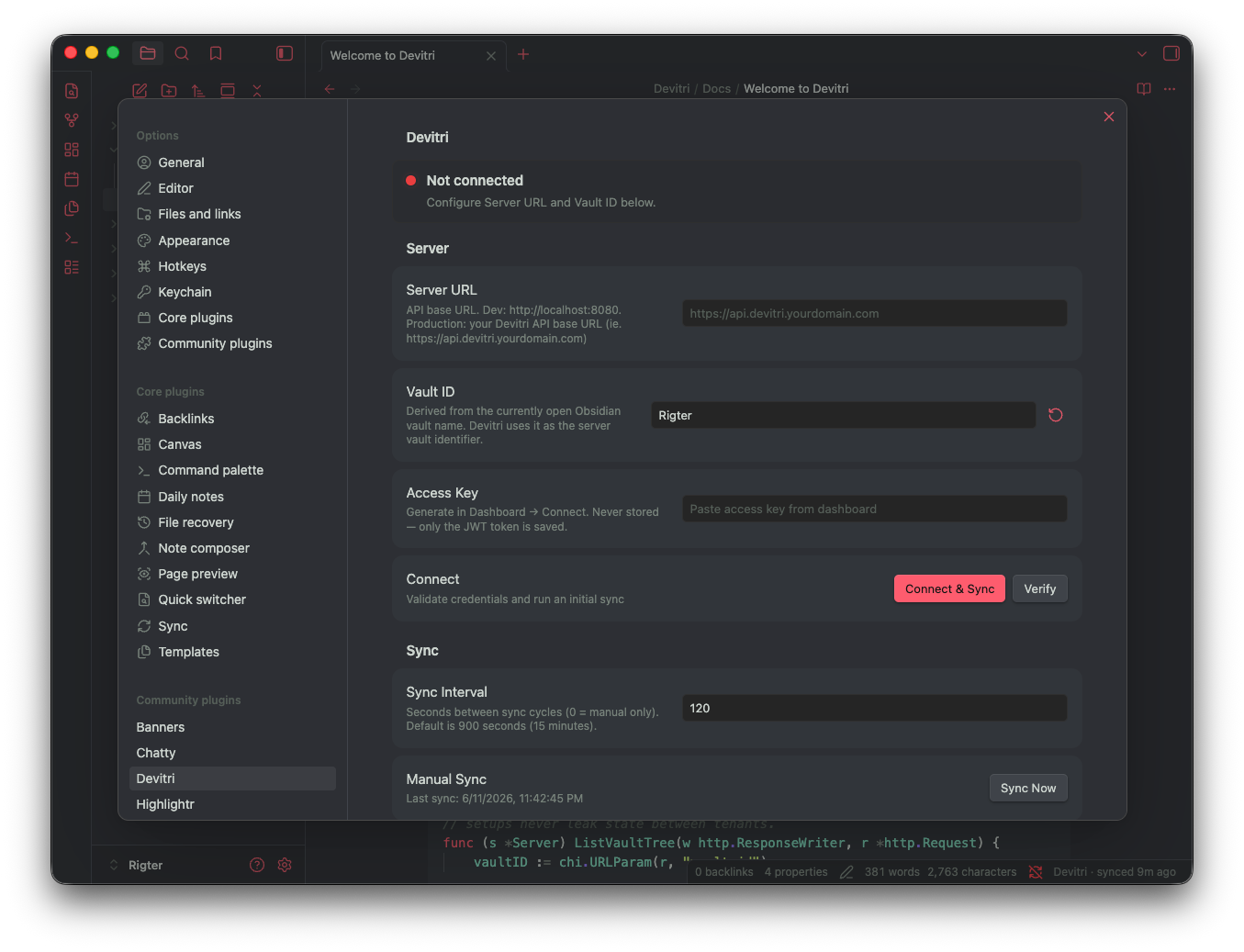
- Enter your server URL, vault ID, and access key, then click Verify or Connect & Sync.
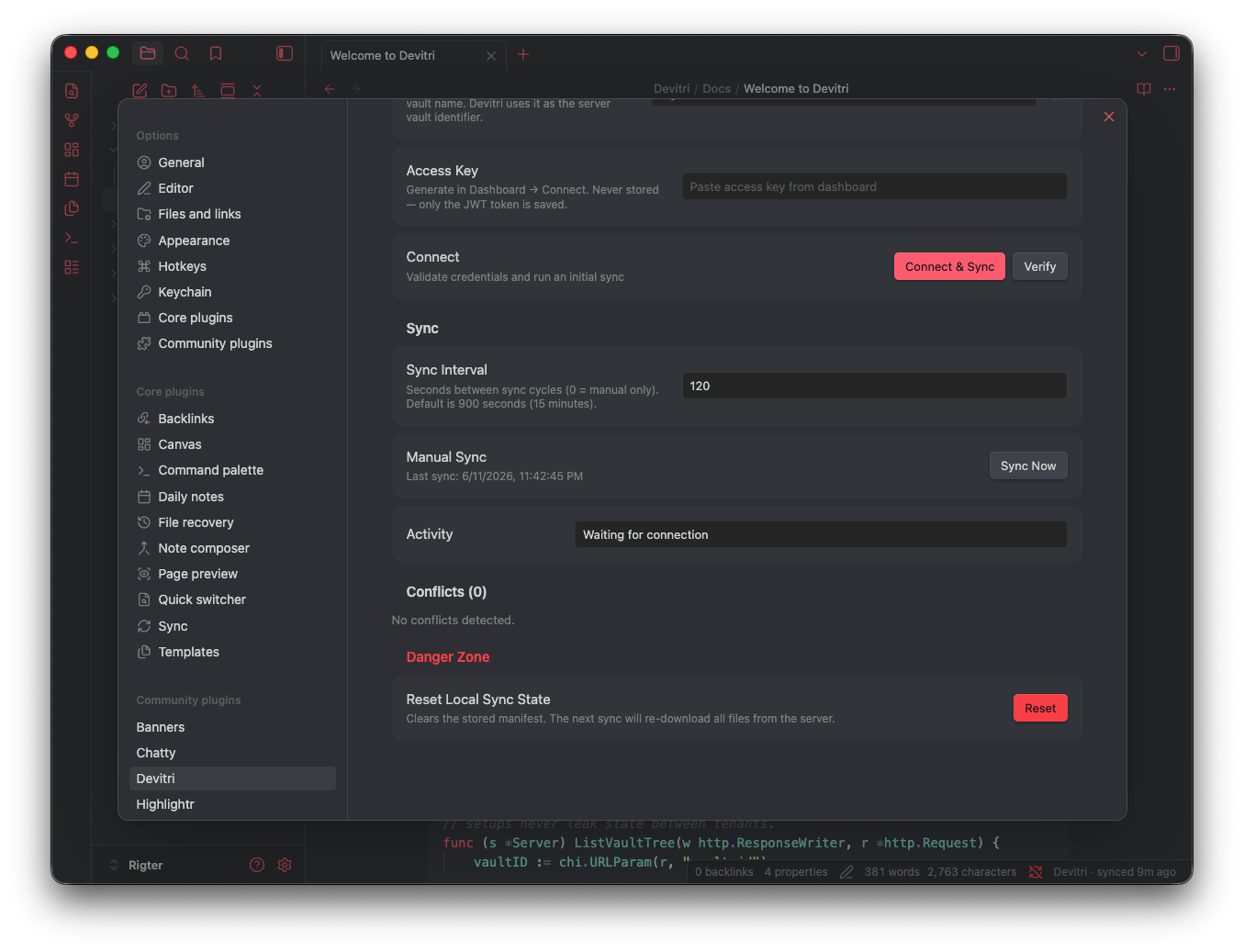
- Sync runs in the background on the interval you choose (default: every 15 minutes), or trigger Sync Now whenever you need an immediate run.
When you edit the same note on two devices, Devitri compares your local copy, the last synced version, and the server copy. For Markdown, non-overlapping edits are merged automatically; overlapping edits get a conflict copy. For images and other binary files, the plugin always keeps both sides safe with a conflict copy instead of overwriting.
Features
- Bidirectional sync — push local changes and pull remote updates in one cycle
- Notes and attachments — Markdown, images (PNG, JPG, GIF, WebP, …), and other vault files
- Automatic Markdown merge when edits do not overlap
- Conflict copies with safe filenames when merge is not possible
- Incremental sync — only changed files are processed after the first full scan
- Bulk-delete protection — large deletion batches require explicit confirmation
- Mobile-safe HTTP — uses Obsidian
requestUrl(desktop, iOS, and Android) - Multi-device settings — reloads credentials when plugin settings sync via your vault
Requirements
- Obsidian 1.12.7 or newer with Community Plugins enabled
- A running Devitri server
- An Access Key from the Devitri dashboard Connect page (not the master password)
Production servers must use HTTPS. Point Server URL at your API host (e.g. https://api.example.com or http://localhost:8080 for local development), not the dashboard UI port unless your reverse proxy serves both on one origin.
Installation
From the Obsidian community plugin store
Search for Devitri under Settings → Community plugins → Browse, install it, and enable it.
Manual installation
Download main.js and manifest.json from the latest release, or build from source:
git clone https://github.com/rigter/devitri-obsidian-plugin.git
cd devitri-obsidian-plugin
npm install
npm run build
Copy the files into your vault. The folder name must match the plugin id in manifest.json (devitri-sync):
VAULT="/path/to/your/vault"
mkdir -p "$VAULT/.obsidian/plugins/devitri-sync"
cp dist/main.js dist/manifest.json "$VAULT/.obsidian/plugins/devitri-sync/"
Restart Obsidian, then go to Settings → Community plugins and enable Devitri.
Configuration
Open Settings → Devitri after enabling the plugin.
| Setting | Description |
|---|---|
| Server URL | Devitri API base URL (http://localhost:8080 for local Docker) |
| Vault ID | Vault slug on the server (e.g. personal) |
| Access key | Long-lived token from dashboard Connect → Generate token |
| Device name | Optional label shown in Devices on the dashboard |
| Sync interval | Background sync period in seconds (default 900; use 0 for manual only) |
Use Verify to check connectivity without syncing. Use Sync Now for an immediate sync run.
Bulk deletes
If a sync would delete more than the configured threshold (default: 20 files or 5% of the vault), the plugin blocks the batch and shows a notice. Open Settings → Devitri → Bulk delete, tap Confirm once, then run Sync Now again.
Resetting sync state
After changing servers or if notes stop syncing, use Reset Local Sync State in the settings danger zone, then Sync Now. This forces a fresh comparison against the server without deleting your notes.
What syncs
| Included | Not included |
|---|---|
Markdown notes (.md) | Anything under .obsidian/ (plugin data, themes, snippets, …) |
| Images and attachments (PNG, JPG, GIF, WebP, SVG, PDF, …) | |
| Other files in your vault |
Embedded images and linked attachments sync like any other vault file. On the first sync (or after Reset Local Sync State), the plugin scans the whole vault — not just .md files — so existing images are included too.
Troubleshooting
| Issue | What to check |
|---|---|
| Connection failed | Server URL points at the API, not the dashboard dev port (:8080, not :3000 / :5173); access key from Connect, not master password; HTTPS for internet-facing servers |
| Plugin not listed | Folder name is exactly devitri-sync; main.js and manifest.json sit side by side; Community plugins enabled |
| Only new notes sync | Reset Local Sync State, then Sync Now (common after switching Server URL) |
| Sync blocked | Confirm once under Bulk delete, then Sync Now |
| Session expired | Generate a new access key in the dashboard Connect page and paste it in settings |
Related projects
| Repository | Role |
|---|---|
| rigter/devitri | Self-hosted API, sync engine, and web dashboard |
| rigter/devitri-obsidian-plugin | This plugin |
Changelog
1.0.0 — initial release
Added
- Three-way sync with SHA-256 content hashes
- Markdown notes, images, and vault attachments
- Automatic Markdown merge and conflict copies for binary files
- Settings tab with Verify, Connect & Sync, and Sync Now
- Background sync on a configurable interval
- Bulk-delete confirmation gate
- Mobile-safe HTTP via Obsidian
requestUrl - Credential reload when plugin settings sync across devices
Development
npm install
npm run check   # TypeScript
npm run build   # esbuild → dist/main.js
See INSTALL.md for build and vault install steps, and PROJECT.md for repository layout.
License
MIT — see LICENSE.
Author
For plugin developers
Search results and similarity scores are powered by semantic analysis of your plugin's README. If your plugin isn't appearing for searches you'd expect, try updating your README to clearly describe your plugin's purpose, features, and use cases.