Folgezettel
unlistedby Fabián Sanhueza Vásquez
Native outline tree view and branching toolkit for Luhmann-style Folgezettel notes in Obsidian.
Folgezettel for Obsidian
A dedicated, native outline view and branching toolkit for Luhmann-style Folgezettel note systems in Obsidian.
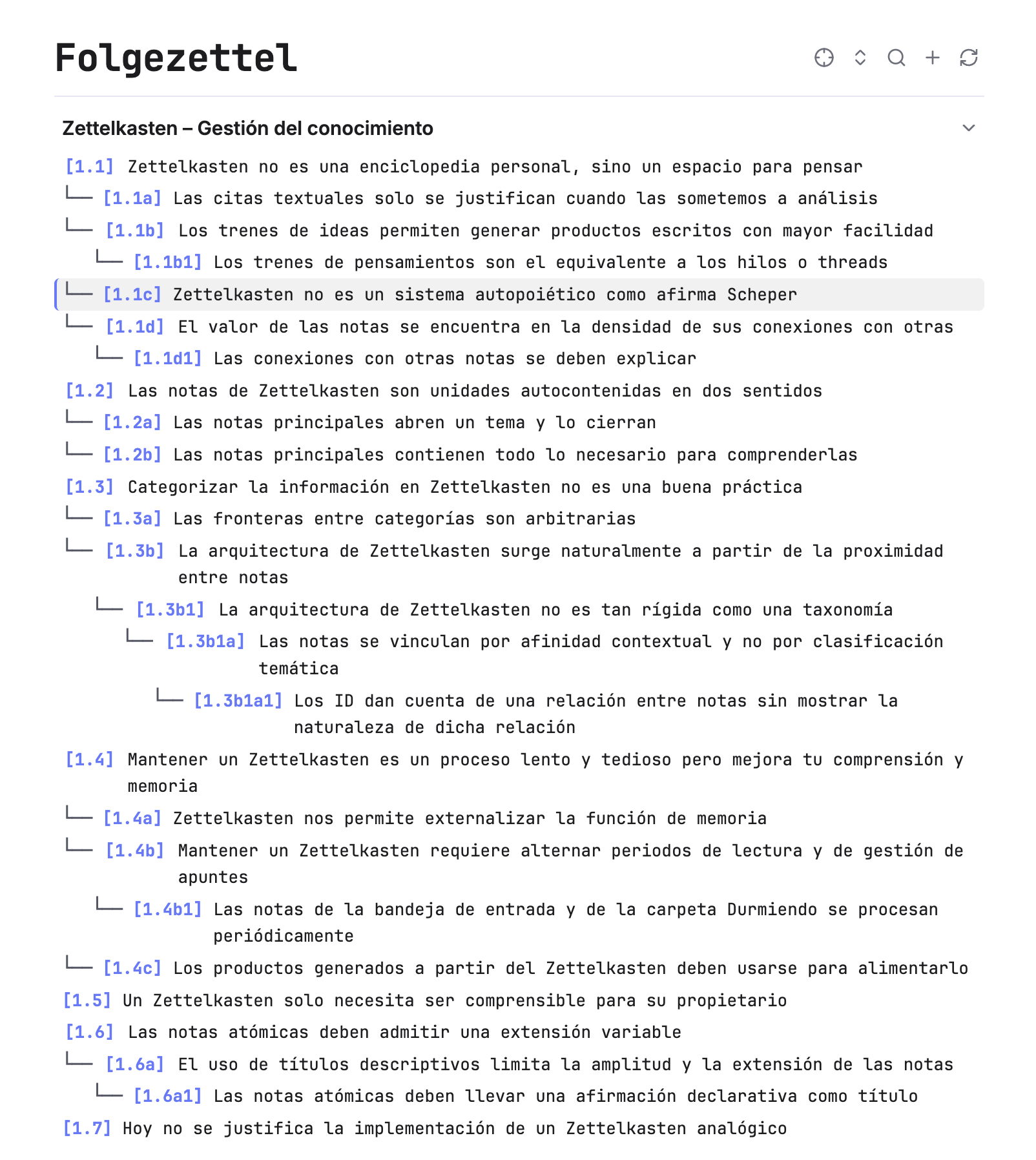
Folgezettel scans Markdown notes located at your vault's root that begin with an alphanumeric identifier (e.g., 1.1, 1.1a, 1.1a1, 1.2, etc.) and visualizes them as an indented, branching thought-train tree with clean tree guides, foldable threads, real-time filtering, and one-click branching actions.
Features
🌳 Visual Folgezettel Hierarchy
- Monospace Tree Alignment: Uses ASCII guide connectors (
└──) that visually align directly with note IDs. - Root-based Thought Trains: Discovers notes at the root of your vault adhering to Folgezettel notation and organizes them into sequential top-level threads (
1.x,2.x,3.x, etc.). - Foldable Nodes: Click directly on any
[ID]badge to fold or expand its child branches. - Native Layout: Renders with readable line length matching Obsidian's Live Preview and Reading views. Opens in a full tab or right sidebar.
🏷️ Click-to-Edit Thread Headers
- Thematic Thread Labels: Name each major thread with a descriptive topic (e.g., Zettelkasten – Knowledge Management).
- Click-to-Edit UX: Displays seamlessly as a clean section heading. Click the heading to toggle into an inline editor, change or clear the label, and press
Enteror click outside to save. - Thread Folding Chevron: Each thread header features a dedicated
vchevron on the far right to collapse or expand the entire thread. - Automatic Persistence: All thread labels are stored safely in
.obsidian/plugins/folgezettel/data.json.
🔍 Live Search & Filtering
- Ancestor-Preserving Search: Filter notes in real time by ID, title, or thread label.
- Context Retention: When a note matches your query, its ancestral path remains visible so you never lose context within the hierarchy.
- Underlined Match Indicators: Matches are clearly highlighted while preserving the clean look of the outline.
🌿 Contextual Branching & Note Assignment
- Context Menu Actions: Right-click any note in the outline to access context-aware actions:
- Assign note to branch (
[ID]): Select an unassigned note from yourBandeja de entrada(Inbox) orDurmiendo(Incubation) folders via fuzzy search and automatically move and rename it into the calculated branch slot. - Create note in branch (
[ID]): Instantly create a new note with the calculated branch ID and open it in a new tab. - Continue thread (
[ID]): If available on the main backbone thread (e.g.,1.1→1.2), assign or create the next consecutive sibling note.
- Assign note to branch (
- Command Palette Integration: The exact same branching actions dynamically appear in Obsidian's Command Palette (
Cmd + P) whenever you have a Folgezettel note open. - New Thread Button: A toolbar button and palette command calculate the next available major thread (e.g.,
13.1) with a single click.
🔗 Reference Insertion with ID Alias
- Editor Command: Trigger
Folgezettel: Insert reference(Insertar referencia) from the Command Palette while writing any note. - Fuzzy Search by ID or Title: Find any Folgezettel note quickly.
- Automatic Wikilink Alias: Automatically inserts
[[Full Note Title|ID]](e.g.,[[4.4c Memory retrieval|4.4c]]) at your cursor.
🎯 Active Note Sync & Navigation
- Smooth Auto-Scroll: Highlights and centers the currently active note in the tree as you navigate your vault.
- Locate Active Note Toolbar Icon: Unfolds any collapsed ancestors or threads and centers the active note instantly.
🌐 Bilingual Support (English & Spanish)
- Automatic Language Detection: Follows Obsidian's active interface language and adapts all buttons, tooltips, placeholders, modals, notices, and commands automatically.
- Manual Language Setting: Choose between Automatic, Español, or English in the plugin settings (Settings > Folgezettel).
- Flexible Folder Discovery: Supports both English (
Inbox,Incubation,Sleeping) and Spanish (Bandeja de entrada,Durmiendo) folders when assigning new notes to branches.
Numbering Convention
Folgezettel implements Niklas Luhmann's branching convention:
| Sequence | Type | Example |
|---|---|---|
| Major Thread | Root conceptual cluster | 1.1, 2.1, 3.1 |
| Sibling on Backbone | Continuation of top-level train | 1.1 → 1.2 → 1.3 |
| Branch / Digression | Alternating digits and letters | 1.1 → 1.1a → 1.1a1 → 1.1a1a |
Commands
| Command | Description |
|---|---|
Folgezettel: Open outline in a new tab | Opens the Folgezettel view in a central workspace tab. |
Folgezettel: Open outline in sidebar | Opens or focuses the Folgezettel view in the right sidebar. |
Folgezettel: Collapse / Expand all | Toggles the folding state of all branches and threads. |
Folgezettel: Create new thread [N.1] | Creates the next consecutive major thread (e.g., 13.1). |
Folgezettel: Refresh outline | Re-scans the vault root and updates the outline tree. |
Folgezettel: Insert reference | Searches Folgezettel notes and inserts [[Title|ID]] at cursor. |
| Active note commands | Contextual branching actions (Assign to [ID], Create note [ID], Continue thread [ID]). |
Installation
Manual Installation
- Download
main.js,manifest.json, andstyles.cssfrom the latest release. - In your Obsidian vault, navigate to
.obsidian/plugins/. - Create a new folder named
folgezetteland paste the downloaded files inside:<vault>/.obsidian/plugins/folgezettel/ ├── main.js ├── manifest.json └── styles.css - Reload Obsidian or restart the app.
- Go to Settings > Community plugins, find Folgezettel, and toggle it On.
Building From Source
# Clone the repository
git clone https://github.com/your-username/obsidian-folgezettel.git
cd obsidian-folgezettel

# Install dependencies
npm install

# Build the production bundle
npm run build
License
MIT License. See LICENSE for details.
For plugin developers
Search results and similarity scores are powered by semantic analysis of your plugin's README. If your plugin isn't appearing for searches you'd expect, try updating your README to clearly describe your plugin's purpose, features, and use cases.