BitLens
unlistedby sjoon21
Reference Bitwarden passwords, API keys and TOTP codes in notes with {{bw:...}} placeholders. Values are decrypted locally, kept only in memory and shown as masked widgets.

BitLens
Keep secrets out of your notes. Reference Bitwarden® items with {{bw:...}} and see them through a lens: masked in place, decrypted only in memory.
Your Markdown files only ever contain the reference, so notes can be synced, shared or pushed to Git without leaking API keys or passwords.




English · 한국어
Install · Usage · Screenshots · How it works · Privacy & security · Limitations
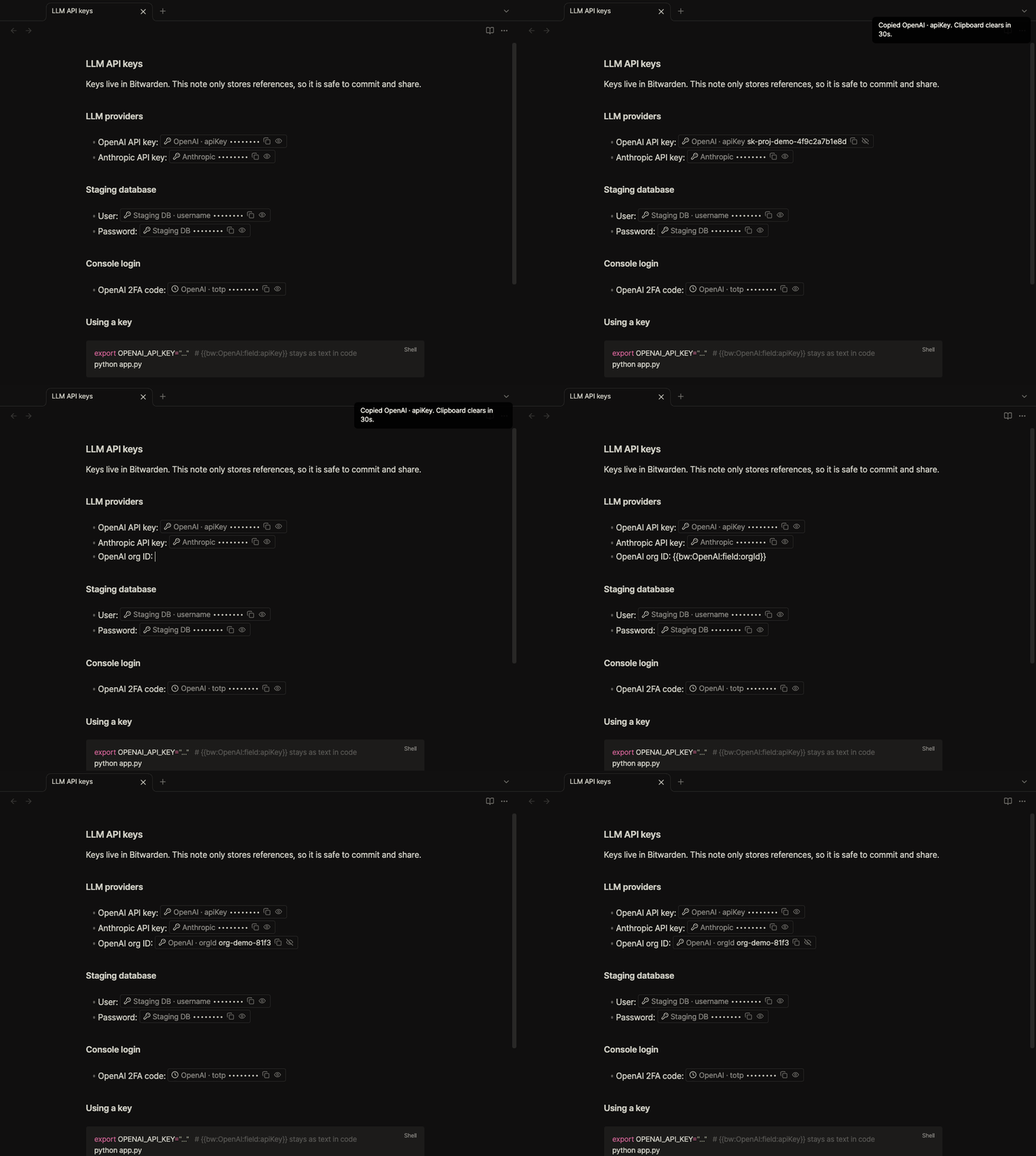
Reveal → copy (the clipboard clears in 30 s) → type {{bw: to insert a reference (sample data)
[!NOTE] BitLens is an independent, unofficial plugin. It is not affiliated with or endorsed by Bitwarden, Inc.
Why BitLens
- 🔒 Nothing secret touches the disk. Your master password, the derived keys, the access token and the decrypted vault live only in memory and are wiped when the vault locks.
- 📝 Notes stay shareable. A note says
{{bw:OpenAI:field:apiKey}}, never the key itself. Commit it, sync it, publish it. - 👁 Masked until you ask. Secrets render as
•••••••• [copy] [show]widgets in Reading view and Live Preview. A value is looked up only at the moment you click. - ⏱ Locks itself. An idle timer locks the vault, and copied values are cleared from the clipboard after 30 seconds.
- 🧪 Checked against Bitwarden's own test vectors. Decryption follows Bitwarden's client protocol and is tested with vectors from Bitwarden's official SDK.
Features
- Inline secret widgets in Reading view and Live Preview: copy, reveal, and live TOTP codes. Move the cursor into a widget to edit the raw reference.
- Insert without typing the syntax: run Insert secret reference to pick one field or a whole item as a ready-made list, or type
{{bw:for autocomplete. - Vault sidebar: search by name, username or URL, favorites and folders, per-field copy / reveal / insert, and TOTP codes with a countdown.
- Status bar lock and Unlock / Lock / Sync commands.
- Bitwarden cloud (US, EU) and self-hosted servers, personal and organization items.
Screenshots
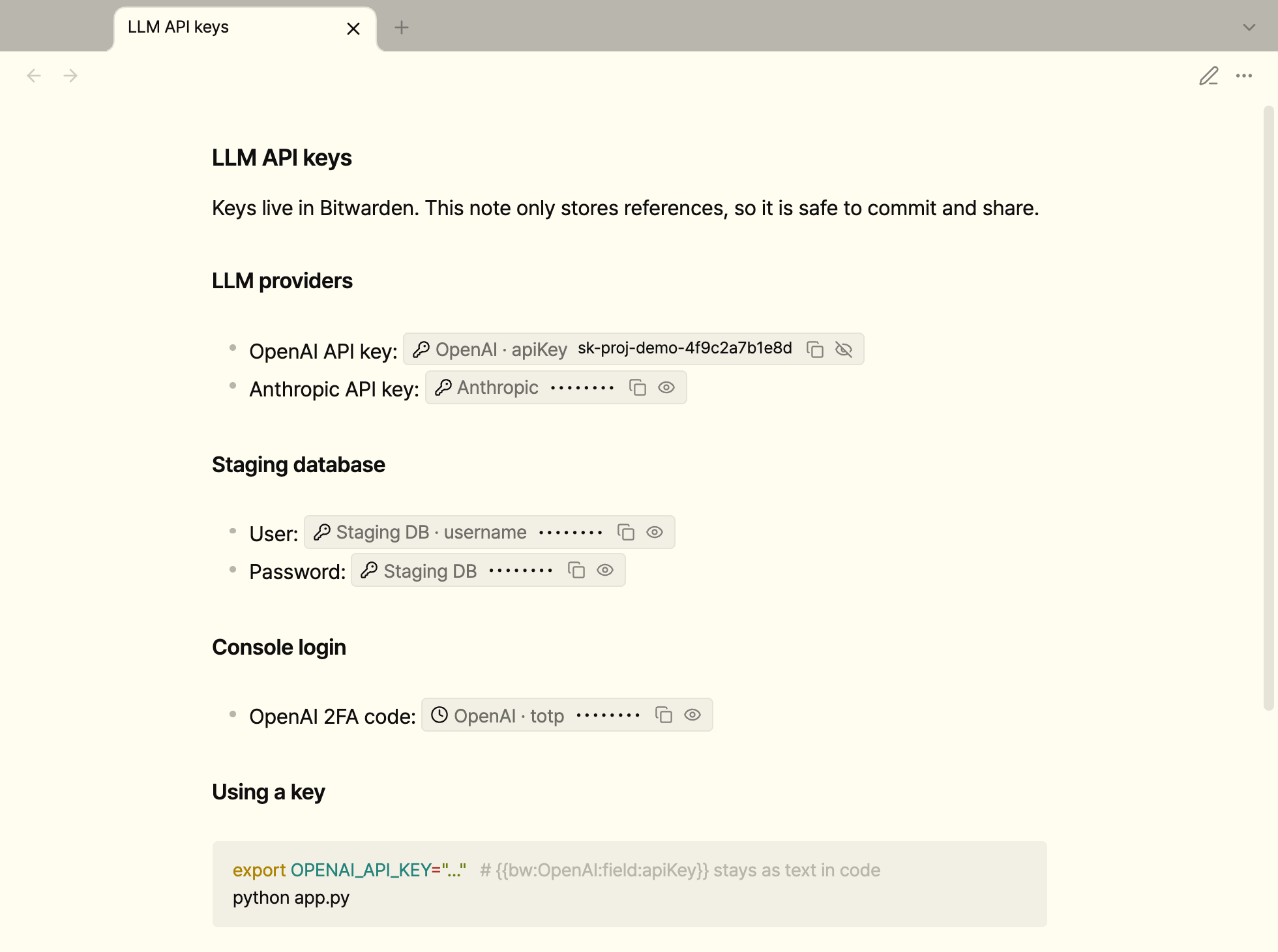
Notes — references render as masked widgets you can reveal or copy
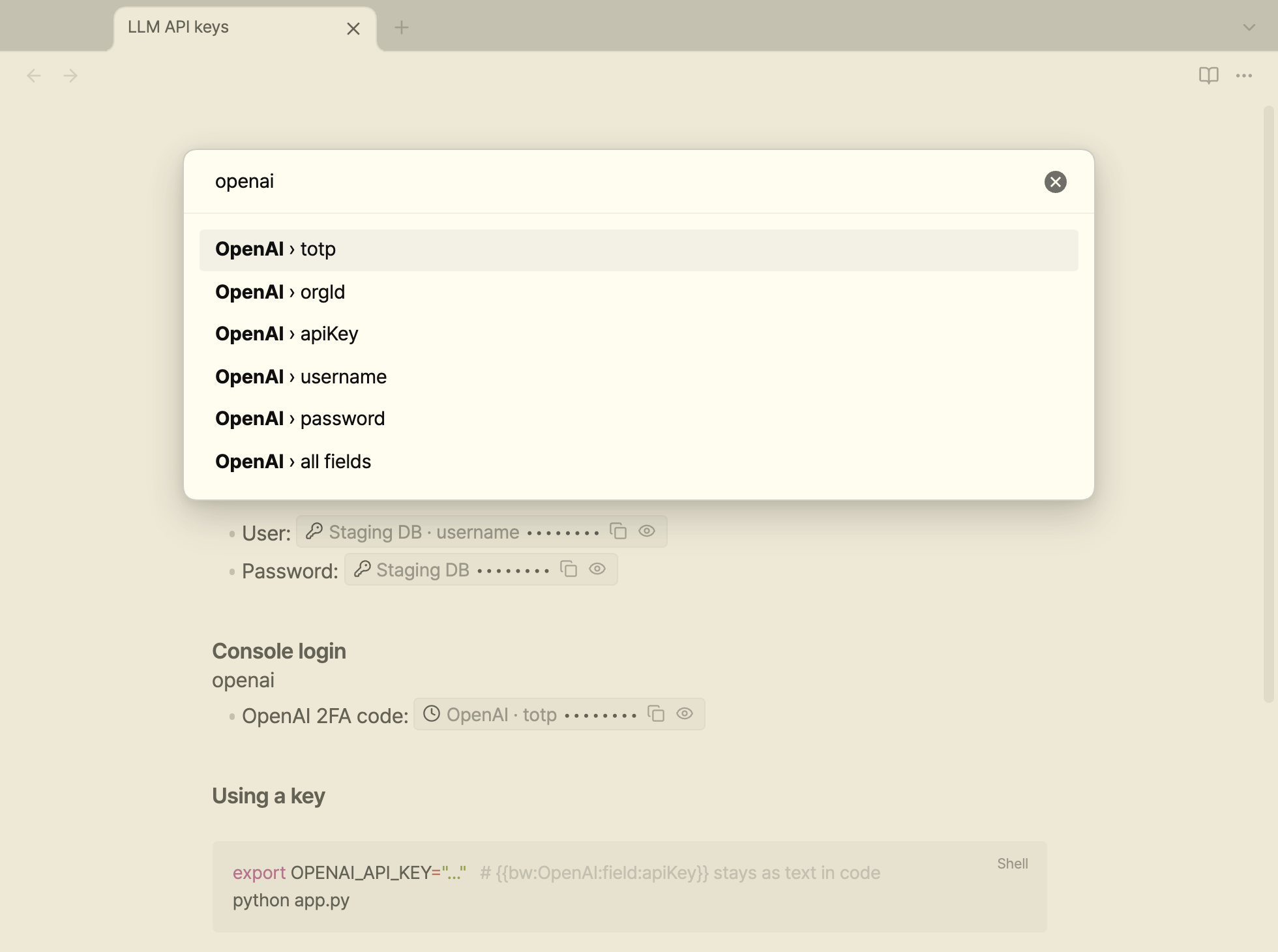
Insert — pick a field or a whole item, no syntax to remember |
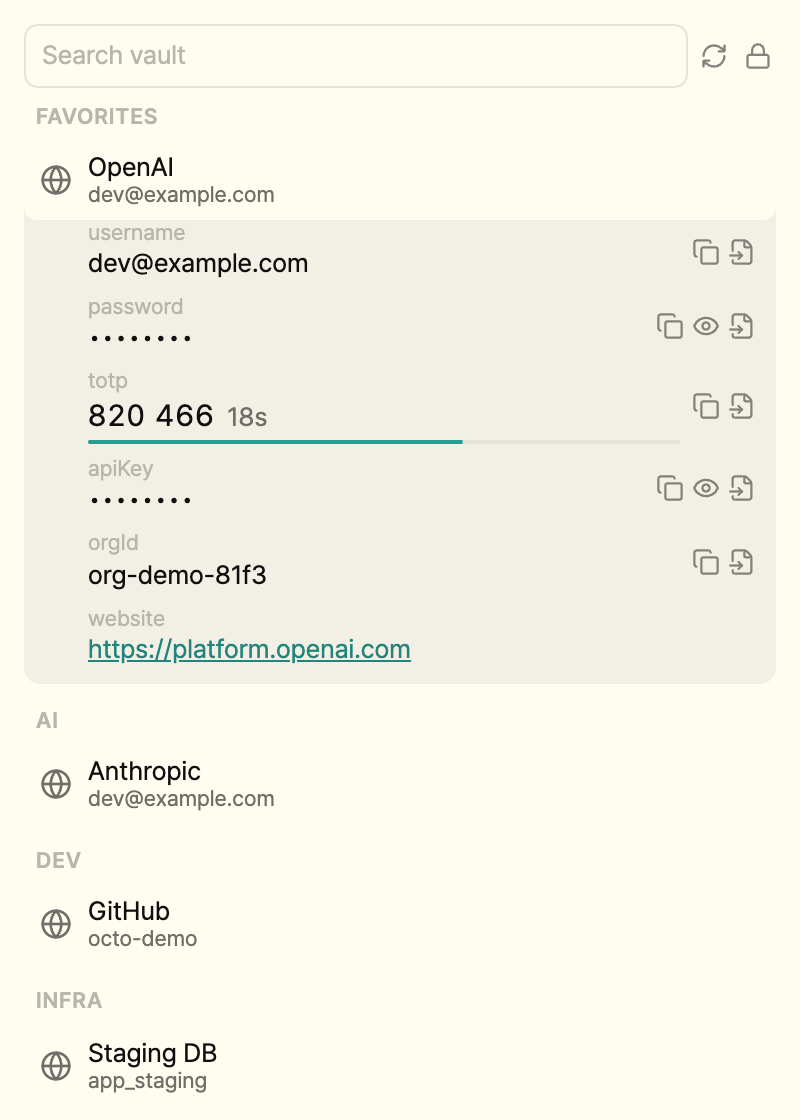
Sidebar — browse, copy, insert, live TOTP |
Screenshots and the demo use made-up sample data.
How it works
flowchart LR
  note["📝 Your note<br/>{{bw:OpenAI:field:apiKey}}"] -- "reference only" --> lens["🔍 BitLens<br/>keys in memory only"]
  server[("☁️ Bitwarden server<br/>encrypted vault")] -- "encrypted sync" --> lens
  you(("🧑 You")) -- "master password" --> lens
  lens -- "masked widget<br/>copy · reveal" --> view["🖥 Obsidian"]
- BitLens logs in with your personal API key and downloads your encrypted vault.
- Your master password derives the keys that decrypt it locally. The password itself is never stored or sent.
- Every
{{bw:...}}in a note becomes a masked widget. The note file is never changed.
Install
BitLens is not in the Community plugins directory yet. Install it manually (desktop only):
- Download
main.js,manifest.jsonandstyles.cssfrom the latest release. - Put them in
<your vault>/.obsidian/plugins/bitlens/. - Reload Obsidian and enable BitLens in Settings → Community plugins.
Requirements: Obsidian 1.11.4 or later on desktop, and a Bitwarden account.
Usage
1. Connect your account
- In the Bitwarden web vault, open Settings → Security → Keys → View API key and note
client_idandclient_secret. - In Obsidian, open Settings → BitLens and fill in the server, your email,
client_idandclient_secret. - Click 🔒 Bitwarden in the status bar, or run Unlock vault, and enter your master password.
2. Reference a secret
Run Insert secret reference (or type {{bw:) and pick a field. Choosing OpenAI › all fields inserts:
- username: {{bw:OpenAI:username}}
- password: {{bw:OpenAI:password}}
- totp: {{bw:OpenAI:totp}}
- apiKey: {{bw:OpenAI:field:apiKey}}
Reference syntax
| Reference | Value |
|---|---|
{{bw:Item}} | password |
{{bw:Item:username}} | username |
{{bw:Item:password}} | password |
{{bw:Item:totp}} | current TOTP code |
{{bw:Item:notes}} | notes |
{{bw:Item:field:Name}} | custom field Name |
Item is the item's name in Bitwarden and must be unique. References inside code spans and code blocks stay as text, so you can document the syntax.
[!TIP] The quickest way to store an API key in Bitwarden is a Login item with the key in its password field. Then
{{bw:OpenAI}}is all you need.
Privacy & security
| Data | Where it lives |
|---|---|
| Master password | Typed into the unlock dialog and used once to derive keys. Never stored or sent. |
| Keys, access token, decrypted vault | Memory only. Wiped on lock, on idle timeout and when Obsidian quits. |
client_secret | Obsidian's secret storage: outside your vault folder, encrypted by the OS keychain. |
| Settings | The plugin's data.json: server, email, client_id, the secret's name, a device id, auto-lock time. Nothing sensitive. |
| Your notes | Only {{bw:...}} references. BitLens never writes to your notes on its own. |
| Network | Only the Bitwarden server you configure (bitwarden.com, bitwarden.eu or self-hosted). No telemetry. |
Decryption follows Bitwarden's client protocol: PBKDF2-SHA256 or Argon2id, HKDF, AES-256-CBC with HMAC-SHA256, and RSA-OAEP for organization keys. Like the official clients, BitLens rejects ciphertext without a valid MAC.
[!IMPORTANT] Network use and account: BitLens requires a Bitwarden account. It contacts only your Bitwarden server, to read your key derivation settings, log in with your personal API key and download your encrypted vault.
Limitations
- Read-only: create and edit items in Bitwarden itself.
- Desktop only for now.
- Bitwarden's newer (v2) encryption is not supported yet. Unlocking such an account shows a clear error.
- Reading view: item names containing Markdown emphasis characters (
*,_) are not recognized. - Sidebar: shows logins, notes and custom fields. Card, identity and SSH key details are not displayed.
Development
npm install
npm test        # unit tests, including Bitwarden SDK test vectors
npm run build   # type check + bundle to main.js
Copy main.js, manifest.json and styles.css into <vault>/.obsidian/plugins/bitlens/ to try a build. Pushing a tag equal to the manifest version creates a draft release.
Argon2id and HKDF come from @noble/hashes.
License
Bitwarden is a trademark or registered trademark of Bitwarden, Inc. in the United States and/or other countries.
For plugin developers
Search results and similarity scores are powered by semantic analysis of your plugin's README. If your plugin isn't appearing for searches you'd expect, try updating your README to clearly describe your plugin's purpose, features, and use cases.