Linear Calendar
unlistedby themm
A year-at-a-glance linear calendar with weekday-aligned months.
★ 3 starsUpdated 8mo agoMIT
Linear Calendar
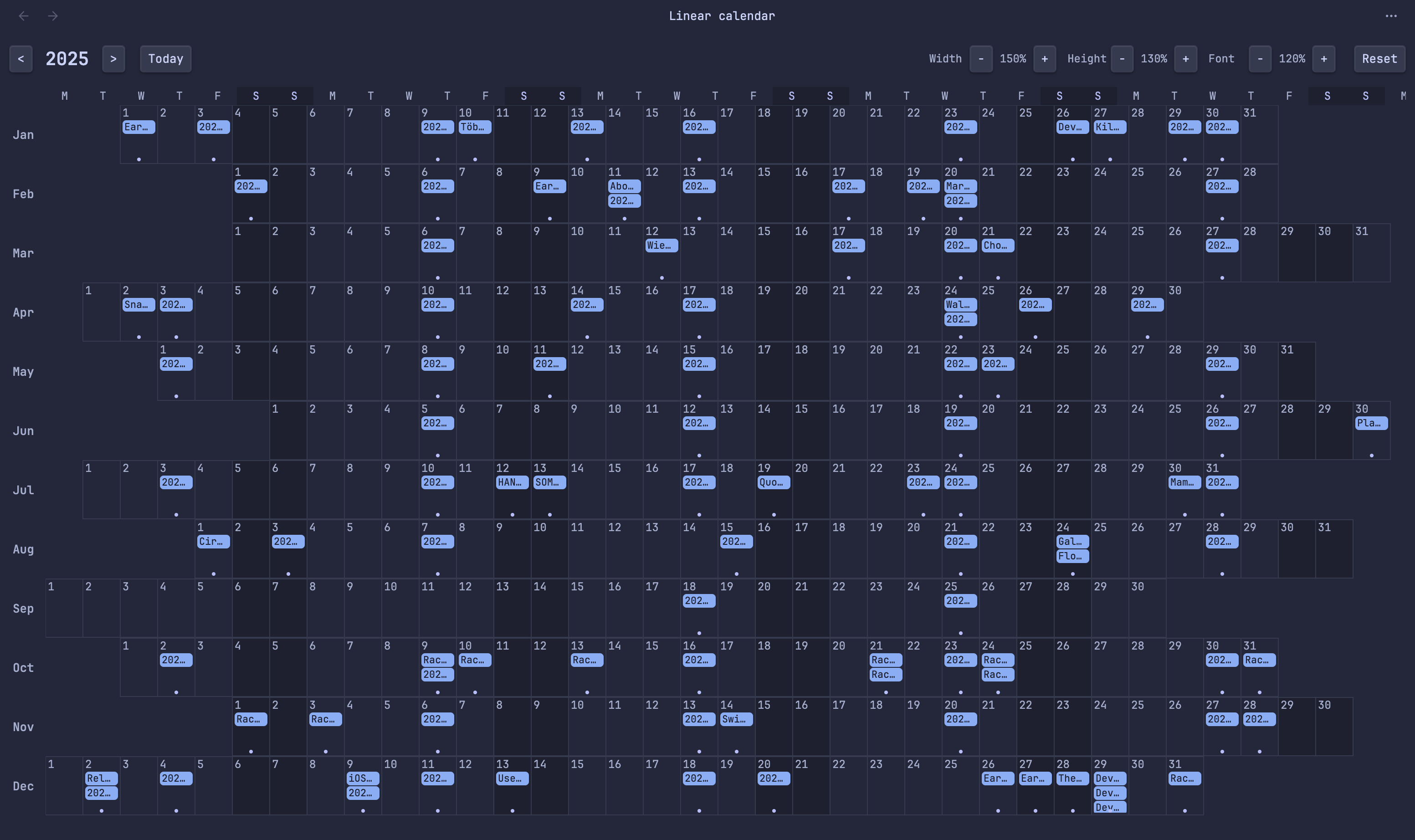
A year-at-a-glance calendar view for Obsidian with months displayed as rows and weekday-aligned columns.
Features
- Linear year view - All 12 months displayed as horizontal rows
- Weekday alignment - Days are aligned by weekday across all months (Mondays under Mondays, etc.)
- Multiple event sources:
- Daily notes (configurable folder and date format)
- Frontmatter date fields (configurable)
- File creation dates
- Interactive:
- Click any day to open/create a daily note
- Click an event to open that note
- Customizable display:
- Independent width/height scaling
- Adjustable font size
- Configurable weekday and month labels
- Visual highlights:
- Today marked with accent color
- Weekend columns distinguished
- Events shown as colored pills
Installation
From Community Plugins (recommended)
- Open Obsidian Settings
- Go to Community Plugins and disable Safe Mode
- Click Browse and search for "Linear Calendar"
- Install and enable the plugin
Manual Installation
- Download
main.js,manifest.json, andstyles.cssfrom the latest release - Create a folder called
linear-calendarin your vault's.obsidian/plugins/directory - Copy the downloaded files into this folder
- Reload Obsidian and enable the plugin in Settings > Community Plugins
Usage
- Click the calendar icon in the ribbon, or
- Use the command palette: "Linear Calendar: Open linear calendar"
Controls
- Year navigation:
<and>buttons to change year,Todayto jump to current year - Width: Adjust cell width (horizontal scaling)
- Height: Adjust cell height (vertical scaling)
- Font: Adjust font size for day numbers and events
- Reset: Return to default sizes
Settings
- Daily notes folder: Where your daily notes are stored
- Daily note format: Date format for daily note filenames (e.g.,
YYYY-MM-DD) - Date fields: Frontmatter fields to check for dates (comma-separated)
- Show file creation dates: Display notes on their creation date
- Weekday/Month labels: Customize the labels
- Default sizes: Set default values for width, height, and font scale
Development
# Install dependencies
npm install

# Build for development (with watch)
npm run dev

# Build for production
npm run build
License
Support
If you find this plugin useful, consider:
- Starring the repository on GitHub
- Reporting issues or suggesting features
- Contributing to the code
For plugin developers
Search results and similarity scores are powered by semantic analysis of your plugin's README. If your plugin isn't appearing for searches you'd expect, try updating your README to clearly describe your plugin's purpose, features, and use cases.