Inline Properties
unlistedby Zizouet
Reference note properties as inline variables anywhere in your vault using {{variable}} syntax.
Inline Properties
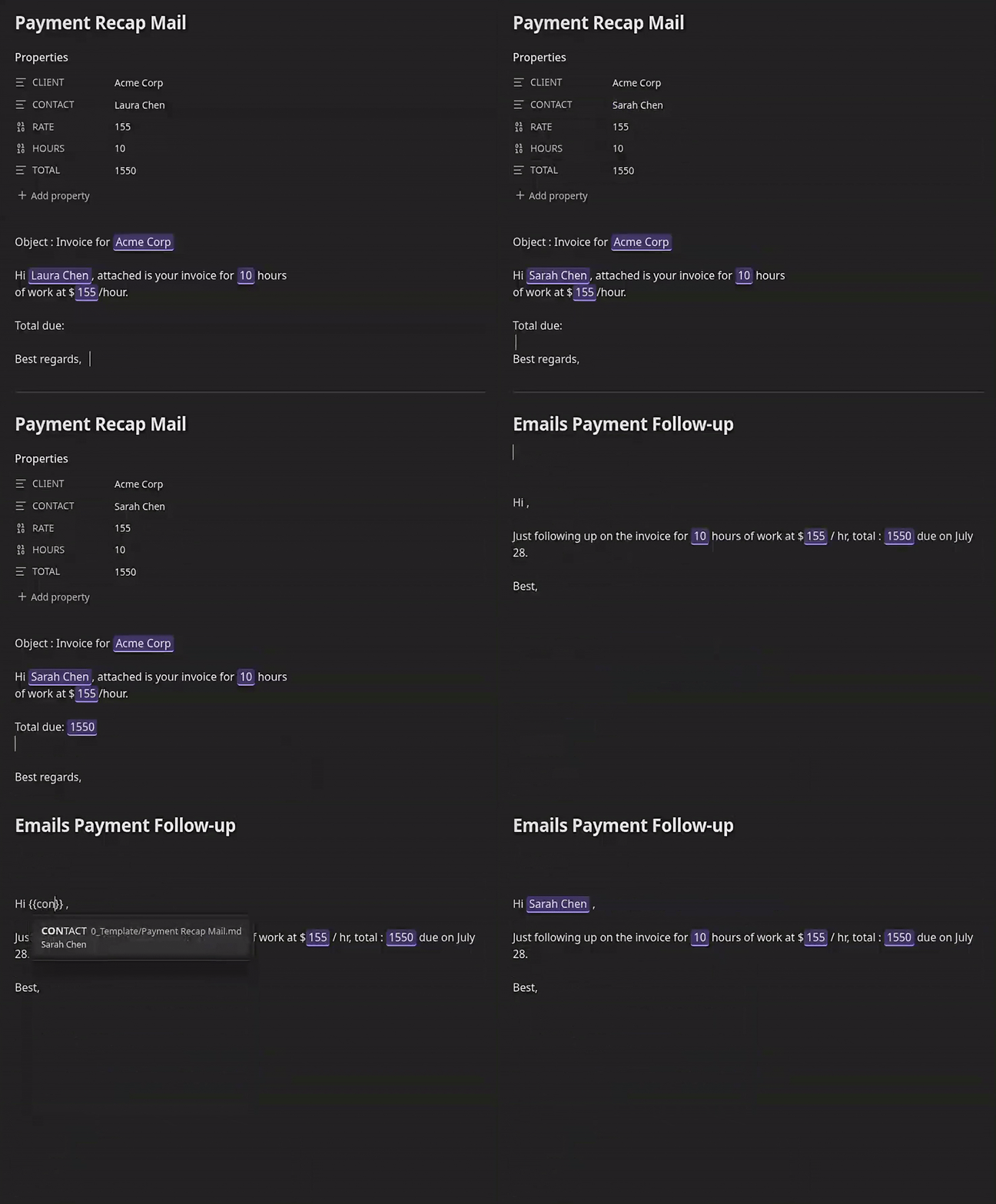
An Obsidian plugin that lets you reference note properties as inline variables anywhere in your vault using {{variable}} syntax. Values render inline in both Live Preview and Reading mode.
How it works
Add variables to a note's frontmatter (Properties):
---
project: Acme Corp
rate: 150
---
Then use them anywhere in that note, or anywhere else in the vault:
The project **{{project}}** runs at ${{rate}}/hour.
The {{variable}} token is replaced inline as you type. Click or tap a rendered value to edit its source property directly. The editor shows the property name and owning note, and includes an Edit reference action when the raw {{...}} source is editable. When you copy text containing variables, the resolved values are copied, not the raw syntax.
Strings, numbers, booleans, lists, and objects keep their existing type when edited. Lists and objects are edited as validated JSON. Changes are written to the owning note's frontmatter and refreshed anywhere the variable is rendered, including imported blocks.
Variable scope
| Syntax | Resolves to |
|---|---|
{{name}} | Property name from the current note's frontmatter |
{{Notes/Budget.md.rate}} | Property rate from Notes/Budget.md |
{{Clients/Acme.md.contact.email}} | Nested frontmatter property in another note |
Local (current note) properties take priority over vault-wide references when names collide.
Autocomplete
Type {{ in any note to trigger autocomplete. Matching is fuzzy and name-first: type a fragment of a variable name (you don't need the path) to find it anywhere in the vault. Each suggestion shows the variable name prominently with its originating path as a muted reference on the side, plus a value preview. Selecting a suggestion inserts the full {{path}} reference and handles Obsidian's auto-closing brackets automatically.
Settings
| Setting | Default | Description |
|---|---|---|
| Highlight live text | Off | Adds a visual highlight to rendered variable values |
| Copy resolved values | On | In editor and rendered-note selections or code blocks, replaces {{var}} with its current value instead of the raw syntax |
Custom highlighting
Override the .lv-live-text CSS class in a CSS snippet:
.lv-live-text {
    background-color: transparent;
    border-bottom: 2px solid var(--color-accent);
    border-radius: 0;
    padding: 0;
}
Installation
This plugin is in the Obsidian community plugin list. You can install it directly from Obsidian.
Development
npm install
npm run dev      # watch mode
npm run build    # production build
Targets Obsidian 0.15.0+, compatible with desktop and mobile.
Massive-vault benchmark
The synthetic benchmark exercises the production VaultProperties index with
large in-memory metadata caches. It measures initial indexing, active-note and
metadata updates, autocomplete candidate preparation, lookups, and heap growth:
npm run bench:massive-vault
npm run bench:massive-vault -- --notes=10000,50000 --properties=8 --folders=100
This isolates plugin indexing costs. It does not measure Obsidian's Markdown parsing, disk I/O, or editor/Reading View DOM rendering.
See Performance for the index design, benchmark limits, and measured before/after results at up to 100,000 notes.
Philosophy
This plugin does one thing: inline variable substitution. The codebase is intentionally minimal to stay easy to maintain. There are no plans to add new features. Future work is limited to improving what is already here.
Credits
Forked from HamzaBenyazid/Live-variables. Refactored to a CodeMirror 6 ViewPlugin for Live Preview and a native EditorSuggest for autocomplete.
For plugin developers
Search results and similarity scores are powered by semantic analysis of your plugin's README. If your plugin isn't appearing for searches you'd expect, try updating your README to clearly describe your plugin's purpose, features, and use cases.