Beacon
approvedby Ben Gutteridge
Fast, theme-aware search and heading navigation for the current note or whole vault. - This plugin has not been manually reviewed by Obsidian staff.
Beacon for Obsidian
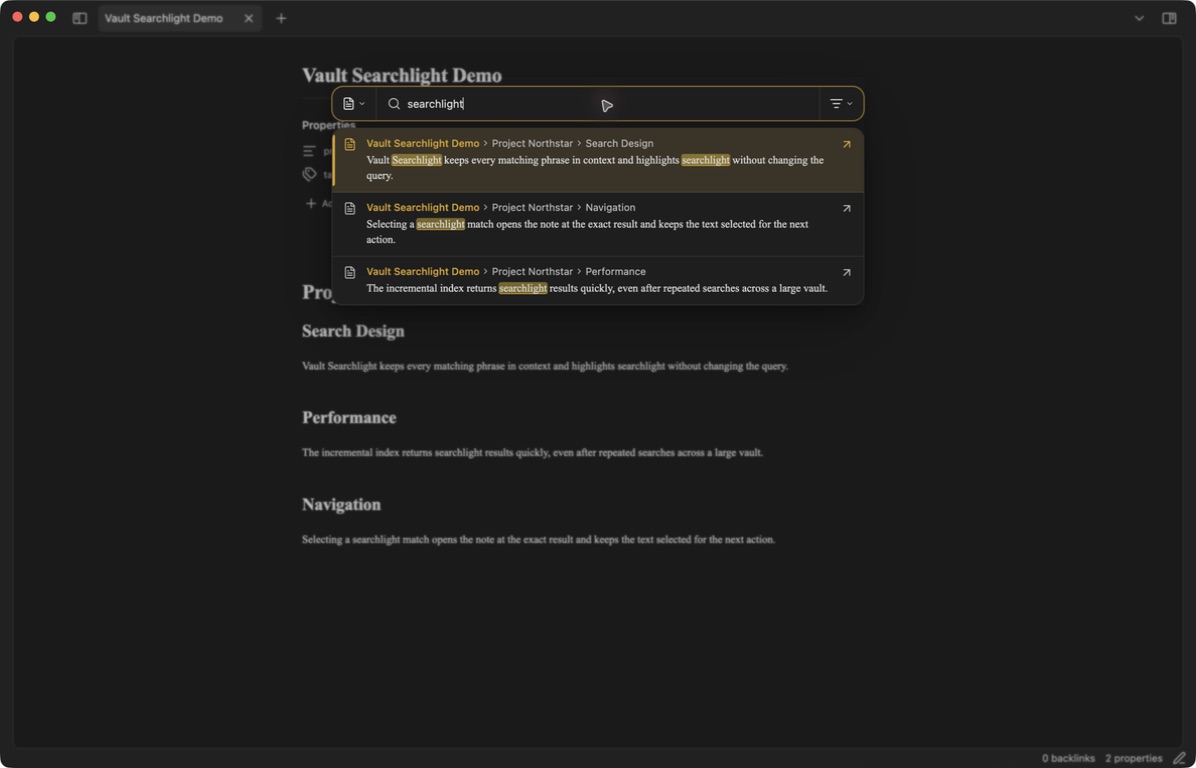
Beacon is a compact, theme-aware search and heading navigation plugin for Obsidian on desktop and mobile. Search the focused Markdown note or the entire vault while the query stays untouched when switching scope—no injected path: prefix and no directory text.
In-file heading navigator
Open the heading navigator to browse the outline for the focused note. It shows rendered Markdown titles with their H1–H6 hierarchy and nesting, keeps the full outline visible while you search, and supports keyboard navigation with the arrow keys, Enter to cycle matches, and Shift+Enter to jump. Jumping selects and highlights the full destination heading line in the editor until the next editor action.
Features
- This file / All files / Properties / Tags search-mode dropdown with icons and a remembered file-search default.
- A middle-right heading navigator for the focused note with hidden-track scrolling.
- Heading searches keep the full outline visible and highlight matches in place;
Entercycles matches andShift+Enterjumps to the selected heading. - Rendered Markdown excerpts with theme-accent match highlights.
- File and Markdown-rendered heading hierarchy shown above every excerpt, including links and inline formatting.
- Exact quoted word and phrase matching, exclusions,
OR, regex, and field operators. - Optional fuzzy matching controlled only from the plugin settings.
- Optional heading-match exclusion hides heading-only result cards while retaining heading breadcrumbs.
- Optional Excalidraw Data exclusion omits generated drawing payload sections.
- Optional Excalidraw Data exclusion for the heading navigator hides that heading and its nested headings.
- Vault-relative paths and glob patterns can exclude files from every search mode.
- Ordinary file searches omit YAML properties and tag tokens; Properties searches and shows only YAML property content, while Tags searches and shows only tag values.
- Property and tag modes have dedicated commands and no separate settings toggles.
- Icon-only relevance, file name, location, and modified-date sorting. The chosen sort survives restarts.
- Unified segmented search bar with icon-only scope and sort controls; their menus retain descriptive text.
- Results appear in a separate theme-native panel with hidden-track scrolling and no command footer.
- No close control; click outside or press
Escto dismiss the search. - Clicking a result opens its note and selects the exact match until the next editor action.
- Incremental in-memory indexing, shared in-flight reads, debounced input, immediate stale-search cancellation, and frame-budgeted rendering for large vaults.
- Keyboard navigation and commands for every switchable option.
- Responsive phone and tablet layouts with safe-area support, touch-sized controls, and software-keyboard-aware sizing.
Mobile
Beacon supports the same search modes, query syntax, sorting, rendered results, result jumps, and heading navigator on Obsidian Mobile. The panels follow the visible screen as the software keyboard opens, respect device safe areas, use touch-sized controls, and avoid reopening the keyboard after a result or heading jump. Mobile indexing and Markdown rendering yield in smaller batches to keep scrolling and typing responsive while preserving the desktop behavior and layout.
Open Beacon from the command palette, or add any Beacon command to Obsidian's mobile toolbar or Quick Action. Hardware-keyboard hotkeys continue to work when a keyboard is connected.
Query syntax
| Syntax | Meaning |
|---|---|
atlas plan | Both terms must occur in the file; matching lines are shown |
"project atlas" | Exact phrase match |
"atlas" | Exact whole-word match |
atlas OR roadmap | Match either group |
atlas -draft | Exclude matches containing draft |
/atlas\\s+plan/i | JavaScript regular expression |
path:Research | Filter by note path |
file:Atlas | Filter by file name |
tag:project | Filter by tag while using Tags mode |
section:Findings | Filter by heading hierarchy |
content:atlas or line:atlas | Match result-line content |
match-case:Atlas | Match content with exact letter case |
ignore-case:atlas | Explicitly match without case sensitivity |
path:/Daily.*2026/ | Use a regular expression inside an operator |
task:* | Match tasks |
task-todo:* | Match incomplete tasks |
task-done:* | Match completed tasks |
Operators are optional. Changing search mode never modifies the search term. Properties and Tags search across the vault and isolate their respective content types.
Commands and hotkeys
| Command |
|---|
| Open search for current file |
| Open search for all files |
| Toggle current file / all files |
| Cycle result sorting |
| Open property search |
| Open tag search |
| Open heading navigator for current file |
Assign any shortcut you prefer in Settings → Hotkeys → Beacon. While the search panel is open, Mod+Alt+F toggles between current-file and all-files search, Mod+Alt+S cycles sorting, the arrow keys navigate results, and Enter opens the selected result. In the heading navigator, Enter cycles matching headings, Shift+Enter jumps to the selected heading, and the arrow keys move through the full outline.
Settings
- Fuzzy matching enables inexact matching without adding a control to the search bar.
- Exclude heading matches hides search cards caused only by heading-line matches.
- Exclude Excalidraw data omits generated drawing content from ordinary search.
- Excluded files accepts one vault-relative file, folder, or glob per line, such as
Archive/,Private.md, or*.excalidraw.md. - Exclude Excalidraw data from heading navigator hides the Excalidraw Data outline branch.
- Result limit caps rendered results to keep repeated searches responsive.
Installation
After the plugin is accepted into the Community Plugins directory:
- Open Settings → Community plugins → Browse in Obsidian.
- Search for Beacon, select it, and choose Install.
- Enable the plugin.
For a manual installation, download main.js, manifest.json, and styles.css from the latest GitHub release and place them in:
<vault>/.obsidian/plugins/vault-searchlight/
The plugin ID and install folder remain vault-searchlight for update continuity. Reload Obsidian, then enable Beacon under Community plugins.
Privacy
Beacon performs indexing and searching locally inside Obsidian. It makes no network requests and includes no analytics or telemetry.
Development
npm install
npm test
npm run build
For local development, symlink this project into that plugin directory and run npm run dev.
License
For plugin developers
Search results and similarity scores are powered by semantic analysis of your plugin's README. If your plugin isn't appearing for searches you'd expect, try updating your README to clearly describe your plugin's purpose, features, and use cases.