Global Search
unlistedby Maksim Radaev (@vflame6)
Search titles, headings, and content across your whole vault — jump to any match and watch it light up.
Global Search
A command-bar style global search for Obsidian. Press a shortcut, search across note titles, headings, and content, then jump straight to the match — which lights up so you can spot it instantly.
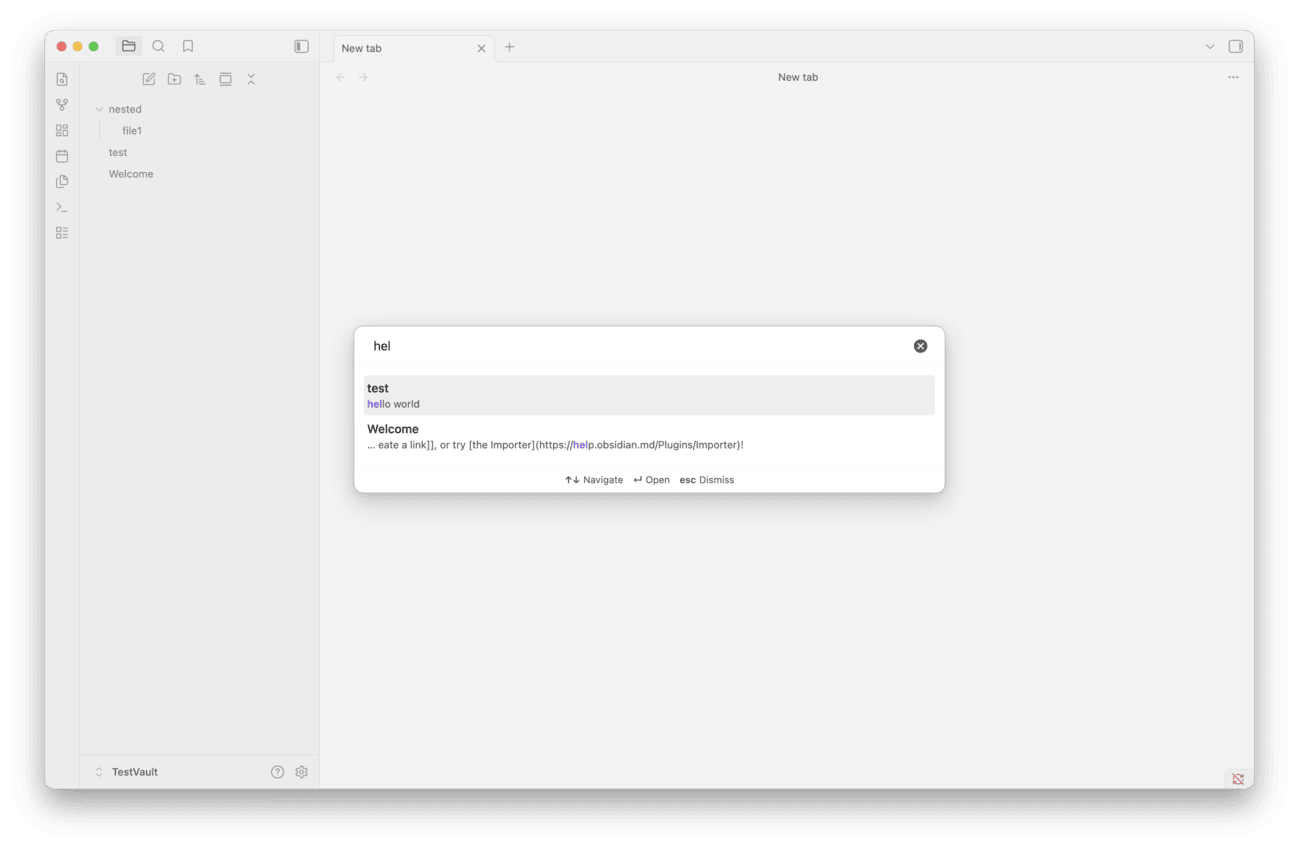
Features
- Search across note titles, headings, and content from one prompt.
- Word or letter matching — find the words you type as typed (default), or fuzzy-match letters in order.
- Configurable scope — match filenames only, content only, or both.
- Jump to the match and scroll it into view, with a one-time highlight animation to draw your eye.
- Configurable highlight — keep it, clear it after 5 seconds, or turn it off.
- Configurable result rows — show or hide the filename, folder path, and matched snippet.
- Open in the current tab or a new tab.
- Recent files when the prompt is empty.
Installation
Manual (local) install
- Download
main.js,manifest.json, andstyles.cssfrom the latest release (or build them — see below). - Create the folder
<your-vault>/.obsidian/plugins/global-search/and copy the three files into it. - In Obsidian, open Settings → Community plugins, reload plugins (or restart Obsidian), and enable Global Search.
Build from source
npm ci
npm run build
This writes main.js. Copy main.js, manifest.json, and styles.css into <your-vault>/.obsidian/plugins/global-search/ as above.
BRAT
You can also install via the BRAT community plugin by adding this repository as a beta plugin.
Usage
- Press Cmd/Ctrl + Shift + K (rebindable in Settings → Hotkeys) to open the search prompt.
- Type to search. Use ↑/↓ to move through results and ↵ to open the selected one.
- The note opens scrolled to the match, which briefly highlights.
Settings
| Setting | Values | Default | Effect |
|---|---|---|---|
| Search scope | Filenames only / Content only / Filenames and content | Filenames and content | Which parts of a note are matched. |
| Match mode | Word search (exact) / Letter search (fuzzy) | Word search | How titles and headings are matched. Word search finds the words you type, as typed. Letter search is fuzzy: the letters only need to appear in order, so test also matches "Tea Set". Content lines are always matched by words. |
| Show filename | on / off | on | Show the note name in a result row. |
| Show file path | on / off | on | Show the folder path in a result row. |
| Show matched content | on / off | on | Show the matched heading/line snippet. |
| Highlight on open | Keep highlight / Until you move off the line / Remove after 5 seconds / Don't highlight | Until you move off the line | How the match is highlighted after you jump to it. The default clears the highlight as soon as you navigate to another line or tab; pick "keep highlight" to leave it until the next open. |
| Open results in a new tab | on / off | off | Open in a new tab instead of the current one. |
| ↳ Focus new tab | on / off | off | When opening in a new tab, switch focus to it instead of leaving it in the background. |
Development
npm ci          # install dependencies
npm run dev     # esbuild watch mode
npm run build   # typecheck + production build
npm run test    # run the unit tests
License
MIT © Maksim Radaev
For plugin developers
Search results and similarity scores are powered by semantic analysis of your plugin's README. If your plugin isn't appearing for searches you'd expect, try updating your README to clearly describe your plugin's purpose, features, and use cases.