Vault Steward
approvedby Ibrahim Arshad
Local-first, evidence-backed vault maintenance for Obsidian. - This plugin has not been manually reviewed by Obsidian staff.
Vault Steward
Keep your vault trustworthy
Vault Steward helps you find broken references, schema problems, task and decision drift, and policy violations in a local Obsidian vault. It presents cited findings and safe repair options; it never edits a note on its own.
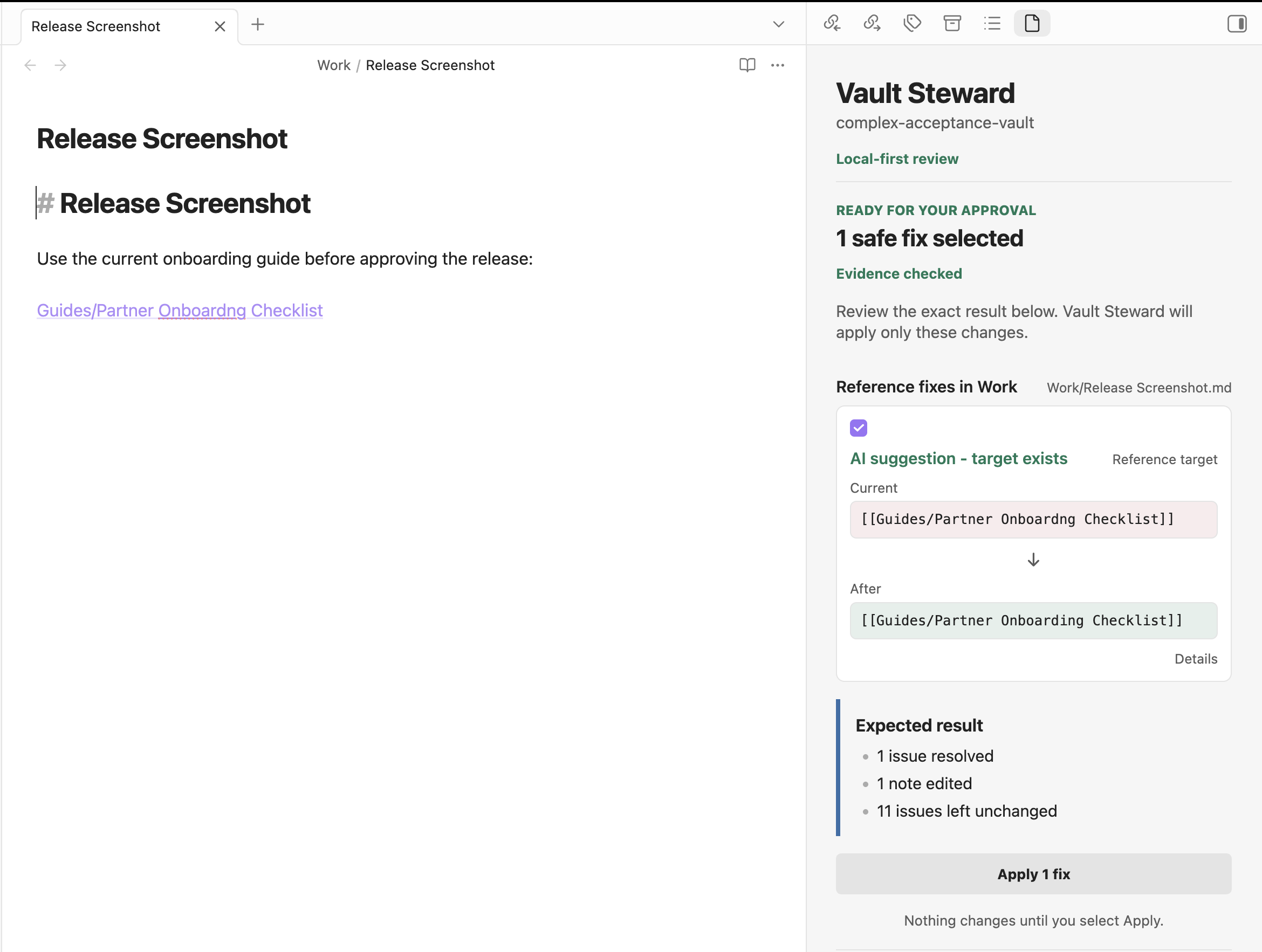
See the complete scan-to-approval walkthrough.
The simple flow
- Choose a model provider in Settings.
- Select Check vault.
- Review the exact Current and After preview for each proposed change.
- Select the changes you want, then explicitly use Apply fixes.
Each selected change is checked against the current note revision immediately before it is applied. If the note changed, Vault Steward preserves that edit and asks you to create a fresh preview.
What Vault Steward checks
- Broken internal links, embeds, and anchors.
- Markdown and frontmatter schema violations.
- Task, decision, and deterministic YAML policy issues.
- Bounded, cited review candidates for duplicate entities, contradictions, staleness, and ambiguous decisions.
Coordinated review, not autonomous editing
Deterministic checks parse the vault, validate evidence, prepare exact diffs, and enforce policy. A configured model can classify or rank bounded cited evidence, but it cannot write notes, change policy, approve a proposal, or apply a fix. You remain the approval authority for every edit.
Choose a model provider
Ollama is the local-first path. Ollama and llama.cpp-compatible providers must use loopback-only endpoints. HyperFusion and OpenAI are experimental opt-in cloud providers: each requires its own API key and acknowledgement before it can receive bounded selected evidence at its fixed API origin. Acknowledging one cloud provider does not enable the other.
Model quality varies by device, model, vault content, and task. See the local model guidance and evaluation methodology for detailed, local evaluation material.
Privacy and safety
Vault Steward stores its canonical state locally and excludes note bodies, prompts, raw model output, absolute paths, URLs, and secrets from default traces. Cloud use is limited to the selected evidence and prompt required for that request; it never grants authority to edit a note. Read the full privacy statement and security overview.
Install and get started
Obsidian desktop 1.13.0 or later is required. Build the plugin, copy the full
dist/vault-steward/ directory to
<vault>/.obsidian/plugins/vault-steward/, enable it in Obsidian, configure a
provider, and start with Check vault. See
release compatibility,
troubleshooting, and
upgrade notes for operating guidance.
Limitations
macOS is the only validated desktop platform; Windows and Linux are unvalidated. Vault Steward cannot establish external facts or guarantee model accuracy, and its repair families are deliberately narrow. See known limitations for the complete boundaries.
Documentation
- Release readiness
- Product walkthrough
- Changelog
- MIT license
- Troubleshooting
- Upgrade notes
- Release compatibility
- Privacy
- Security
- Known limitations
- Observability and retained data
Development
Use Node.js 20 or later for development and packaging. Run the documented checks in CONTRIBUTING.md; release owners should follow the release-readiness guide.
For plugin developers
Search results and similarity scores are powered by semantic analysis of your plugin's README. If your plugin isn't appearing for searches you'd expect, try updating your README to clearly describe your plugin's purpose, features, and use cases.