Vault Link Check
approvedby Tomayachi
Scan your vault for broken internal links and sort them into near-misses (a note that exists under a slightly different name) and planned notes you meant to write. Runs entirely on your device. - This plugin has not been manually reviewed by Obsidian staff.
Vault Link Check
Find broken internal links in your Obsidian vault and, more usefully, tell them
apart. A broken [[wikilink]] is not one kind of thing. Some point at a note
that does exist under a slightly different name (you renamed it, or fat-fingered
it). Others point at a note you meant to write and never did. Those want opposite
responses: fix the first, revisit the second. This plugin sorts them for you.
Prefer not to install anything? There's a browser version of the same classifier at vault-link-checker.vercel.app. This plugin is the native version that reads your live vault index directly, so aliases and heading/block refs are resolved for you with nothing to upload.
What it does
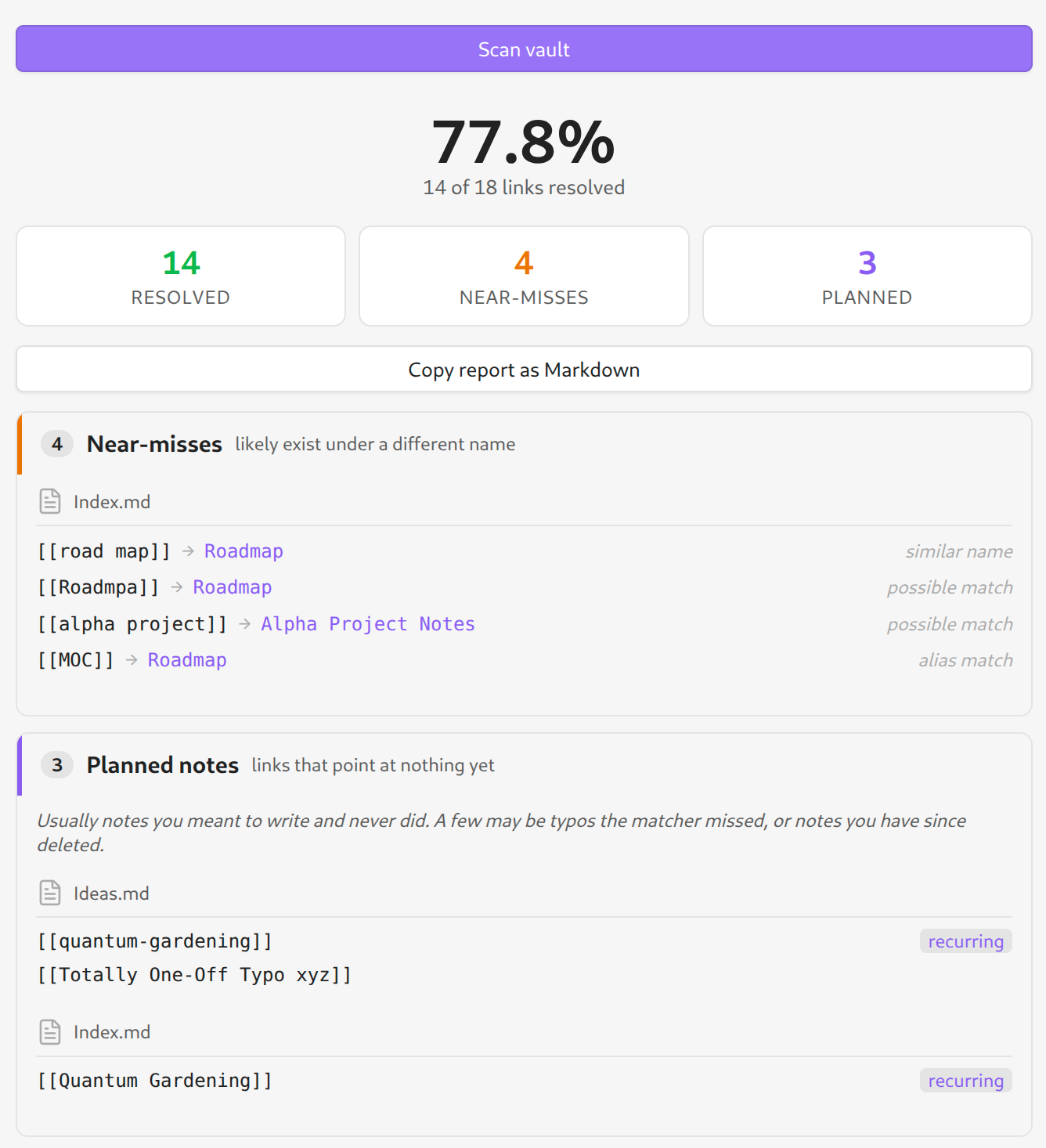
Run a scan and you get a report pane grouped into three buckets:
- Resolved — links that point at a note that exists. Just a count.
- Near-misses — the link is broken, but a real note is a close match: same name with different spacing or punctuation, a one- or two-character typo, or a frontmatter alias that lines up. Each row suggests the note it probably meant, so a rename or retype is a quick fix.
- Planned notes — links that point at nothing. Treated as dropped ideas,
not errors: a
[[link]]you wrote is a note past-you wanted and didn't get to. Ones you linked from more than one note are flagged recurring — a stronger signal it's worth writing. Copy the whole set out as a Markdown checklist to seed a backlog.
Everything runs on Obsidian's own link index (metadataCache), so aliases,
heading refs (#), block refs (^) and path-qualified links are all classified
correctly with no re-parsing.
How it's different from existing link plugins
Plugins like Dangling links and Find orphaned files and broken links answer "which links are broken?" and "which notes are unreferenced?" — they give you a flat list. Vault Link Check answers the next question: for each broken link, what should I do about it? The value is the classification — near-miss (with a suggested target) versus planned note — and the "recurring idea" signal, not just the detection. It reports; it never edits your vault.
Install
From Community plugins (once accepted): Settings → Community plugins → Browse → search "Vault Link Check" → Install → Enable.
Beta via BRAT: install the BRAT plugin, then "Add beta plugin" with this repository URL.
Manual: download main.js, manifest.json and styles.css from the latest
release into <vault>/.obsidian/plugins/vault-link-check/, then enable it.
Usage
- Click the unlink ribbon icon, or run "Vault Link Check: scan vault" from the command palette.
- Rows link back to the source note (and near-miss rows to the suggested target) so you can jump straight to a fix.
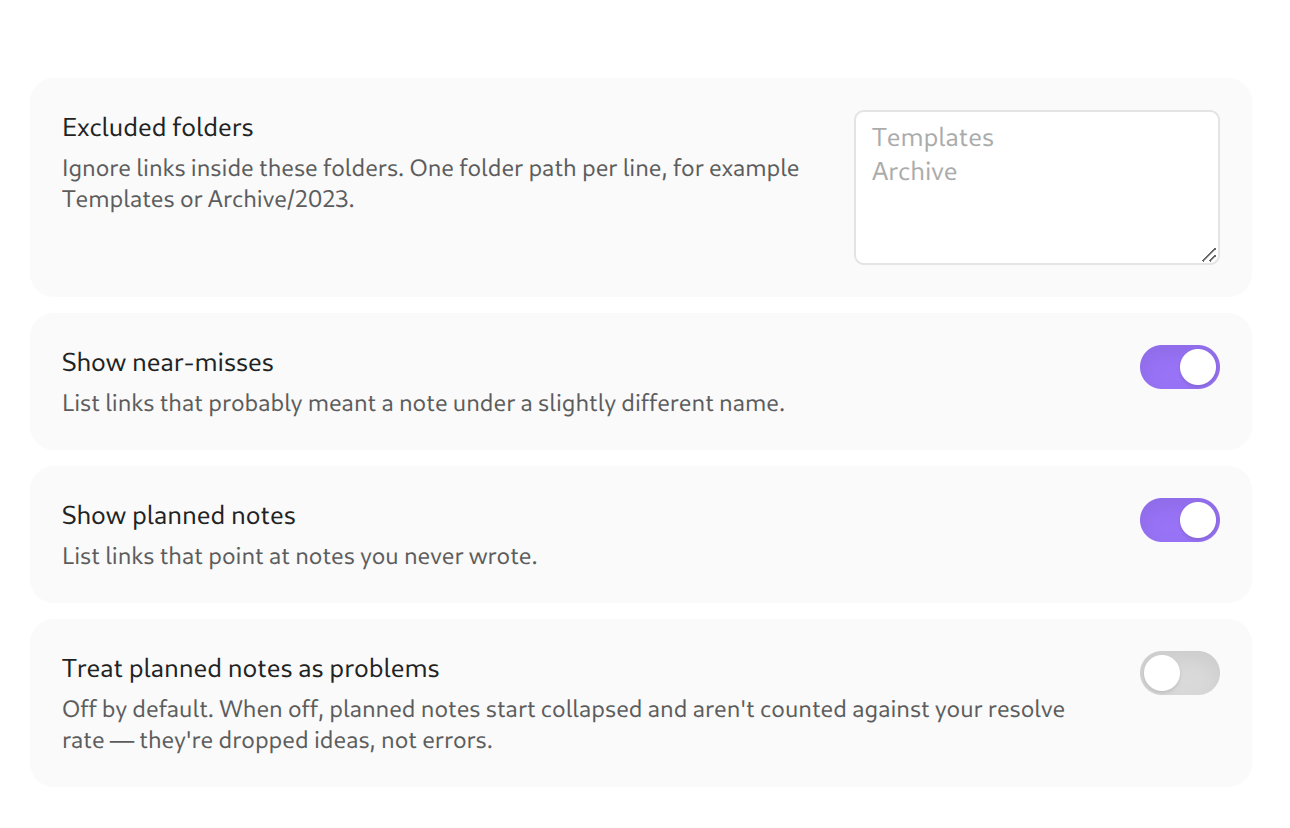
- Settings let you exclude folders (templates, archives), hide either section, and choose whether planned notes count against your resolve rate (off by default — they're ideas, not bugs).
Privacy
Runs entirely on your device. No network calls, no telemetry, no account, no
external assets. The source is here and the release bundle is a single generated
main.js you can inspect. It works with your connection disabled.
Development
npm install
npm test        # pure classifier tests via node --test
npm run build   # type-check + bundle to main.js
The interesting logic lives in src/scan.ts (a pure, Obsidian-free classifier)
so it can be unit-tested without a running app. src/adapter.ts is the only file
that reads the live vault.
License
MIT — see LICENSE.
For plugin developers
Search results and similarity scores are powered by semantic analysis of your plugin's README. If your plugin isn't appearing for searches you'd expect, try updating your README to clearly describe your plugin's purpose, features, and use cases.