Visual Agent Map
approvedby Kevin Tsai
Explore topics with asynchronous AI tasks in a visual map backed by Markdown notes. - This plugin has not been manually reviewed by Obsidian staff.
Visual Agent Map
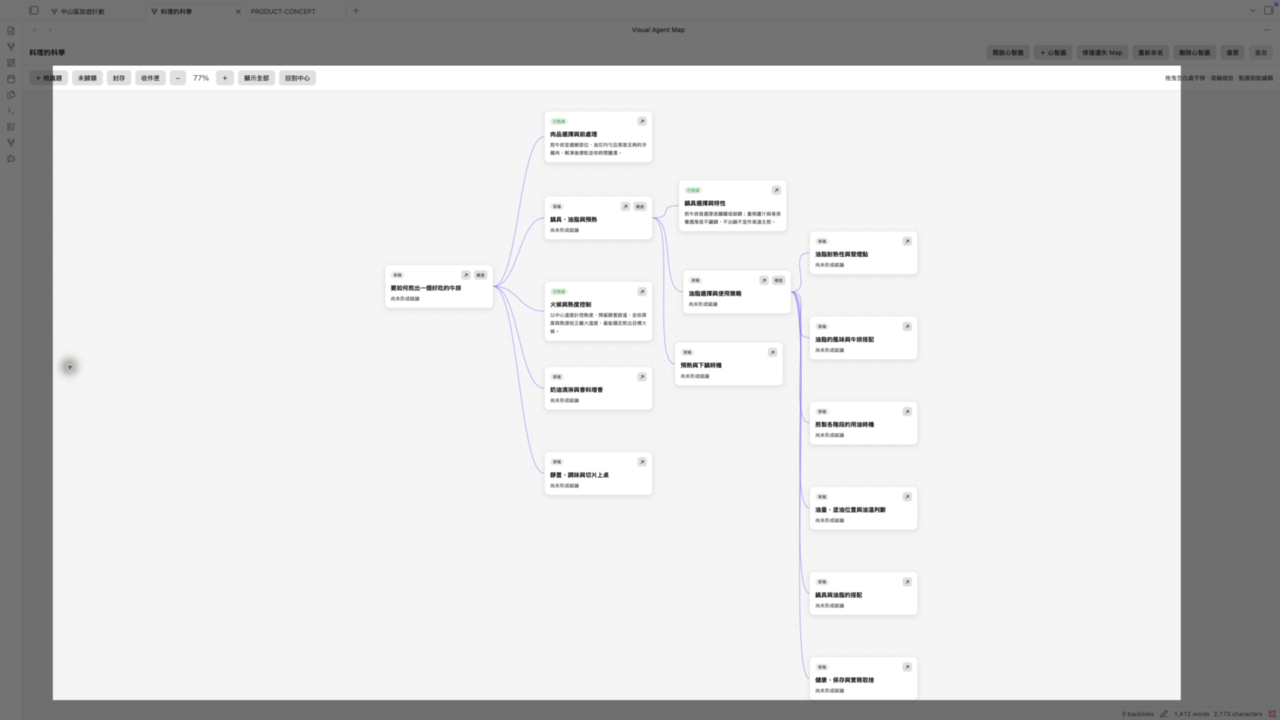
Turn complex questions into a visual research map while keeping every result in editable Markdown.
English
Visual Agent Map is a desktop-only Obsidian plugin for breaking a broad question into connected topics, running focused Codex tasks, and preserving the results as ordinary Markdown notes. The map shows structure and current understanding at a glance; notes remain readable, editable, and portable without the plugin.
Highlights
- Visual topic map — create topics and subtopics, drag nodes, collapse branches, zoom, and change parent relationships.
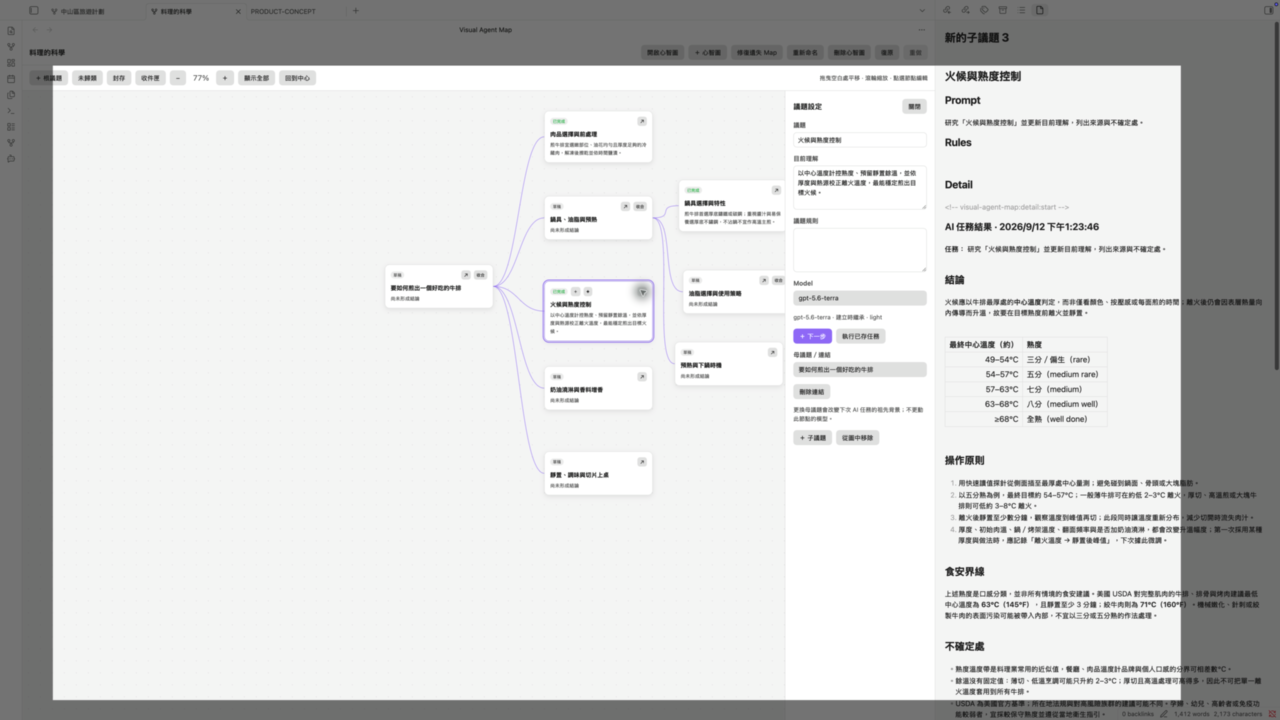
- Focused topic workspace — keep current understanding, reusable AI rules, and the next task beside each topic.
- Codex-assisted research — research, compare options, check risks, propose subtopics, or synthesize findings.
- Markdown-first storage — each topic is a normal Markdown note; the map structure is stored in
Map.md. - Knowledge organization — remove notes from a map without deleting them; reclaim, archive, or move them later.
- Safer editing — previewed migration, conflict handling, and session undo/redo protect existing work.
- Built-in sample — explore a read-only Taiwan travel map, then duplicate it into an editable workspace.
- Debug log — inspect, copy, or clear VAM runtime diagnostics from the Command Palette.
- Local credentials — uses locally signed-in Codex tools and never stores API keys.
How it works
- Create a mind map for a research subject.
- Add topics and subtopics to define the questions to answer.
- Choose and confirm a focused Codex task.
- Review the summary on the map and the full Markdown detail.
- Continue research or synthesize related findings into a new topic.
Requirements
- Obsidian desktop
1.13.7or later (the verified compatibility baseline for this release). - A local Codex installation signed in to your account.
codex-acpis preferred; Codex CLI is used only when ACP has a prompt-before transport error.- Desktop only. Current release:
0.6.1.
Install
Download main.js, manifest.json, and styles.css from the exact GitHub Release you choose. Do not install from a branch.
- Create
<your-vault>/.obsidian/plugins/visual-agent-map/. - Place the three release assets in that folder, preserving an existing
data.json. - Reload Obsidian and enable Visual Agent Map under Settings → Community plugins.
- Confirm the local
codex-acpand Codex CLI paths in plugin settings.
Do not copy the repository or run npm install inside the plugin directory. See INSTALL.md for agent-assisted installation.
Vault data
Agent Workspace/
├── Topics/
│   └── <topic>/
│       ├── Map.md
│       ├── Notes/
│       ├── Unassigned/
│       └── Archive/
└── Inbox/
Plugin-created content stays in the vault. A fresh installation creates the empty workspace structure and opens the read-only built-in sample; uninstalling the plugin does not delete workspace content.
Privacy and network access
- No telemetry and no stored API keys.
- A topic task is sent to the locally signed-in Codex tool only after you explicitly confirm it. Relevant topic content, instructions, and the task are included as context.
- The plugin runs configured
codex-acpor Codex CLI outside the vault; it never installs or updates them. - Remote images in Markdown follow Obsidian's ordinary image-loading behavior.
Current limitations
- Desktop only; available through the Obsidian Community Plugin catalog.
- No automatic layout, node search, multiple parents, or persistent task history.
- Undo/redo lasts for the current Obsidian session.
Build from source
Run npm ci, npm run build, and npm test at the repository root. The production assets are main.js, manifest.json, and styles.css.
繁體中文
Visual Agent Map 是桌面版 Obsidian 外掛:用視覺化心智圖拆解複雜問題、執行聚焦的 Codex 任務,並將所有結果保存為一般 Markdown 筆記。
心智圖讓你快速掌握研究結構與目前結論;即使不使用外掛,底層筆記仍可直接閱讀、編輯與搬移。
主要功能
- 視覺化議題地圖:建立議題與子議題、拖曳節點、收合分支、縮放,以及調整母子關係。
- 議題工作台:在每個節點旁管理目前理解、AI 規則與下一步任務。
- Codex 輔助研究:研究、比較、風險檢查、拆解子議題與整合發現。
- Markdown 優先:每個節點都是普通 Markdown 筆記,圖面結構保存在
Map.md。 - 知識整理:從圖上移除筆記不會刪除內容,之後仍可認領、封存或移至其他主題。
- 安全編輯:遷移預覽、衝突處理與工作階段復原/重做,降低影響既有資料的風險。
- 內建範例:可瀏覽唯讀的台灣旅遊心智圖,再複製成自己的可編輯版本。
- 偵錯日誌:可從命令面板查看、複製或清除 VAM 執行記錄。
- 使用本機登入狀態:使用本機已登入的 Codex 工具,不儲存 API key。
使用方式
- 為研究主題建立一張心智圖。
- 新增議題與子議題,定義需要回答的問題。
- 選擇並確認一項聚焦的 Codex 任務。
- 在心智圖查看摘要,在 Markdown 筆記閱讀完整內容。
- 繼續研究,或將相關發現整合成新的議題。
系統需求
- Obsidian 桌面版
1.13.7或更新版本(本版本實際驗證的相容性基線)。 - 已在本機安裝並登入 Codex。
- 建議使用
codex-acp;只有 ACP 在送出 prompt 前發生 transport error 時,才會改用 Codex CLI。 - 僅支援桌面版。目前版本:
0.6.1。
安裝
請從指定的 GitHub Release 下載 main.js、manifest.json、styles.css;不要使用 branch 檔案。
- 建立
<你的-vault>/.obsidian/plugins/visual-agent-map/。 - 放入三個 release assets,並保留既有的
data.json。 - 重新載入 Obsidian,在 設定 → 第三方外掛 啟用 Visual Agent Map。
- 在外掛設定確認本機
codex-acp與 Codex CLI 路徑。
不要把整個 repository 複製到外掛資料夾,也不要在該資料夾執行 npm install。可參考 INSTALL.md 的安裝說明。
Vault 資料
Agent Workspace/
├── Topics/
│   └── <topic>/
│       ├── Map.md
│       ├── Notes/
│       ├── Unassigned/
│       └── Archive/
└── Inbox/
外掛建立的資料保存在 Vault 的 Agent Workspace/。全新安裝只建立空的基本結構並開啟唯讀內建範例;卸載外掛不會刪除 Workspace 內容。
隱私與網路存取
- 不含 telemetry,也不儲存 API key。
- 只有你確認執行 AI 任務後,外掛才會將相關議題內容、指令與任務交給本機已登入的 Codex 工具。
- 外掛會在 Vault 外執行設定的
codex-acp或 Codex CLI,但不會自行安裝或更新它們。 - Markdown 的遠端圖片會依 Obsidian 一般行為連線至對應圖片來源。
目前限制
- 僅支援桌面版,已上架 Obsidian Community Plugin catalog。
- 尚未包含自動排列、節點搜尋、多母議題與永久任務歷史。
- 復原/重做只保留在目前 Obsidian 工作階段。
從原始碼建置
在 repository 根目錄執行 npm ci、npm run build 與 npm test。正式產物為 main.js、manifest.json、styles.css。
License
Copyright © 2026 Kevin Tsai.
This project is licensed under the GNU Affero General Public License Version 3 (AGPL-3.0-only). See LICENSE.
For plugin developers
Search results and similarity scores are powered by semantic analysis of your plugin's README. If your plugin isn't appearing for searches you'd expect, try updating your README to clearly describe your plugin's purpose, features, and use cases.