by Walter Forkel
Record, transcribe, clean up, and append thoughts with configurable providers.
Voice Append
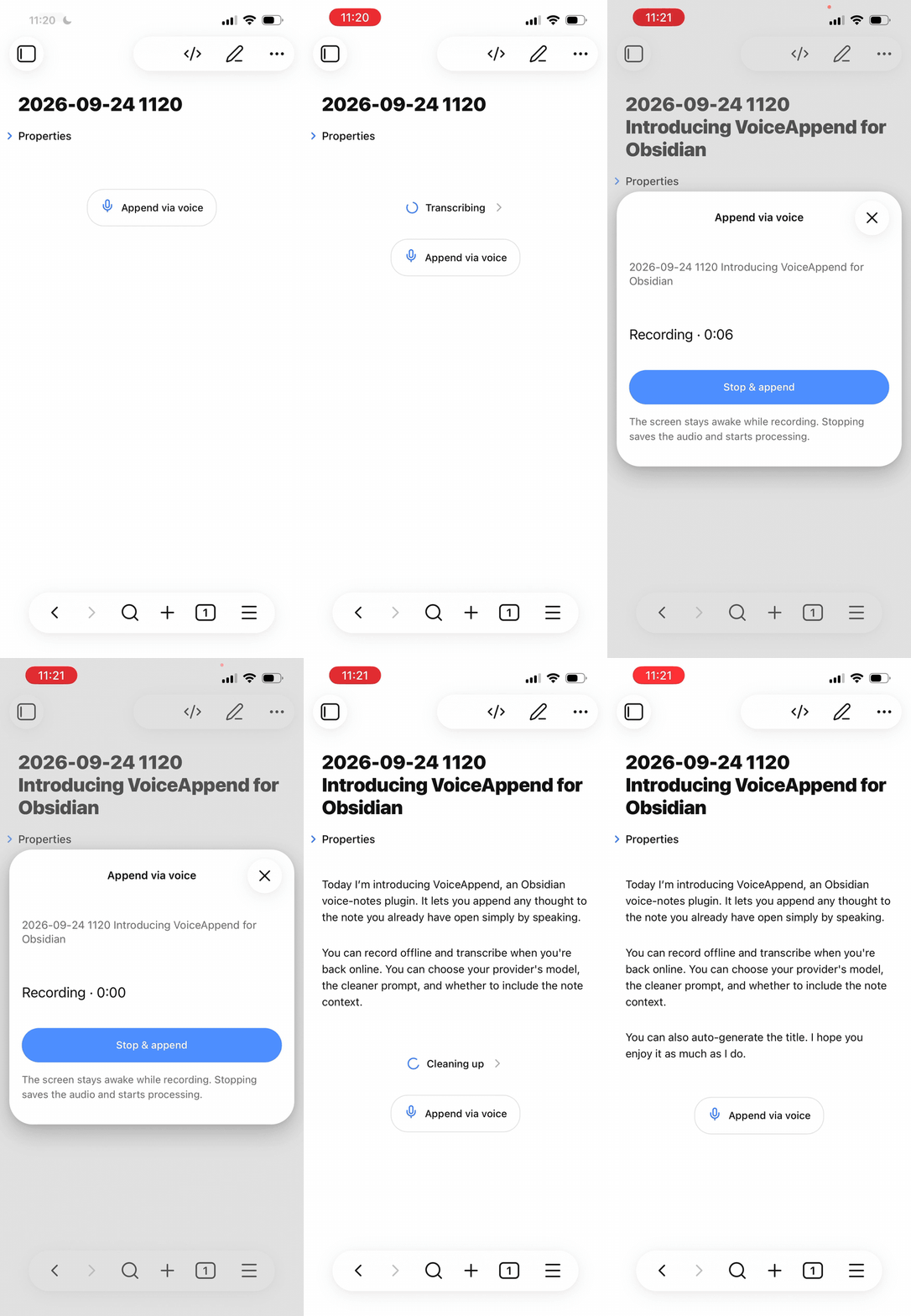
Voice Append records a thought, transcribes it through a configurable transcription provider, cleans it up with an LLM provider, and appends the result to the active Obsidian note. It is designed for quick capture on iPhone and also works on desktop.
Features
- Record from the end of a note, the command palette, the ribbon, or Obsidian's mobile toolbar.
- Keep the screen awake while a recording is active where the platform permits it.
- Transcribe and clean up speech directly through OpenAI-compatible provider endpoints without a separate server.
- Show progress at the end of the target note without writing technical markers into Markdown.
- Resume saved jobs after a restart or temporary network failure.
- Optionally include note context and familiar names or terminology during cleanup.
- Optionally generate a filename when the note contains only frontmatter.
- Optionally add the original transcript below the cleaned text. This is disabled by default.
- Use the interface in English or German, following Obsidian's language setting.
Requirements
- Obsidian 1.11.4 or later
- Credentials accepted by the configured providers, unless a local endpoint requires no authentication
- Network access to the configured providers while processing a recording
The defaults use https://api.openai.com/v1, gpt-transcribe for transcription, and gpt-5.6-luna for cleanup. Model availability depends on your provider account and may change over time.
Installation
Until Voice Append is listed in Obsidian's Community Plugins directory, install it manually from a GitHub release or build it from source.
For a manual installation, run npm ci && npm run release, then copy these files from dist/ into <vault>/.obsidian/plugins/voice-append/:
main.jsmanifest.jsonstyles.css
Reload Obsidian, open Settings → Community plugins, and enable Voice Append.
Setup and use
- Open Settings → Voice Append.
- Choose the OpenAI, OpenRouter, or Custom preset, then select an existing LLM provider secret or create one with Obsidian's keychain picker. The key and its selection stay local to each device; configure them once on desktop and once on mobile. Existing Voice Append keys remain selected automatically.
- Confirm the two model names and select Test configuration. The test sends a bundled two-second sample through transcription and cleanup without changing a note or creating a saved recording.
- For local or mixed providers, open Advanced provider settings to configure separate endpoints and shared, separate, or no authentication.
- Open a Markdown note and select Append via voice at the end of the note. You can also run the command from the command palette, ribbon, or mobile toolbar.
- Select Stop & append when finished. The recording is saved locally before network processing starts, and the note scrolls to the processing indicator.
Open Recordings and status from the plugin settings or command palette to retry a failed job, download its audio, reassign its target note, or delete it.
Settings
- Show recording button in notes controls the inline button. Commands and toolbar actions remain available.
- Generate titles for empty notes requests a title in the same cleanup call. The separate Title prompt is included in the cleanup instructions only when a title is requested. If the note has no body content both when recording starts and when the result is appended, the plugin renames the file through Obsidian so links stay current. Frontmatter is ignored. The default Append to existing filename mode preserves Unique Notes timestamps (for example,
20260924 083000 Morning idea.md); Replace existing filename uses only the generated title. Generated titles are not inserted into the note body. - Include original transcript adds a collapsed transcript section below the cleaned text.
- Dated heading adds a timestamped heading to each append.
- Use note context for cleanup sends up to 16,000 characters from the target note, excluding frontmatter and HTML comments. The note is reference material; only the new transcript is rewritten.
- Familiar names and concepts supplies up to 2,000 characters of preferred spellings and terminology to transcription and cleanup.
- Provider preset keeps the normal setup compact. OpenAI and OpenRouter fill known endpoints and model defaults; Custom preserves manual values.
- Test configuration runs the exact configured transcription and cleanup calls with bundled audio and the currently selected secrets. It does not save or overwrite keys, or read or modify a note. Normal provider charges may apply.
- Advanced provider settings supports separate transcription and LLM endpoints. Transcription can share the LLM key, use its own device-local key, or omit authentication. LLM requests can use the main key or omit authentication.
- Transcription provider base URL and LLM provider base URL may point to different OpenAI-compatible API roots. Transcription uses
/audio/transcriptions; cleanup and optional title generation use/chat/completionswith Structured Outputs. URLs must be plainhttporhttpsAPI bases and cannot contain credentials, query strings, or fragments. Keep API keys in Secret Storage, never in a URL.
Each job keeps a snapshot of its processing settings, so changing settings does not alter recordings that are already queued.
OpenRouter example
OpenRouter can handle both steps with the plugin's single API key. Set both provider base URLs to https://openrouter.ai/api/v1, use an OpenRouter key, and select OpenRouter model slugs. For transcription, openai/whisper-1 is one documented option. For cleanup, choose a model that supports structured outputs through Chat Completions. Availability and model support can change; see OpenRouter's structured outputs and transcription guide.
The default setup shares one key. Advanced settings can store a separate transcription key or omit authentication for a local endpoint.
Privacy and data handling
Voice Append sends new audio to the configured transcription provider and its transcript to the configured LLM provider. The configuration test sends only its bundled synthetic sample and generated transcript. Note context is sent only when Use note context for cleanup is enabled. Familiar names and concepts are sent when that field is populated. Cleanup requests use store: false.
API keys are stored in Obsidian Secret Storage. You can select an existing secret from Obsidian's keychain or create one with its native picker. Only the selected secret's name is saved in device-local preferences, outside synced plugin settings. Existing plugin-owned keys and unambiguous older vault-ID-based keys remain usable. A missing or cleared selection never silently switches to another provider's key. Endpoint URLs and models are ordinary plugin settings; no raw key is written there. Recordings, transcripts, cleanup results, and the local append journal are stored in IndexedDB on the device where they were created. New audio is read and stored as bytes before the plugin reports it saved. They are not synced through the vault. Audio from completed jobs is removed after seven days; pending and failed jobs remain until completed or deleted.
Review the privacy and data-retention policies of your configured providers before using the plugin with sensitive material.
Feedback and support
Use GitHub Issues to report bugs or suggest features. Search existing issues first, and remove API keys and private note content before submitting a report. The plugin settings provide direct links for bug reports and feature requests.
Platform behavior and limitations
- A recording can be up to 10 minutes and 24 MiB.
- Keep Obsidian open while recording. Mobile operating systems can still stop the app when it moves to the background.
- The Screen Wake Lock API is requested only while recording. Device support and power-saving rules can override it.
- Audio chunks remain in memory until recording stops. An abrupt app termination can lose the active, unsaved segment.
- Older recordings stored as browser Blobs are migrated to byte storage when readable. If an older Blob has lost its underlying data, retrying cannot recover the missing audio; try exporting it from Recordings and status.
- Network requests have a 120-second wait budget. Retrying after a timeout may incur another API charge, but the append journal prevents the same result from being written twice when recovery is unambiguous.
- The queue is local to one device. Concurrent edits or sync conflicts can require manual review.
Development
npm ci
npm test
npm run build
npm run dev
npm run build type-checks the project and writes the production bundle to main.js and dist/main.js. npm run dev watches the source files and includes the local test commands and an inline source map. Set OBSIDIAN_PLUGIN_DIR to install successful builds into a test vault automatically:
OBSIDIAN_PLUGIN_DIR="/path/to/Test Vault/.obsidian/plugins/voice-append" npm run dev
Development builds include two local test commands. Production builds omit them and source maps. Run npm run release to create the distributable files in both the repository root and dist/.
The processing path is:
recorder.ts → IndexedDB → resumable job processor → configured providers → Obsidian editor or vault
The test suite covers storage recovery, append idempotency, localization, microphone permissions, wake lock behavior, note context, title generation, provider request contracts, and error handling.
Releasing
- Update
minAppVersioninmanifest.jsonif necessary. - Run
npm version patch,npm version minor, ornpm version major. The version script updatesmanifest.jsonandversions.json. - Push the commit and the generated tag.
- The release workflow verifies the tag, runs the test suite, builds the plugin, and creates a draft GitHub release with the required assets.
- Review and publish the draft release.
Release tags must match the version exactly, without a v prefix.
Roadmap
Planned and exploratory feature ideas are tracked in ROADMAP.md and as GitHub issues. Current themes include quick capture into a new note, configurable title generation outside the voice append flow, and locally selected context from related notes, concepts, and tag hierarchies.
Contributing and security
Bug reports and focused pull requests are welcome. See CONTRIBUTING.md for development guidance. Please report security issues according to SECURITY.md, rather than opening a public issue.
License
For plugin developers
Search results and similarity scores are powered by semantic analysis of your plugin's README. If your plugin isn't appearing for searches you'd expect, try updating your README to clearly describe your plugin's purpose, features, and use cases.