by Sultan
Finds places in your notes where you mention another note by title without linking it, even when Arabic spelling hides it («وبالكتابةِ» for «الكتابة»), and links them only when you approve.
Wasl · وَصْل
An Obsidian plugin that finds where you mentioned a note's title without linking it, even when the Arabic is written with a prefix, diacritics or a tatweel, and links it only when you approve.


Why
You have a note titled «الكتابة» ("writing"). In other notes you wrote «وبالكتابةِ أفهم نفسي» ("and by writing I understand myself"), «للكتابة طقوسها» ("writing has its rituals") and «الكتـابة» with a tatweel. All of them mean that note, and you never linked any of them.
Obsidian's built-in unlinked mentions look for the name literally, so it catches none of the three. Wasl takes the note you have open, searches the rest of your vault for its title and aliases, and understands Arabic spelling variation. It shows each mention in its sentence together with the reason it matched, and you decide.
How you use it
- Open the note you want to see mentions of. Open the Wasl panel from the link icon in the sidebar, or with the command Show unlinked mentions.
- Wasl searches and lists results grouped by the note they appear in. Each result shows its sentence with the word highlighted and why it was suggested: "prefix: وبـ", "tatweel", and so on.
- Press Link to see a preview of the link as it will be written. If it looks right, press Confirm link; otherwise cancel. If you don't want this mention, press Ignore and it won't be suggested again (you can show what you ignored and stop ignoring it from the panel).
- If you change your mind afterwards, the command Undo last link restores the sentence.
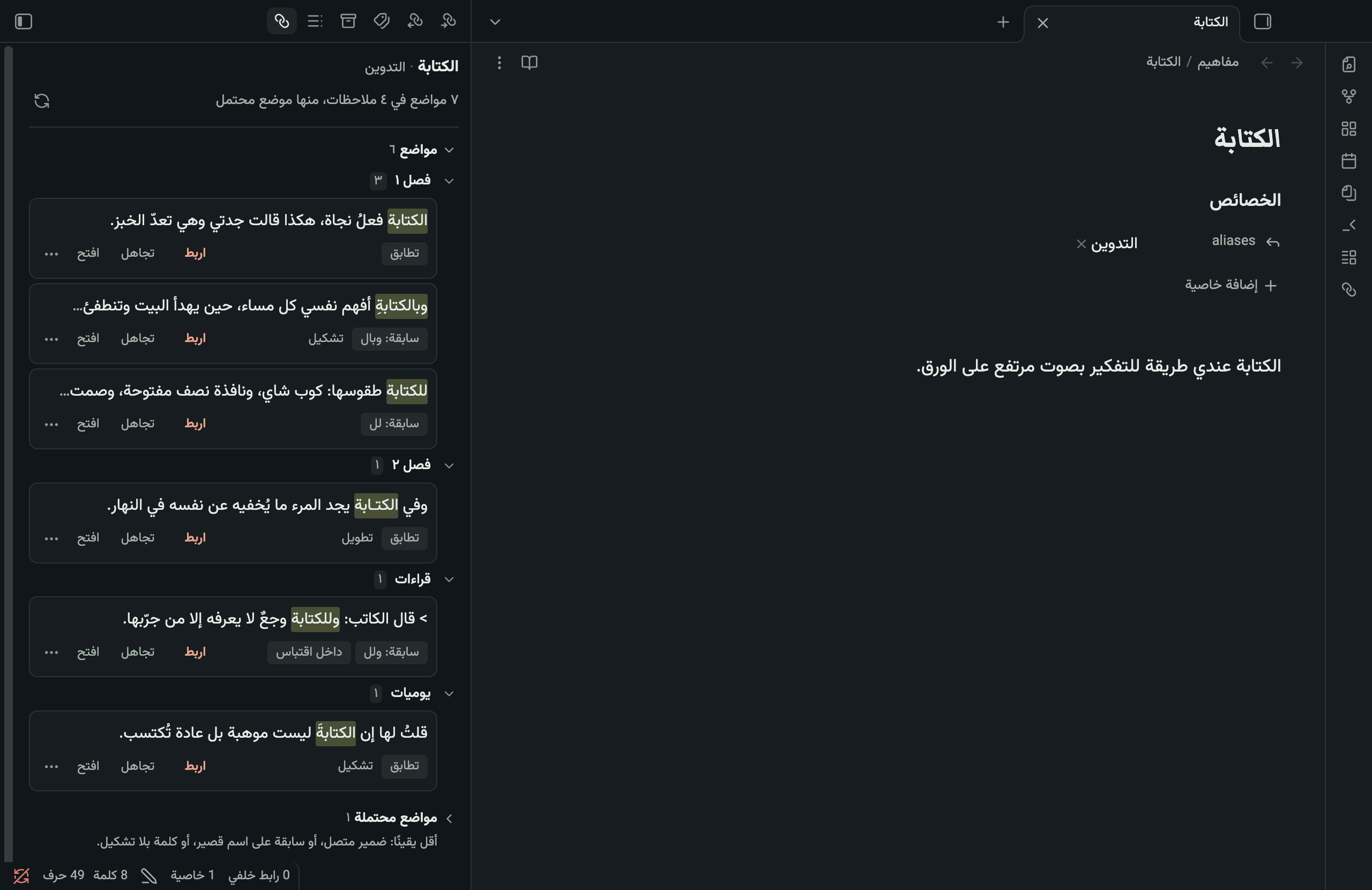
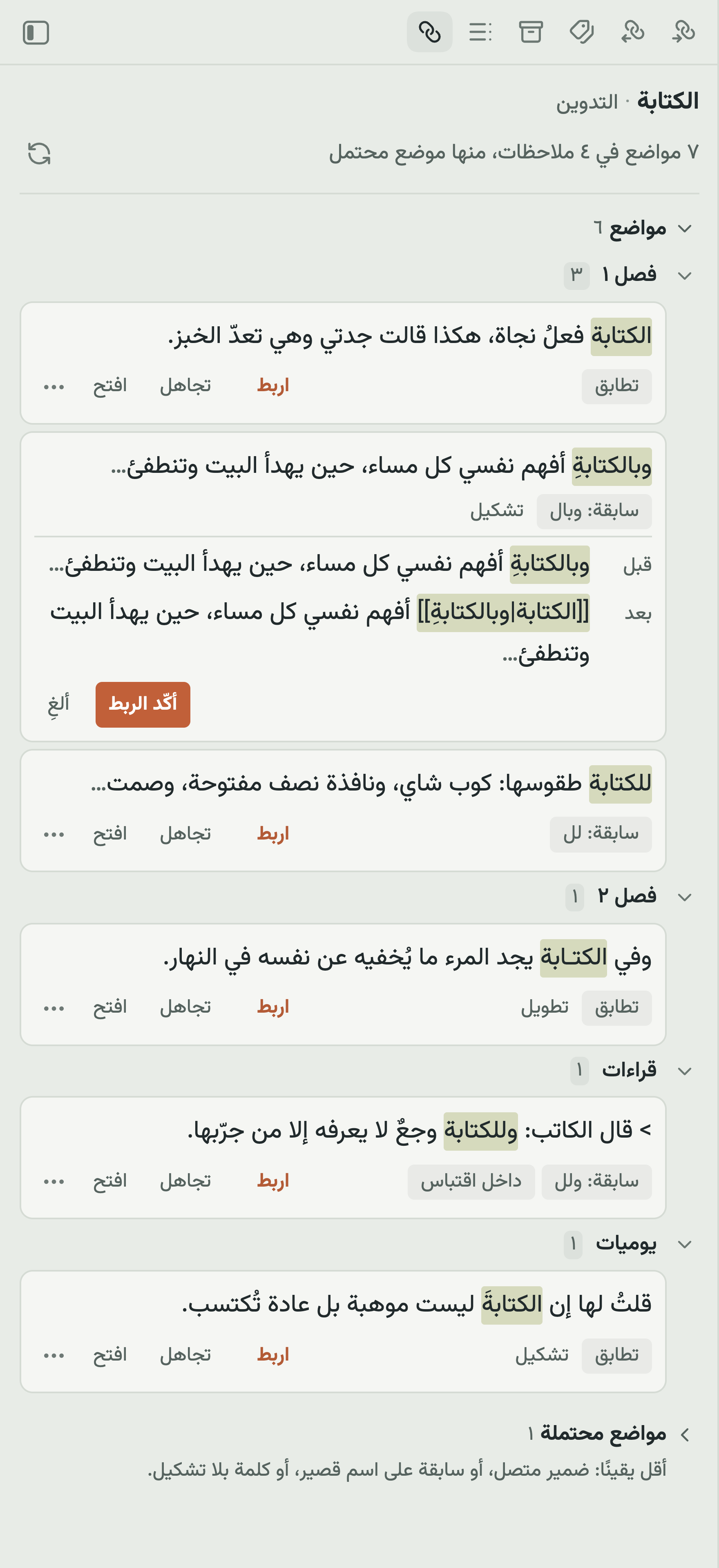
Two screenshots from a demo vault in the Khazaf theme; every sentence was written for the demo.
Wasl writes to no file before you confirm, never links everything at once, and draws no underlines while you type. It works only when its panel is open.
The link keeps your word as you wrote it
The link wraps the whole word, prefix included, and the word stays as its display text, so your sentence doesn't change:
وبالكتابةِ أفهم نفسي → [[الكتابة|وبالكتابةِ]] أفهم نفسي
The display text is written in every link, even when the word matches the title exactly ([[الكتابة|الكتابة]]). Obsidian drops the display text when it equals the title, and then renaming the note later changes the word inside your sentence.
What it matches
Wasl compares only against your existing note titles and their aliases. It doesn't analyze the language at large and uses no AI. Every suggestion carries its reason.
| Kind | What is accepted | Example for a note «الكتابة» | Where it appears |
|---|---|---|---|
| Match | The same letters after ignoring diacritics, tatweel, invisible marks, copied PDF presentation forms, Arabic-Indic and Persian digits, Persian kaf and yeh, and Latin case | «الكتابةُ», «الكتـابة» | Mentions |
| Prefix or initial hamza | A prefix from a closed list: و/ف, then ب/ك/ل, then «ال», including «لل». And a dropped hamza at the start of a word (الانسان → الإنسان) | «وبالكتابةِ», «للكتابة» | Mentions |
| Indefinite (opt-in) | The word without «ال», only for a note you asked for it (see Note options) | «كتابة» | Mentions |
| Possible | An attached pronoun («ذاكرته» for a note «الذاكرة»), a one-letter prefix on a short name, or an unvocalized word for a vocalized title | «كتابتها» | The Possible mentions section, collapsed by default |
Limits of the matching
Wasl doesn't promise to find every mention. These are its limits:
- No roots, derivation, plurals or synonyms. «كتب», «كتّاب» and «الكاتب» are not suggested for «الكتابة». Add any of them as an alias of the note. The reason: Arabic stemmers conflate different words («الكتابة» with «الكتاب»), and a wrong link is worse than a missed one.
- No changes at the end of a word: «على» and «علي», «كتابة» and «كتابه» stay different words. No mid-word hamza either: «سأل» and «سال».
- Short names: a two-letter name never loses a prefix («بجد» is not suggested for a note «جد»). A three-letter name with a one-letter prefix goes to Possible, because «وجود» may be «و + جود» or a word on its own.
- Names with no letters, or Latin glued to punctuation, such as «C++», can't be searched; the panel tells you to add an alias with letters.
- Multi-word titles: the prefix is accepted on the first word only, the other words must match as written with a single space between them, and a match never crosses a line break.
- Accusative tanwin («زيدًا» for a note «زيد») is outside the rules for now.
- Deliberately skipped: section headings (writing a link inside a heading breaks the links that point to it), code, existing links and embeds, math, comments, HTML, tags, footnotes, block IDs, and note properties. Quoted text is shown with a "inside a quote" label, and can be hidden in the settings.
- Conflicting vocalization: if you vocalize a note's title («الدَّرَج») it won't match «الدُّرج»; vocalizing signals that you want the distinction.
- A limit in Obsidian itself: in Markdown-style links (
[text](note.md)), when the text equals the note's name exactly, Obsidian rewrites the text on rename. Wikilinks ([[ ]]) are unaffected.
What was measured, and what wasn't
On 84 synthetic Arabic test cases locked before measuring (some of them cases where nothing should be suggested), Wasl's output matched the accepted expectation in 83 cases. On the novel-style sentences among them, layer 1 dropped to 90.9%, below our 95% bar, because of the optional indefinite matching. That does not mean 98% of its suggestions are correct in your notes.
In one experiment on a single Arabic novel with placeholder concept titles, what Wasl adds came to about 41% of all the correct mentions (those Obsidian's built-in feature finds plus those Wasl adds). It is a first estimate that predates Wasl's current matching core. Details are in docs/experiments/ (Arabic).
Accuracy in daily use has not been measured in numbers. I used it for a week on an iPhone and I'm happy with it, but that is an impression, not a measurement.
Note options
Add what fits the note to its properties:
| Property | When | What it does |
|---|---|---|
wasl: exact | Names of people | Only the name itself is accepted: no «ال», no prefix, no different hamza. A note «سلطان» won't catch «السلطان». |
wasl: indefinite | Concept notes | Also catches the word without «ال»: a note «الكتابة» catches «أحب كتابة الرسائل». Don't enable it for a note about a thing («اللوحة», "the painting"), because «لوحة» is a common word. |
aliases | Any note | Alternative names that Wasl searches for too. This is how you cover plurals and synonyms. |
Settings
Under Settings → Wasl:
- Excluded folders: notes inside them aren't searched. One folder per line.
- Possible mentions: collapsed or hidden.
- Mentions inside quotes: shown with a label, or hidden.
- First mention only: show only the first mention in each note, and nothing from notes that already link the target. "Already link" is decided by the file a link points to, the way Obsidian resolves it, not by the name: a link to
a/Meaningdoes not hide mentions forb/Meaning. - Interface language: Arabic or English; automatic follows Obsidian.
If Obsidian's Automatically update internal links setting is off, Wasl warns you: Obsidian asks before updating links when you rename or move a note, and renaming outside Obsidian breaks the links Wasl wrote.
On mobile
Wasl is written to run on a phone: no Node, no external libraries, and its panel appears in the side drawer. It has been tried on an iPhone (Obsidian 1.14.4): search time, how the written links render in reading and editing, and a week of daily use. Android hasn't been tried yet, so there's no promise there.
Privacy
Wasl doesn't connect to the internet and never sends your notes to anyone. It reads your notes inside Obsidian and writes only what you confirmed.
In the plugin's settings file on your device it keeps three things: your settings; the list of what you ignored, which includes note paths, a normalized copy of each ignored word and a fingerprint of the nearby text; and number-only counters (how many were linked and rejected) with no names and no text. If you use Obsidian Sync, that file may travel with your plugin settings. The command Export statistics to a note writes the counters to a new note if you want to see them.
Installation
Wasl has been submitted to Obsidian's community plugin directory but cannot be installed from inside the app yet. Until then, install it manually:
- Download
main.js,manifest.jsonandstyles.cssfrom the latest release. - Create a folder named
waslinside.obsidian/plugins/in your vault and put the three files in it. - Restart Obsidian, then enable "Wasl" under Settings → Community plugins.
Development
Requires Node 20 or newer.
npm install
npm test
npm run build
npm run dev rebuilds on save. Code rules are in CONTRIBUTING.md (Arabic). The execution plan is in PLAN.md and the feasibility study in docs/study.md, both in Arabic.
License
MIT.
بالعربية
إضافة لـ Obsidian تدلّك على كل موضع ذكرتَ فيه عنوان ملاحظة دون أن تربطه، حتى لو كتبتَه بسابقة أو تشكيل أو تطويل، وتربطه بموافقتك.
الفكرة
عندك ملاحظة عنوانها «الكتابة». وفي ملاحظات أخرى كتبتَ «وبالكتابةِ أفهم نفسي» و«للكتابة طقوسها» و«الكتـابة» بتطويل. كلها تقصد الملاحظة نفسها، لكنك لم تربطها.
لوحة «الإشارات غير المربوطة» المدمجة في Obsidian تبحث عن الاسم حرفيًا، فلا تلتقط أيًّا من هذه الثلاث. وصل تفتح ملاحظتك الحالية، وتبحث في بقية مجلد ملاحظاتك (Vault) عن عنوانها وأسمائها البديلة، وهي تفهم فروق الكتابة العربية. ثم تعرض كل موضع في جملته مع سبب ظهوره، وأنت تقرر.
كيف تستعملها
- افتح الملاحظة التي تريد معرفة أين ذُكرت. ثم افتح لوحة وصل من أيقونة الرابط في الشريط الجانبي، أو من الأمر «اعرض المواضع غير المربوطة».
- تبحث وصل وتعرض لك النتائج مجمّعة حسب الملاحظة التي ورد فيها الذكر. على كل نتيجة جملتها، والكلمة مبرَزة، وسبب اقتراحها: «سابقة: وبـ»، «تطويل»، وهكذا.
- اضغط اربط فتظهر معاينة للرابط كما سيُكتب. إن أعجبتك اضغط أكّد الربط، وإلا ألغِ. وإن لم تكن تريد هذا الموضع اضغط تجاهل فلا يُقترح عليك ثانية (ويمكنك إظهار المتجاهَل وإلغاء تجاهله من اللوحة).
- إن ندمت بعد الربط فالأمر «تراجع عن آخر ربط» يعيد الجملة كما كانت.
لقطتان من مجلد ملاحظات تجريبي بثيم خزف؛ الجمل كلها كُتبت للعرض.
لا تكتب وصل في أي ملف قبل تأكيدك، ولا تربط الكل دفعة واحدة، ولا تضع خطوطًا تحت الكلمات وأنت تكتب. تعمل حين تفتح لوحتها فقط.
الرابط يحفظ كلمتك كما كتبتها
يُكتب الرابط حول الكلمة كاملة بما فيها السابقة، وتبقى الكلمة كما كتبتها نصًّا ظاهرًا، فلا تتغير الجملة:
وبالكتابةِ أفهم نفسي ← [[الكتابة|وبالكتابةِ]] أفهم نفسي
ويُكتب النص الظاهر في كل رابط، حتى لو طابقت الكلمة العنوان تمامًا ([[الكتابة|الكتابة]]). لأن Obsidian إن وجد النص الظاهر مساويًا للعنوان حذفه، فإذا أعدتَ تسمية الملاحظة لاحقًا تغيّرت الكلمة داخل جملتك.
ماذا تلتقط
وصل تقارن بعناوين ملاحظاتك الموجودة فقط، وبأسمائها البديلة (aliases). لا تحلّل اللغة كلها ولا تستعمل ذكاءً اصطناعيًا. وكل اقتراح معه سببه.
| النوع | ما يُقبل | مثال لملاحظة «الكتابة» | أين يظهر |
|---|---|---|---|
| تطابق | الحروف نفسها بعد تجاهل الحركات والتطويل والعلامات الخفية وأشكال PDF المنسوخة، والأرقام العربية والفارسية، والكاف والياء الفارسيتان، وحالة الأحرف اللاتينية | «الكتابةُ»، «الكتـابة» | المواضع |
| سابقة أو همزة أولى | سابقة من قائمة مغلقة: و/ف ثم ب/ك/ل ثم «ال»، مع «لل». وهمزة أول الكلمة المحذوفة (الانسان ← الإنسان) | «وبالكتابةِ»، «للكتابة» | المواضع |
| نكرة (اختيارية) | الكلمة بلا «ال»، لكن فقط في ملاحظة طلبتَ لها ذلك (انظر «خيارات الملاحظة») | «كتابة» | المواضع |
| محتمل | لاحقة ضمير («ذاكرته» لملاحظة «الذاكرة»)، أو سابقة من حرف واحد على اسم قصير، أو كلمة بلا تشكيل لعنوان مشكول | «كتابتها» | قسم «مواضع محتملة»، مطوي افتراضيًا |
وتُعرض الأمثلة التالية كما تُعرض في الاستعمال:
| النص | الملاحظة | يُقترح؟ | السبب |
|---|---|---|---|
| الكتابة فعلُ نجاة | الكتابة | نعم | تطابق بعد تجاهل الحركة |
| وبالكتابةِ أفهم نفسي | الكتابة | نعم | سابقة: وبـ |
| للكتابة طقوسها | الكتابة | نعم | لام الجر مع «ال» |
| الجسـد يتذكر | الجسد | نعم | تطويل |
| الانسان في المدينة | الإنسان | نعم | همزة أولى محذوفة |
| قرأتُ الكتابَ | الكتابة | لا | «كتاب» كلمة أخرى |
| أعجبني كتابه | الكتابة | لا | «كتابه» بالهاء ليست «كتابة» |
حدود المطابقة
وصل لا تعدّك بأن تجد كل إشارة. هذه حدودها:
- لا جذور ولا اشتقاق ولا جموع ولا مرادفات. «كتب» و«كتّاب» و«الكاتب» لا تُقترح لملاحظة «الكتابة». إن أردت أيًّا منها فأضفه اسمًا بديلًا للملاحظة. السبب: مُجذِّعات العربية تخلط كلمات مختلفة («الكتابة» مع «الكتاب»)، والربط الخاطئ أسوأ من الربط الفائت.
- لا تغيير في آخر الكلمة: «على» و«علي»، و«كتابة» و«كتابه»، تبقى كلمتين مختلفتين. ولا همزة وسط الكلمة: «سأل» و«سال».
- أسماء قصيرة: الاسم من حرفين لا تُنزع عنه سابقة («بجد» لا تُقترح لملاحظة «جد»). والاسم من ثلاثة أحرف مع سابقة من حرف واحد يذهب إلى قسم «محتمل» لا إلى المواضع، لأن «وجود» قد تكون «و + جود» وقد تكون كلمة قائمة بذاتها.
- أسماء بلا حروف عربية أو لاتينية سليمة مثل «C++»: لا يمكن البحث عنها، فتخبرك اللوحة أن تضيف لها اسمًا بديلًا بحروف.
- العنوان من عدة كلمات: السابقة تُقبل على الكلمة الأولى فقط، وبقية الكلمات تُطابَق كما هي، بمسافة واحدة بينها، ولا مطابقة عبر سطر جديد.
- تنوين النصب («زيدًا» لملاحظة «زيد») خارج القواعد حاليًا.
- ما تتجاوزه وصل عمدًا: عناوين الأقسام (لأن كتابة رابط داخل عنوان قسم تكسر الروابط التي تشير إليه)، والكود، والروابط والتضمينات الموجودة، والمعادلات، والتعليقات، وHTML، والوسوم، والحواشي، ومعرّفات الكتل، وخصائص الملاحظة. والكلام المقتبس يظهر لك مع علامة «داخل اقتباس» (ويمكن إخفاؤه من الإعدادات).
- التشكيل المتعارض: إن شكّلتَ عنوان ملاحظتك («الدَّرَج») فلن تُقترح لها «الدُّرج»؛ فالتشكيل عندك إشارة إلى أنك تريد التمييز.
- حدّ في Obsidian نفسه: في روابط صيغة Markdown (
[نص](ملاحظة.md)) حين يطابق النص اسم الملاحظة تمامًا، يعيد Obsidian كتابة النص عند إعادة تسمية الملاحظة. وروابط الويكي ([[ ]]) سليمة.
ما قيس وما لم يُقَس
على ٨٤ حالة اختبار عربية اصطناعية قُفلت قبل القياس (منها حالات يجب ألا يُقترح فيها شيء)، وافق ناتج وصل التوقع المقبول في ٨٣ حالة. وفي مجموعة جمل الرواية منها نزلت دقة الطبقة ١ إلى ٩٠٫٩٪، دون عتبتنا ٩٥٪، بسبب النكرة الاختيارية. وهذا لا يعني أن ٩٨٪ من اقتراحاتها صحيحة في ملاحظاتك.
وفي تجربة على نص رواية عربية واحدة بعناوين مفاهيم افتراضية، كانت المواضع التي تضيفها وصل نحو ٤١٪ من مجموع المواضع الصحيحة (ما تجده الميزة المدمجة في Obsidian مضافًا إليه ما تضيفه وصل). تقدير أولي سبق نواة وصل بصيغتها الحالية. والتفاصيل في docs/experiments/.
لم تُقَس دقتها بأرقام في الاستعمال اليومي. استعملتُها أسبوعًا على iPhone وأنا راضٍ عنها، لكن هذا انطباع لا قياس.
خيارات الملاحظة
تضيف إلى خصائص الملاحظة (Properties) ما يناسبها:
| الخاصية | متى | ماذا تفعل |
|---|---|---|
wasl: exact | أسماء الأشخاص | يُقبل الاسم نفسه فقط: لا «ال» ولا سابقة ولا همزة مختلفة. فملاحظة «سلطان» لا تلتقط «السلطان». |
wasl: indefinite | ملاحظات المفاهيم | تلتقط الكلمة بلا «ال» أيضًا: ملاحظة «الكتابة» تلتقط «أحب كتابة الرسائل». لا تفعّلها لملاحظة اسم شيء («اللوحة») لأن «لوحة» كلمة شائعة. |
aliases | أي ملاحظة | أسماء بديلة يبحث عنها وصل أيضًا، وهي الطريقة لتغطية الجموع والمرادفات. |
الإعدادات
من الإعدادات ← وصل:
- مجلدات مستثناة: لا يُبحث في الملاحظات داخلها. مجلد في كل سطر.
- المواضع المحتملة: مطوية أو مخفية.
- مواضع داخل اقتباس: تظهر مع علامة، أو تُخفى.
- أول ذكر فقط: يظهر أول موضع في كل ملاحظة، ولا يظهر شيء من ملاحظة تربط الهدف من قبل. و«تربط الهدف» تُحكم بالملف الذي يصل إليه الرابط كما يحلّه Obsidian، لا بالاسم: رابط إلى
أ/المعنىلا يُخفي المواضع عنب/المعنى. - لغة الواجهة: عربية أو إنجليزية، والتلقائي يتبع Obsidian.
وإن كان إعداد Obsidian «تحديث الروابط الداخلية تلقائيًا» مطفأً، تنبّهك وصل إلى ذلك: يسألك Obsidian قبل تحديث الروابط عند إعادة تسمية ملاحظة أو نقلها، وإعادة التسمية من خارج Obsidian تكسر الروابط التي كتبتها وصل.
على الجوال
وصل مكتوبة لتعمل على الهاتف: لا Node ولا مكتبات خارجية، وتظهر لوحتها في الدرج الجانبي. جُرّبت على iPhone (Obsidian 1.14.4): زمن البحث، وشكل الروابط المكتوبة في العرض والتحرير، ثم أسبوع من الاستعمال اليومي. أما أندرويد فلم تُجرَّب بعد، فلا وعد بها.
الخصوصية
لا تتصل وصل بالإنترنت ولا ترسل ملاحظاتك إلى أحد. تقرأ ملاحظاتك داخل Obsidian وتكتب فقط ما أكّدتَه.
وتحفظ في ملف إعدادات الإضافة على جهازك ثلاثة أشياء: إعداداتك؛ وقائمة ما تجاهلتَه، وفيها مسارات الملاحظات ونسخة مطبّعة من الكلمة المتجاهَلة وبصمة للسياق القريب؛ وعدّادات أرقام فقط (كم رُبط وكم رُفض) بلا أسماء ولا نصوص. وإن كنتَ تستعمل Obsidian Sync فقد ينقل هذا الملف مع إعدادات إضافاتك. والأمر «تصدير الإحصاءات إلى ملاحظة» يكتب لك أرقام العدّادات في ملاحظة جديدة إن أردت رؤيتها.
التثبيت
قُدّمت وصل إلى دليل إضافات Obsidian ولم تصر قابلة للتثبيت من داخل التطبيق بعد. إلى ذلك الحين ثبّتها يدويًا:
- نزّل
main.jsوmanifest.jsonوstyles.cssمن آخر إصدار. - أنشئ مجلدًا باسم
waslداخل.obsidian/plugins/في مجلد ملاحظاتك، وضع الملفات الثلاثة فيه. - أعد تشغيل Obsidian، ثم فعّل «Wasl» من الإعدادات ← الإضافات المجتمعية.
التطوير
يحتاج Node 20 فأحدث.
npm install
npm test
npm run build
npm run dev يبني عند كل حفظ. قواعد الكود والاختبارات في CONTRIBUTING.md. وخطة التنفيذ في PLAN.md، ودراسة الجدوى في docs/study.md.
الرخصة
MIT.
For plugin developers
Search results and similarity scores are powered by semantic analysis of your plugin's README. If your plugin isn't appearing for searches you'd expect, try updating your README to clearly describe your plugin's purpose, features, and use cases.