White Noise
approvedby zhouhua
Play white noise to help you focus on your work.
★ 6 stars↓ 1,679 downloadsUpdated 1y agoMIT
White Noise Plugin
A white noise plugin for Obsidian designed to help users focus better and enter a calmer working state.
Features
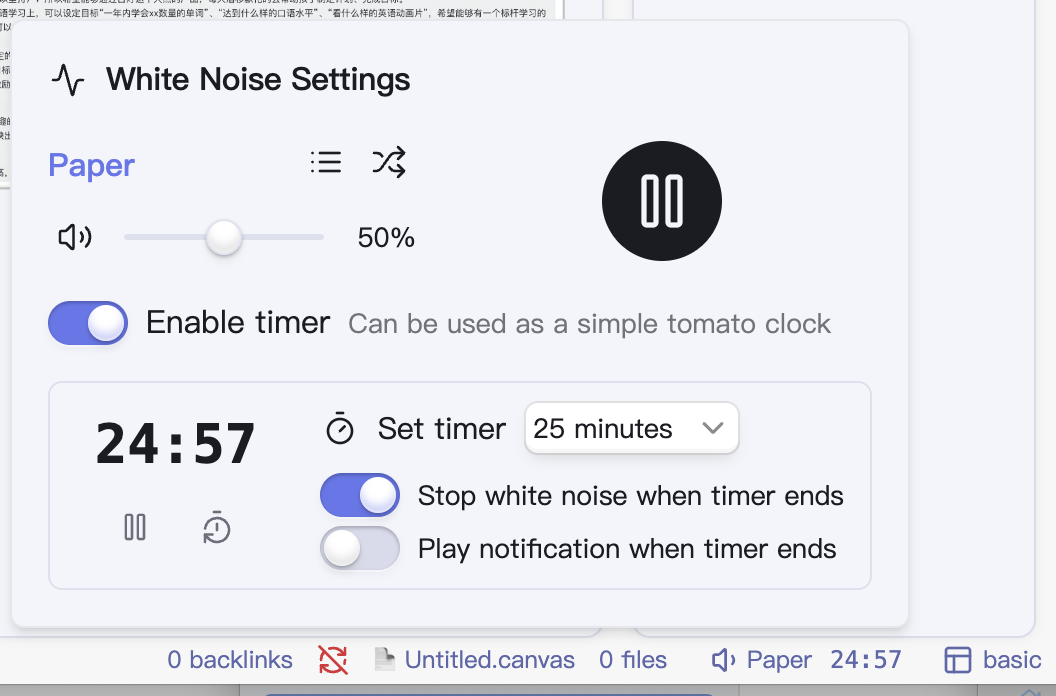
- White Noise: Includes dozens of sounds such as rain, coffee shop noise, and more
- Volume Control: Independently control the white noise volume, which can coexist with your music
- Timer Function: Built-in simple pomodoro timer that works in conjunction with white noise
Screenshot
Installation
- Open Obsidian and navigate to Settings
- Go to Community plugins and disable Safe mode
- Click on Browse and search for "White Noise"
- Click Install, then Enable the plugin
Credits
This plugin uses sound materials from the Moodist project. To better adapt to the Obsidian environment, some sound materials have been modified:
- Removed some potentially anxiety-inducing sound effects (such as thunder)
- Removed several oversized audio files to reduce the plugin size
- Further compressed the audio, modified to variable bit rate, merged dual channels into joint stereo, and preserved only sounds between 40Hz ~ 15000Hz
- Removed base noise audio files, replacing them with dynamically generated noise
Consider visiting the Moodist project to learn more.
For plugin developers
Search results and similarity scores are powered by semantic analysis of your plugin's README. If your plugin isn't appearing for searches you'd expect, try updating your README to clearly describe your plugin's purpose, features, and use cases.