Word Progress Bar
approvedby somenoy
Progress bar in the status bar that shows goal of words. - This plugin has not been manually reviewed by Obsidian staff.
Word Progress Bar for Obsidian
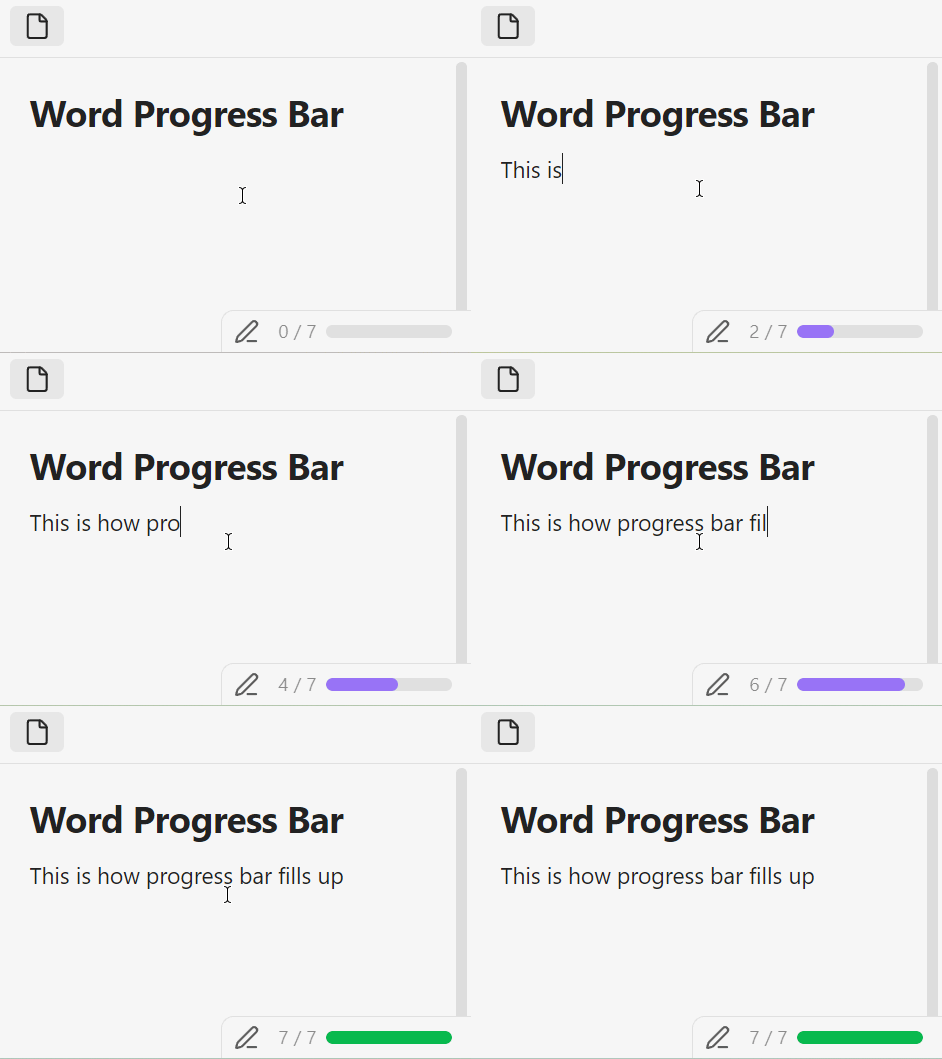
Track your writing progress with a miniature progress bar in the status bar.
Set a word count goal and watch the bar fill up as you write. When you hit your goal, it turns green.
Usage
For all files (default goal)
Toggle on Use default word goal for all files in settings and set a Default word goal. The progress bar will appear on every note using that goal.
For specific files (property)
Add a word-goal property (default) to a note's frontmatter:
---
word-goal: 500
---
The progress bar will show only on notes that have this property. You can rename the property key in settings (Frontmatter key for per-file goal).
Installation
Go to Community Plugins and search for Word Progress Bar
Manual
- Download
main.js,manifest.json, andstyles.cssfrom the latest release - Copy them to
<Vault>/.obsidian/plugins/word-progress-bar/ - Reload Obsidian and enable the plugin in Settings → Community plugins
For plugin developers
Search results and similarity scores are powered by semantic analysis of your plugin's README. If your plugin isn't appearing for searches you'd expect, try updating your README to clearly describe your plugin's purpose, features, and use cases.