by IvyYang1999
Sort Obsidian File Explorer folders by name, created time, or modified time.
Workbench Explorer Sort
Per-folder sorting, directly in Obsidian's native File Explorer.



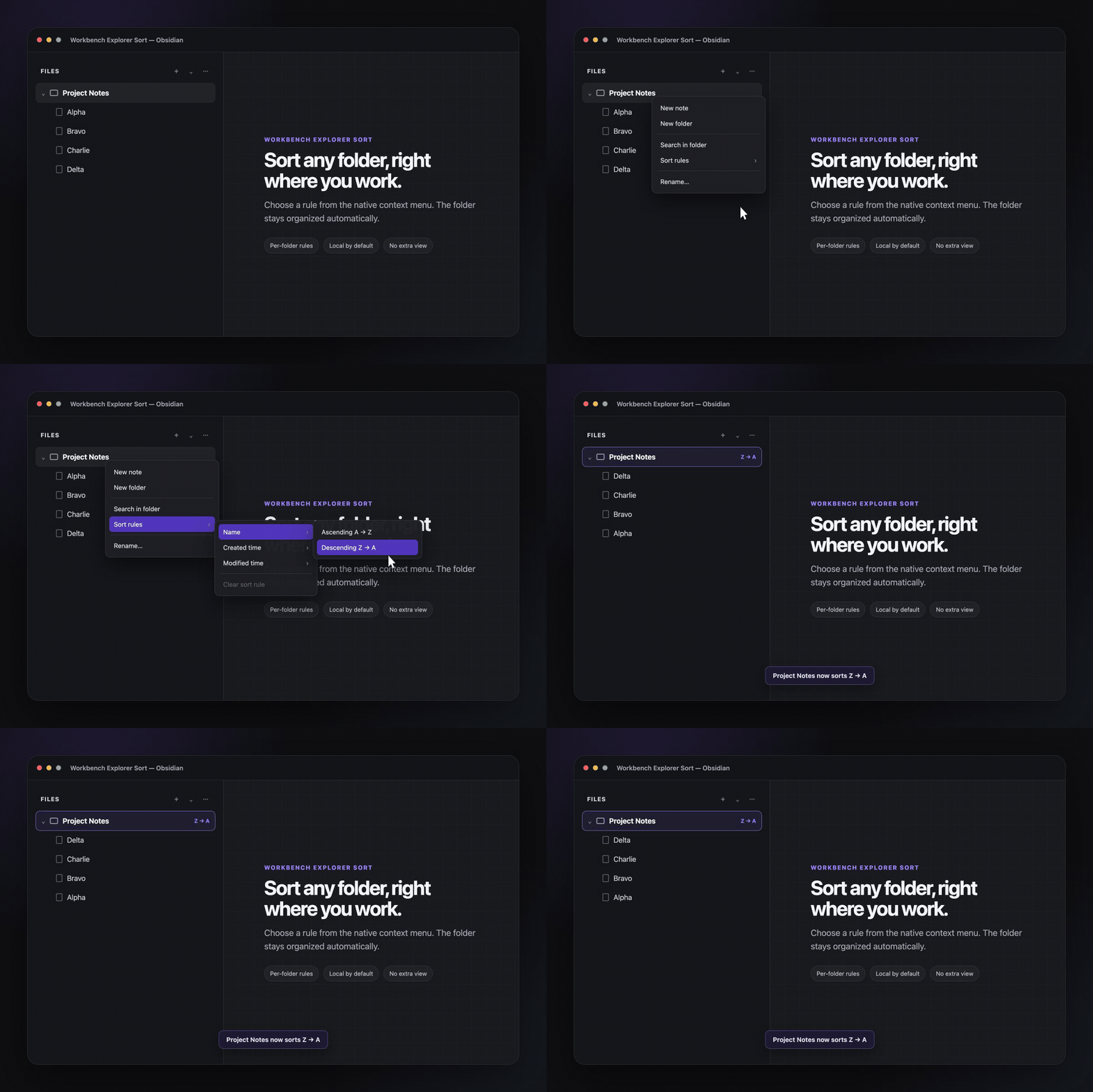
Workbench Explorer Sort adds persistent sorting rules to individual folders in Obsidian's native file tree. Right-click a folder, choose a rule, and keep working—there is no separate view to manage.
Why it is useful
- Folder-specific: sort project notes alphabetically while keeping a journal newest-first.
- Native workflow: every rule lives in the File Explorer context menu.
- Persistent: rules survive restarts and follow folders when they are renamed.
- Private by default: the plugin makes no network requests and stores settings in your vault's local plugin data.
Sort modes
| Field | Directions |
|---|---|
| Name | A → Z, Z → A |
| Created time | New → Old, Old → New |
| Modified time | New → Old, Old → New |
Use it
- Right-click any folder in Files.
- Choose Sort rules.
- Pick Name, Created time, or Modified time, then choose a direction.
To return the folder to Obsidian's default order, choose Sort rules → Clear sort rule.
Install
Community plugins
- Open Settings → Community plugins → Browse.
- Search for Workbench Explorer Sort.
- Select Install, then Enable.
Manual installation
Download main.js, manifest.json, and styles.css from the latest release, then place them in:
<vault>/.obsidian/plugins/workbench-explorer-sort/
Reload Obsidian and enable the plugin under Settings → Community plugins.
Optional CLI
cli.js lets local scripts and agents read or update the same rules. It is included in GitHub releases but is not installed by Obsidian's Community Plugins browser.
Run it from a vault root:
node /path/to/cli.js list
node /path/to/cli.js get "Project Notes"
node /path/to/cli.js set "Project Notes" name-desc
node /path/to/cli.js clear "Project Notes"
Pass --vault /path/to/vault when running it from another directory. Supported mode values are name-asc, name-desc, ctime-desc, ctime-asc, mtime-desc, mtime-asc.
Compatibility
- Obsidian 1.13.0 or later
- Desktop only
Development
npm ci
npm run check
npm run dev
See CONTRIBUTING.md for the contribution workflow.
License
MIT © IvyYang1999
For plugin developers
Search results and similarity scores are powered by semantic analysis of your plugin's README. If your plugin isn't appearing for searches you'd expect, try updating your README to clearly describe your plugin's purpose, features, and use cases.