Workout Planner
approvedby spatariurares
Visualize workout data with interactive charts and advanced search capabilities.
Workout Planner Plugin



A comprehensive plugin for Obsidian that visualizes workout data with interactive charts, tables, and timers. Store your logs in a single CSV file and get beautiful visualizations, progress tracking, and duration estimation directly inside your notes.
Quick Start
Go to Settings → Workout Planner and click Create examples to generate a demo folder with sample workout data and notes showcasing all plugin features — charts, tables, timers, and dashboards.
Features
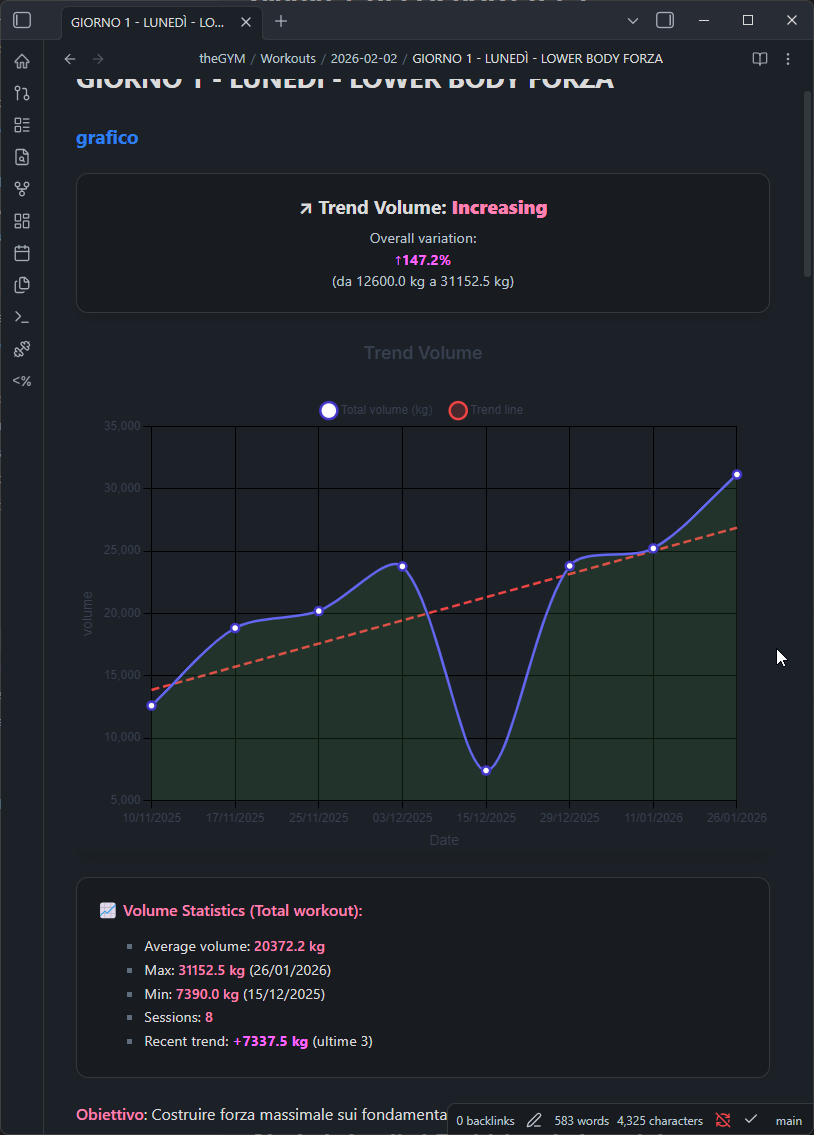
- Interactive Charts — Volume, weight, reps, duration, distance, pace, heart rate via Chart.js
- Smart formatting: duration as
1h 30m, pace as5:30 min/km - Trend lines with inverted logic for pace (lower = faster = improving)
- Smart formatting: duration as
- Data Tables — Sortable logs with edit/delete, protocol badges, progressive overload targets
- Workout Timers — Countdown, interval, and stopwatch with presets and audio notifications
- Workout Dashboard — Stats, muscle heat map, recent workouts, volume analytics, protocol effectiveness
- Quick Log — Touch-friendly modal for fast logging with recent exercises and weight adjustment buttons
- Protocol Tracking — Custom training techniques (drop sets, supersets, myo-reps, etc.) with badge display
- Duration Estimation — Compare actual vs. estimated workout duration
- Canvas Export — Visualize workout structure on Obsidian Canvas
- Dynamic Exercise Types — Strength, Cardio, Flexibility with custom field definitions
- Exercise Conversion — Convert exercises between types with field mapping
- Custom Muscle Tags — Map tags in any language to canonical muscle groups
- Dataview Integration — Public API for querying logs and stats from Dataview queries
- Templater Integration — Use workout data in templates
- Responsive Design — Works on desktop and mobile
Usage
Commands
Access via Command Palette (Ctrl/Cmd + P):
| Command | Description |
|---|---|
| Create CSV log file | Initialize the CSV file for storing workout logs |
| Insert workout chart | Insert a workout-chart code block |
| Insert workout table | Insert a workout-log code block |
| Insert workout timer | Insert a workout-timer code block |
| Insert workout dashboard | Insert a workout-dashboard code block |
| Insert workout duration | Insert a workout duration estimator code block |
| Create exercise page | Create a new exercise page |
| Create exercise section | Add an exercise block to a note |
| Add exercise block | Insert an exercise block with autocomplete |
| Export workout to canvas | Export workout data to Obsidian Canvas |
| Convert exercise | Convert exercise logs from one type to another |
| Manage muscle tags | Open the muscle tag manager |
| Generate tag reference | Create a reference note for all available muscle tags |
| Audit exercise names | Scan vault for exercise name inconsistencies |
Code Blocks
Embed charts, tables, timers, and dashboards directly in your notes using code blocks.
workout-chart
exercise: Squat
type: volume
dateRange: 30
showTrendLine: true
showStats: true
height: 400
Parameters:
| Parameter | Type | Default | Description |
|---|---|---|---|
exercise | string | — | Exercise name to filter |
type | string | volume | volume, weight, reps, duration, distance, pace, heartRate |
chartType | string | exercise | Group by: exercise, workout, combined, all |
dateRange | number | 30 | Days to include |
showTrendLine | boolean | true | Display trend line |
showStats | boolean | false | Show avg/max/min stats box |
exactMatch | boolean | false | Exact vs. fuzzy exercise name matching |
height | number | 400 | Chart height in pixels |
title | string | — | Custom chart title |
limit | number | — | Maximum number of data points |
Pace charts: trend logic is inverted — decreasing pace (faster) = Improving (green), increasing pace (slower) = Declining (red).
workout-log
exercise: Bench Press
exactMatch: false
dateRange: 14
sortBy: date
sortOrder: desc
limit: 50
Parameters:
| Parameter | Type | Default | Description |
|---|---|---|---|
exercise | string | — | Exercise name to filter |
exactMatch | boolean | true | Exact vs. fuzzy matching |
dateRange | number | — | Days to include |
sortBy | string | date | date, exercise, weight, reps, volume |
sortOrder | string | desc | asc or desc |
limit | number | 50 | Maximum rows to display |
columns | array | all | Visible columns, e.g. ["date","reps","weight"] |
workout-timer
type: countdown
duration: 90
rounds: 3
sound: true
preset: rest
Parameters:
| Parameter | Type | Default | Description |
|---|---|---|---|
type | string | countdown | Timer mode: countdown, interval, stopwatch |
duration | number | 30 | Duration in seconds (countdown/interval) |
rounds | number | 1 | Number of rounds (interval mode) |
sound | boolean | false | Play audio on completion |
showControls | boolean | true | Show play/pause/reset buttons |
preset | string | — | Use a saved preset by name (overridden by explicit params) |
workout-dashboard
No parameters — renders the full dashboard with all widgets.
Settings
Setup & data
| Setting | Description |
|---|---|
| CSV log file path | Folder where workout_logs.csv and muscle-tags.csv are stored |
| Exercise folder path | Path to the folder containing exercise pages |
| Weight unit | kg or lb — affects all views and new log defaults |
| Setup CSV files | Creates both CSV files in the configured folder |
| Generate example data | Creates a demo folder with sample workouts |
Mobile logging
| Setting | Description |
|---|---|
| Default exact match | When enabled, exercise filtering uses exact name matching by default |
| Quick weight increment | Weight step for +/- buttons in create/edit log modals (e.g., 2.5) |
Timer presets
Save reusable timer configurations (countdown, interval, stopwatch) with name, duration, rounds, sound, and controls settings. Set a default preset for new timers.
Custom protocols
Define custom training techniques beyond the built-in ones. Each protocol has a name, abbreviation (max 3 chars), and badge color. Protocols appear as badges in tables and dashboard widgets.
Training parameters
| Setting | Description |
|---|---|
| Weight increment | Default weight step for progressive overload suggestions |
| Duration per repetition | Seconds per rep — used when rep count is known |
| Default reps per set | Assumed reps when not specified (0 = use fallback set duration) |
| Fallback set duration | Seconds per set when reps are not available (default: 45s) |
Advanced
| Setting | Description |
|---|---|
| Exercise block template | Template inserted when creating exercise blocks via modal |
| Run all maintenance | Runs migration tasks (block IDs, exercise type upgrades) |
Custom Muscle Tags
Map custom tags (in any language) to canonical muscle groups for the heatmap and exercise categorization.
Tag Manager
Open via Command Palette → Workout: Manage muscle tags. Supports add, edit, delete, search, and fuzzy duplicate detection.
CSV Format
Tags are stored in muscle-tags.csv alongside your workout log:
tag,muscleGroup
petto,chest
schiena,back
spalle,shoulders
Canonical Muscle Groups
chest, back, shoulders, biceps, triceps, quads, hamstrings, glutes, calves, abs, core, forearms, traps, rear_delts
Data Format
All workout logs are stored in a single CSV file:
date,exercise,reps,weight,volume,origine,workout,timestamp,notes,protocol
| Column | Description |
|---|---|
date | ISO 8601 datetime (YYYY-MM-DDTHH:mm:ss.sssZ) |
exercise | Exercise name |
reps | Repetitions |
weight | Weight used |
volume | Calculated volume (reps × weight) |
origine | Source or workout routine (supports Obsidian links) |
workout | Workout name |
timestamp | Unique entry identifier (ms since epoch) |
notes | Optional notes |
protocol | Training protocol (e.g., drop_set, standard) |
Custom exercise types add extra columns automatically (e.g., duration, distance, pace).
Example
date,exercise,reps,weight,volume,origine,workout,timestamp,notes,protocol
2025-01-17T10:30:00.000Z,Bench Press,8,100,800,[[Push Day]],Workout A,1737138600000,,standard
2025-01-17T10:35:00.000Z,Squat,10,80,800,[[Leg Day]],Workout A,1737138900000,,standard
Dataview Integration
The plugin exposes window.WorkoutPlannerAPI for use in Dataview queries and other plugins.
Methods
getWorkoutLogs(filter?)
const logs = await WorkoutPlannerAPI.getWorkoutLogs({
  exercise: "Squat", // partial match, case-insensitive
  workout: "Push Day",
  dateRange: { start: "2025-01-01", end: "2025-01-31" },
  protocol: "drop_set",
  exactMatch: false,
});
Returns: date, exercise, reps, weight, volume, workout, notes, timestamp, protocol
getExerciseStats(exercise)
const stats = await WorkoutPlannerAPI.getExerciseStats("Bench Press");
// { totalVolume, maxWeight, prWeight, prReps, prDate, totalSets,
//   averageWeight, averageReps, lastWorkoutDate, trend }
getExercises(filter?)
const exercises = await WorkoutPlannerAPI.getExercises({
  tag: "chest",
});
Examples
Recent logs table:
const logs = await WorkoutPlannerAPI.getWorkoutLogs({
  exercise: "Squat",
  dateRange: { start: "2025-01-01" }
});
dv.table(
  ["Date", "Reps", "Weight", "Volume"],
  logs.map(l => [l.date.split("T")[0], l.reps, l.weight + " kg", l.volume])
);
Exercise PR:
const stats = await WorkoutPlannerAPI.getExerciseStats("Bench Press");
dv.paragraph(`**PR:** ${stats.prWeight} kg × ${stats.prReps} reps (${stats.prDate})`);
Weekly volume:
const logs = await WorkoutPlannerAPI.getWorkoutLogs({
  dateRange: {
    start: moment().subtract(7, "days").format("YYYY-MM-DD"),
    end: moment().format("YYYY-MM-DD")
  }
});
const volume = logs.reduce((sum, l) => sum + l.volume, 0);
dv.paragraph(`**This week:** ${volume.toLocaleString()} kg total volume`);
The API is available after the plugin loads. Access as
WorkoutPlannerAPIorwindow.WorkoutPlannerAPI.
Translations
⚠️ All translations except English are generated via AI (LLM-based machine translation). Some may contain errors or unnatural phrasing. Feel free to open an issue or PR with corrections.
Third-Party Libraries
- Chart.js v4.4.0 — MIT — github.com/chartjs/Chart.js
License
MIT License — see LICENSE for details.
For plugin developers
Search results and similarity scores are powered by semantic analysis of your plugin's README. If your plugin isn't appearing for searches you'd expect, try updating your README to clearly describe your plugin's purpose, features, and use cases.