by Omer Cooper
Wrap selected text in custom tags, and set each wrapper's hotkey right where you create it.
Wrap with Hotkeys
An Obsidian plugin that wraps the selected text in tags you define, such as <mark>…</mark>,
<u>…</u> or <sub>…</sub>, each with its own hotkey. Press the hotkey again to unwrap.
Inspired by Wrap with shortcuts. The difference is that you set each wrapper's hotkey in the same dialog where you create it, and new wrappers work right away, with no restart.
This plugin was vibecoded: all of its code and this README were written by AI (Claude Code), directed and tested by Omer Cooper.
Using it
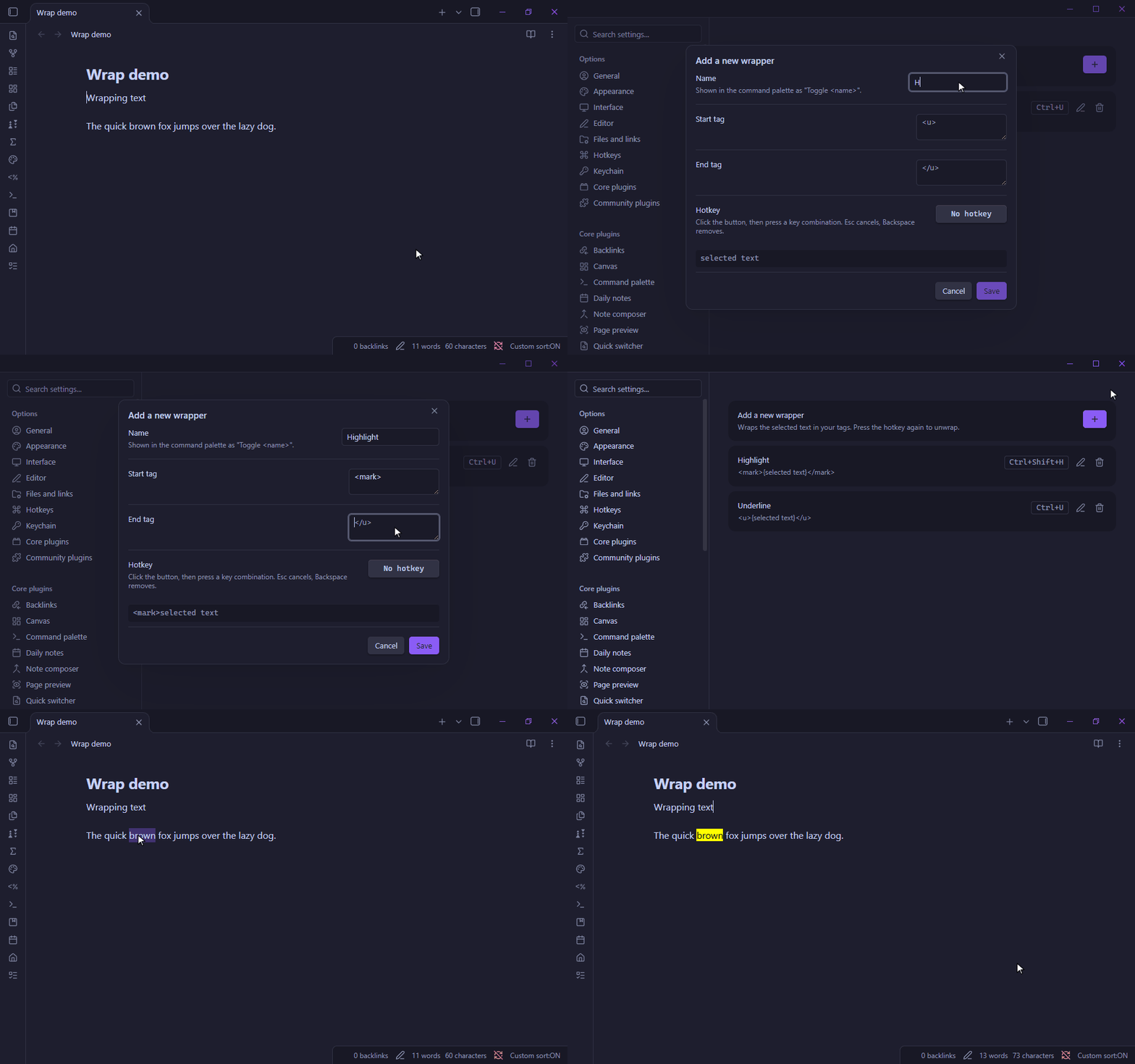
Open Settings → Wrap with Hotkeys and click +. In the dialog:
| Field | What it does |
|---|---|
| Name | Shown in the command palette as "Toggle name" |
| Start tag / End tag | Text put before and after the selection. One of them may be empty, e.g. a start tag of - [I] only |
| Hotkey | Click it, then press a key combination such as Ctrl+Shift+H. Esc cancels, Backspace removes it. If another command already uses the combination, the dialog tells you which one |
The dialog shows a preview of the wrapped text. Click Save, then select text in a note and press the hotkey:
- the selection is wrapped in the tags;
- if the tags are already right around the selection, or at its edges, they are removed instead.
The pencil and trash buttons edit and delete a wrapper. Each wrapper is also a command, so you can run it from the command palette.
Good to know
- Hotkeys are Obsidian hotkeys. They are saved in Obsidian's own hotkey list, so they also
appear (and can be changed) in Settings → Hotkeys. The plugin reaches that list through an
internal Obsidian object (
app.hotkeyManager), because the public API can't set a hotkey. - Coming from Wrap with shortcuts? On first run, if that plugin is installed in the vault, its wrappers and their hotkeys are copied over. You can then turn the old plugin off.
Install
With BRAT: install BRAT, run
BRAT: Add a beta plugin for testing and enter OmerCooper/wrap-with-hotkeys.
Manually: copy main.js, manifest.json and styles.css from the
latest release into
<vault>/.obsidian/plugins/wrap-with-hotkeys/, reload Obsidian and turn the plugin on under
Settings → Community plugins.
License
For plugin developers
Search results and similarity scores are powered by semantic analysis of your plugin's README. If your plugin isn't appearing for searches you'd expect, try updating your README to clearly describe your plugin's purpose, features, and use cases.