YoungLook Japanese

English · 简体中文
Turn the Japanese videos and subtitles already on your computer into study material you can pause, query, and practice with.
Obsidian plugin · Windows / macOS / Linux · Obsidian 1.7.2+
What it does
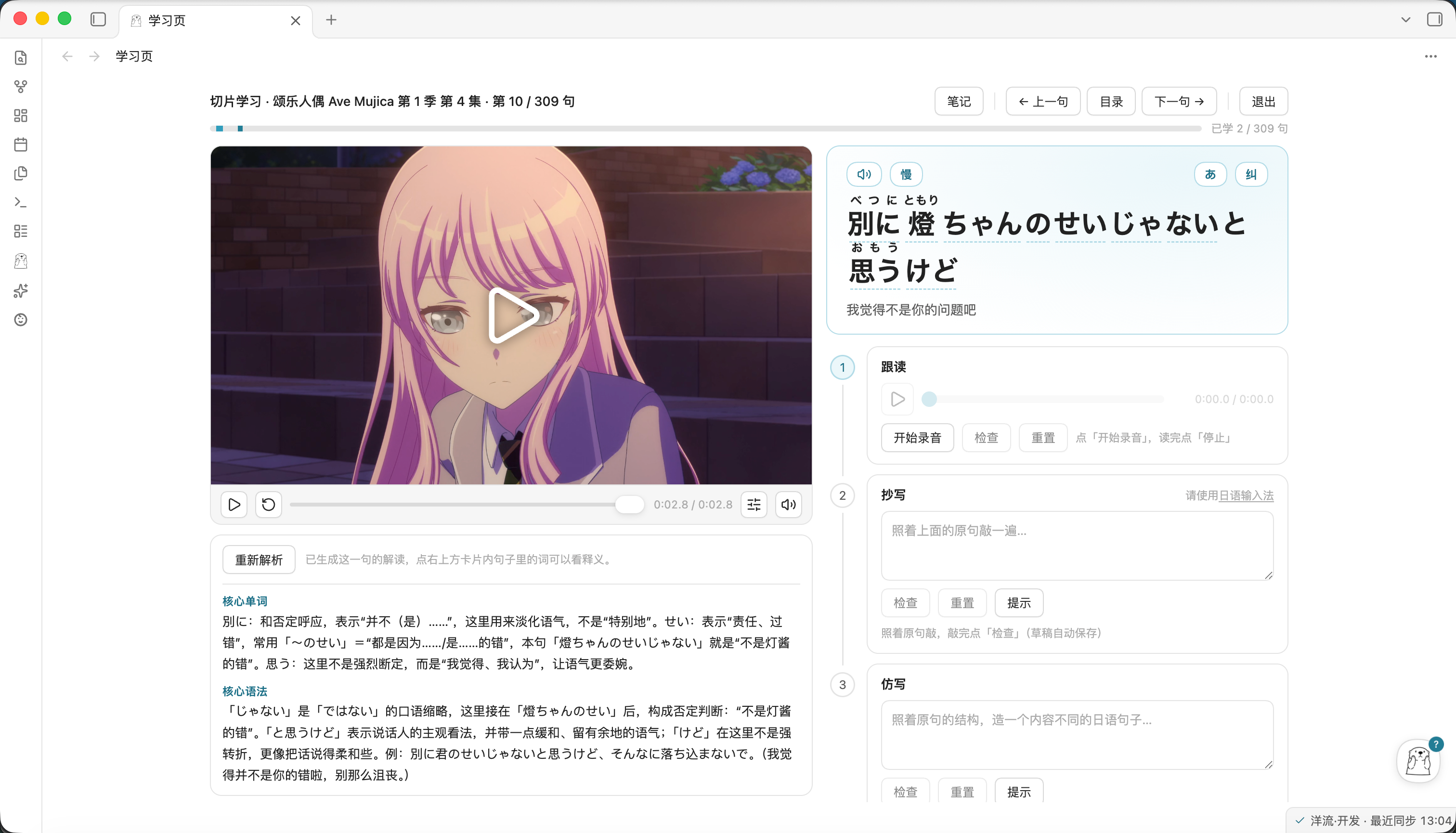
The lines you could have learned from disappear in a second when you watch anime or dramas. YoungLook Japanese turns videos and subtitles already on your computer into your own study material:
- Pause on any line, listen and read as many times as you like
- Click any word to look up its meaning and reading; new words go straight into your vocabulary notebook
- Record yourself reading aloud and compare against the original audio
- Write a note on every sentence — sign in and they sync to your account, available on any device
Video and subtitle files stay where they are. The plugin only remembers their paths — no copying, no uploading.
Installation
From the Community plugins directory (recommended)
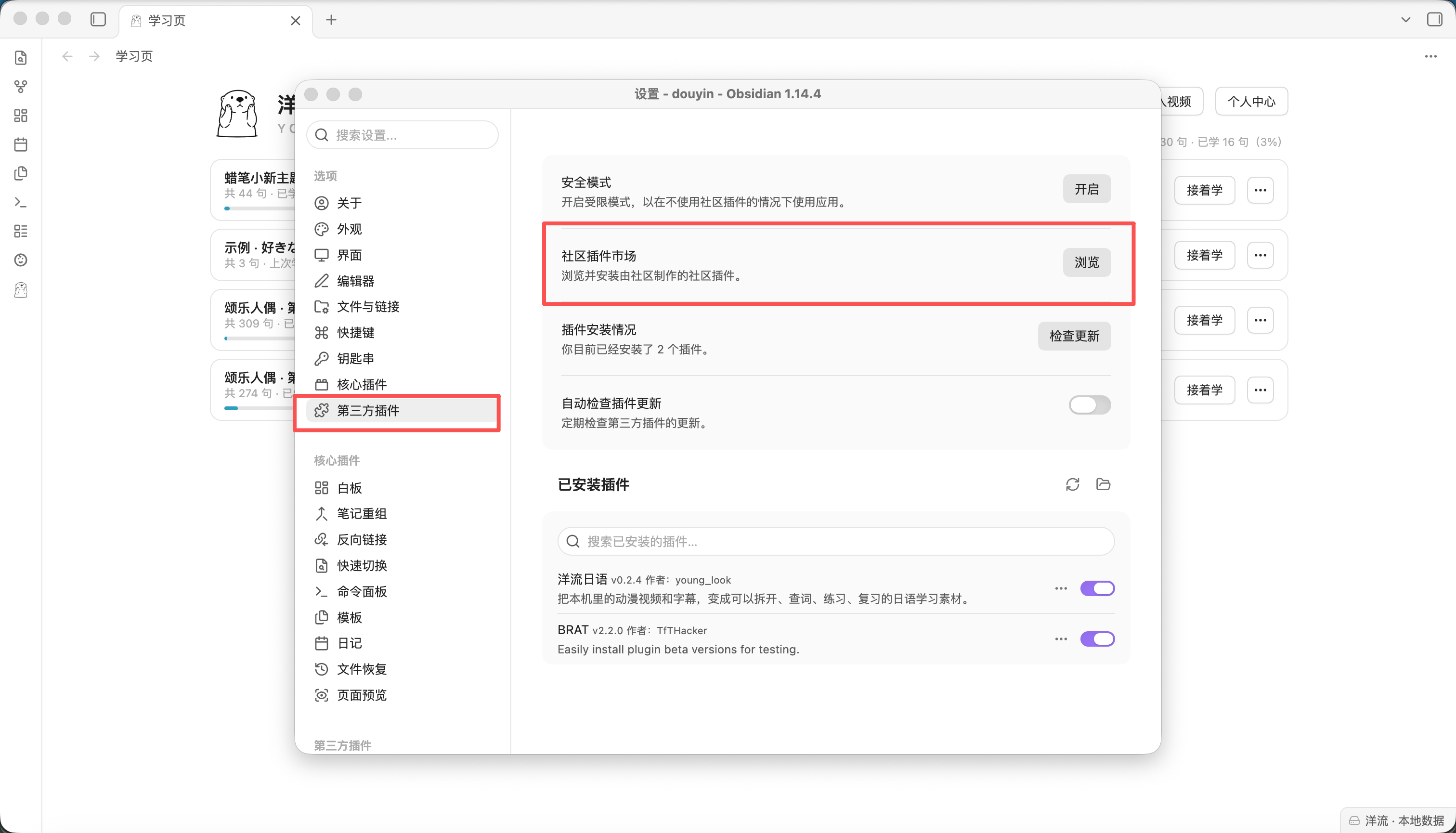
- Open Settings → Community plugins in Obsidian.
- If restricted mode is on, turn it off with Turn off restricted mode (some versions label it Turn off safe mode). No community plugin can be installed while it is on.
- Select Browse next to Community plugins, search for YoungLook Japanese, then Install and Enable.
- The sea-otter icon appears in the left sidebar — click it to open the study view.
The plugin never updates itself. Updates come from Obsidian's Community plugins: check for updates there, or rely on BRAT if you installed it that way.
The first dictionary lookup offers to download the Japanese tokenizer dictionary (~17 MB, one time, fully offline afterwards).
Getting started
- Click the sea-otter icon in the left sidebar. The list contains one sample item — press Start and it offers to download the demo material (~4 MB, one time, offline afterwards).
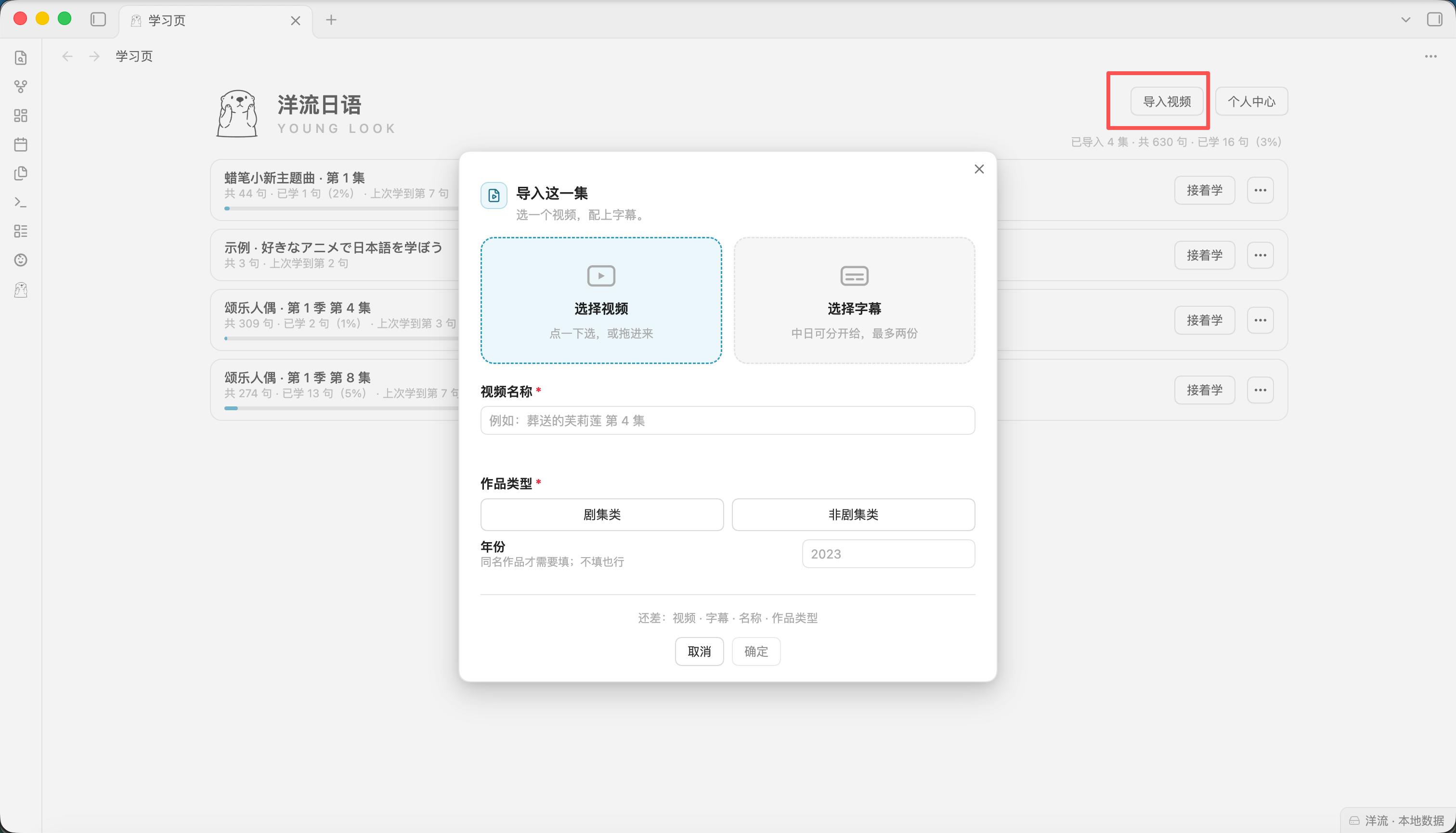
- Import your own material: Import video in the top-right → pick a video file and a subtitle file → give it a name. Done.
- To look up a word, click it in the sentence. To hear a reading, click Hint (downloads the dictionary once, fully offline afterwards).
- For AI analysis and pronunciation feedback: open Personal center → Account, choose the built-in model or fill in your own API key. Switch anytime.
FAQ
Does it require an account or payment?
No. Local features (import, splitting, lookup, notes) work without signing in. AI features (analysis, imitation practice, read-aloud feedback, assistant Q&A) need a model: either your own API key (free — requests go straight to your provider, not through us) or the built-in model (pay per use from a small balance). You can switch anytime.
Are my videos and subtitles uploaded?
No. They stay where they are; the plugin only remembers their paths.
Why desktop only?
The plugin reads video files on your computer; Obsidian mobile cannot do that.
What is the dictionary?
A Japanese tokenizer dictionary (~17 MB), downloaded once on your first lookup, fully offline afterwards.
Network & data
The plugin does not collect usage analytics: no third-party trackers, no ads, no telemetry SDKs. All network requests happen when you actively use a feature.
Servers it connects to
| Destination | When | Why |
|---|---|---|
YoungLook server (younglook.cc) | Signing in, syncing study records, using the built-in model for AI analysis / imitation / read-aloud / assistant, downloading the dictionary and demo material | These features run or store data on the server itself |
| Your own model provider | Only when you filled in your own API key (BYOK) and selected it | Requests go directly to your provider, not through us |
Bangumi (api.bgm.tv) | Only when you press Auto-detect in the import dialog | Fetches the title, year and episode names so you don't type them. Fails silently — import is unaffected |
| GitHub | When you install or update the plugin through the Community plugins directory or BRAT | Pulled by Obsidian / BRAT themselves — the plugin never downloads or replaces its own code |
Files it reads outside the vault
This is the core of the plugin: it reads videos and subtitles wherever they live on your computer — nothing needs to be moved into the vault. Only two cases involve reading: the two files you pick at import time, and playback along the recorded path while studying. The plugin only remembers paths — no copying, no modifying, no uploading, and it never scans directories you did not point it at.
What reaches the server
Signed-in accounts only:
- Account: email or phone number, nickname, avatar
- Study records: titles and episode numbers, progress, vocabulary, your per-sentence notes
- AI usage: scene, token counts, cost — never the transcript itself
One record that exists without signing in
- Install records: when you successfully install the Japanese dictionary or the demo material, the plugin reports once "what was installed, resource version, plugin version". The request itself carries your source IP, which the server stores with the record — only to deduplicate by IP and estimate how many installs happened (several people behind one network count as one, so it is an approximation). It is not linked to accounts or study records and contains no file content. To have it deleted, email
info@younglook.cc.
What is never uploaded
- Video and subtitle files (only local paths are kept)
- The server never stores the transcript
Deleting data: signing out only disconnects the device. To delete your account and cloud data, email info@younglook.cc from your account address — handled within 7 business days. Full privacy policy: younglook.cc/privacy.
Building from source
npm install
npm run build     # output = main.js (building on the master branch points at the production server)
Source lives in src/. The released main.js is not committed (it is a build artifact) and is distributed only via GitHub Releases — so reviewers can always rebuild the binary from the sources in this repository.
License
MIT © young-look. The shipped bundle packages third-party components (kuromoji / mecab-ipadic dictionary / node-qrcode / webm-muxer); see THIRD-PARTY-NOTICES.md.
Project website: younglook.cc
For plugin developers
Search results and similarity scores are powered by semantic analysis of your plugin's README. If your plugin isn't appearing for searches you'd expect, try updating your README to clearly describe your plugin's purpose, features, and use cases.