3D Semantic Graph
approvedby khr0907
Visualize your notes in a 3D semantic space using embedding-based layouts or uploaded vectors. - This plugin has not been manually reviewed by Obsidian staff.
Obsidian 3D Semantic Graph
Visualize your vault as a 3D semantic universe — notes that mean similar things cluster together.
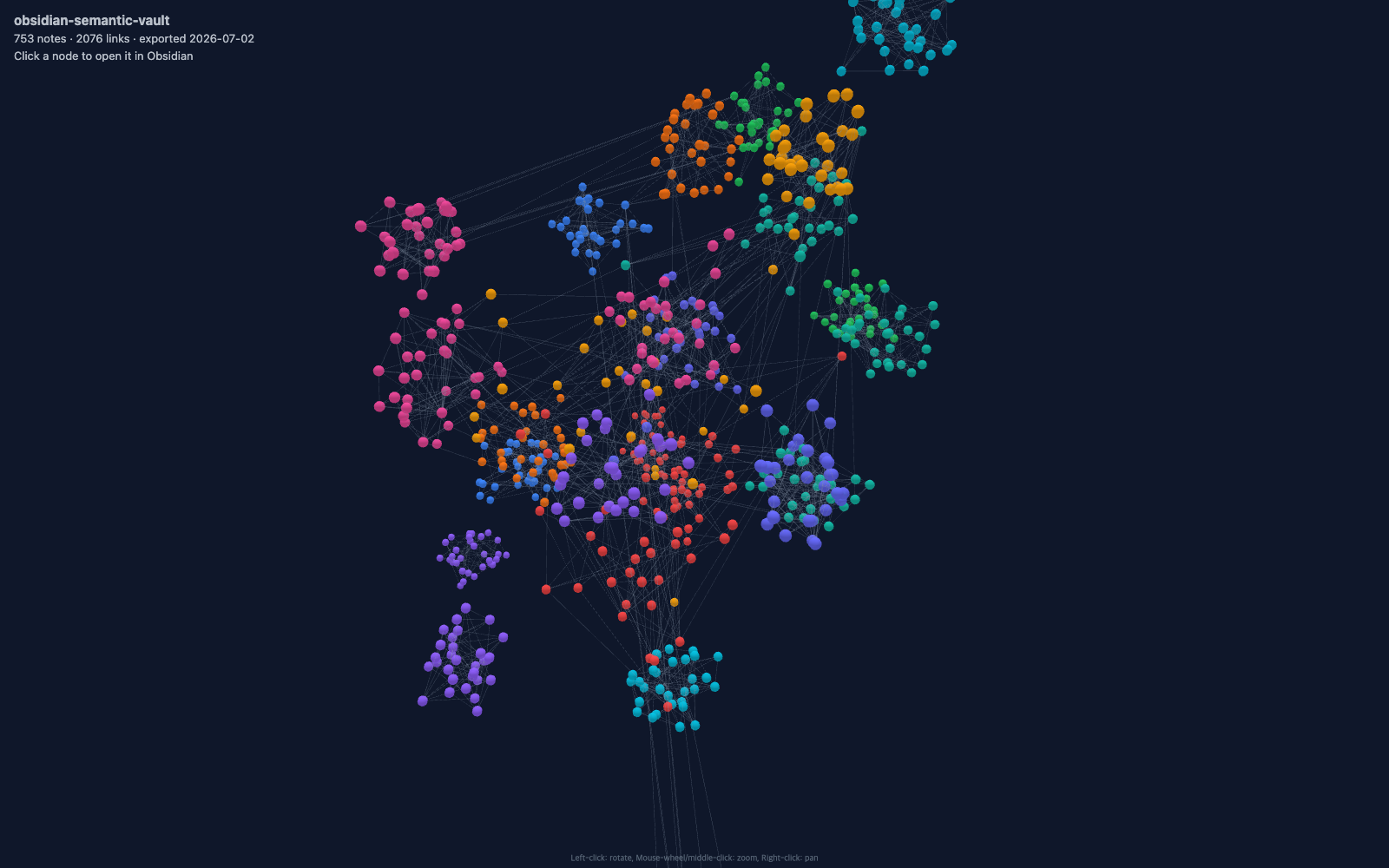
Desktop-only Obsidian plugin that visualizes your notes in an interactive 3D space. Notes are positioned using OpenAI embeddings or validated uploaded vectors projected into 3D via UMAP or PCA, so semantically related notes cluster together. Without embeddings, the plugin uses a folder-based clustered sphere layout with ConvexHull cluster regions.
Features
- Semantic 3D layout — OpenAI embeddings or uploaded vectors reduced to 3D coordinates via UMAP or PCA
- Semantic search — search by meaning from the toolbar; the top matches are highlighted in the graph and the camera flies to the best one
- Auto-labeled semantic clusters — cluster regions grouped by embedding similarity (k-means) with topic labels generated from note titles and tags (e.g. "space · astronomy · telescope"); switchable back to folder grouping
- Provider-ready architecture — OpenAI generation today, a reserved Anthropic/Claude adapter, and capability-based interfaces for future providers
- Insights panel — suggested links (semantically close but unlinked note pairs, ranked by cosine similarity plus shared-tag / same-folder / co-link signals, drawn as dashed lines and insertable with one click), potential duplicates, orphan notes, and per-cluster MOC (Map of Content) generation
- Semantic neighbors sidebar — a mini 3D view plus ranked list of the active note's nearest semantic neighbors
- Timeline playback — replay your vault's growth over time by note creation date (file created time by default; optionally frontmatter
created/date created) - Interactive HTML export — download the current graph as an HTML file with deep links back into your vault (internet required to load the renderer CDN)
- Korean and English UI — language setting (auto / English / 한국어); auto follows the Obsidian app language
- Clustered sphere fallback — folder-based clustered layout with color-coded groups when no embeddings are available
- ConvexHull cluster regions — translucent 3D hulls that outline semantic or folder clusters (toggle: On / Hover / Off)
- Note links — real links from Obsidian's resolved references, togglable from the toolbar
- Node coloring — by folder or first tag
- Uploaded vectors — import/export custom vector JSON files as an alternative to API-generated embeddings
- Entry animation — nodes expand from the center and the camera flies in when the graph opens (toggle in settings; respects OS reduced-motion)
- Appearance controls — light/dark theme, grid, auto orbit, node size, opacity, drag sensitivity
- Deterministic seeding — same layout seed produces the same graph layout
- Fast reopen — content hashes and computed layouts are cached, so reopening an unchanged vault skips both re-embedding and UMAP/PCA
- Embedding cache — reuses unchanged note vectors to minimize API calls
- Folder exclusion — skip specified folders from both graph and embedding generation
Screenshots
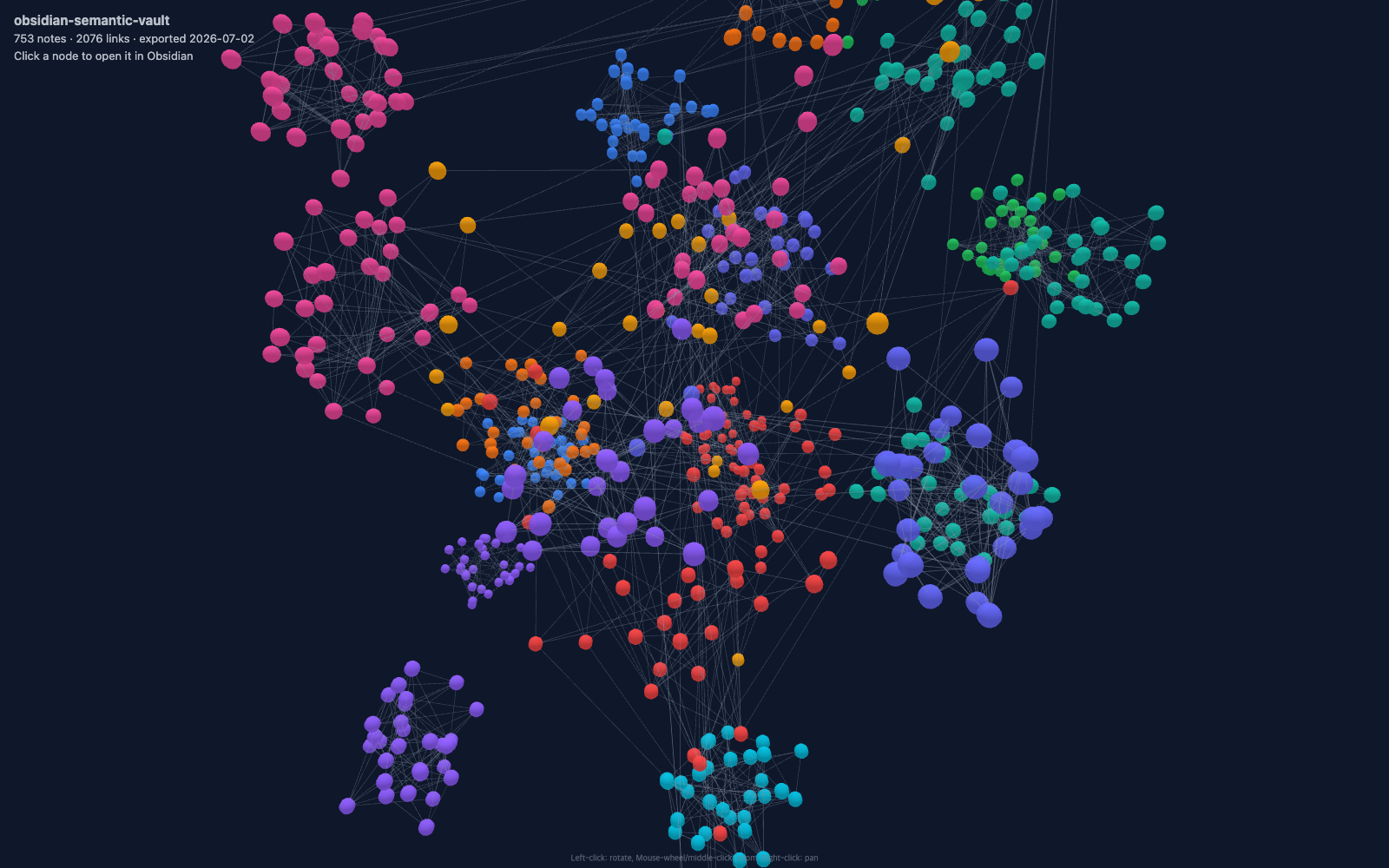
Semantic clusters up close — each color is a top-level folder, and embedding-based layout pulls related topics together even across folders:
How It Works
- Markdown files are loaded from the vault, excluding folders listed in settings.
- Nodes are created from files; links are built from Obsidian's resolved note references.
- If an OpenAI API key or uploaded vectors are available, embeddings are projected to 3D with UMAP or PCA.
- Otherwise, a clustered sphere layout groups notes by top-level folder with ConvexHull regions.
Embedding provider support
- OpenAI — fully supported for note and query embeddings.
- Anthropic (Claude) — visible as a reserved, disabled adapter. Anthropic currently has no native embeddings API, so the plugin does not silently route note content through a third party.
- External/local models — intentionally deferred. Provider capabilities and adapters are already isolated so they can be added without changing graph, search, or settings logic.
Uploaded vectors remain available independently of provider generation. Semantic search over uploaded vectors requires metadata identifying the same OpenAI provider and model used for query embeddings.
Installation
Requires Obsidian 1.11.0 or newer (desktop only).
Community plugins
Search for 3D Semantic Graph in Settings → Community plugins and install.
Build from source
git clone https://github.com/KHR0907/obsidian-3d-semantic-graph.git
cd obsidian-3d-semantic-graph
npm ci
npm run check
npm run check runs the type checker, linter, tests, and production build. Copy only the runtime files into the plugin directory:
<your-vault>/.obsidian/plugins/3d-semantic-graph/
├── main.js
├── manifest.json
└── styles.css
Create the directory if it does not exist. Then restart Obsidian and enable 3D Semantic Graph in Settings → Community plugins. When updating an existing manual installation, replace the same three files and restart Obsidian; plugin data and embedding caches in that directory are left untouched.
Development
npm run dev    # watch mode
npm run build  # production build
npm run check  # typecheck, lint, tests, and production build
The distributable files are main.js, manifest.json, and styles.css. Development dependencies and source files do not need to be copied into a vault.
Usage
- Open Settings → 3D Semantic Graph and optionally configure OpenAI embeddings or upload vectors.
- Open the graph from the ribbon icon or the Open 3D Semantic Graph command.
- Toolbar controls:
- Refresh — rebuild the graph
- Reset Camera — return to the default camera angle
- Search — semantic search; Enter highlights the top matches and flies to the best one, click a result to fly to it, double-click to open the note, Esc to clear
- Links — toggle link visibility
- Grid — toggle XZ grid
- Clusters — cycle cluster regions mode (On → Hover → Off)
- Insights — open the insights panel (suggested links, duplicates, orphans, MOC)
- Timeline — replay vault growth by note creation date
- Export HTML — download an interactive HTML snapshot (internet required when opened)
- Click a node to select it. Shift-click to open the note.
- Open the Semantic neighbors sidebar with the Open semantic neighbors command to see the active note's nearest notes.
Settings
| Setting | Description | Default |
|---|---|---|
| Language | Plugin UI language (auto / English / 한국어) | auto |
| Embedding Provider | OpenAI, or the disabled Anthropic/Claude reservation | openai |
| API Key | OpenAI API key for embedding generation | Empty |
| Embedding Model | Embedding model for the selected provider | text-embedding-3-large |
| Custom Vector JSON | Upload/export vector JSON instead of API embeddings | Empty |
| Projection Method | UMAP or PCA for dimensionality reduction | umap |
| Layout Seed | Seed for deterministic layout | Random |
| Timeline Date Source | Date the timeline uses: file created time or frontmatter created | ctime |
| Suggested Links | Max suggested links in the insights panel | 20 |
| Neighbor Count | Notes shown in the semantic neighbors sidebar | 10 |
| Node Color By | Color nodes by folder or first tag | folder |
| Show Links | Display link lines between notes | Off |
| Show Grid | Display XZ grid plane | On |
| Show Clusters | ConvexHull cluster region visibility | hover |
| Cluster Grouping | Group cluster regions semantically (auto-labeled) or by folder | semantic |
| Scene Theme | Auto (match app theme), dark, or light background | auto |
| Node Opacity | Node transparency (0.15–1.0) | 1.0 |
| Node Size | Node size multiplier (0.4–2.0) | 1.5 |
| Drag Sensitivity | Camera rotation sensitivity (0.2–3.0) | 1.0 |
| Auto Orbit Speed | Idle camera rotation speed (0 to disable) | 0.2 |
| Entry Animation | Expand-and-fly-in animation when the graph opens | On |
| Exclude Folders | Comma-separated folders to exclude | Empty |
| Number of Neighbors | UMAP local/global balance (5–50) | 40 |
| Minimum Distance | UMAP clustering tightness (0–0.99) | 0.80 |
Caching
embeddings-cache.json— note vectors; automatically invalidated when the model or note content changesembeddings-hashes.json— lightweight content-hash index used to validate the vault without parsing the full vector cachelayout-cache.json— computed 3D coordinates and semantic clusters; reused when nothing changed so reopening skips UMAP/PCA entirely
All three live in the plugin directory and rebuild automatically when stale.
Privacy and vector format
When OpenAI generation is enabled, cleaned note text and semantic search queries are sent to the selected OpenAI embedding model. The API key is stored in Obsidian's local plugin settings; embeddings and layout caches remain in the local plugin directory. Uploaded vector JSON is validated for finite values, consistent dimensions, and paths that exist in the current graph before it is accepted.
Exports include provider, model, and dimensions metadata plus an entries object keyed by exact vault-relative Markdown paths. Vector export downloads a file and does not create or overwrite a note in the vault.
Pairwise insights are capped at 3,000 embedded notes and duplicate results are bounded to keep memory and UI work predictable.
Tech Stack
- 3d-force-graph — 3D graph rendering
- Three.js — WebGL scene, ConvexGeometry for cluster hulls
- umap-js — UMAP dimensionality reduction
- esbuild — bundler
- OpenAI embeddings through Obsidian's
requestUrlAPI
License
MIT
For plugin developers
Search results and similarity scores are powered by semantic analysis of your plugin's README. If your plugin isn't appearing for searches you'd expect, try updating your README to clearly describe your plugin's purpose, features, and use cases.