ReverySky 3D Graph
approvedby MoonSkorch Studio
Interactive 3D graph built with the Unity engine and shaped into an explorable universe. - This plugin has not been manually reviewed by Obsidian staff.
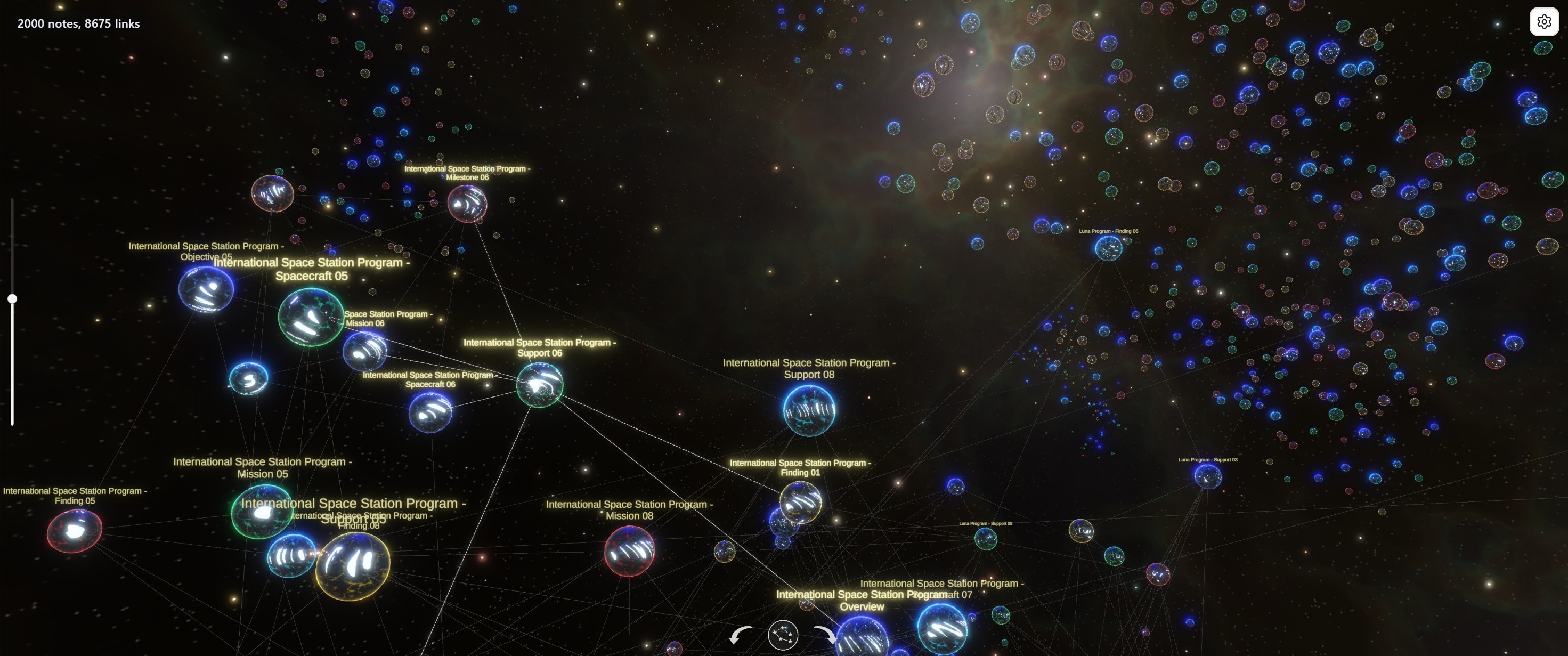

ReverySky 3D Graph is an interactive 3D graph that lets you explore your vault as a connected universe. It runs on a bundled Unity WebGL runtime with live graph updates and integrated note navigation.
Features
- A dynamic force-directed layout for smaller graphs
- A wide panoramic starfield for larger, denser graphs
- A chronological layout that arranges notes by date
- Ego Graph mode for exploring the neighborhood around a focused note
- Landmarks view for displaying selected note details directly on the graph
- Combined filters by path, tag, and date

- Two-way navigation: click a node to fly to it and open its note; activate a note to find it on the graph
- Pan, zoom, rotation, and timeline navigation
- Longer notes appear as larger nodes; more connected nodes glow brighter
- Stress-tested with graphs of up to 10,000 notes
Installation
Install ReverySky 3D Graph from Obsidian Community plugins.
Download and installation may take some time because the plugin includes a bundled Unity WebGL runtime.
Requirements: Obsidian 1.12.7 or later, desktop only, and WebGL-compatible graphics hardware.
Opening the graph
After enabling the plugin, you can open the graph in either of two ways:
- Click the left ribbon button Toggle ReverySky 3D Graph.
- Run ReverySky 3D Graph: Open from the command palette.
Visual quality
Visual quality depends on your display resolution, screen scaling, graphics driver, and the GPU used by Obsidian. For the clearest image, keep your graphics driver up to date and let Obsidian use a high-performance GPU when your device offers one. On dual-GPU laptops, this is usually set in your system graphics settings.
The graph settings panel includes two visual controls:
Render Scale: higher values sharpen the graph but use more GPU power.Frame rate: controls how often the Unity runtime renders frames:Auto,60 FPS,30 FPS, or24 FPS.Autolets Unity synchronize rendering to the display, which may still be capped by the Obsidian/Electron host.
Character support
Graph note titles support Latin text with accents, Cyrillic text, Simplified Chinese, common symbols, and monochrome emoji.
Navigation
- Pan: drag the graph with the primary mouse button to move the camera focus across the current layout.
- Zoom: use the vertical slider on the left side of the graph, or use the mouse wheel for quick zooming.
- Rotate: use the on-screen rotate controls, or hold the right mouse button and drag horizontally.
- Node to note: click any node to fly to it and open its note.
- Note to node: activate a note to find and highlight it on the graph.
- Display mode: use the round view button to switch between detailed, simplified, and Landmarks views, each showing a different level of graph detail.
- Date navigation: in the
Dateslayout, use the date slider to move along the time axis while keeping pan, zoom, and rotation available.
Filter
Open the settings panel from the graph view to limit which notes are sent to the runtime. The filter box supports:
path:to match notes by vault-relative file path. Folder suggestions are built from the current vault data.tag:to match notes by tag. Tag suggestions use tags collected from Markdown metadata and frontmatter.date:to match note dates fromdate,created, orcreated_atfrontmatter, with file creation time as a fallback. Supported forms include exact dates and comparisons such asdate:>=2026-01-01.- A leading
-to exclude matches, such as-path:Archive. - Filters can be combined, for example:
path:Projects tag:research -path:Archive date:>=2026-01-01
Use Escape in the filter box to clear the query. Use the Tags switch to hide tag-derived graph structure without changing the current path, date, or tag filter.
Layout
The layout control changes how the same vault data is arranged:
Dynamic links: a force-directed layout for link-heavy inspection in vault slices up to 500 notes.Scalable links: a more stable layout for larger vault slices and denser link graphs.Dates: a chronological layout that arranges notes by date and enables the date slider.Auto: choosesDynamic linksfor smaller datasets and switches toScalable linksabove 500 notes.
Ego Graph
Ego Graph limits the graph to the active note and its connected neighborhood. The center follows the current focus: activating a note in Obsidian or clicking a node in the 3D graph rebuilds the neighborhood around that note.
Ego mode: turns Ego Graph on or off.Depth: controls how many link steps from the center are included, from 1 to 5. Both incoming and outgoing note links count toward the neighborhood.Neighbor links: shows all links between notes included in the Ego Graph. When disabled, only links connecting one layer of the neighborhood to the next remain visible.
The current filters, tag visibility, and layout settings continue to apply to the resulting graph.
Landmarks

Landmarks show a context cloud around each note: names, places, concepts, events, keywords, or other key details stored in a text property.
ReverySky uses the note's landmarks frontmatter property by default. You can choose any other text property as the Landmark source and switch between properties. Strings and arrays of strings are supported.
To quickly add a landmark from a note, select some text, right-click, and choose Add to landmarks or Add to <property name>. The property is created when missing or appended to when it already contains a list.
Use the round view button to switch to Landmarks mode without changing the layout: the same notes can show their connections and tags, or their landmark context cloud.
Screenshot
The optional Copy screenshot action captures the current graph view and places it in the system clipboard as a PNG image. This uses clipboard write access only for the screenshot action. ReverySky 3D Graph does not read existing clipboard contents.
Privacy, network, and local files
ReverySky 3D Graph processes vault structure locally on your device.
Vault data
The plugin uses Obsidian's vault and metadata APIs to collect the information required to build the graph:
- Markdown file paths and note titles
- Tags from note metadata and frontmatter
- Dates from the
date,created, orcreated_atfrontmatter properties, with file creation time as a fallback - File sizes
- Resolved links between notes
The graph payload does not include the full Markdown contents of your notes.
Vault data is passed from the Obsidian plugin to the embedded Unity runtime through local bridge messaging within Obsidian. It is not sent to external servers.
Settings-panel help icons are external GitHub README links and open only when clicked by the user.
ReverySky 3D Graph does not include telemetry, analytics, advertising, user accounts, subscriptions, or payments.
Local runtime files
The Unity WebGL runtime is bundled with the plugin release and is not downloaded from an external server.
When the graph is opened for the first time, the plugin extracts the bundled runtime into a versioned cache inside the installed plugin directory:
<vault-config-dir>/plugins/reverysky-map/.reverysky-runtime/<version>/
Later graph launches reuse the validated cache.
Runtime file access is limited to the installed plugin directory. It is not used to scan, read, or write vault notes, unrelated user files, or system files outside the plugin directory.
Local WebGL server
Unity WebGL requires its runtime files to be loaded through HTTP. ReverySky 3D Graph therefore starts a local loopback server when the graph runtime is needed.
The server:
- Binds exclusively to
127.0.0.1on a randomly selected port - Is accessible only from the same device
- Accepts only
GETandHEADrequests - Serves files only from the prepared Unity runtime directory
- Stops when the graph view is closed or when the plugin is unloaded
The local server only delivers Unity WebGL runtime files to the embedded graph iframe. It does not process or serve vault notes.
Runtime packaging and source availability
The release build uses the embedded-archive package mode. Other package modes and release shapes are documented in Packaging Modes.
The Obsidian plugin source code and the Unity project source code are available in this repository. The Unity project keeps the technical project name ReverySky Map; the public Obsidian plugin display name is ReverySky 3D Graph.
Release assets are built and attested by GitHub Actions from tracked repository contents. To make the build reproducible without running Unity Editor in GitHub Actions, the compact Unity WebGL runtime input under unity-webgl/Build/runtime-* is intentionally tracked after the local Unity export/import workflow.
The standard Obsidian community plugin release shape consists of a small set of root release assets: manifest.json, main.js, and optionally styles.css.
ReverySky 3D Graph also requires a Unity WebGL runtime, including Unity-generated JavaScript, WebAssembly, data files, and visual and runtime assets. To keep the release self-contained in the standard Obsidian plugin shape, the embedded-archive package mode stores the generated Unity WebGL build archive inside the released main.js.
The ReverySky 3D Graph WebGL view was built with Unity® software and includes Unity-generated WebGL runtime files. ReverySky 3D Graph is not sponsored by or affiliated with Unity Technologies or its affiliates. Unity and related Unity marks are trademarks or registered trademarks of Unity Technologies or its affiliates in the U.S. and elsewhere.
Because the bundled runtime is large, plugin files may not be transferred by sync services with per-file size limits. Install the plugin separately on each device when necessary.
See the Third-Party Notices for bundled visual assets and runtime dependencies.
WebAssembly module
The packaged Unity WebGL runtime includes a single WebAssembly module, runtime-code.wasm. Unity generates this file from the project source in unity/ReverySkyMap/ as part of the WebGL build process. The binary module contains the compiled Unity runtime and ReverySky 3D Graph code required to render and run the interactive 3D graph inside Obsidian.
License
Original source code and project-owned materials are licensed under the MIT License.
Created and maintained by MoonSkorch Studio.
Third-party visual assets
The built plugin uses several third-party visual assets. Their raw source files are intentionally excluded from Git and must be added manually for local Unity development.
See Third-Party Notices and Unity setup instructions.
Future development
ReverySky is built around the idea that every experience and every piece of information is a world of its own. Through their connections, these worlds form a living universe that can be explored, expanded, and shaped.
I want to continue developing ReverySky in this direction through richer visualizations, deeper ways to navigate connected information, and new mechanics.
I’m open to sponsorship, funding, and publishing or marketing partnerships that can help move this work forward.
- Donations: Support ReverySky
- Email: reverysky.journal@proton.me
- Reddit: u/natkorch
For plugin developers
Search results and similarity scores are powered by semantic analysis of your plugin's README. If your plugin isn't appearing for searches you'd expect, try updating your README to clearly describe your plugin's purpose, features, and use cases.