Ābele Obsidian plugin
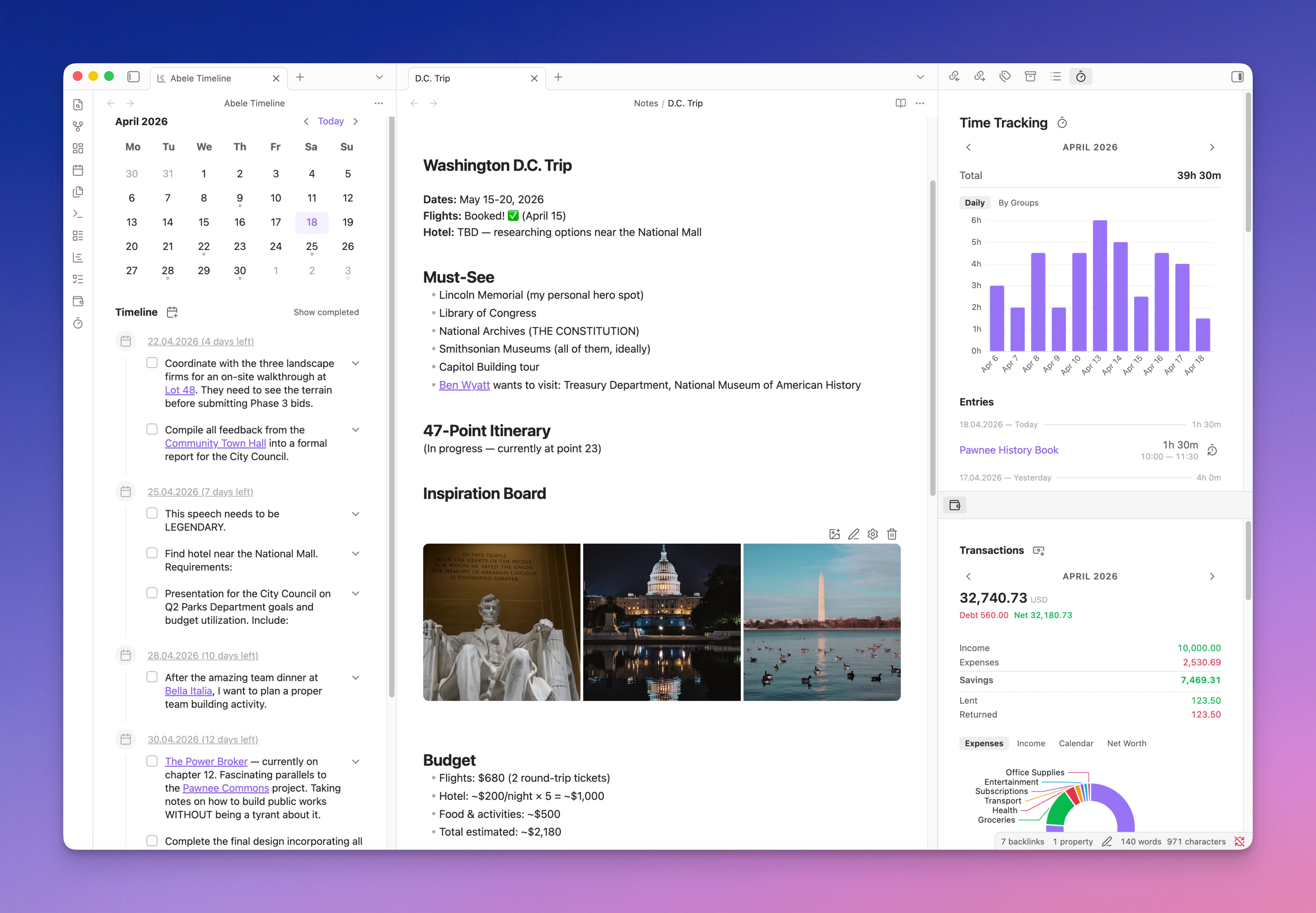
An Obsidian plugin that adds a lot of functionality I personally find missing:
- Logs
- Tasks
- Journals and Calendar
- Financial Tracker
- Time Tracker
- Image Galleries
- Charts
- Templates
- AI Agents
- Scripts
- Various helper tools, etc.
I've been working on this plugin for several years. It started as a collection of helpers that were hard to adapt to workflows other than my own, and it depended heavily on the Dataview API. I rewrote it from scratch to make it more universal and as independent of other plugins as possible. My goal is to consolidate all the functionality I need into a single plugin.
Everything in it is a note. A task is a note, a transaction is a note, a time entry is a note, and notes belong to each other through the groups frontmatter property. groups is a graph rather than a folder tree: a note can belong to several groups, and a group can belong to another group. Every list and every timeline in the plugin follows those links, and so does everything an agent is allowed to see.
Most of my recent work has gone into the last two items on that list. A script is plain JavaScript that runs inside Obsidian with the whole vault in scope, so anything the plugin doesn't do, I can write once and then run from a command, a note header, a link, or an agent. Agents and scripts are the part I'd point at first now. The rest of the plugin is what they're built on.
The plugin has been tested on a vault with over 16k notes on both desktop and iOS.
Features
Logs
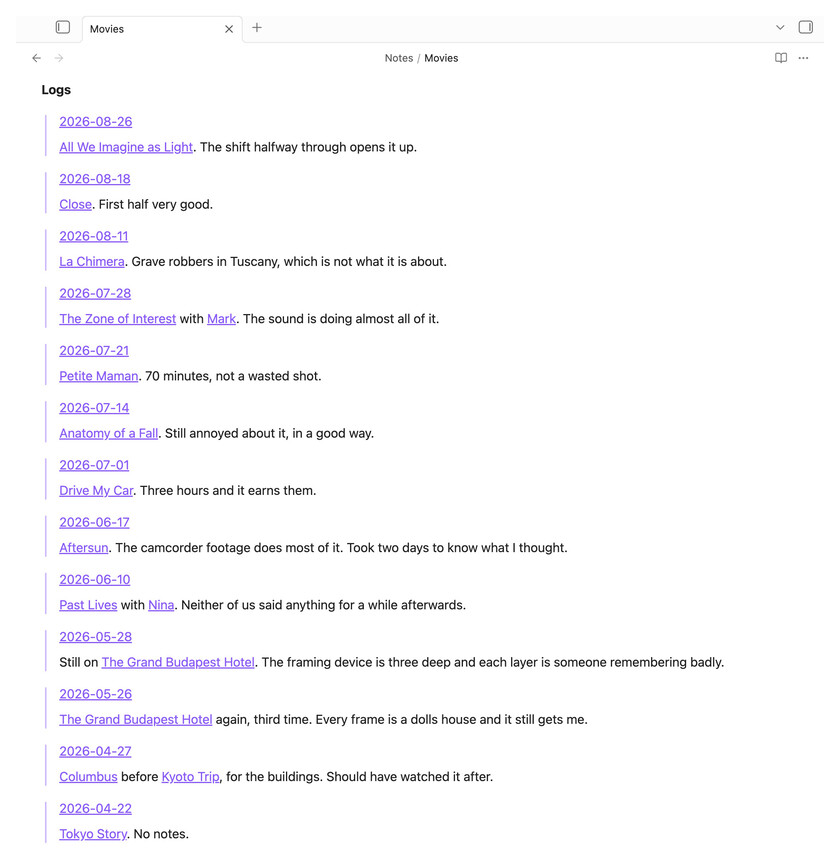
The first and probably the most important feature for my Obsidian workflow. Logs are individual paragraphs or whole notes that appear in full, in chronological order, inside related notes. I write most of my notes in daily notes, so I can write something like:
Met with [[John]] and [[Anna]] at [[Coffee House]], then went to the movies to watch [[Interstellar]]
and this entry appears in the timeline of every linked note — [[John]], [[Anna]], [[Coffee House]], [[Interstellar]] — so when I visit them, I know the context and when I interacted with them.
Logs cross-link through groups too. [[Interstellar]] has a groups link to [[Movies]], so Movies shows which movies I watched and when, with the context. A link in a note's text contributes only that paragraph; a link in the groups property makes the whole note a log. That's how I write meeting reports, which rarely fit in one paragraph.
Tasks
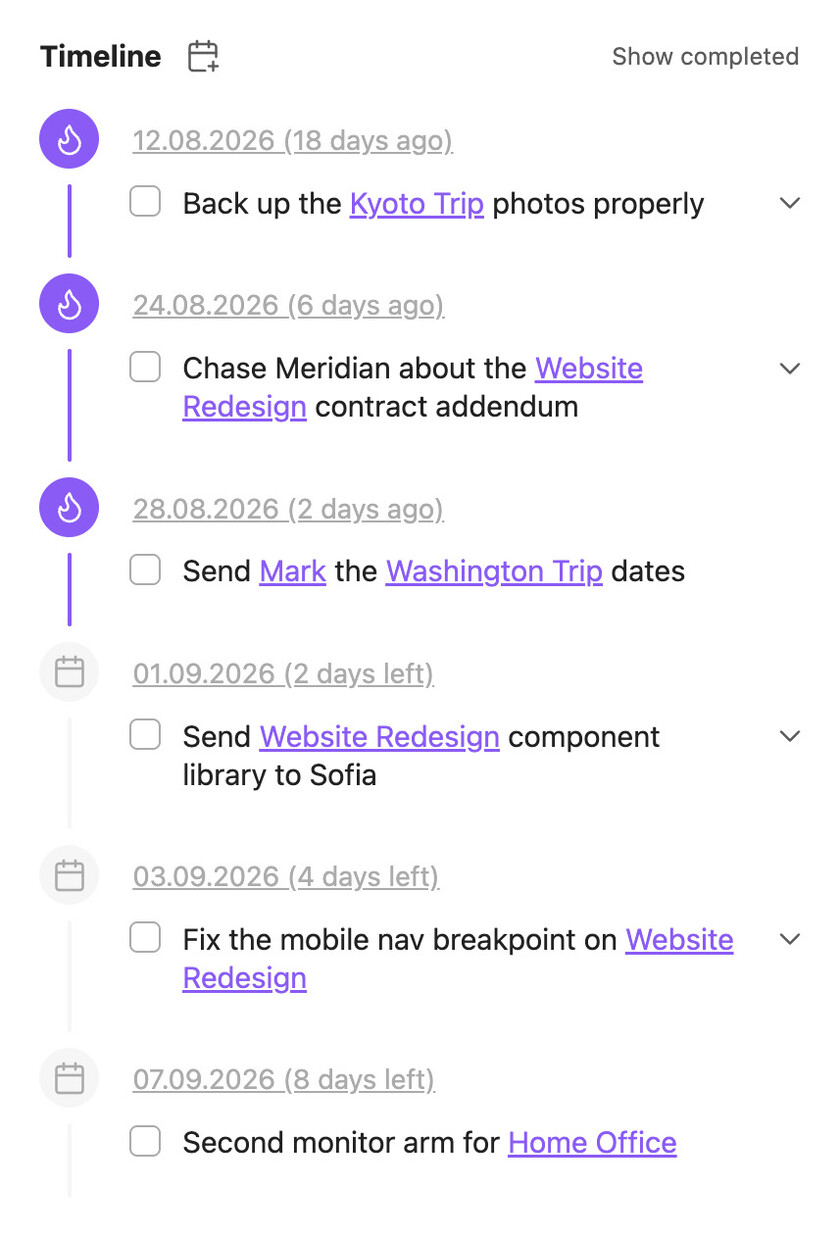
In Ābele, tasks are notes. Deadlines, completion status, creation date — all of it lives in their properties. Tasks appear in the general timeline, in related notes, in daily notes, and as a general list. A task can carry a priority, which puts it higher in the list of undated tasks, and labels of any kind, each with a colour of its own, to filter any task list by. I deliberately left out nesting, since I find it distracting. I have over 1000 tasks in Obsidian now, open and closed, and I no longer keep a personal task list anywhere else.
Tasks being notes means a task can carry a long description and everything attached to it. Automatic title setting lets titles hold links to other notes, so a task appears in every relevant context.
Journals and Calendar
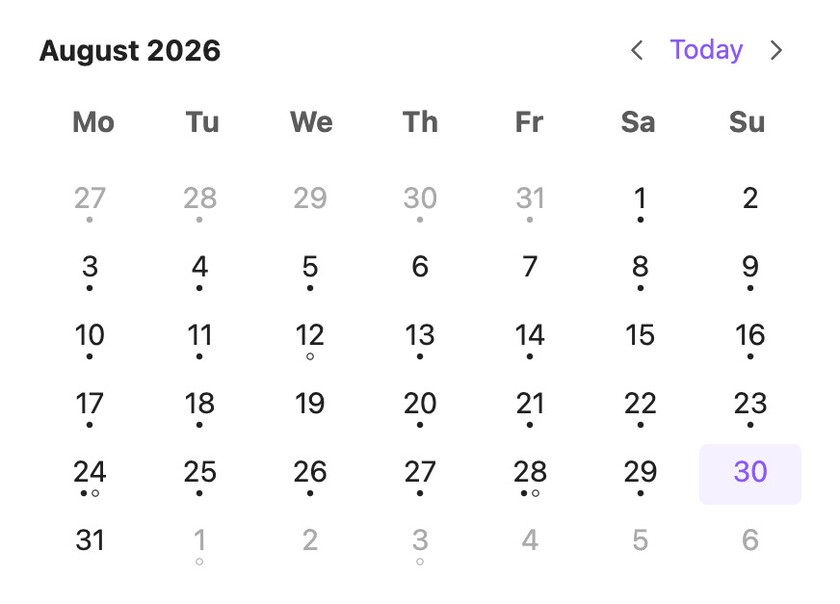
Besides daily notes I keep monthly and yearly ones, plus a separate daily health journal for data exported from Apple Health, which I don't want mixed into my main journal. Journals group the notes belonging to one journal, create them from a configurable path, switch between several journals for the same date, open from a calendar click, and mark which dates have notes and open tasks.
Events from other calendars show there too, beside the tasks and read only: Google, iCloud or Outlook by their secret calendar link, or any CalDAV account such as iCloud, Fastmail or Nextcloud. Each calendar has its own colour, repeating events and time zones are handled the way the calendar wrote them, and the last copy is kept on the device so the list works offline. A click on an event makes a meeting note tied to that day (how).
Financial Tracker
I used to use Firefly III, but I missed the linking Obsidian gives you, and creating a transaction there was more work than it should have been.
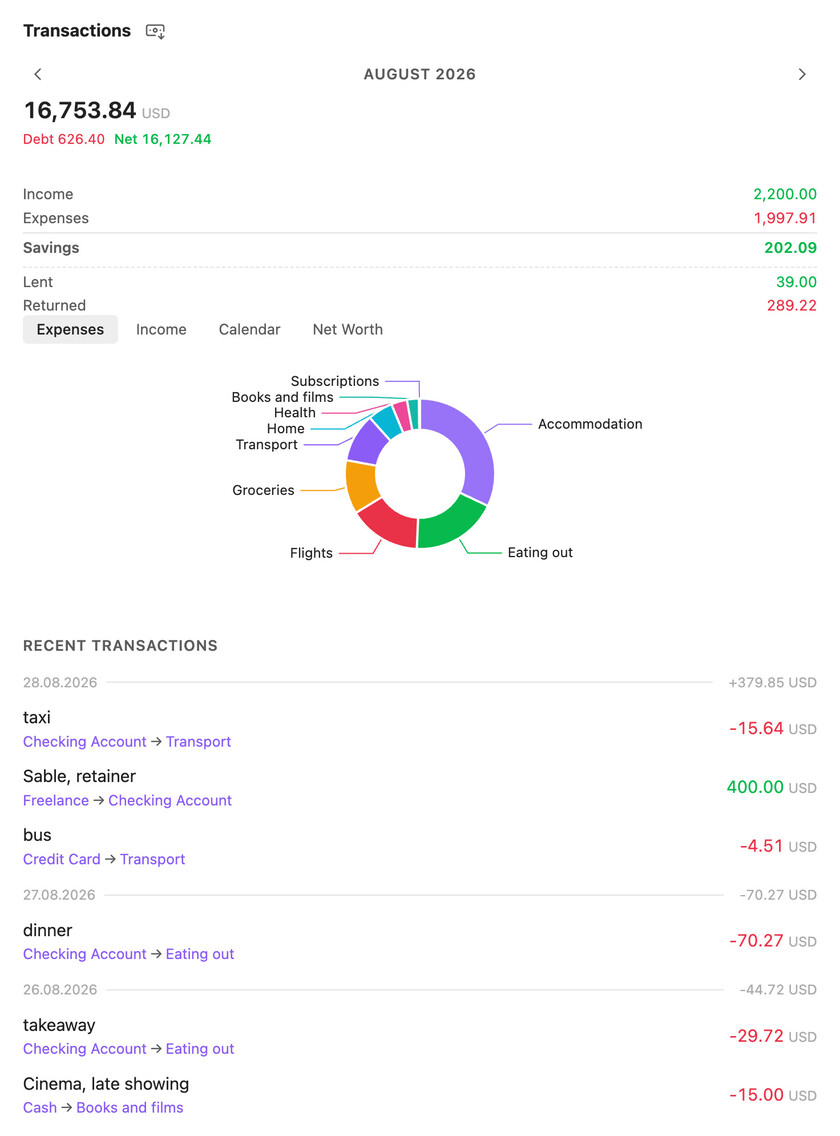
Each transaction is a separate file with from, to, amount and currency in its properties. From and To are links to account notes, which are assets, income, expenses or liabilities, and their types decide whether a transaction counts as positive, negative or neutral in the balance. Multi-currency works the way Firefly does it, by giving the amount in two currencies. Transaction lists and analytics appear in the finance sidebar, in account notes, and in every note a transaction links to.
Time Tracker
The time tracker is my replacement for Toggl, and conceptually it's the finance module with time entries instead of transactions. One entry is one file, with a start, an end, and a groups property pointing at whatever is being tracked.
Entries appear in the sidebar and in every note they link to, then in their groups, and so on up the tree — so if you track time against tasks under a project, the project note shows the total. For reports I use Obsidian's own Bases, which exports a CSV of all tasks and projects.
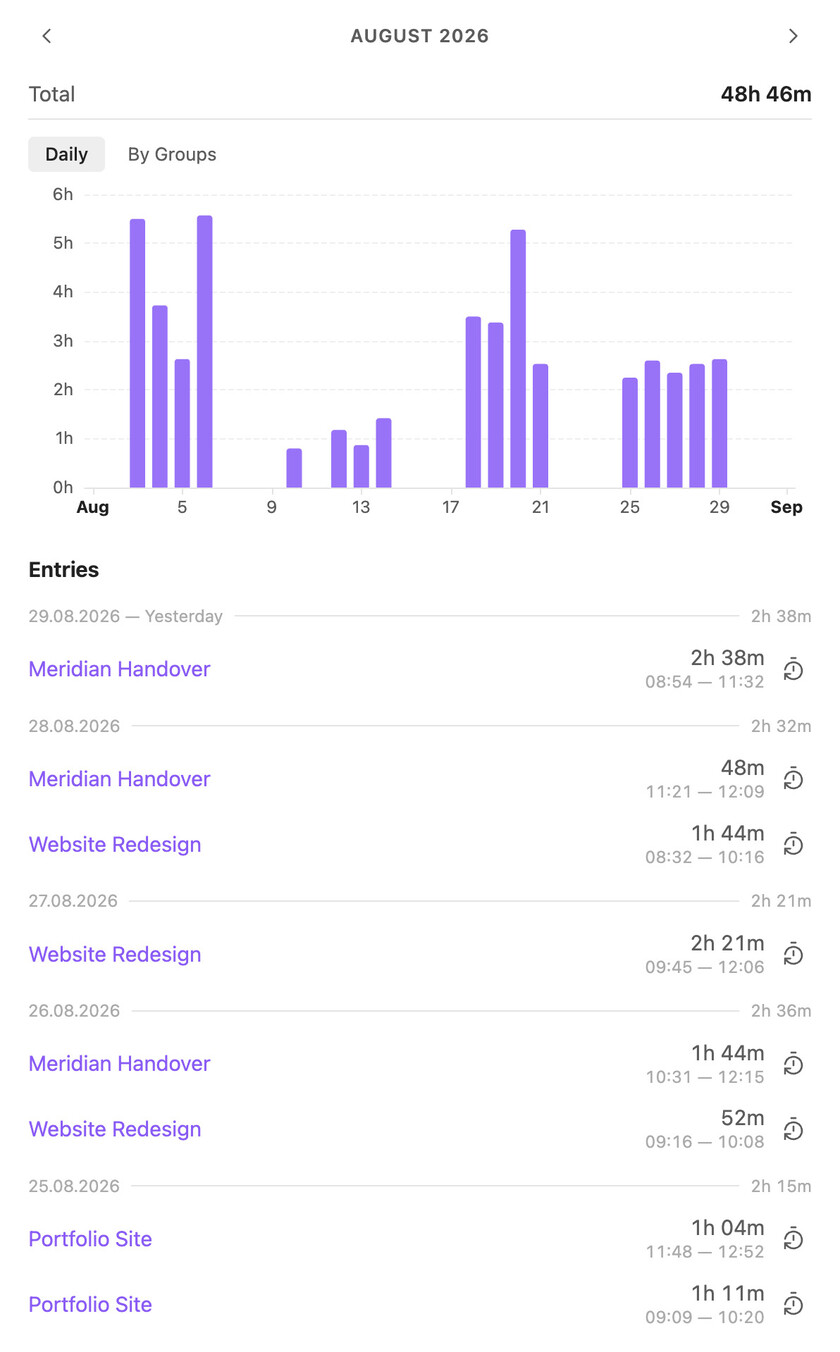
Image Galleries
Working with images was a long-standing pain point in my Obsidian workflow. This module handles adding, arranging, moving and editing images inside a note.
Charts
Charts turn numeric note properties into trends and comparisons. This Obsidian Bases view can plot financial records, time entries or other measurements, using the same notes as the rest of the plugin.
Templates
I used to use Templater, which is powerful, but I didn't find it convenient, and I wanted something lighter and wired into the rest of the plugin rather than sitting beside it. So I wrote my own. Over time templates ended up used by every other module, and became one of the foundations of the plugin.
AI Agents
AI agents work with explicitly chosen parts of a vault rather than treating every note as available. Access can follow relationships between notes as well as folders, so a flat collection can still have precise boundaries.
So access is a scope built from files, folders, patterns and, most usefully, groups. Grant an agent the "My Project" group and it gets every note linking to that project through groups, everything under those, and so on down the graph. If a path falls outside the scope, the tools refuse it.
An agent is a named configuration: a model and a fallback, a system prompt composed from text blocks and vault notes, which tools it may use and whether each one asks first, its scope, and how far it may delegate. A chat picks an agent, and can override the model, permissions or scope for itself without touching the agent. Utility agents stay out of the chat picker, to be called by scripts, delegation or message interceptors instead.
An agent with delegation depth above zero can hand a self-contained task to another agent, or fan the same task out over a list of items with one sub-agent per item. Every delegated run keeps its full transcript, readable inline in the chat or in its own tab.
To work with a vault, agents have file operations, search, the plugin's own relation tools (the logs, backlinks, tasks and transactions of a note), web search and fetch, image reading and generation, voice input, the ability to run any script, and the tools of any MCP server reachable over HTTP (how). There is also a prompt library and support for skills. My favorites are still "defuddle", which teaches the agent to load a website straight into clean markdown, and "deepresearch", which has it dig into a topic iteratively, through web search and whatever other tools it has to hand.
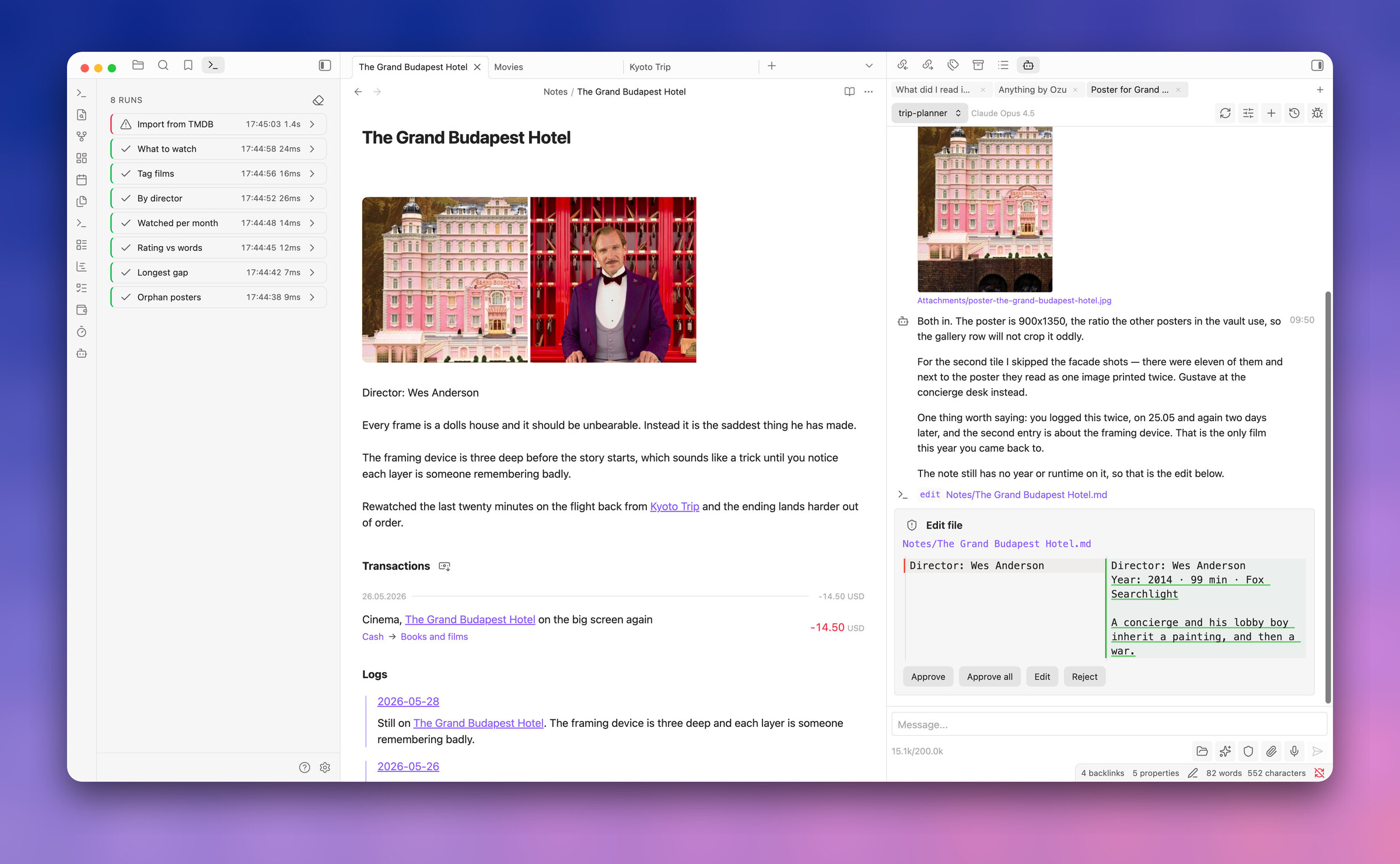
Any of that can also be asked in place. Select a passage in a note, ask your question, and the chat opens on the margin beside it — anchored to that passage, scoped to that note, and able to edit the text it is about. It is an ordinary chat underneath, so when a question turns into work, open it in the sidebar and carry on there.
Scripts
Skills are not deterministic. An agent follows one today and does something odd with it tomorrow, and for anything I want to happen the same way every time, that isn't good enough. So I wanted a way to build automations inside Obsidian, with agents and for agents, that runs predictably, and that the agents themselves can write for me.
A script is a JavaScript file in the vault that runs inside Obsidian with full vault access, and a comment header declaring its name, icon and parameters:
// @name Tag untagged notes
// @description Finds notes without tags and adds one
// @icon tag
// @param tag string "Tag to add" = "todo"
Parameters become a form when a person runs the script, and arguments when an agent or another script calls it. In the body you get file operations, structured search, the template engine, fetch, forms and markdown modals, dayjs, and agent() — so a script can hand the fuzzy part of a job to a model and keep the rest exact. Whatever it logs becomes its output.
There are five ways to start one: the command palette, a button in a note's header that runs it against that note, an abele:// link, an agent calling it as a tool, or an automation — a rule that runs it by itself when a task is completed, a note of some type changes, and so on, handing it the frontmatter before and after. Every run of the session is listed with its status, its log lines and what it returned, and can be stopped or run again from there.
Find and replace
A find-and-replace tool for note contents, which I built for vault migration. Moving 6000 notes to an almost completely flat structure, following @kepano's approach, meant rewriting properties based on a note's directory, merging several properties into one, replacing text only in notes carrying a given property. So it works with conditions and handles frontmatter properly, rather than treating a note as text.
Smaller things
- Deep links (
abele://) that open a note, run a command, or run a script with parameters - Footnote sidenotes, and colored highlights with
=={color} text== - Fenced-code syntax highlighting in Source and Live Preview using Obsidian's Prism and theme, filling language gaps without overpainting native tokens
- Comment chats anchored to a passage of a note, or of an agent's answer inside a chat
- Mermaid diagrams drawn the way GitHub draws them — the width of the note, with zoom, drag, full screen and copy as source, SVG or picture (how)
- CSS snippets loaded and hot-reloaded from a folder in the vault
- Sync between devices through a self-hosted abele-sync server — chosen per device, with version history, deleted files and notes merged when two devices change one. There is no hosted service (how)
- Settings transfer to another device — QR codes, a line of text, or a file — scripts, skills and prompts included
- GitHub issues, pull requests with their diffs, discussions, comparisons and files opened from links in notes, in tabs of their own — read only, off by default (how)
Network use
Nothing leaves the device unless a feature you set up sends it:
- AI agents talk to the model providers you add, and send them the conversation, including notes the agent read. Web search goes to Brave, with your key;
fetchand downloads go wherever the agent points them; the map tools ask OpenStreetMap services (Photon, Overpass, FOSSGIS routing) and the maps load OpenFreeMap tiles; image generation goes to the image provider you add. - Scripts you write can make requests of their own; the Firefly III migration reads from the server you name.
- MCP servers you connect are sent the tool calls an agent makes to them — the arguments, which may hold text from your notes — along with the token and headers you gave that server. Only servers reached over HTTP are supported; the plugin never starts a program on your computer.
- GitHub tabs, when switched on, read from GitHub or your GitHub Enterprise server with your token.
- Voice input sends the recording to the transcription model you chose.
- Calendars you add are read from their secret links or CalDAV servers, with the username and password you gave, when Obsidian starts and every half hour by default; the plugin only reads them and never writes to them.
Keys, tokens, calendar links and passwords are kept in Obsidian's keychain, not in the settings file.
Roadmap
Mostly agents right now, and bug fixes. I'm using the plugin to build custom learning systems for myself, which is how I keep finding out what it's missing. There will be more Bases views, and I hope for more capable APIs once Obsidian supports them.
Development approach
The original version of the plugin, its architecture and all its core functionality — logs, journals, tasks, timeline, templates, find and replace, most of the UI and the helpers — were written entirely by hand. It isn't built that way anymore. I don't write the code now: development is fully agent-driven, and what I look at is the architecture rather than the implementation. To keep control over what the agents change, I've more or less moved to TDD. I still check that the plugin works before pushing it here, and I think all of this is worth saying plainly.
It's in very active development, so bugs are expected, and I haven't written detailed documentation yet. If you want to try it and can't get it running, open an Issue and I'll try to help.
Documentation
The documentation for people using the plugin is inside it: Open documentation in the
command palette, or Documentation at the top of any settings tab. Notes for anyone working on the
plugin live in docs/:
- Design — the shared UI kit and the rules every screen follows.
- Obsidian compliance — the guidelines the plugin is held to, and where it knowingly departs from them.
- Testing — the three test tiers, and how to assert against a running Obsidian.
- AI Agent — agents, delegation and the scripting API.
- Agent reference — the docs the agent itself reads, and the rules for keeping them true.
- Script views — the tab a script can open and fill with an interface.
- GitHub — the links that open in tabs, and the token they need.
- Calendars — other calendars beside the tasks, by link or CalDAV.
- Mermaid — the diagram viewer that replaces Obsidian's own.
- Templates and URL Protocol.
Installation
TODO
License
For plugin developers
Search results and similarity scores are powered by semantic analysis of your plugin's README. If your plugin isn't appearing for searches you'd expect, try updating your README to clearly describe your plugin's purpose, features, and use cases.