Agents
approvedby tsilva
Launch AI agents from your vault — right-click any file or folder to open a terminal with context. Supports Claude, Codex, and other AI CLI tools. - This plugin has not been manually reviewed by Obsidian staff.
Agents
🚀 Launch AI agents from your vault — right-click any file or folder to open a terminal with context 🤖
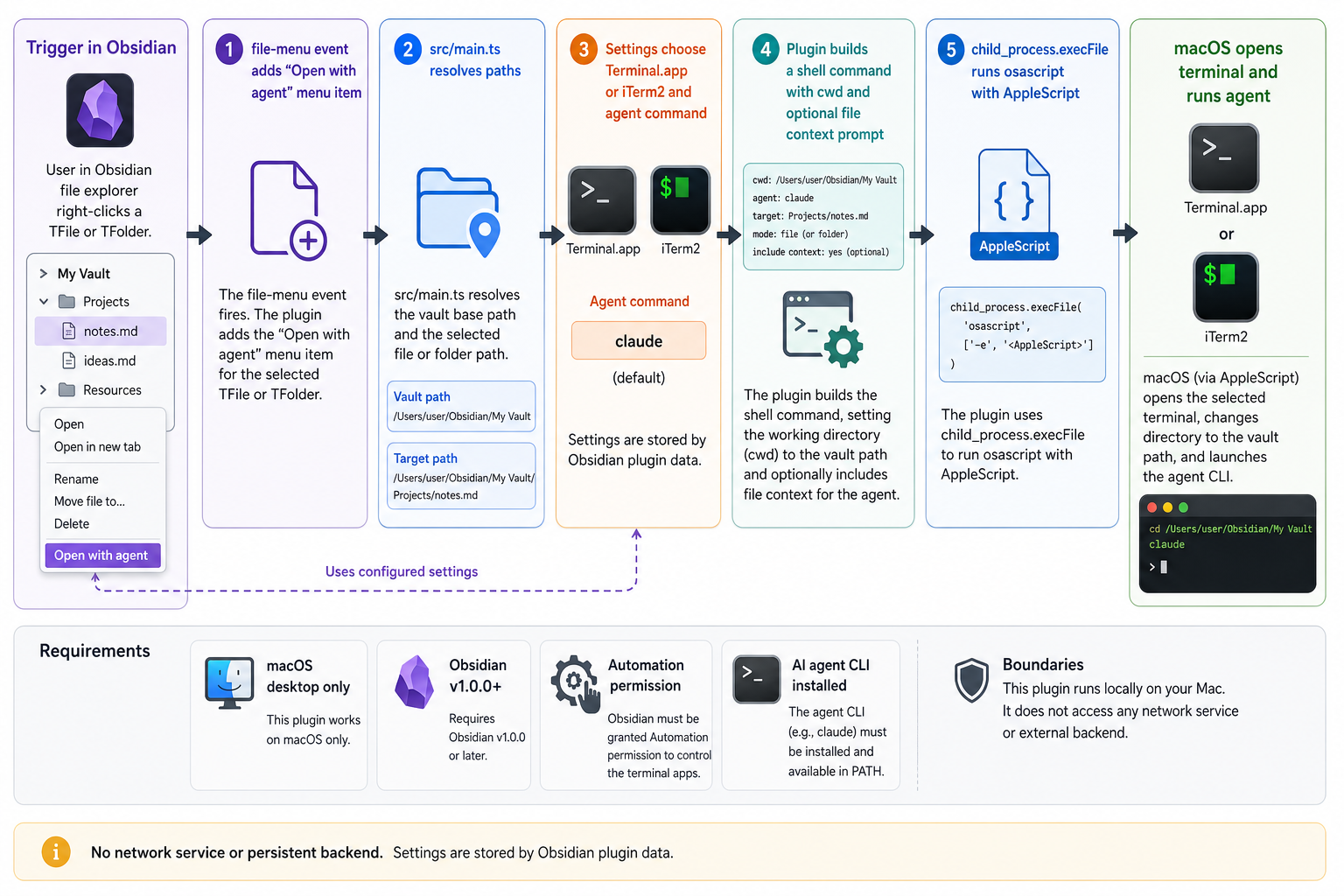
Agents is a macOS-only Obsidian plugin that adds an Open with agent action to the file explorer context menu. Right-click a note or folder and it opens your configured AI CLI in Terminal.app or iTerm2, already pointed at the right vault location.
Files launch the agent from the parent folder with a short file-context prompt. Folders launch the agent directly in that folder.
Install
From Obsidian, install Agents in Settings -> Community Plugins -> Browse, then enable it.
For local development:
git clone https://github.com/tsilva/obsidian-agents-plugin.git
cd obsidian-agents-plugin
pnpm install
pnpm run build
pnpm run install-plugin
Reload Obsidian, then right-click a file or folder in the file explorer and choose Open with agent.
Commands
pnpm install             # install dependencies
pnpm run dev             # watch-build main.js during development
pnpm run build           # type-check and build the production plugin
pnpm run install-plugin  # build if needed, symlink into a vault, and enable the plugin
pnpm run version         # sync package version into manifest.json and versions.json
Notes
- macOS desktop only. The plugin exits early on non-Darwin platforms.
- Obsidian v1.0.0 or newer is required by
manifest.json. - The default agent command is
claude; settings can change it to another CLI such ascodex. - Terminal.app is the default terminal. The settings toggle switches launches to iTerm2.
- The first launch may require macOS Automation permission for Obsidian to control Terminal.app or iTerm2.
pnpmis the expected package manager for this repo.- The plugin runs locally through AppleScript and
osascript; it does not use a backend service.
Architecture
License
For plugin developers
Search results and similarity scores are powered by semantic analysis of your plugin's README. If your plugin isn't appearing for searches you'd expect, try updating your README to clearly describe your plugin's purpose, features, and use cases.