by sally
Chat with AI about selected Markdown and save only the excerpts you confirm.
AI Reading Companion
English | 中文
Select text in any Obsidian note, discuss it with an OpenAI-compatible model, and save only what you confirm — the conversation itself never lands in your vault automatically.
What it does
- Ask about any selection. Right-click selected text or an image in a note; the answer cites your notes, not its training data.
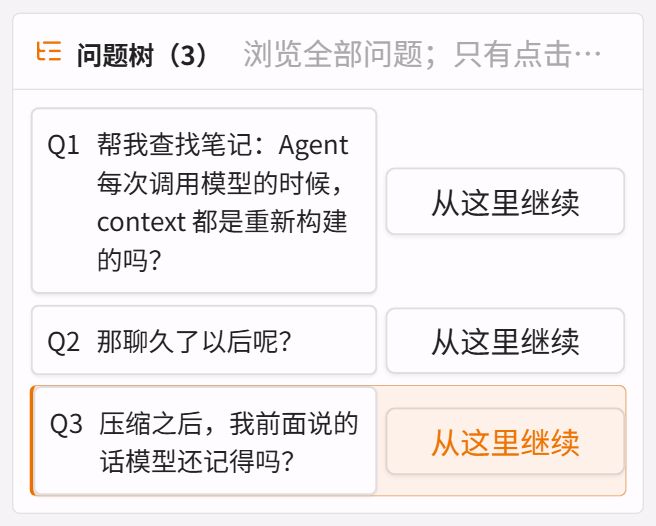
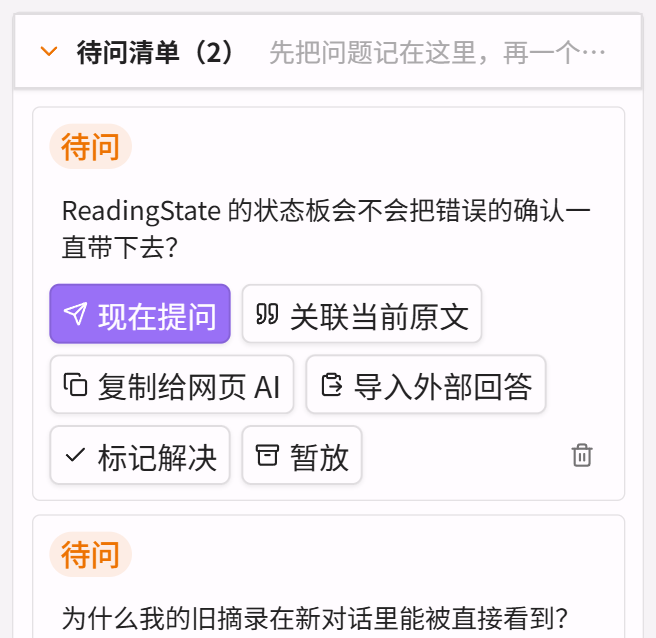
- Multi-turn with branches. Follow-ups stay in the thread; the question tree lets you jump back to any earlier question and continue from there instead of re-asking.
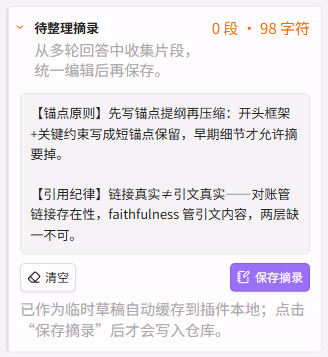
- Pending questions. Park questions you haven't asked yet; ask them later without losing the thread.
- Editable excerpt draft. Pull text out of any answer into a draft, edit it, and save once — the draft is the only thing written to your vault, and only after you confirm.
- Your notes, not the model's memory. Folder-scoped lexical retrieval over the notes you allow; answer citations link to real headings, and suspect ones are flagged in the answer.
- No hidden writes. Conversations, reasoning, and search results stay in the view unless you save a draft or a reviewed web source.
Why it exists
General chatbots answer from memory; this plugin answers from your notes and your reading state. It keeps the question tree, a pending list, and your confirmed excerpts in view, so you can trace how the conversation got to the current answer.
Screenshots
 |  |
 |
Installation
Download main.js, manifest.json, and styles.css from the latest release into:
<vault>/.obsidian/plugins/ai-reading-companion/
Restart Obsidian and enable AI Reading Companion under Community plugins.
Setup
- Create a named model configuration (OpenAI, Kimi, GLM, Volcengine Ark, or a custom OpenAI-compatible endpoint).
- Choose the API protocol and enter the model ID and API key (stored in Obsidian SecretStorage).
- Optionally enable folder-scoped local knowledge: add one allowed folder per line under Local knowledge.
- Optionally configure web search (Kimi, GLM, Tavily, Brave, Exa, Serper, SearXNG, or a Remote MCP adapter).
Privacy & data
- No telemetry, no analytics, no background network calls.
- API keys are stored in Obsidian SecretStorage and sent only to the configured endpoint.
- Conversations live in the plugin's local data (
data.json) until you save a draft; clearing the conversation list removes them. - Local retrieval is folder-scoped and lexical only — no embeddings, no whole-vault index.
Development
npm install
npm run dev
npm run build
npm run lint
npm run verify
Author
License
Apache License 2.0.
AI Reading Companion(AI 阅读伴学)
在 Obsidian 里选中一段文字,用 OpenAI 兼容模型围绕它开聊,只有你确认的内容才会写进知识库——对话本身不会自动落盘。
它能做什么
- 对任意选中内容提问。 在笔记里选中文字或图片后右键提问,答案引用的是你的笔记,不是模型的训练数据。
- 多轮对话 + 分支。 追问留在同一条线里;问题树可以回到任意一个旧问题续接,不用重问。
- 待问清单。 把还没问的问题先记下来,之后逐条问,不打断当前思路。
- 可编辑摘录草稿。 从任意回答里把文字拖进草稿,编辑后一次保存——草稿是唯一会写进库的内容,且必须你确认后才写。
- 用的是你的笔记,不是模型的记忆。 按你授权的文件夹做词法检索;答案里的引用链接到真实存在的标题,存疑的引用会在答案里标明。
- 没有隐藏写入。 对话、推理过程、搜索结果都留在界面里,除非你保存了草稿或审阅过的网页来源。
为什么做这个
通用聊天机器人凭记忆回答;这个插件凭你的笔记和你的阅读状态回答。问题树、待问清单、你确认过的摘录都在界面上,你能看清这段对话是怎么走到当前答案的。
截图
| |
|
安装
从最新 Release 下载 main.js、manifest.json、styles.css,放到:
<你的库>/.obsidian/plugins/ai-reading-companion/
重启 Obsidian,在社区插件里启用 AI Reading Companion。
配置
- 建一个命名模型配置(OpenAI、Kimi、GLM、火山引擎,或自定义 OpenAI 兼容端点)。
- 选 API 协议,填模型 ID 和 API key(存进 Obsidian SecretStorage)。
- 可选:在本地知识里开文件夹范围的检索,一行一个授权文件夹。
- 可选:配置联网搜索(Kimi、GLM、Tavily、Brave、Exa、Serper、SearXNG,或 Remote MCP 适配器)。
隐私与数据
- 没有遥测、没有分析、没有后台网络请求。
- API key 存在 Obsidian SecretStorage,只发往你配置的端点。
- 对话存在插件本地数据(
data.json)里,直到你保存草稿;清空对话列表会一并删除。 - 本地检索只在你授权的文件夹内做词法检索——不建 embedding、不建全库索引。
开发
npm install
npm run dev
npm run build
npm run lint
npm run verify
作者
许可证
Apache License 2.0.
For plugin developers
Search results and similarity scores are powered by semantic analysis of your plugin's README. If your plugin isn't appearing for searches you'd expect, try updating your README to clearly describe your plugin's purpose, features, and use cases.