by Zhe
Manage Anke writing projects, character portraits, and NGA BBCode export and publishing.
Anker
Manage Anke (dice-driven fiction) projects and character portraits, write in Markdown, and export or publish individual sections to the NGA forum. Each character is stored in one Markdown file, with headings organizing portrait groups.
Installation
Requires Obsidian 1.11.4 or later on macOS or Windows. Open Anker in the community directory and select Add to Obsidian.
For manual installation, download the install ZIP from Releases, extract the anke-writing folder into your vault's .obsidian/plugins/ folder, then enable Anker in Settings → Community plugins. When updating, keep your existing data.json and reload the plugin.
Usage
Create a project folder, run anke init from the command palette, and select that folder. Add characters from the sidebar. Create a chapter such as 1-1 Chapter.md inside the project folder and separate sections with a standalone --- line, leaving a blank line above it. Use Option/Alt+C to copy the selected text or current section as NGA BBCode. All shortcuts can be changed in Obsidian's Hotkeys settings.
The interface is primarily in Chinese. Writing and character management work offline; remote image previews access the image host, and optional NGA publishing sends the chosen section to your bound forum thread using the cookie you provide. The plugin enumerates vault file paths and cached metadata to find projects, characters, chapters and image choices. It writes to the clipboard only when you invoke the copy command; it does not read the clipboard. No telemetry is collected.
中文介绍
在 Obsidian 中创作安科:管理多部作品和角色差分,用 Markdown 写作,将当前分节复制为 NGA BBCode 或发布到 NGA。
角色和正文都是 Vault 中的 Markdown 文件。一个角色一个文件,用标题管理差分组;笔记、附件、窗口布局和编辑历史沿用 Obsidian 的功能。
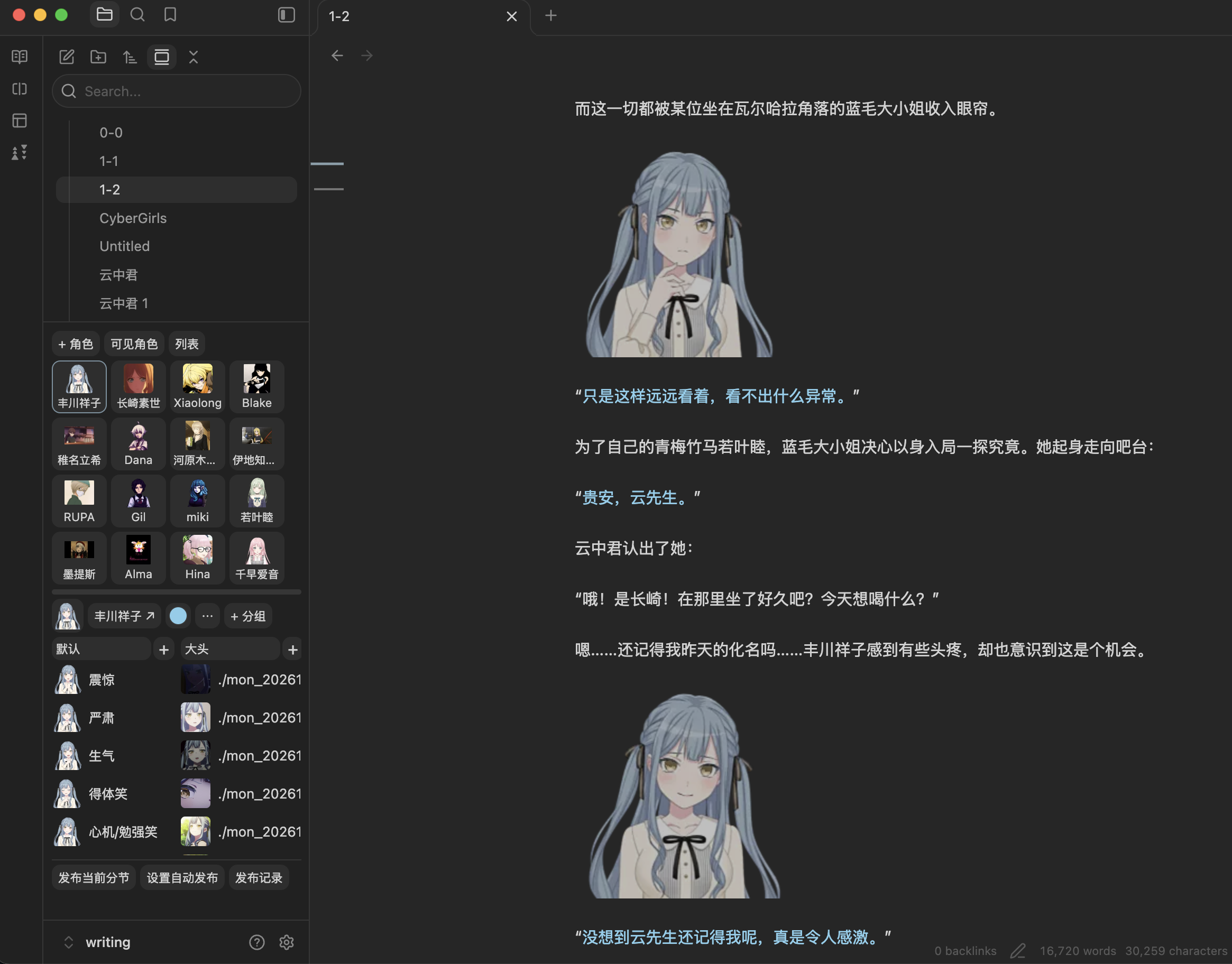
功能
- 项目与角色:自动跟随当前文件识别作品,各项目拥有独立角色库;角色颜色、别名、头像和备注保存在 Markdown 属性中。
- 差分管理:紧凑缩略图、悬停预览、可折叠分组、全文描述搜索,以及组内排序、跨组和跨角色拖动。
- 写作辅助:NGA 骰子、对白上色/清色、中文引号配对、确认式 Tab 补全、半角标点转全角。
- NGA 导出与发布:Markdown 转 BBCode,按分割线识别分节;可手动发布当前分节或设置定时发布。
安装
支持 macOS 和 Windows,要求 Obsidian 1.11.4 或更新版本。macOS 已做实际使用验证;Windows 尚待实机验证。
打开 Anker 社区插件页面,点击 Add to Obsidian 安装。若新上架条目尚未同步到客户端,也可通过 GitHub 手动安装:
- 打开 Releases,下载对应版本的
obs-anker-<version>.zip。 - 解压后,将
anke-writing文件夹放入你的 Vault 的.obsidian/plugins/。 - 在 Obsidian「设置 → 第三方插件」中启用 Anker。
更新时替换插件包中的文件,再停用并重新启用插件。保留已有的 data.json,它保存偏好和发布记录。插件文件夹名保持 anke-writing,以沿用现有设置和快捷键。
开始写作
- 在 Vault 中创建一个作品文件夹。
- 按 Cmd/Ctrl+P,运行 anke init,选中该文件夹。初始化保留已有文件。
- 在角色面板点击「添加角色」,再用分组旁的「+」添加差分。
- 在作品目录下创建
1-1 第一章.md,开始写作;文件名识别规则和角色目录名都可在插件设置中修改。 - 用独占一行的
---分节,与上方正文隔一个空行。把光标放在目标分节里,按 Option/Alt+C,即可复制为 NGA BBCode。
我的作品/
  我的作品.md       # 项目配置,由 anke init 创建
  1-1 第一章.md
  1-2 第二章.md
  角色/
    若叶睦.md       # 角色属性、差分和笔记
| 默认快捷键 | 功能 |
|---|---|
| Option/Alt+D | 插入 NGA 骰子 [dice]1d100[/dice] |
| Option/Alt+1~3 | 对应角色对白上色,再按一次清色 |
| Option/Alt+C | 复制选区/当前分节为 NGA BBCode |
| Cmd/Ctrl+Shift+P | 搜索差分并插入 |
所有命令都可在 Obsidian「快捷键」设置中重新绑定。
网络与数据
- 写作和角色文件保存在本地 Vault,角色管理与 BBCode 转换不要求 NGA 账号。插件枚举保险库文件路径及缓存元数据,以识别项目、角色、章节和图片选项。
- 仅在执行复制命令时写入剪贴板,不读取剪贴板内容。
- 预览远程图片时会访问图片链接的主机;检查 NGA 图片尺寸及导出带尺寸图片时会匿名访问对应图片地址。
- 发布功能使用你主动保存的 NGA Cookie,向绑定帖子的 NGA 主机发送回复。Cookie 使用 Obsidian SecretStorage 保存;发布记录保存在插件配置中,包含已发送的正文。
- 定时发布只在指定执行设备的 Obsidian 运行时执行;错过的任务会提示处理。插件没有遥测,也不读取 Vault 外的个人文件。
- 本地图片可用于角色管理;发布到 NGA 前需自行上传到可访问的图床。插件目前不提供图片上传。
反馈
插件免费使用。欢迎通过 Issues 提交问题或建议,请附上复现步骤、系统和 Obsidian 版本;不要附带 Cookie 或私密正文。
赞赏
插件免费使用。如果它对你的创作有帮助,欢迎用微信扫描下方赞赏码支持维护。金额随意,打赏完全自愿。

许可
代码采用 MIT License,允许使用、修改和再分发,需保留版权及许可声明。你的作品内容仍归你所有。第三方组件按各自许可证授权,详见第三方许可。
For plugin developers
Search results and similarity scores are powered by semantic analysis of your plugin's README. If your plugin isn't appearing for searches you'd expect, try updating your README to clearly describe your plugin's purpose, features, and use cases.