Mention Autocomplete
approvedby Darren Zheng
Type @ to full-text search and link notes. Rendered preview, smart sentence alias, keyboard-first. - This plugin has not been manually reviewed by Obsidian staff.
Obsidian @ Mention Autocomplete
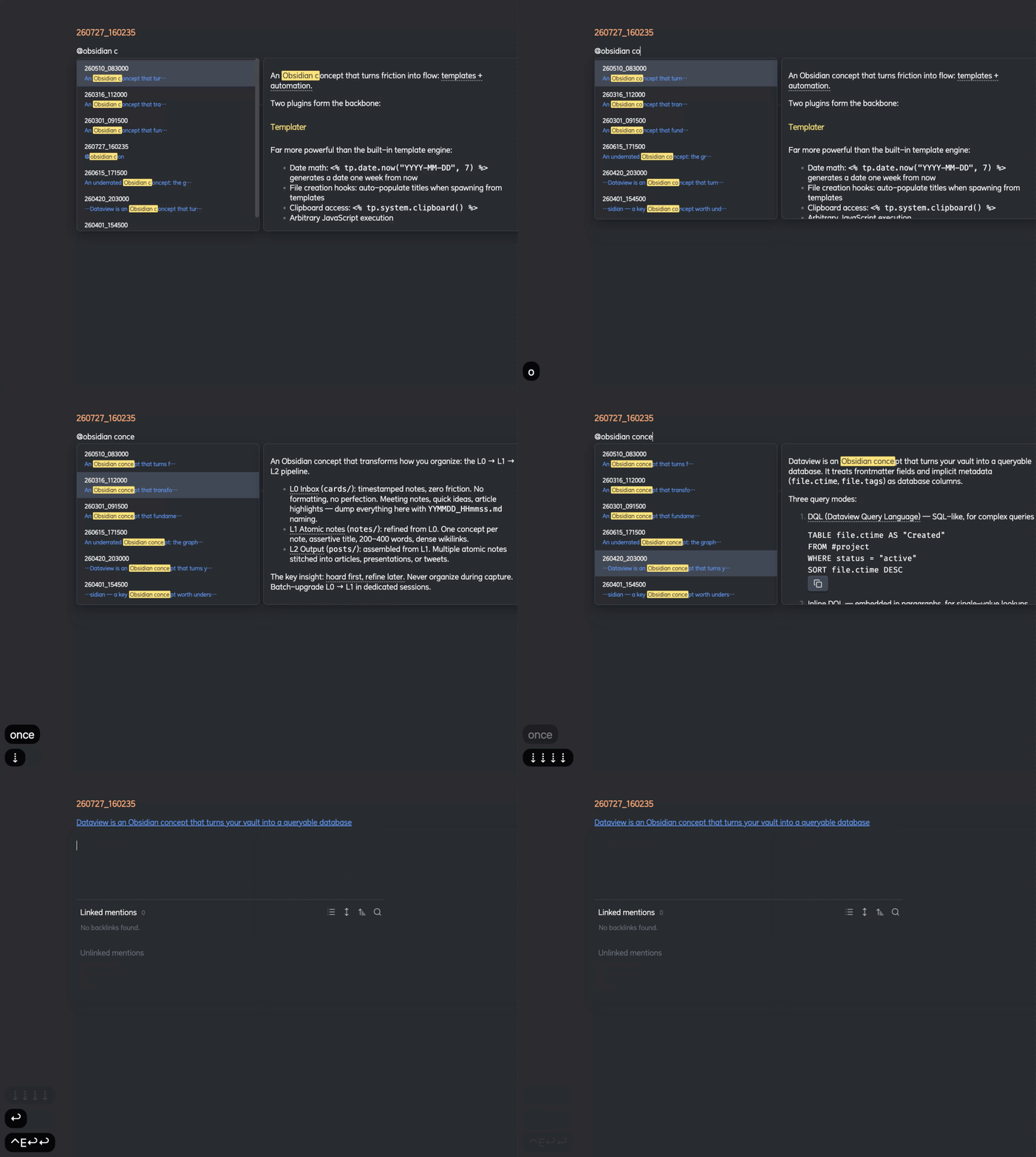
Type @ to instantly search and link any note in your vault — with full-text search, rendered preview, and smart sentence extraction.
Why
Obsidian's built-in [[ autocomplete only matches note titles, and even then only by fuzzy title match. When you have hundreds of timestamped notes (250727_095442.md), finding the right one by title is impossible. You need to search by content — "which note was I talking about 早睡 in?"
@mention lets you type @早睡 and immediately see every note that mentions it, with the exact matching sentence highlighted, and the full note rendered in a side panel.
@ can also fully replace [[ ]] title linking: title matches rank above content matches and are marked with an accent 标题 chip (content matches get a muted 正文 chip). Title matching is fuzzy like the native suggester — @bpe finds Byte Pair Encoding — and picking a title match always inserts a clean [[Title]] (never [[Title|Title]]).
Features
- Full-text search across all markdown files (strips YAML frontmatter, indexes content)
- Title-first fuzzy matching —
@matches file titles like[[ ]](subsequence + multi-word), ranked above content matches: exact > prefix > substring > fuzzy > content-only - Match-type marks — title matches: accent title text + highlighted matched chars + accent
标题chip (file icon); content matches: muted正文chip (search icon) - Clean title links — picking a title match inserts a plain
[[Title]](never[[Title|Title]]), content matches insert[[note#heading|matching sentence]] - Edit-time sorting + relative dates — results tie-break by last edit (descending); every hit shows a natural-language relative time: 今天 / 昨天 / 前天, then
YYYY-MM-DD @trigger — type@keywordanywhere in a note to see matches- Rendered detail panel — hover or keyboard-navigate to see the full note body with markdown rendering
- Keyword highlighting — bright yellow highlights in both the suggestion list and detail panel
- Smart alias extraction — inserts
[[note#heading|matching sentence]]bounded by sentence terminators - IME-aware — correctly handles Chinese pinyin input; Enter confirms characters, then selects
- Keyboard-first —
↑↓/Ctrl+NCtrl+Pto navigate,Enterto select,Escto dismiss - Click outside to dismiss
- Live index — automatically updates as you create, edit, rename, or delete notes
Usage
- Type
@followed by any keyword - Navigate results with arrow keys or mouse
- Press
Enterto insert a wikilink — the alias auto-selects for quick editing
Install
From Obsidian Community Plugins
Search for "Mention Autocomplete" in Settings → Community Plugins → Browse.
Manual
Copy main.js, manifest.json, and styles.css into .obsidian/plugins/at-mention-autocomplete/.
Performance
Indexes are built in-memory at startup. For vaults with 10,000+ notes, initial indexing takes ~1-2 seconds. Subsequent searches are instant (O(n) substring match with scoring). File changes are debounced and incrementally updated.
License
MIT
For plugin developers
Search results and similarity scores are powered by semantic analysis of your plugin's README. If your plugin isn't appearing for searches you'd expect, try updating your README to clearly describe your plugin's purpose, features, and use cases.