by heykim109
Adds timeline, calendar and graph views to Bases, plus paging, group controls, manual ordering and configurable open targets in an enhanced table view.
↓ 819 downloadsUpdated 20d agoMIT
Bases Plus
Made to fill the gaps in Obsidian's Bases views.
- Keeps the built-in Bases behavior as much as possible and only fills in the missing pieces
- Makes table, timeline, calendar, graph and kanban fully workable in Bases
- (This plugin will be discontinued once Obsidian ships similar features natively)
한국어 — the Korean page is the primary document; this page follows it
Install
- Community plugins: search for
Bases Plusin Obsidian's community plugin browser and install it - Manual: copy
main.js,manifest.jsonandstyles.cssfrom a release into.obsidian/plugins/bases-plus/in your vault, then restart Obsidian - Then open a base and pick one of the
Plus …view types. The Bases core plugin must be enabled.
Shared
- Open targets: modal · new tab · new window
- Pick the default in settings
- A modal can promote itself to a new tab or window
- The modal shows the note's own header: more options menu, editable title, reading view toggle
- Right-click:
Open with Bases Plus- Enable it in settings
- The same item is available on the built-in Bases views too
- Groups: table · timeline · kanban
- Drag an item onto another group to move it there
- Its property or tags change, or the file moves into that group's folder
- The group
+button adds a new item to that group- In the table and timeline, choose a new note or a new canvas
Group target propertyappears only when theGroup byproperty can't be written to, such as a formula- Pick a note property, the folder or tags to write instead
- With the folder, items go to the folder where that group's notes live
- Drag an item onto another group to move it there
- Colors: timeline · calendar
- Pick a default color, or any color for a value
- In progress: timeline · calendar
- Set
In progress propertyandIn progress valueto draw items with no end date up to today
- Set
The five views
Plus table
- Collapsible groups, manual ordering, whole-table paging, per-group paging
- Drag column headers to reorder columns
- Column widths fit their content, and the last column fills the view
- List values: pick from values already used in the base, double-click to edit
- Drag list values and tags to reorder them
- Edit date cells in place, like the built-in table

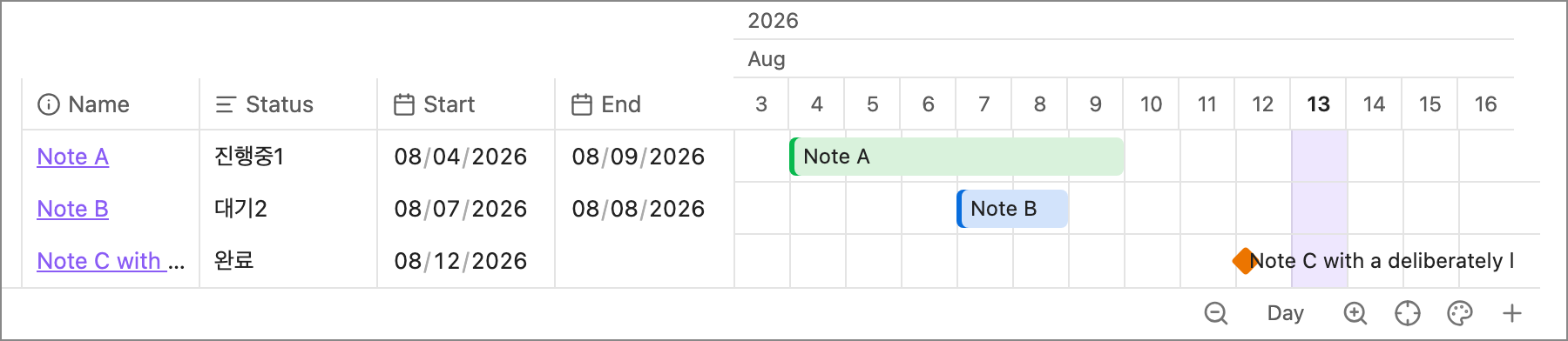
Plus timeline
- Timeline with a table pane, timeline properties, colors by status
- Adjustable zoom
- Weekends and week boundaries marked at day zoom
Show outlinks: notes an item links to appear as foldable rows under it, with editable dates
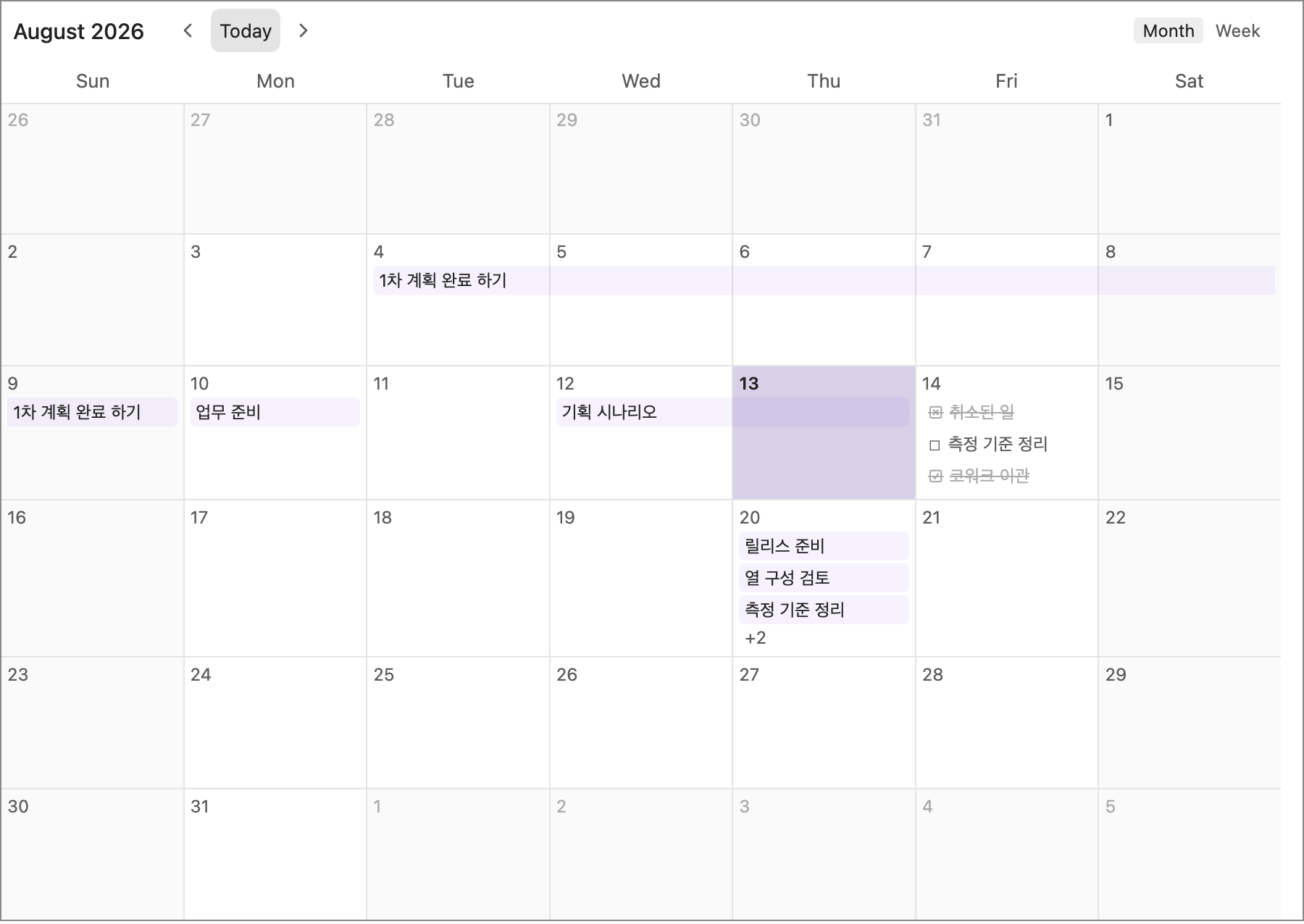
Plus calendar
- Title options: a checkbox or any property in front, a status picker behind
- Property chips and tasks on the calendar
- Show files, tasks or both
- Tasks sit on their done (✅) or cancelled (❌) date, otherwise on their due (📅) date
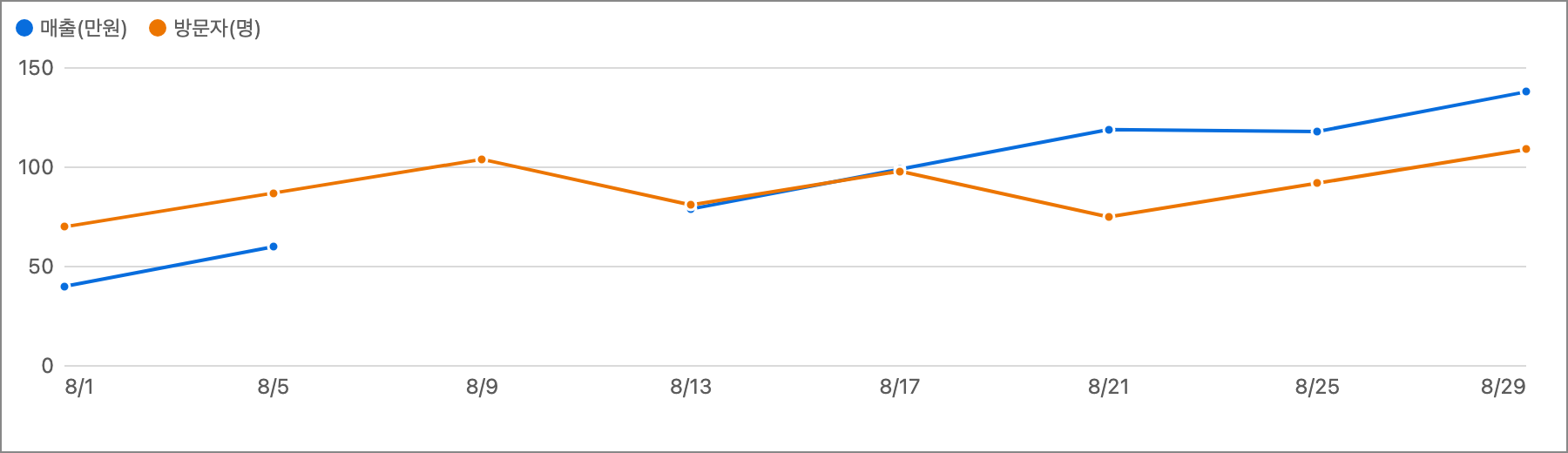
Plus graph
- X-axis windowing, series from visible properties, legend show/hide
- Y-axis range: from zero, fit to data, or set min and max
- Adjustable plot height
Plus kanban
- One column per group; choose
Group byin the toolbar - Drag a card to another column to change its value, or within a column to reorder it
- Paging per column
- Cards take the same options as calendar items
Feedback
- Report problems or ideas via GitHub issues or email (kim109238@gmail.com)
- The plugin is maintained once a month, or whenever needed
Data and network
- Collects nothing and never connects to the internet
- Everything happens inside your vault — and there are no ads
License
For plugin developers
Search results and similarity scores are powered by semantic analysis of your plugin's README. If your plugin isn't appearing for searches you'd expect, try updating your README to clearly describe your plugin's purpose, features, and use cases.