by Bag of Tips
Add pagination, column search, and quality-of-life enhancements to native Obsidian Bases.
Bases Utilities
Bases Utilities adds pagination, column search, and focused quality-of-life improvements to native Obsidian Bases. It works with the built-in views instead of replacing them.
Features
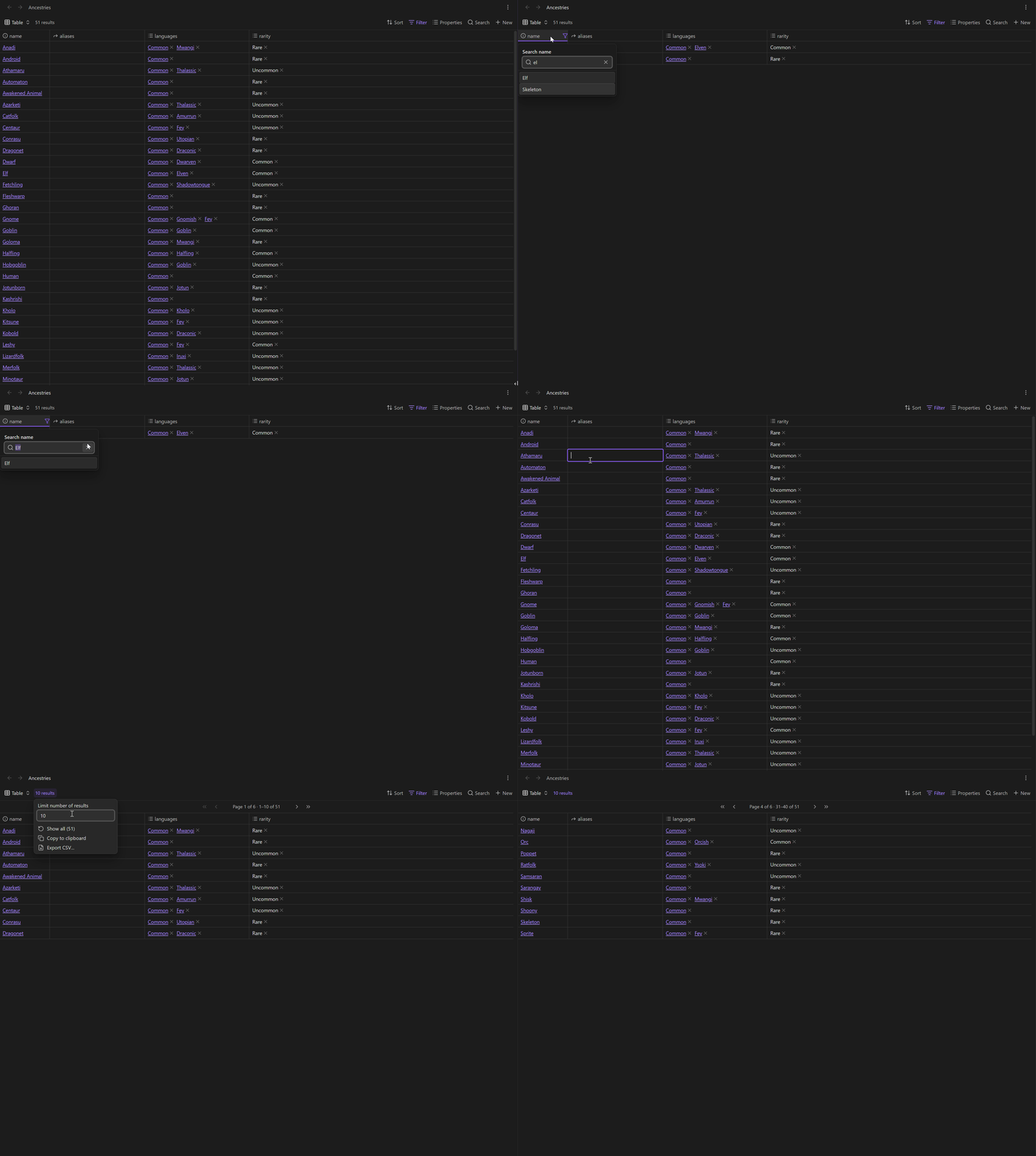
- Turn the native Limit number of results value into a page size.
- Place pagination controls at the top, bottom, or both.
- Search an individual table column from its header.
- Get matching suggestions from values already present in the column.
- Assign a template or command to the native New button for each Base.
- Keep the native Bases toolbar, filters, sorting, grouping, editing, and rendering.
Pagination
Open a native Table, Cards, or List view. Open the result-count menu and set Limit number of results. Bases Utilities uses that value as the number of items per page. Clear the native limit or choose Show all to disable pagination.
The command palette includes:
- Bases Utilities: Toggle pagination in current base
- Bases Utilities: Go to first page in current base
The toggle is session-only and does not edit the .base file.
Under Settings → Bases Utilities, choose whether pagination controls appear at the top, bottom, or both. The default is top.
Column search
Select a table header to open a search box for that column. Matching is case-insensitive and filters results before pagination is applied.
As you type, the popup suggests values present in the column. The first match is selected automatically. Use the mouse, Up and Down arrow keys, or Enter to choose a suggestion. Items in list properties are suggested separately.
The active column displays a filter icon until the search is cleared.
Column search on left click is enabled by default. Disable Open column search on left click to restore native left-click sorting. Search this column remains available in the header's right-click menu.
New note actions
The native New button works normally until you assign an action. Right-click New to choose from these options:
- Choose a template lists Markdown files in the vault. Bases creates the note normally, preserving properties derived from the Base, and then adds missing template properties and template content.
- Assign a command lists available commands, including commands registered by other plugins. Selecting one makes New run that command instead of the native creation action.
- Use native New behavior clears the assignment for that Base.
You can also clear the assignment from the first entry in either picker. Template variables for {{title}}, {{date}}, {{time}}, and custom date or time formats are supported.
For plugin developers
Search results and similarity scores are powered by semantic analysis of your plugin's README. If your plugin isn't appearing for searches you'd expect, try updating your README to clearly describe your plugin's purpose, features, and use cases.