by dingzy53
Export a folder of notes to a single PDF with an outline, contents page, cross-references and unfolded callouts.
Folder to PDF




Export all notes in a folder of your Obsidian vault to a single PDF.
Features
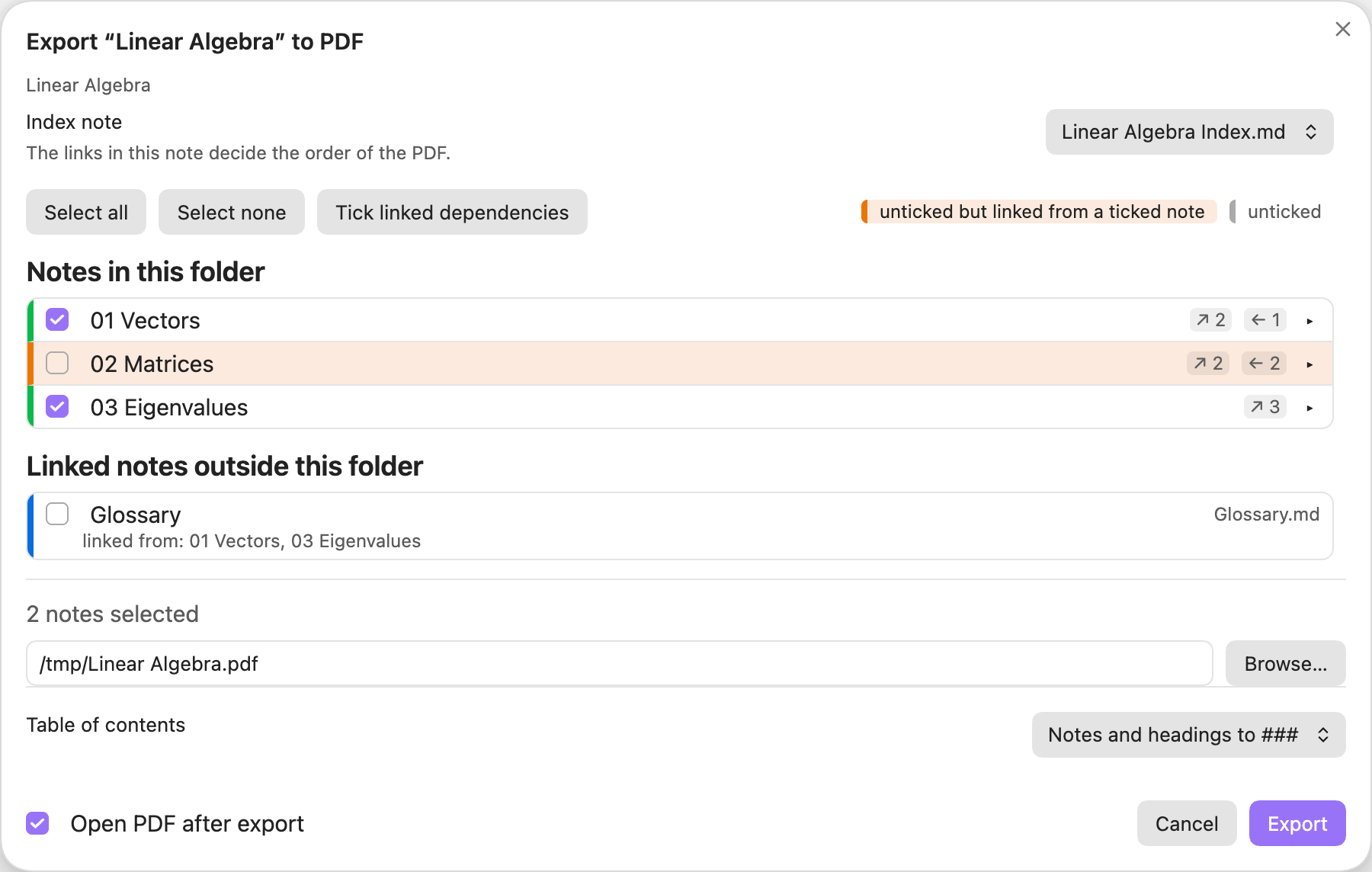
- Notes in the order of the folder's index note, with a checklist to leave some out and drag them into a custom order.
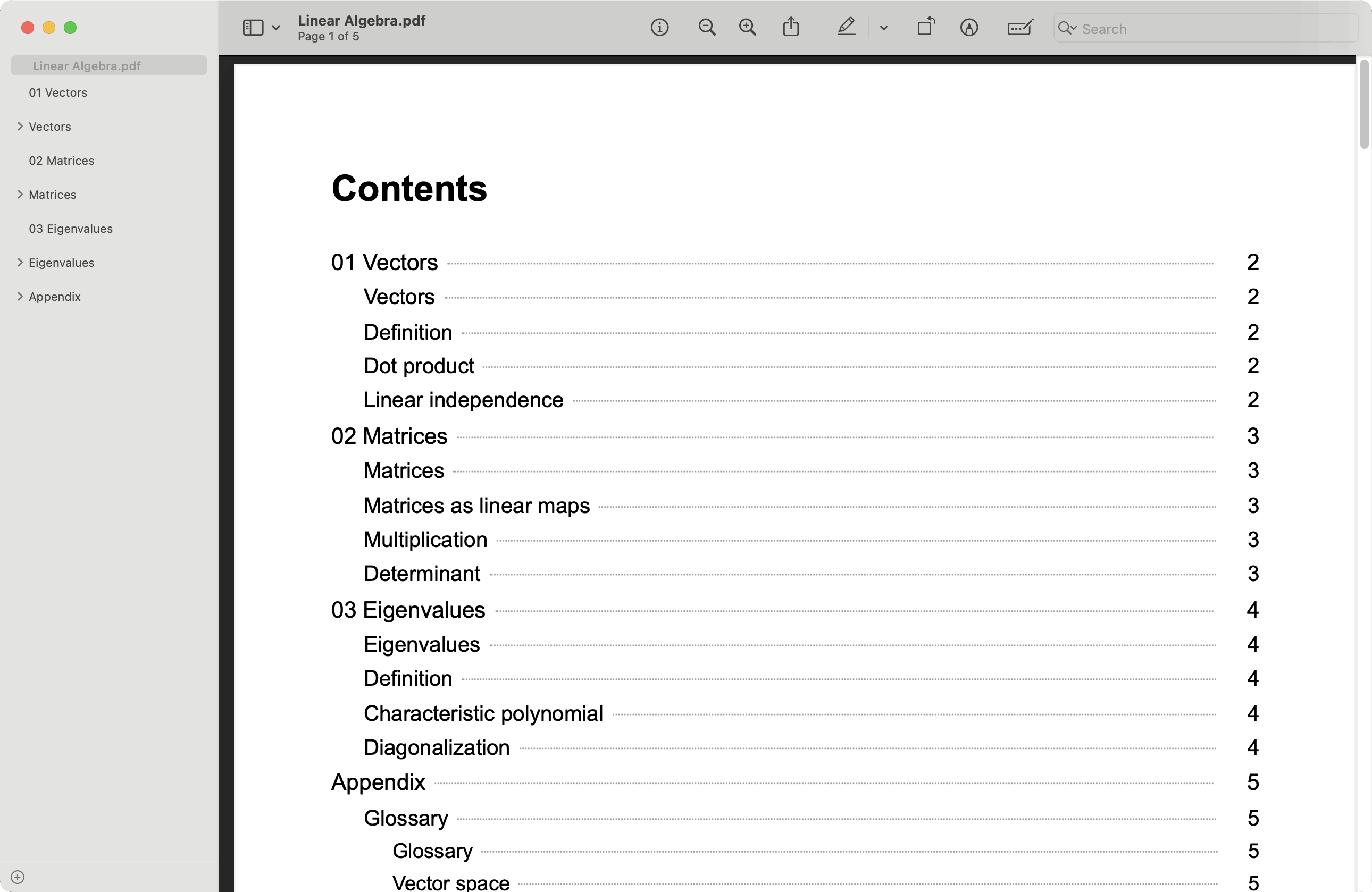
- A PDF outline (notes,
##and###headings) and a contents page with page numbers. - Clickable cross-references between the exported notes.
- Linked notes outside the folder can be added as an appendix.
- Callouts unfolded, and always printed in the light theme. A callout title is kept with its content, and short callouts stay on one page.
- Math in link text (
[[Note|$\chi^2$]]) is rendered, not printed as LaTeX.
Requirements
- Obsidian 1.13.1 or newer, desktop only (the plugin uses Obsidian's own PDF printing).
- Optional: the Native TikZ plugin 1.2.0 or newer, so TikZ diagrams print in the light theme. Version 1.2.0 is not released yet. With 1.1.2, diagrams can print in dark colors when Obsidian uses a dark theme.
Installation
From the community directory (recommended)
- Open Settings → Community plugins and turn on community plugins if asked.
- Select Browse, search for Folder to PDF, then select Install and Enable.
You can also open the plugin's page: community.obsidian.md/plugins/batch-export.
Manually
- Download
main.js,manifest.jsonandstyles.cssfrom the latest release. - In Settings → Community plugins, select the folder icon next to Installed plugins. This opens
<vault>/.obsidian/plugins/. - Create a folder named
batch-exportthere and put the three files in it. - Select the reload icon next to Installed plugins, then enable Folder to PDF.
Beta versions: install BRAT and add dingzy53/obsidian-batch-export.
Update or remove: select Check for updates or Uninstall in Settings → Community plugins.
Usage
- Right-click a folder and choose Export folder to PDF…, or run the command for the folder of the active note.
- A checklist starts in index order. Drag the grip handle (or use the arrow buttons) to change the export order; Reset order puts it back. Selections, custom order, appendix choices and contents depth are remembered per folder. A note is amber when it is unticked but a ticked note links to it, so its cross-references would be dead text.
- Linked notes outside the folder are listed separately and can be added as an Appendix.
- The default order comes from the links in the folder's index note.
- Choose the contents-page heading depth in the export dialog. It is remembered per folder.
The PDF has an outline (note, ##, ###), a contents page, and clickable cross-references. Output is always light, whatever your Obsidian theme. The plugin only reads your notes and never writes into the vault.
Settings
Page size, margins, font size, outline depth, contents depth (default for new exports), render timeout.
Hide tags (off by default) leaves #tags out of the PDF. A line that holds only tags, such as #TODO, is removed.
Privacy and security
- Filesystem: the plugin writes the PDF to the location you choose, using Node's
fs. It also writes short-lived scratch files to the system temp folder and reads the finished PDF back to compute contents-page numbers and fix link positions. It never writes into your vault. - Electron IPC: the PDF is produced through the
print-to-pdfIPC call, the same one Obsidian's built-in PDF export uses.@electron/remoteis used only for the native save dialog and to temporarily switch the window background to white while printing in dark mode. - Vault access: notes are only read (
vault.cachedRead), never modified. - Network: none.
Limitations
- Math in link text is rendered only when the whole formula is plain text. A formula split by other markup, such as
[[Note|*$x$*]], prints as written. - PDF bookmark titles read accents in the wrong order:
$\bar{X}$in a heading becomes¯𝑋in the outline. The contents page and the heading itself are correct. - Callouts longer than a third of a page can still break across pages, and in rare cases just below their title.
Development
npm install
npm run dev     # watch build
npm run build   # type-check and bundle to main.js
npm run lint
npm test
To try a build, symlink main.js, manifest.json and styles.css into <vault>/.obsidian/plugins/batch-export/. See AGENTS.md for design notes.
Releasing
npm version patch   # bumps package.json, manifest.json and versions.json, commits and tags
git push --follow-tags
The tag triggers the Release workflow, which lints, tests, builds and attaches main.js, manifest.json and styles.css to a GitHub release.
License
MIT © 2026 Ding Zheng Yuan
For plugin developers
Search results and similarity scores are powered by semantic analysis of your plugin's README. If your plugin isn't appearing for searches you'd expect, try updating your README to clearly describe your plugin's purpose, features, and use cases.