Bookmarks Caller
approvedby namikaze-40p
Easily open bookmarks.
★ 9 stars↓ 5,896 downloadsUpdated 28d agoMIT
Obsidian Bookmarks Caller
This is an Obsidian plugin which can easily open bookmarks.
Open bookmarks with the following commands:
Open modal: Open bookmarks with keeping the keyboard home positionSearch: Search and open bookmarks
Before using this plugin, please do the following:
- Enable the Bookmarks core plugin (
Settings→Core plugins→Bookmarks). - Add bookmarks. (See this official help page for instructions on how to add them.)
[!NOTE]
- Supported: The following bookmark types.
- Bookmark a file
- Bookmark a folder
- Bookmark a search term
- Bookmark a graph
- Bookmark a heading
- Bookmark a block
- Bookmark a url (Only Desktop App)
How to use
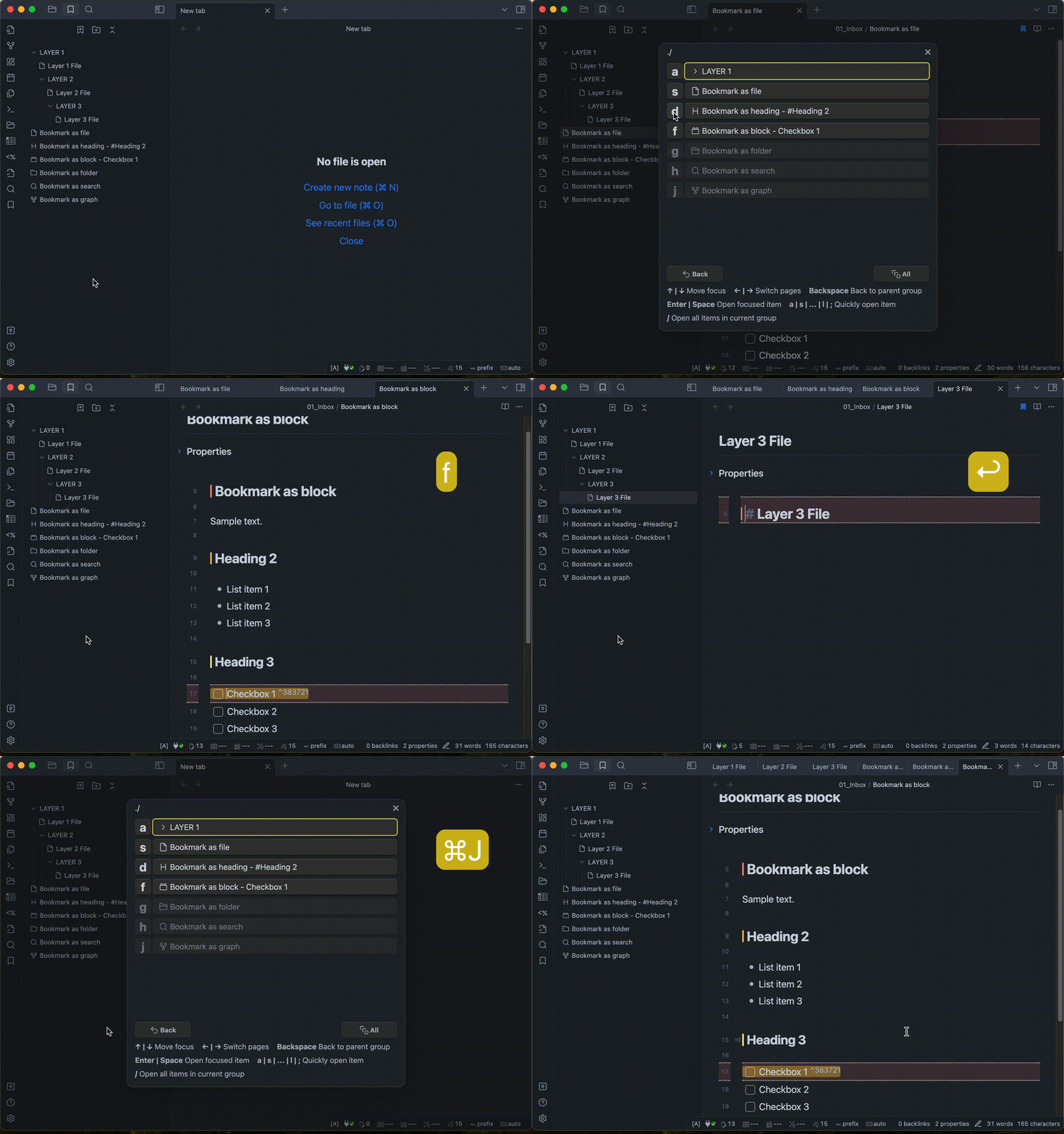
Open modal: Open bookmarks with keeping the keyboard home position
- Call the modal in one of the following ways.
- Using hotkey. (recommend)
- Click the icon(
Open modal) from the Ribbon. - Selecting
Bookmarks Caller: Open modalfrom the command palette.
- Select the bookmark you wish to open in one of the following ways.
- Press the one-letter key displayed to the left of the item name. (recommend)
- Move the cursor with arrow keys and select the item.
- Click on the item name with the mouse cursor.
- If you want to open all of the bookmarks in the current group, in one of the following ways.
- Using shortcut key. (recommend)
- Click "All" button.
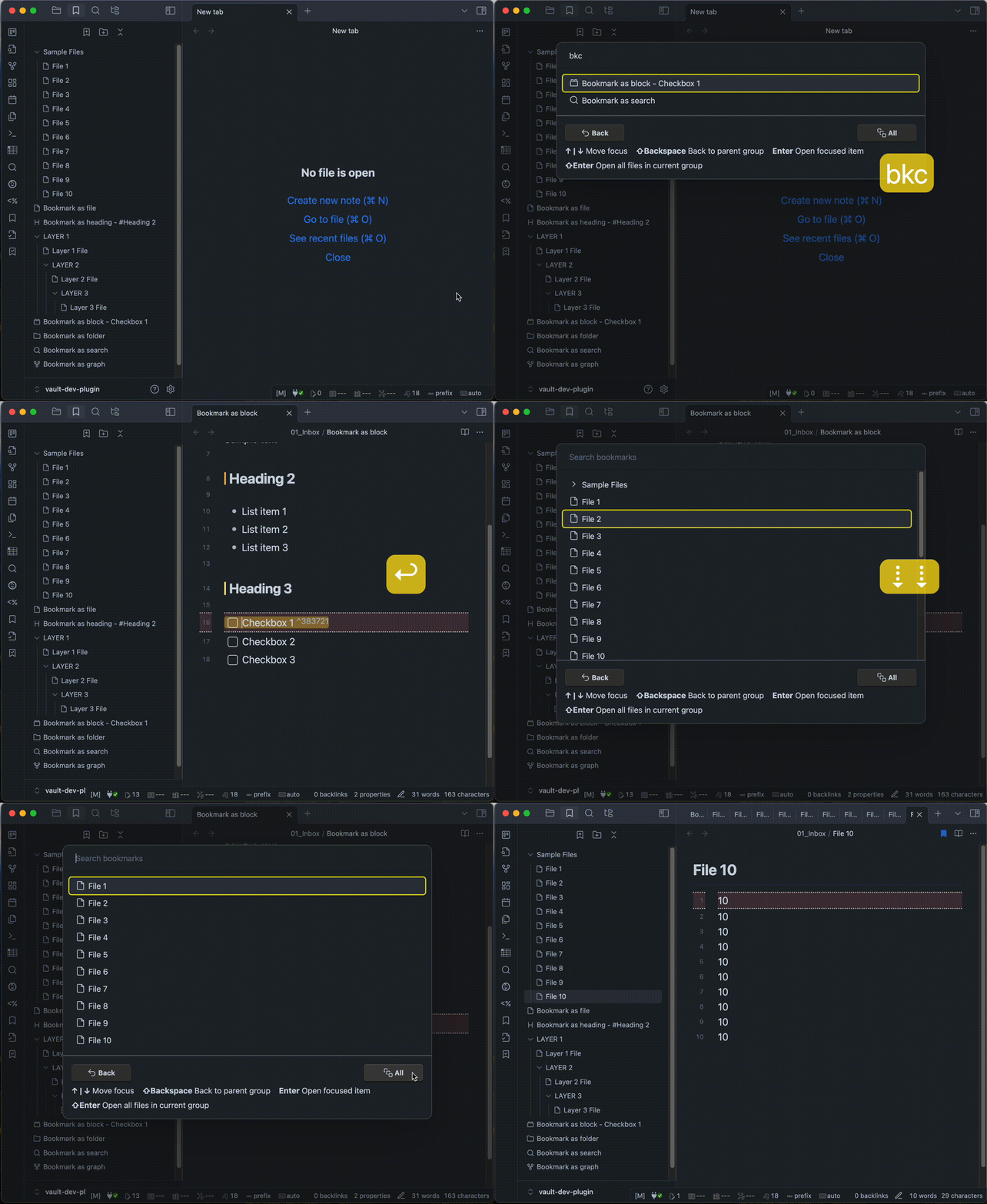
Search bookmarks: Search and open bookmarks
- Call the modal in one of the following ways.
- Using hotkey. (recommend)
- Click the icon(
Search) from the Ribbon. - Selecting
Bookmarks Caller: Searchfrom the command palette.
- Enter keywords to find a bookmark.
- Select the bookmark you wish to open in one of the following ways.
- Move the cursor with arrow keys and select the item.
- Click on the item name with the mouse cursor.
- If you want to open all of the bookmarks in the current group, in one of the following ways.
- Using shortcut key (
Shift + Enter). (recommend) - Click "All" button.
- Using shortcut key (
Copy bookmarks.json to clipboard
- Call the command in one of the following ways.
- Using hotkey.
- Selecting
Bookmarks Caller: Copy bookmarks.json to clipboardfrom the command palette.
[!NOTE]
- This is an experimental feature. It may be discontinued in the future.
Installation
You can find and install this plugin through Obsidian’s Community Plugins Browser.
For detailed steps or alternative installation methods, click here.
For plugin developers
Search results and similarity scores are powered by semantic analysis of your plugin's README. If your plugin isn't appearing for searches you'd expect, try updating your README to clearly describe your plugin's purpose, features, and use cases.